
SWRFD-60T - Refrigerator CRUX - Free user manual and instructions
Find the device manual for free SWRFD-60T CRUX in PDF.


| Product Type | Radio Replacement Interface with Steering Wheel Control Retention |
| Brand | CRUX |
| Model | SWRFD-60T |
| Compatibility | 2019 and Up Select Ford Vehicles (E Series, EcoSport, Escape, F-Series Super Duty, Transit, Transit Connect) |
| Functions | Retains factory steering wheel controls, provides accessory power (2A max), illumination output, reverse signal, backup camera retention (requires manual wiring on 2022+ vehicles with 6.5" screen) |
| Included Parts | Interface module, 32-pin connectors, 12-pin connector, 3.5mm SWC cables (Option A and B), installation harness |
| Power Supply | 12V DC; accessory power output 2A max |
| DIP Switch Settings | Configurable for Alpine, Clarion, Kenwood, JVC, Pioneer, Sony, BOSS, Atoto, Dual, and other brands |
| LED Indicators | Solid Blue (CAN recognized), Flashing Blue (CAN not recognized), Solid Red (12V ACC on), Red off (12V ACC off) |
| Firmware | Updateable via QR code; production firmware SW 2.2.0 (most models), SW 2.1.7C (Transit Connect) |
| Backup Camera Retention | Required manual wiring on 2022+ Ford vehicles with 54-pin Sync module: White/Green (Video+), Blue/Gray (Video-), Black (Shield) |
| Start/Stop System | Alternative constant 12V source recommended to prevent radio shutdown during engine start-stop events |
| Audio System Compatibility | Made for non-amplified vehicles; does not retain SYNC |
Frequently Asked Questions - SWRFD-60T CRUX
User questions about SWRFD-60T CRUX
0 question about this device. Answer the ones you know or ask your own.
Ask a new question about this device
Download the instructions for your Refrigerator in PDF format for free! Find your manual SWRFD-60T - CRUX and take your electronic device back in hand. On this page are published all the documents necessary for the use of your device. SWRFD-60T by CRUX.
USER MANUAL SWRFD-60T CRUX
Radio Replacement with Steering Wheel Control Retention for
Select 2019 and Up Ford Vehicles
PRODUCT MANUAL
VER.032326
CONTACT
ADDRESS:
CRUX Interfacing Solutions
21541 Nordhoff St. Unit C,
Chatsworth, CA 91311
PHONE:
(818) 609-9299
E-MAIL:
support@cruxinterfacing.com
sales@cruxinterfacing.com
WEBSITE:
www.cruxinterfacing.com
PRODUCT FEATURES:
- Retains Factory Features in Select Ford Vehicles.
- Retains Factory Steering Wheel Controls via Built-in Pre-programmed Interface.
- Made for Non Amplified Vehicles.
- Provides Accessory Power (2A max).
- Provides Illumination Output.
- Provides Reverse Signal.
PARTS INCLUDED:

INSTALLATION DIAGRAM:

flowchart
graph TD
    A["To Factory Harness"] --> B["32 PIN Connectors"]
    B --> C["12 PIN Connector"]
    C --> D["CRUX®"]
    D --> E["Mini USB not used"]
    F["Make a connection between CRUX wiring harness and Aftermarket radio harness"] --> G["Aftermarket Radio"]
    H["TROUBLESHOOTING"] --> I["LED LIGHT - LED MODULE FEEDBACK"]
    H --> J["Solid Blue - CAN recognized"]
    H --> K["Flashing Blue - CAN not recognized"]
    H --> L["Solid Red - Module providing 12V ACC"]
    H --> M["Red off - 12V ACC off"]
    N["3.5MM SWC CABLES (OPTION A or B)"]
    O["Option A: Blue/Yellow for JVC & KENWOOD\nBlack/Yellow for Parking Brake Output"] --> P["To Aftermarket Radio"]
    Q["Option B: Black/Yellow for Parking Brake Output"] --> R["To Aftermarket Radio"]
DIP SWITCH SETTINGS:
AFTERMARKET RADIO DIP SWITCH SETTINGS:
| RADIO BRAND: DIP#: 1 2 3 | ||
| Atoto, Dual, Fahrenheit, Jensen, Nakamichi | OFF ON | ON |
| Pioneer, Power Acoustik, Soundstream | OFF ON | ON |
| Blaupunkt, Most off-brand Radio | OFF ON | ON |
| Alpine | OFF OFF | OFF |
| Clarion | ON ON | OFF |
| Kenwood | ON ON | ON |
| JVC | ON OFF | ON |
| BOSS, Old Sony | ON OFF | OFF |
| New Sony (with CarPlay) | OFF ON | OFF |
SWC TROUBLESHOOTING OPTION

Located internally, need to take plastic casing off module
If Steering Wheel Controls don't work or work properly, please switch internal DIP switch from 3v3 to 5v as shown in picture above.
NOTE: For Atoto, Blaupunkt, Dual, Farenheit, Nakamichi, Power Acoustik, Soundstream, and most off-brand radios. Check the aftermarket radio's manual to see if the SWC buttons need to be programmed
3.5MM SWC CABLES
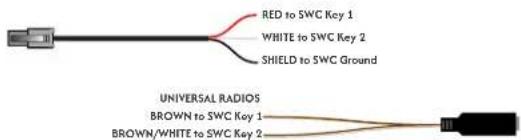
Plug in the 3.5MM to 4-Pin SWC cable to the SWC module or use the Blue/White wire for JVC and Kenwood.
For aftermarket radios that have wires for SWC connections, cut off the 3.5mm plug on the CRUX SWC Cable (option B) and connect the SWC wires as follows:
Note that there are some radios that only have SWC1 and SWC2, in this case "shield" does not need to be connected.
VEHICLE APPLICATIONS:
| YEARS | MAKE | MODEL | Assigned Firmware: |
| 2021-UP | FORD | E Series (E-350/E-450) | CX-401-A-FORD-E-light |
| 2020-UP | FORD | Eco Sport | SW 2.2.0 (Production Firmware) |
| 2020-UP | FORD | Escape | SW 2.2.0 (Production Firmware) |
| 2020-UP | FORD | F250/F350/F450/F550 | SW 2.2.0 (Production Firmware) |
| 2020-UP | FORD | Transit (150/250/350) | SW 2.2.0 (Production Firmware) |
| 2019-UP | FORD | Transit Connect | SW 2.1.7C |
NOTE: Does NOT retain SYNC.

To download the latest firmware for your device, scan the qr code and select the SWRFD-60T on the dropdown menu.

natural_image
Two Ford minivans displayed side by side, one silver and one white, with no visible text or symbols on the vehicles themselves.TROUBLESHOOTING:

START/STOP System
Issue:
In vehicles equipped with a factory Start/Stop system, the radio may turn off when the vehicle comes to a stop. When the engine restarts, the radio may remain off instead of powering back on.
Cause:
The Start/Stop system temporarily interrupts power, which can affect the radio's operation.
Solution:
To prevent this issue, an alternative constant 12V power source must be used.
- Locate a constant 12V source, such as the vehicle's cigarette lighter.
- Route this constant power connection to the module.
- Ensure a secure and proper connection.
Using a constant 12V source will maintain power to the interface and prevent the radio from shutting off permanently during Start/Stop operation.

For a step-by-step walkthrough of this process, scan the QR code to watch our detailed video tutorial.

2022 & Up Ford Vehicles with 6.5" Screen (54-Pin Sync Module) Backup Camera Retention
Note:
The backup camera video wires are NOT included in the plug-and-play harness for these vehicles.
Wiring Required:
To retain the factory backup camera, a manual connection must be made at the vehicle's 54-pin Sync module.
- White/Green = Video (+)
- Blue/Gray = Video (−)
- Black = Shield
Carefully tap into these wires and ensure all connections are secure and properly insulated. This step is required for proper backup camera functionality.

For a step-by-step walkthrough of this process, scan the QR code to watch our detailed video tutorial.
Brand : CRUX
Model : SWRFD-60T
Category : Refrigerator