
Chione M4-360 - Liquid Cooler Gamdias - Free user manual and instructions
Find the device manual for free Chione M4-360 Gamdias in PDF.


Pick your language and provide your email: we'll send you a specifically translated version.
| Product Type | All-in-One Liquid CPU Cooler |
| Model | Chione M4-360 |
| Brand | Gamdias |
| Radiator Size | 360mm |
| Radiator Dimensions | 397 x 120 x 27 mm |
| Fan Size | 120mm x 3 |
| Fan Speed | 800 – 2000 RPM |
| Fan Airflow | 65 CFM |
| Fan Noise Level | 18 – 35 dBA |
| Pump Speed | 2800 RPM |
| Pump Noise Level | <25 dBA |
| Socket Compatibility | Intel LGA 1700/1366/1200/115X, AMD AM5/AM4 |
| Cold Plate Material | Copper |
| Radiator Material | Aluminum |
| Tube Length | 400 mm |
| Lighting | Addressable RGB |
| Voltage | 12V DC |
| Net Weight | 1.2 kg |
| Maintenance | Sealed, no refill required |
| Warranty | 3 years |
Frequently Asked Questions - Chione M4-360 Gamdias
What tools are needed for installing the Chione M4-360?
You will need a Phillips-head screwdriver and possibly a hex key (included). Thermal paste is pre-applied on the cold plate.
Which Intel and AMD sockets are supported?
It supports Intel LGA 1700, 1366, 1200, 115X and AMD AM5 and AM4.
How do I control the RGB lighting?
Connect the RGB cable to your motherboard's 3-pin ARGB header and use the motherboard software (e.g., ASUS Aura Sync, MSI Mystic Light) or a separate controller.
What is the recommended radiator placement?
For best performance, mount the radiator at the top or front of the case with fans pushing air through it. Ensure the pump is below the top of the radiator to avoid air bubbles.
How do I clean the cooler?
Dust the radiator and fans with compressed air every few months. Do not use water or solvents on the electrical parts. Wipe the cold plate with isopropyl alcohol if you remove it.
The pump is making a rattling noise. What should I do?
If you hear a rattling noise, tilt the case gently to dislodge any air bubbles trapped in the pump. Ensure the pump is lower than the top of the radiator. If noise persists, contact support.
Can I add more fans to the radiator?
The radiator supports push-pull configuration (fans on both sides) if your case has clearance. Use the included fan screws for mounting.
Is thermal paste included?
Yes, thermal paste is pre-applied on the cold plate. If you need to remove it, clean with isopropyl alcohol and apply a pea-sized amount of new paste.
What case dimensions are required for the 360mm radiator?
Your case must support a 360mm radiator (at least 3 x 120mm fan slots) with enough width for the radiator and fans (typically 130-140mm).
Does the cooler require any software?
No. Fan speed can be controlled via the motherboard's CPU fan header using PWM. RGB control requires motherboard software or a controller.
User questions about Chione M4-360 Gamdias
0 question about this device. Answer the ones you know or ask your own.
Ask a new question about this device
No questions yet. Be the first to ask one.
Download the instructions for your Liquid Cooler in PDF format for free! Find your manual Chione M4-360 - Gamdias and take your electronic device back in hand. On this page are published all the documents necessary for the use of your device. Chione M4-360 by Gamdias.
USER MANUAL Chione M4-360 Gamdias
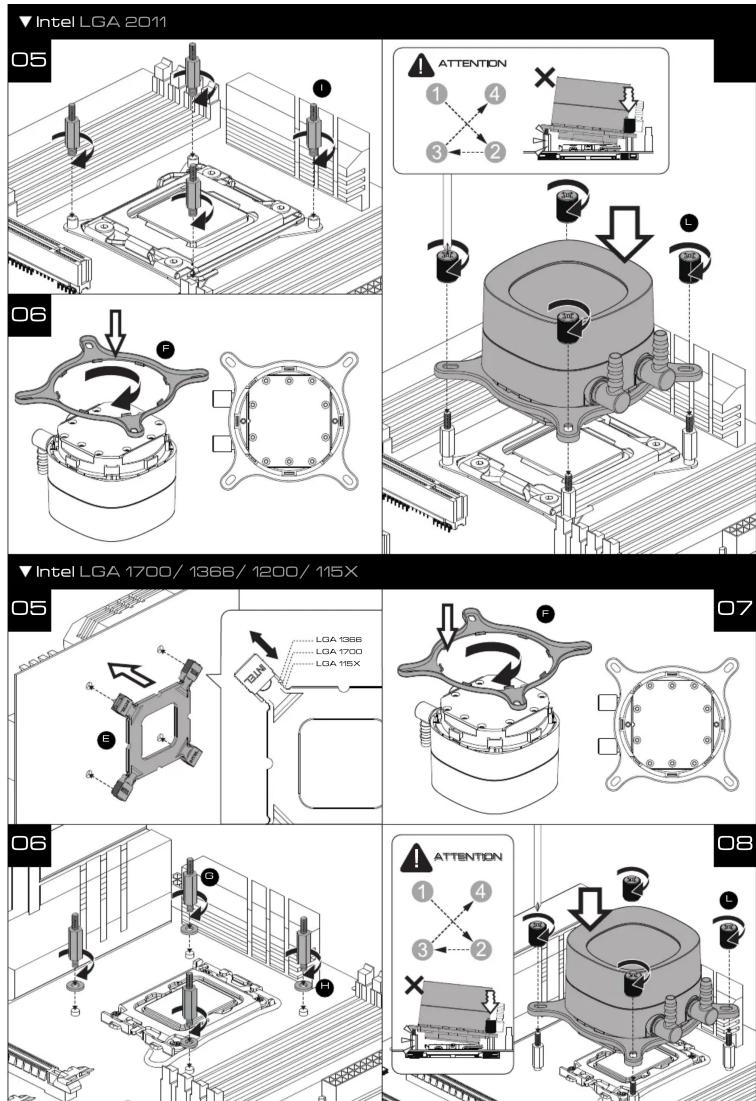

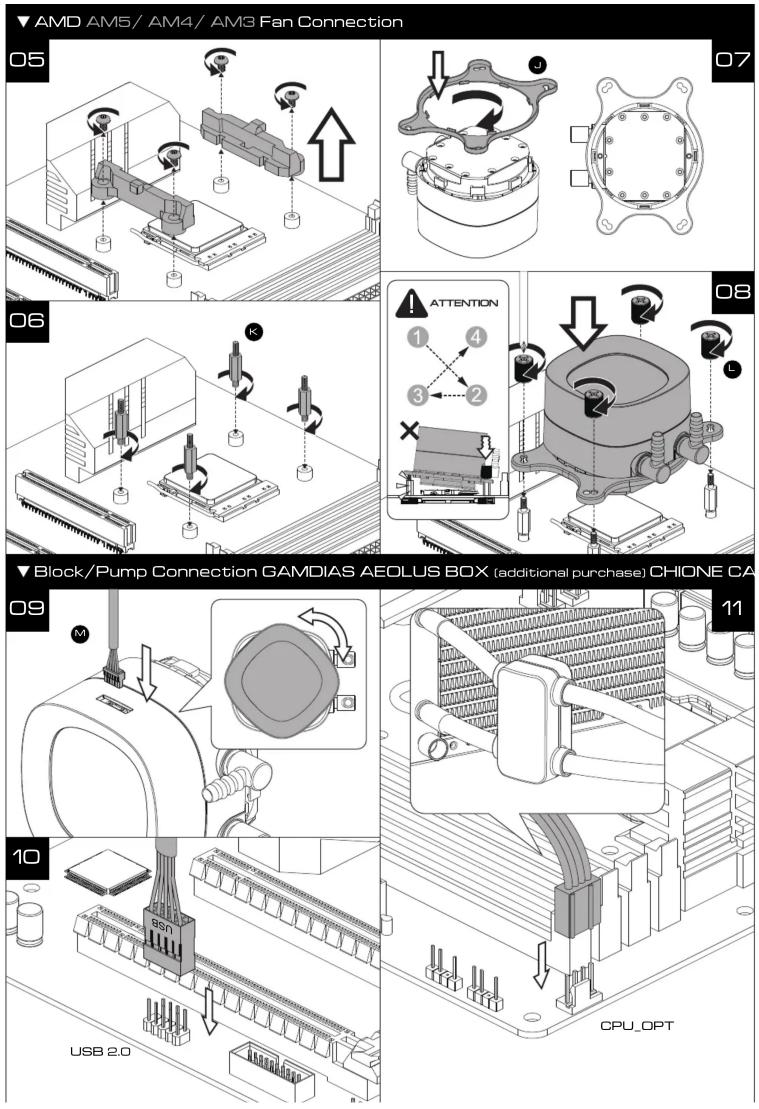
![graph TD A["CPU/FAN"] --> B["FAN_PWM"] B --> C["FFDC"] C --> D["FFDC"] D --> E["FFDC"] E --> F["FFDC"] F --> G["FFDC"] G --> H["FFDC"] H --> I["FFDC"] I --> J["FFDC"] J --> K["FFDC"] K --> L["FFDC"] L --> M["FFDC"] M --> N["FFDC"] N --> O["FFDC"] O --> P["FFDC"] P --> Q["FFDC"] Q --> R["FFDC"] R -->…](/content/2026/05/957214/images/4f13043840cae3535c8ccedc9ca9d391c3348150ab77684628f335adaea90ad3.jpg)

Manual assistant
Powered by Anthropic
Waiting for your message
Product information
Brand : Gamdias
Model : Chione M4-360
Category : Liquid Cooler