
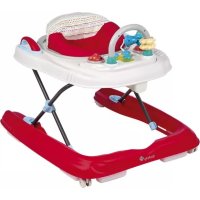
DX Developmental Walker - High chair SAFETY 1ST - Free user manual and instructions
Find the device manual for free DX Developmental Walker SAFETY 1ST in PDF.


| Type de produit | Baby Walker / High Chair |
| Modèle | DX Developmental Walker |
| Marque | Safety 1st |
| Poids maximum de l'enfant | 26 lbs (11.8 kg) |
| Âge recommandé | Lorsque l'enfant peut s'asseoir sans aide jusqu'à ce qu'il marche seul |
| Alimentation | 2 piles AAA alcalines (non incluses) pour la barre de jouets son et lumière |
| Dimensions (approximatives) | Non spécifiées, mais conçu pour usage intérieur |
| Réglage en hauteur | Oui, plusieurs positions pour s'adapter à la croissance de l'enfant |
| Fonctionnalités principales | Barre de jouets avec sons et lumières, plateau amovible, bandes antidérapantes, roues avant pivotantes |
| Entretien et nettoyage | Essuyer avec un chiffon humide et du savon doux. Lavage en machine pour le coussin de siège (cycle délicat, eau froide, séchage à l'air). Ne pas utiliser d'eau de Javel ni repasser. |
| Sécurité | Ne pas utiliser si l'enfant peut se tenir debout à plat ou grimper. Toujours surveiller. Utiliser uniquement sur des surfaces planes. Bloquer les escaliers. |
| Pièces détachées et réparabilité | Contacter le service client au 1-800-544-1108 ou visiter www.safety1st.com. Pièces disponibles sur demande. |
| Informations générales | Distribué par Dorel Juvenile Group, Inc. Assemblage par un adulte requis. Outil nécessaire : tournevis cruciforme. |
Frequently Asked Questions - DX Developmental Walker SAFETY 1ST
User questions about DX Developmental Walker SAFETY 1ST
0 question about this device. Answer the ones you know or ask your own.
Ask a new question about this device
Download the instructions for your High chair in PDF format for free! Find your manual DX Developmental Walker - SAFETY 1ST and take your electronic device back in hand. On this page are published all the documents necessary for the use of your device. DX Developmental Walker by SAFETY 1ST.
USER MANUAL DX Developmental Walker SAFETY 1ST
Ready, Set, Walk! 2.0 Developmental Walker
Maximum weight: 26 lbs. (11.8 kg).
Adult assembly required
IMPORTANT:
• Baby must be able to sit up unassisted
• Baby must not weigh more than 26 lbs. (11.8 kg).
• Discontinue use when baby can walk unassisted.
- Allow only the child's toes to touch the floor. DO NOT allow the child to stand flat footed on the floor in any position
• Discontinue use if baby can stand flat footed in the highest height
position or can climb out of the product
- Recommended for indoor use.
Read all instructions before assembly and use of walker.
• Adult assembly required.
- CAUTION: Keep small parts away from children during assembly.
- Keep instructions for future use
- Tools needed. Phillips head screwdriver (not included). - Requires two "AAA" alkaline batteries (not included).
- Requires two - AAN - alkaliic batteries (not included).

WARNING:
Failure to follow these warnings and the assembly instruction
could result in injury or death
• DO NOT use the walker if it is damaged or broken.
• DO NOT use until baby can sit up by itself.
• Clean grip strips regularly to maintain stopping performan
• NEVER leave child unattended. Always keep child in view
in walker
• Use only on flat surfaces free of objects that could cause t
walker to tip over.
• To avoid burn injuries, keep child away from hot liquids.
ranges, radiators, space heaters, fireplaces, etc.
• DO NOT use this walker when your child can walk unassis
• Discontinue use of walker when child is able to climb out.

WARNING:
STAIR HAZARD
• AVOID serious injury or death.
• Block stairs/steps securely before using walker.
A Seat pad
B Tray with legs
Base (with 6 c
D Front easter (2)
- Home doctors (2)
E Real Wheels (2)
F Rear wheel axle (2)
Toy bar
H Toys (3)
Sound & Lights button
(2 AAA Batteries not included)
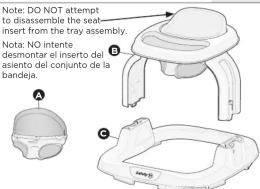

Keep These Instructions For Future Use
- Remove all contents from packaging and discard box, protective plastic covering and/or poly bags
• Wine down walker parts with warm soapy water before use
• Lay out and identify all parts.
- Do not return this product to the place of purchase. If any parts are
missing, email support@djgusa.zendesk.com, or chat with us at www.scfsta1st.com. You can also call Consumer Goods at (200) 544-1100
Have ready the model number (WA094) and date code (manufacture
date located on the bottom of the tray assembly) ready.
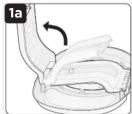
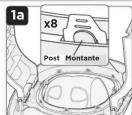
Turn tray assembly upside
down. Lift top leg (Figure
la). Push leg downward an
erasure locking tab snaps in place (Figure 1b). Repeat c
other leg (Figure 1c).


Turn tray over so it is upright
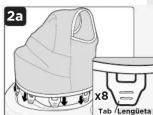
Ensure seat pad is in right
orientation with print visible from the top and plain fabric visible from
underneath. Place seat pad into seat
of tray as shown. Position fabric
so the seat pad warning lines up with the seat back insert the 8 tabs
with the seat back insert the 6 seats on seat pad into slots of seat ring
(Figure 2a).
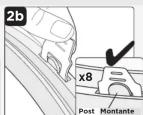
Turn tray upside down. Pull seat tabs up and over tray posts to
secure seat in place (Figure 2b).
IMPORTANT: Fabric seat must be secure before use. To make
certain, pull up on seat fabric above each tab. If tab(s) is not
Secure, Repeat step in Figures 2d and 2b
WARNING: Check fabric seat tabs
WARNING. Check fabric seat tabs for security before each use
for security before each use.
3 Assembling Casters and Wheels
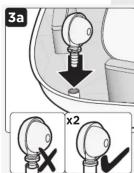
Flip base over to expose underside. Locate
holes in front corners. Firmly insert front
castors into the holes (Figure 3a). Ensure casters are inserted fully.
ocate rear wheel channels and place
wheels in the rear channels. Line up wheel
holes with channel holes. Push plastic tab
to either side and insert axle through wheel
Note (Figure 3b): Release plastic tab.
Repeat for other wheel.

into base (Figure 4a
Press button on leg
and push downward
to lock in pi (Figure 4b)
NOTE: T=
Assembly up before pressing button on legs
Densest with other loci. Knows that both loci
(Figure 4c) and fully secured before proceeding.


4 Coloque la bandeja
en la base
To Assemble (continued)
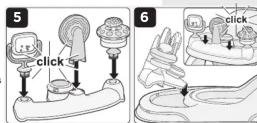
5 Attach Toys to Toy Bar
Insert toys in corresponding openings as shown, and push down until they click into place (Figure 5).
6 Attach Toy Bar
Insert tab closest to sounds and lights button first. Then push down on toy bar until a click is heard (Figure 6). The toy bar should lock in 3 places (left, middle, right).
Adjust height so your baby can stand comfortably making sure that only the ball of each foot is touching the floor (Figure 1). If the ball of each foot does not touch the floor, lower the height. If baby stands flat footed, raise the height. Note: Discontinue use if baby can stand flat footed in the highest position.
NOTE: Always ensure that the height adjustment buttons are locked and the legs are set at the same height before use.
⚠ WARNING: NEVER adjust walker height with child in walker.
1 Aiuste la altura
Push height adjust button, lift upward until leg is no longer inserted into base (Figure 2a). Repeat with other side.
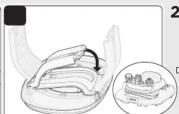
Turn tray assembly upside down. Pull tab at base of tray outward to release leg, then pull leg upward to unlock (Fig 2b). Fold and snap either leg in place (Fig. 2c) then repeat
with the other leg. Note: You will hear a loud locking sound when legs are secure.
Turn tray assembly over, line up back of tray and base. Snap together for storage. ALWAYS use caution when collapsing walker.

2 Para plegar
Pull other leg out and upward as shown, until it is no longer captured by locking tab (Figure 3b). Push legs straight down into tray to lock legs in place (Figure 3c). Note: You will hear a loud locking sound when legs are secure.

3 Para desplegar
4 Sounds and Lights Toy Bar
To activate, move switch to "ON" position and press sound and lights button on toy bar (Figure 4).

Using Phillips head screwdriver, remove battery compartment door on sounds and lights button. Insert two "AAA" batteries (not included) into the compartment as indicated (Figure 5). Replace and secure battery door. Note: Reference battery compartment for proper battery orientation.
NOTE: Install new batteries and re-try function before calling Consumer Care on electronics. We recommend alkaline batteries for longer battery life.

Z. BATTER CAUTION: These instructions as they contain important information. • We recommend alkaline batteries for longlife life • DO NOT mix old and new batteries. • DO NOT mix alkaline, standard (carbon zinc), or rechargeable (nickel cadmium) batteries. • Non-rechargeable batteries are not to be recharged. • Rechargeable batteries are to be removed from this unit before being charged. • Rechargeable batteries are only to be charged u adult supervision. • Only batteries of the same or equivalent type as recommi are to be used. • Batteries are to be inserted with the correct polarity. • Exhaust batteries are to be removed from the unit. • The supply terminals are not to short-circuited. • Check that all contact surfaces are clean and bright before installing batteries. • DO NOT submerge any part of the product in water. • Dispose of batteries safely. • Remove batteries when stored for long periods of non-
Care and Maintenance
1 Fabric Seat Pad
Remove seat pad: Release tray assembly from base (see instructions on folding walker). With tray assembly upside down, release tabs on seat pad from tray posts (Fig. 4). Send leaflets to tray
(Figure 1). Push tabs through openings on tray and pull seat pad up to remove (Figure 1b).
Wash seat pad: Machine-wash in cold water on gentle cycle. Drip dry or line dry. No bleach. No iron.
PT CLEAN. CLEAN GRIP STRIPS WITH WATER ONLY
[Non-Text]
[EMPTY]
3 Ba
se and Tray Assembly
sure to keep Product away from direct sunlight or heat.
4 To
ys DO NOT SUBMERGE TOYS IN WATER. Hand wash and dry all toys
make sure to wring out cloth thoroughly beforehand. Avoid wiping
FCC Information
This device compiles with part 15 of the FCC Rules. Operation is subject to the following two conditions (1) this device may not cause harmful interference, and (2) this device must accept any interference received, including interference that may cause undesired operation. RADIO AND TELEVISION INTERFERENCE
This equipment has been tested and found to comply with the limits for a Class B digital device, pursuant to Part 15 of the FCC rules. These limits are designed to provide reasonable protection against harmful interference in a residential installation. This equipment generates, uses and can radiate radio frequency energy and, if not installed and used in accordance with the instructions, may cause harmful interference to radio communications. However, there is no guarantee that interference will be a particular interference. If equipment does cause harmful interference in radio or television reception, which can be determined by turning the equipment off and on, the user is encouraged to try to correct the interference by one or more of the following measures: - Reorient or relocate the receiving antenna.
- Increase the separation between the equipment and the receiver. - Connect the equipment into an outlet on a circuit different from that to which the
receiver is connected.
- Consult the dealer or an experienced radio TV technician for help. Changes and Modifications not expressly approved by the manufacturer or registrant of this equipment can void your authority to operate this equipment under Federal Communications Commissions rules.
One (1) Year Limited Warranty
Dorel Juvenile Group, Inc. warrants to the original purchaser that this product (Ready, Set, Walk! Developmental Walker), is free from material and workmanship defects when used under normal conditions. The property is sold at the time of sale in the event that such defects in material or workmanship Dorel Juvenile Group, Inc., will repair or replace the product, at our option, free of charge. Purchaser will be responsible for all costs associated with packaging and shipping the product to Dorel Juvenile Group Consumer Relations Department at the address of not on front page and all other freight or insurance costs associated with the return. Dorel Juvenile Group is responsible for all costs associated with the purchase price. This product should be returned in its original package accompanied by a proof of purchase, either a sales receipt or other proof that the product is within the warranty period. This warranty is void if the owner repairs or modifies the product or the product has been damaged as a result of misuse arising from any loss arising from the sale. The property shall be exclusively stated previously, including but not limited to, any incidental or inconsequential damages.
SOME STATES DO NOT ALLOW THE EXCLUSION OR LIMITATION OF INCIDENTAL OR CONSEQUENTIAL DAMAGES, SO THE ABOVE LIMITATION OR EXCLUSION MAY NOT APPLY TO YOU.
THIS WARRANTY GIVES YOU SPECIFIC LEGAL RIGHTS, AND YOU MAY ALSO HAVE OTHER RIGHTS THAT MAY VARY FROM STATE TO STATE.
ADVERTENCIA
- WARNING:
- STAIR HAZARD
- WARNING: Check fabric seat tabs
- WARNING. Check fabric seat tabs for security before each use
- for security before each use.
- To Assemble (continued)
- Attach Toys to Toy Bar
- Attach Toy Bar
- ⚠ WARNING: NEVER adjust walker height with child in walker.
- Aiuste la altura
- Para plegar
- Para desplegar
- Sounds and Lights Toy Bar
- Care and Maintenance
- Fabric Seat Pad
- Ba
- To
- FCC Information
- One (1) Year Limited Warranty
- ADVERTENCIA
Brand : SAFETY 1ST
Model : DX Developmental Walker
Category : High chair