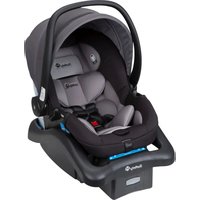
244431010 - Baby product SAFETY 1ST - Free user manual and instructions
Find the device manual for free 244431010 SAFETY 1ST in PDF.


Pick your language and provide your email: we'll send you a specifically translated version.
| Product Type | Baby Monitor |
| Brand | Safety 1st |
| Model | 244431010 |
| Dimensions (Parent Unit) | 3.5 x 2.5 x 1.2 inches |
| Dimensions (Baby Unit) | 4.0 x 3.0 x 2.0 inches |
| Weight (Parent Unit) | 4.2 oz |
| Weight (Baby Unit) | 5.1 oz |
| Power Source | AC adapter (included) or 4 AA batteries (not included) per unit |
| Display Type | 1.8-inch color LCD |
| Audio/Video | Two-way audio, video with night vision |
| Range (Line of Sight) | Up to 900 feet |
| Temperature Monitoring | Yes, baby's room temperature displayed |
| Night Vision | Infrared LEDs for clear night viewing |
| Battery Life | Up to 4 hours (parent unit) / 8 hours (baby unit) on battery |
| Charging Time | Approximately 3 hours |
| Cleaning | Wipe with a dry or slightly damp cloth; do not use harsh chemicals |
| Safety Certifications | FCC, CE, RoHS compliant |
| Warranty | 1 year limited warranty |
| Manufacturer | Safety 1st |
| Country of Origin | China |
| Included Components | Parent unit, baby unit, AC adapters (2), user manual |
Frequently Asked Questions - 244431010 SAFETY 1ST
How do I pair the parent and baby units?
Press and hold the PAIR button on both units for 3 seconds. They will automatically sync. Refer to the manual for detailed steps.
Why is the parent unit screen showing 'No Signal'?
Check if the baby unit is powered on and within range. Ensure there are no obstructions. Reposition the units if needed.
How can I extend battery life on the parent unit?
Reduce screen brightness and turn off the vox (voice activation) feature. Also, keep the unit plugged in when not in use.
What should I do if the temperature reading seems incorrect?
Ensure the baby unit is not near a heat source or draft. Move it to a different location and allow it to adjust for a few minutes.
Can I use rechargeable batteries in the units?
Yes, you can use NiMH rechargeable AA batteries. Note that battery life may be shorter than with alkaline batteries.
Is the monitor safe for use near a crib?
Yes, but place the baby unit at least 3 feet away from the crib to prevent strangulation from cords. Use cord organizers if necessary.
How do I reset the monitor to factory settings?
With both units on, press and hold the RESET button on the back of each unit for 10 seconds until the indicator flashes.
Why is there interference or static on the audio?
Other wireless devices (Wi-Fi, microwaves) can cause interference. Move the units away from such devices or switch to a different channel if available.
What is the maximum range of the monitor?
Up to 900 feet in open air. Actual range may vary due to walls and obstacles.
How do I clean the units?
Unplug the units and wipe them with a dry or slightly damp cloth. Do not immerse in water or use cleaning sprays.
User questions about 244431010 SAFETY 1ST
0 question about this device. Answer the ones you know or ask your own.
Ask a new question about this device
No questions yet. Be the first to ask one.
Download the instructions for your Baby product in PDF format for free! Find your manual 244431010 - SAFETY 1ST and take your electronic device back in hand. On this page are published all the documents necessary for the use of your device. 244431010 by SAFETY 1ST.
USER MANUAL 244431010 SAFETY 1ST

Manual assistant
Powered by Anthropic
Waiting for your message
Product information
Brand : SAFETY 1ST
Model : 244431010
Category : Baby product