
Solar X - Wireless Speaker MONSTER - Free user manual and instructions
Find the device manual for free Solar X MONSTER in PDF.


| Product Type | Solar Lantern / Flashlight |
| Brand | Monster |
| Model | Solar X |
| Dimensions | 6.3 x 6.3 x 6.3 inches |
| Weight | 1.4 lb (635 g) |
| Power Source | Solar panel (monocrystalline) |
| Battery | Built-in Li-ion 2000mAh |
| Charging Time (Solar) | 4-6 hours (direct sunlight) |
| Charging Time (USB) | 2-3 hours (via micro-USB) |
| Run Time (High) | 4-6 hours |
| Run Time (Low) | 12-15 hours |
| Light Output | 300 lumens (max) |
| Light Modes | High, Low, Flashing |
| USB Output | 5V / 1A (for charging devices) |
| Water Resistance | IPX4 (splash-resistant) |
| Material | ABS plastic with rubber grip |
| Care & Cleaning | Wipe with a dry, soft cloth. Avoid solvents. |
| Safety | Do not expose to fire or extreme heat. Keep away from children. |
| Spare Parts | Not available separately. Contact support. |
| General | Ideal for camping, emergency, and outdoor use. |
Frequently Asked Questions - Solar X MONSTER
User questions about Solar X MONSTER
0 question about this device. Answer the ones you know or ask your own.
Ask a new question about this device
Download the instructions for your Wireless Speaker in PDF format for free! Find your manual Solar X - MONSTER and take your electronic device back in hand. On this page are published all the documents necessary for the use of your device. Solar X by MONSTER.
USER MANUAL Solar X MONSTER
natural_image
Black rectangular electronic device with solar panel array, placed on a patterned surface (no text or symbols visible)MONSTER®
SOLARA
INDOOR/OUTDOOR WIRELESS
Controls & Connections 5
LED Indicators 6
Getting Started - Charging The Speaker 7
LED Color Functions 9
3.5 mm Aux Input 10
Bluetooth Connection 11
EZ-PLAY Wireless Connection 12-13
Specifications 16
Important Safety Instructions 17-18
Help & Troubleshooting 19
FCC Warning Statement 20-21
Limited Warranty 22
FOR QUESTIONS OR TECHNICAL SUPPORT PLEASE CALL: 1-800-976-0677
OR EMAIL: support@mymonsteraudio.com
Please do not return this product to the store. www.MyMonsterAudio.com
PACKAGE CONTENTS
- MONSTER SOLARA: Wireless Solar Speaker

natural_image
Exterior view of a black and white RemKon 3D smart speaker with solar panels (no text or symbols visible on body)- Power Adapter (5.5V/2.6A DC Adapter)
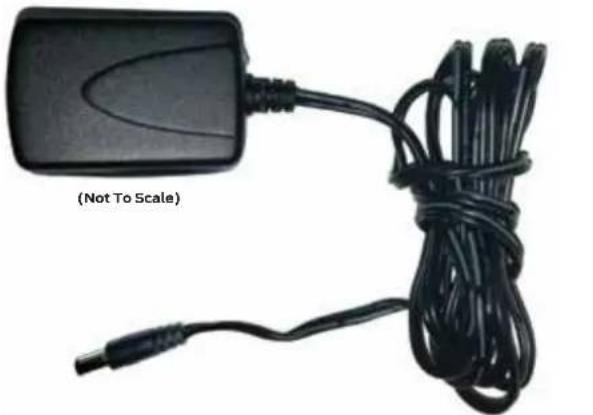
natural_image
Black rectangular device with coiled black cable and a terminal plug, labeled (Not To Scale) (no text on device body)- Aux Cable
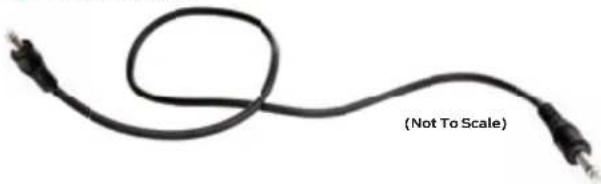
natural_image
Coiled black cable with two connectors, labeled (Not To Scale) at the end (no other text or symbols)- User Manual (incl. Limited Warranty Statement)
- Quick Start Guide
If any items are missing, contact our customer service team at 1.800.976.0677.
CONTROLS & CONNECTIONS
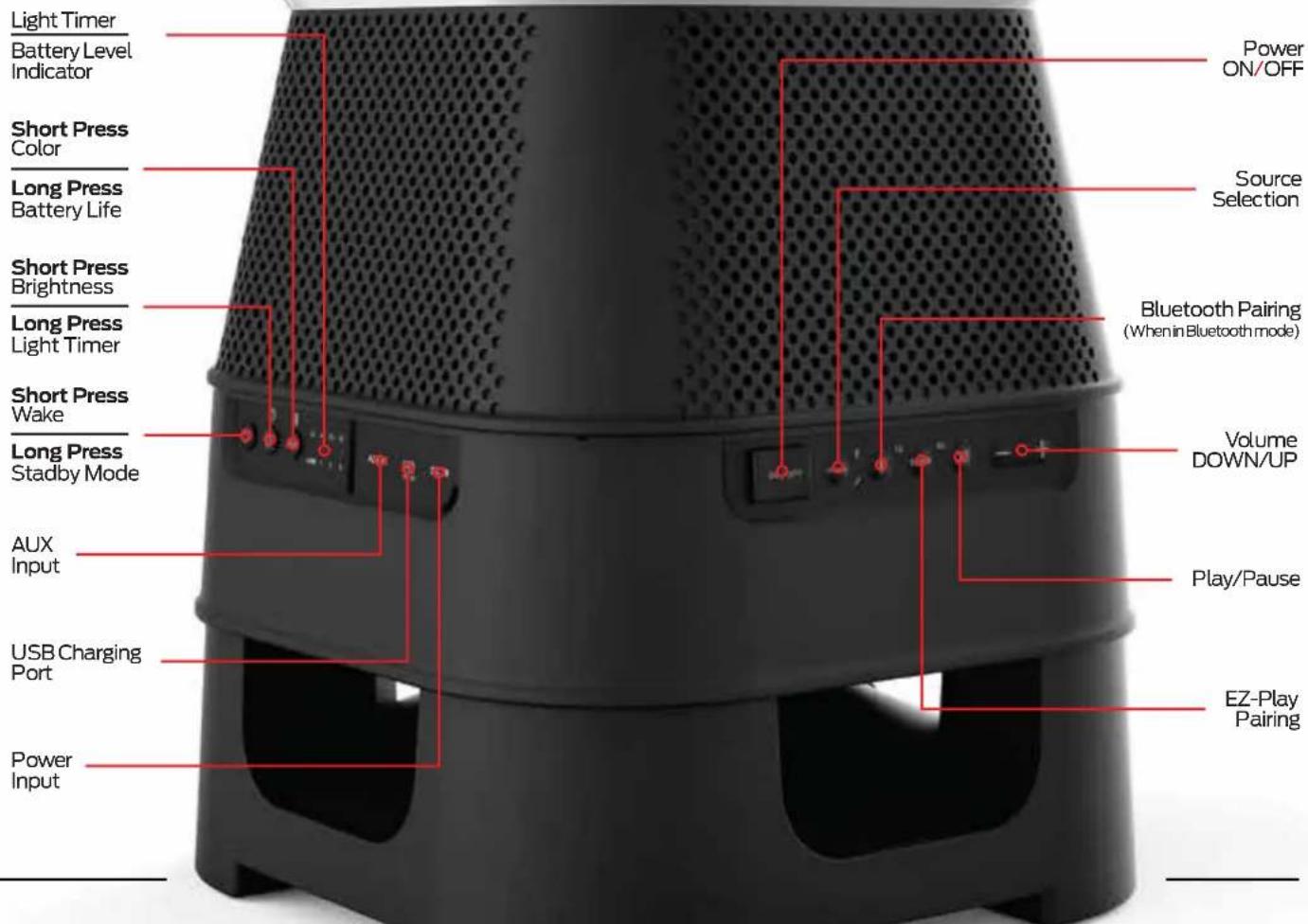
LED INDICATORS
Bluetooth AUX

Slow Flash
Bluetooth On Standby
Fast Flash
Bluetooth
Pairing mode
Solid
Bluetooth
Connected

Solid
AUX
Connected
TX Mode (Transmit)

EZ·PL▶Y
RX Mode (Receive)
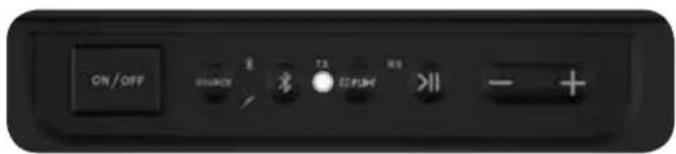
Slow Flash
Transmit Mode Standby
Fast Flash
Transmit Mode
Searching
Solid
Transmit Mode
Connected

Slow Flash
Receive Mode Standby
Fast Flash
Receive Mode
Searching
Solid
Receive Mode
Connected
GETTING STARTED - CHARGING THE SPEAKER
BEFORE FIRST USE:
Charge the unit for 6 hours.
Connect the speaker to a power outlet to start charging.
When fully charged
RED LED +1, +2, +3
Will remain solid

When low on battery
RED LED will flash rapidly.
To indicate battery level
Long Press (3 seconds) the Color/Battery Indicator button.

- Connect the power cable to the Solara speaker.
- Plug the power cable into a wall outlet.
- Flip the Power switch to ON
- Solara will enter Bluetooth Pairing mode automatically. Pair with your Bluetooth device.

natural_image
Black and white photo of a modern electric air purifier with speaker grille and power cord (no visible text or symbols)(Not To Scale)

When unplugged, the speaker will enter standby mode after 15 minutes of inactivity.

natural_image
Outdoor setup with two people sitting on chairs, one standing and one standing nearby, near a glowing yellow-orange device (no visible text or symbols)
natural_image
Exterior view of a swimming pool with a small robotic device on a wooden deck (no signage or text visible)
natural_image
Person sitting on a striped mat watching a blue-lit UV-reflecting device near a beach with rocks and ocean in background (no text or symbols visible)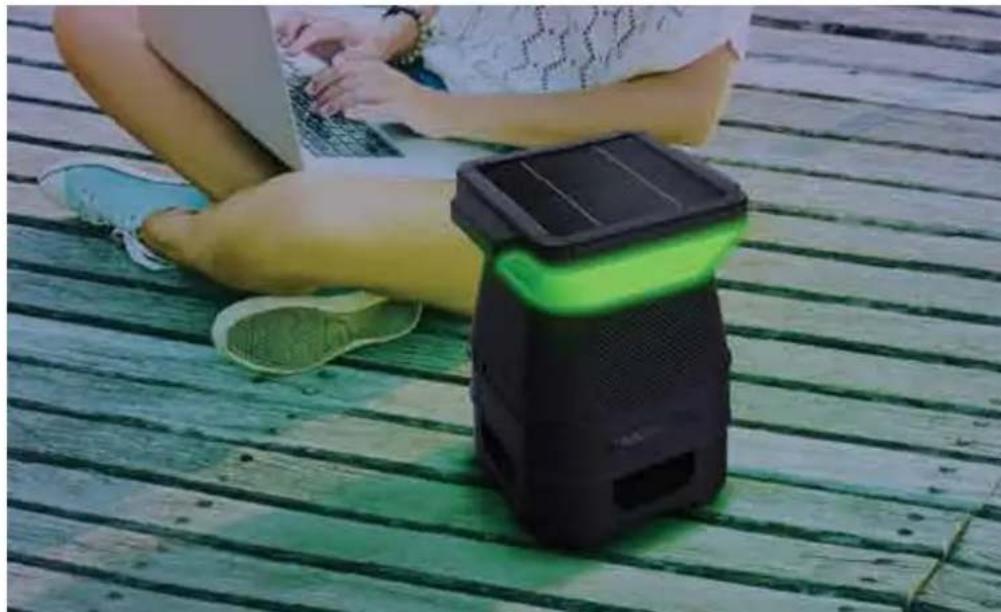
natural_image
Person sitting on a green wooden deck using a laptop and a black smart speaker with green light (no text or symbols visible)LED COLOR FUNCTION
CHANGING COLORS
Short Press the Color/Battery Indicator button to cycle through the preset colors:
Chrome (Demo Mode), Red, Dark Blue, Green, Purple, Amber, Light Blue, White
NOTE: Long Press (3 seconds) the Color/Battery Indicator button to display battery capacity: (LOW, 1,2,3)
Short Press the Light/Brightness button to cycle through the preset brightness level:
100%, 75%, 50%, 25%, OFF.
Long Press (3 seconds) the Light/Brightness button to adjust light timer duration:
2 Hours, 4 Hours, 6 Hours, 8 Hours
NOTE: When light is OFF, press the key to turn light ON
AUTO MODE
Auto Mode will be enable/disabled when light sensor in solar panel detects change from day to night or night to day.
Day Time (AUTO MODE ON): Lights will remain off during day time, unless user input changes light brightness, color, or enables timer.
Night Time (AUTO MODE ON): Lights will remain on during night time to the last color and brightness level setting that was used. NOTE: To disable AUTO MODE at night set brightness to 0%
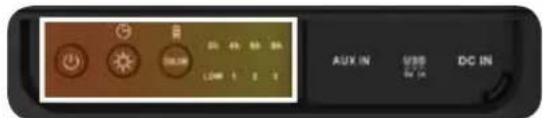
Long Press (3 seconds) the Standby key to enter Standby mode mode


natural_image
Black and yellow portable speaker with perforated grille and control buttons (no visible text or symbols)
3.5MM AUX INPUT (Cable Included)
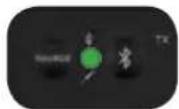
- Ensure the speaker is in AUX mode, if not press the SOURCE button until the green LED is solid.
- Plug a the 3.5mm cable into the AUX port.
- Connect your audio device to the AUX cable to play your music.
- Control volume on the speaker.

BLUETOOTH CONNECTION
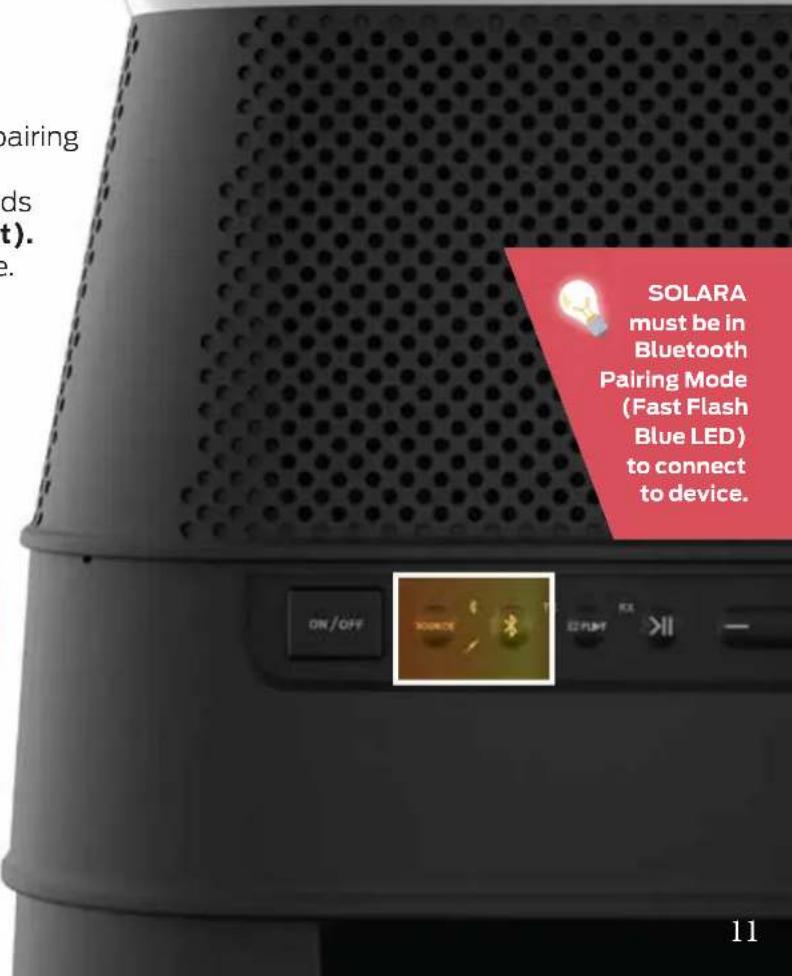
- Set the speaker source to Bluetooth (unpaired). Blue LED will flash
- Make sure the Bluetooth function is enabled on your device.
- Place the Bluetooth device and speaker within pairing distance (\~3 feet).
- Press and hold the Bluetooth button for 3 seconds to enter pairing mode (BLUE LED will flash fast).
- Search for Bluetooth connections on your device. Select "Monster Solara."
- The speaker will confirm connection with an audible message (BLUE LED will turn solid).


EZ-PLDY WIRELESS CONNECTION (ADDITIONAL SPEAKERS SOLD SEPARATELY)
The EZ-Play feature allows you to connect up to 8 compatible speakers and broadcast your favorite music through all speakers simultaneously – without using a single wire! Speakers can sync and play up to 100 feet apart from each other, and continue to function effectively through walls.

SET TX SPEAKER (TRANSMIT)
- Make sure the speaker is powered on. The Bluetooth BLUE LED and EZ-PLAY TRANSMIT (TX) WHITE LED will flash slowly.

- Press and hold the EZ-PLAY button for 3 seconds to put the speaker into Transmit Pairing Mode. The TRANSMIT (TX) WHITE LED will flash rapidly.

- The TX speaker will automatically connect with RX speakers that are in Receive Pairing Mode and within pairing range (<10 ft).
SET RX SPEAKER (RECEIVING)
- Make sure the speaker is powered on.
The Bluetooth BLUE LED and EZ-PLAY TRANSMIT (TX) WHITE LED will flash slowly.

- Press the EZ-PLAY button to change the speaker mode from Transmit to Receive. The RECEIVE (RX) AMBER LED will flash slowly.

- Press and hold the EZ-PLAY button for 3 seconds to put the speaker into Receive Pairing Mode. The RECEIVE (RX) AMBER LED will flash rapidly.

- The RX speaker will automatically connect with a TX speaker that is in Transmit Pairing Mode and within pairing range (<10 ft). RECEIVE (RX) AMBER LED will stay solid.
- Repeat steps to add up to 7 RX speakers. Play audio through up to 8 speakers at once.
HARNESS
THE SUN
Wireless speakers can free your listening experience in ways that a corded speaker cannot. But even wireless speakers need time to recharge at the power outlet.
The Solara speaker harnesses the sun's energy to recharge its power bank. Every minute out in the sun means less time being spent plugged into a socket.
By taking advantage of solar energy, you get to spend more time outdoors, enjoying the music you love and bask in the Solara experience.

natural_image
Close-up of a black industrial solar panel with white grating, placed on a wooden deck (no visible text or symbols)SPECIFICATIONS
| General | |
| Input(s) | Bluetooth 3.0 | AUX | EZ-Play | USB (5V/1A) |
| Buttons | Wake Up | Brightness/Light Timer | Color/Battery Level | ON/OFF | Source | Bluetooth | EZ-PLAY | Play/Pause | Volume Down/UP |
| LED Indicators | Transmit (TX) (White) | Receive (RX) (Amber) | AUX (Green) | Bluetooth (Blue) | Battery/Timer (Red x1, Green x3) |
| Power Input | 5.5V/2.6A DC In |
| Power Saving | Auto off after 15 min. |
| Speaker Power | 2 x 3.5W |
| Drive(s) | 3.5" Full Range (x4) | 6.5" Passive Radiator (x1) |
| THD + Noise | 7 5dB |
| Cabinet Material | Plastic |
| Dimensions (W x H x D) | 1 1.3" x 14.2" x 11.3" |
| Weight 9 lbs | |
| Operating Temperature | |
| Operating Temperature Range | 32F° - 104F° |
| Operating Humidity Range | 40~90% RH |
| Storage Temperature Range | -13F° to 158F° |
IMPORTANT SAFETY INSTRUCTIONS
-
Read all instructions and save them for personal reference in the future.
-
Follow all directions for operating the product.
-
Heed all warnings on the product and in the operation instructions.
-
Clean with a dry cloth only. Always unplug the product from any power source before cleaning.
-
Do not use third-party attachments or non-recommended accessories with this product.
-
Do not place product on an unstable surface, such as a cart, stand, tripod, table, etc. Unstable surfaces may cause the product to fall and cause serious injury to people and serious damage to the product. Follow all manufacturer instructions for mounting and accessories.

-
Do not block or cover ventilation slots. Openings in the product cabin ensure reliable operation and prevent overheating. Avoid placing on beds, sofas, and rugs, or mounting on racks or bookcases, unless proper ventilation is provided.
-
Do not use plug incorrectly. The product may come with a polarized, alternating-current line plug (one blade is wider/larger than the other). This is a safety feature: the plug will only go into outlet receptacles one way. Do not force the plug. If the plug does not fit, contact your electrician to replace the outlet.
-
Prevent power cord hazards. Route cords to avoid walking on them or pinching them, especially at plug ends and connection points to the product & power outlets.
IMPORTANT SAFETY INSTRUCTIONS(CONTINUED)
- Unplug power cord when not in use. The product should not be plugged into a power source when not in use for long periods of time.
- Do not use this product near bodies of water. The product is not waterproof and cannot be fully submerged in water. Power cords and electric currents should never be exposed to water.
- Do not set up near heat sources. Avoid radiators, stoves, heat registers, amplifiers, and other devices that produce heat. Avoid long exposure to sunlight and high temperatures.
- Refer all service to qualified personnel. If the product becomes damaged during use or encounters a malfunction, contact qualified service personnel. Do not attempt to service yourself.
- To use wirelessly, disconnect AC plug completely. The plug must be completed disconnected from the power outlet.
- Do not stand, sit, jump or strike the Solara with sharp objects. The product may break and not function.
- Solar panel must be cleared of dust, leaves and water to achieve maximum power conversion. Avoid using cleaning materials and manually dissecting parts.
- Solar panel may be hot when sitting under sun, please use caution when touching.
HELP & TROUBLESHOOTING
| No power / Will not turn on | Press the battery indicator button to check the current battery level. Plug into a power source and charge the speaker. |
| No sound playing | Increase the volume on source device, pressVolume Up (+). Ensure device is not muted.Increase the volume on speaker, pressVolume Up (+).Ensure speaker is properly paired with the source device.Press Play/Pause button on speaker.If source device is outside Bluetooth range move speaker closer. |
| Smartphone / Tablet remote app isn’t working | Ensure phone or tablet is properly paired with the Solara speaker. |
| LED button is flashing red | Please charge by plugging directly into wall outlet. Ensure that charging cable is not damaged. |
For additional help please contact our support team at:
Phone: Telephone: 1-800-976-0677
Email: support@mymonsteraudio.com
Hours of Operation:
Monday - Friday: 7:00 am - 5:00 pm (PST)
Saturday - Sunday: CLOSED
FCC WARNING STATEMENT
Changes or modifications not expressly approved by the party responsible for compliance could void the user's authority to operate the equipment. This equipment has been tested and found to comply with the limits for a Class B digital device, pursuant to Part 15 of the FCC Rules.
These limits are designed to provide reasonable protection against harmful interference in a residential installation. This equipment generates, uses, and can radiate radio communications. However, there is no guarantee that interference will not occur in a particular installation. If this equipment does cause harmful interference to radio or television reception, which can be determined by turning the equipment off and on, the user is encouraged to try to correct the interference by one or more of the following measures:
- Reorient or relocate the receiving antenna.
- Increase the separation between the equipment receiver.
- Connect the equipment into an outlet on a circuit different from that to which the receiver is connected.
- Consult the dealer or an experienced radio/TV technician for help.
FCC Radiation Exposure Statement
This equipment complies with FCC radiation exposure limits set forth for an uncontrolled environment. In order to avoid the possibility of exceeding the FCC radio frequency exposure limits, Human proximity to the antenna shall not be less than 20cm (8 inches) during normal operation.

A lightning flash and arrowhead within an equilateral triangle denotes the presence of insulated “dangerous voltage” within the product’s enclosure. The voltage may be of sufficient magnitude to constitute a risk of electric shock to persons who come into contact with it.

An exclamation point within an equilateral triangle denotes the presence of important operation & maintenance/service instructions.
WARNING
Prevent fire and shock hazards. Do not use extension cords or outlets that expose plug blades. Do not expose cables and plugs to rain or moisture.
Do not attempt to perform any servicing that is not included in the operating instructions. Do not attempt to replace the battery, as incorrect installation can cause fire or explosion. For service, contact qualified service personnel.
Do not remove cover or back of product. There are no user-serviceable parts inside. Attempting to modify controls or performance beyond manufacturer specifications may result in hazardous exposure to radiation.
LIMITED WARRANTY
Model: MNSOL-BLK
This Monster-branded product, marketed as new, in the original carton to the original purchaser ("Product"), is warranted by Russell Distribution Company, LLC against manufacturing defects in materials and workmanship for a limited warranty period of Ninety (90) Days for Labor and One (1) year for Parts. This Limited Warranty is conditioned upon proper use of Product by you, the Purchaser.
This Limited Warranty does not apply to store display products and product sold as a 'marked down' special, in as is condition, 'close outs', "liquidation and clearance sales", "open box", products missing accessories, or no fault found.
Proof of purchase in the form of a Bill of Sale, Receipt or Receipted Invoice is evidence the Product is within the limited warranty period. The Bill of Sale, Receipt or Receipted Invoice must be presented as a pre-condition to obtaining the limited warranty service.
This limited warranty begins on the original date of purchase and is valid only on Products purchased through authorized dealers and used in the United States, and Puerto Rico, by the original Purchaser. To receive warranty service, the Purchaser must first contact us for problem determination and service procedures. The original dated bill of sale, receipt or receipted invoice must be presented upon request as proof of purchase.
We will repair your product or if repairs cannot be made, we will replace it at no charge with the same or similar product. If the Product is defective as specified in this limited warranty during the limited warranty period, we may use new or remanufactured parts to repair the Product. All replaced parts and products become our property and must be returned to us. Replacement parts and products assume the remaining original limited warranty, or ninety (90) days, whichever is longer.
Product freight must be prepaid by you, the original Purchaser and shipped in either its original packaging or packaging affording an equal degree of protection. We will not be responsible for or obligated to replace damaged Products.
If the Product is received damaged, it is your responsibility as the consumer to file a claim against the carrier. We will only store the damaged Product for 30 days and reserve the right, in our sole discretion, to dispose of the damaged Product or ship it back to you at your expense after 30 days.
This limited warranty covers manufacturing defects in materials and workmanship encountered in normal, and except to the extent otherwise expressly provided for in this statement noncommercial use of this Product, and shall not apply to the following, including, but not limited to: Damage which occurs in shipment; delivery and installation; applications and uses for which this Product was not intended; altered Product or serial numbers; cosmetic damage or exterior finish: accidents, abuse, neglect, fire, water, lightning or other acts of nature; use of products, equipment, systems, utilities, services, hardware, supplies, accessories, applications, installations, repairs, external wiring or connectors not supplied or authorized by us or the manufacturer, which damage this Product result in service problems: incorrect electrical line voltage, fluctuations and surges: customer adjustments and failure to follow operating instructions, cleaning, maintenance and environmental instructions that are covered and prescribed in the instruction book; reception problems and distortion related to noise, echo, interference or other signal transmission and delivery problems; burned-in images. Uninterrupted or error-free operation of the Product is not warranted.
THERE ARE NO EXPRESS OR IMPLIED WARRANTIES OTHER THAN THOSE LISTED AND DESCRIBED ABOVE, AND NO WARRANTIES WHETHER EXPRESS OR IMPLIED, INCLUDING, BUT NOT LIMITED TO, ANY IMPLIED WARRANTIES OF MERCHANTABILITY OR FITNESS FORA PARTICULAR PURPOSE, SHALL APPLY AFTER THE EXPRESS WARRANTY PERIODS STATED ABOVE, AND NO OTHER EXPRESS WARRANTY OR GUARANTY GIVEN BY ANY PERSON, FIRM OR CORPORATION WITH RESPECT TO THIS PRODUCT SHALL BE BINDING ON US. REPAIR OR REPLACEMENT AS PROVIDED UNDER THIS LIMITED WARRANTY IS YOUR EXCLUSIVE REMEDY ASTHE CONSUMER. WE SHALL NOT BE LIABLE FOR ANY INCIDENTAL, OR CONSEQUENTIAL DAMAGES FOR BREACH OF ANY EXPRESS OR IMPLIED WARRANTY ON THIS PRODUCT; EXCEPT TO THE EXTENT PROHIBITED BY APPLICABLE LAW, ANY IMPLIED WARRANTY OF MERCHANTABILITY OR FITNESS FORA PARTICULAR PURPOSE ON THIS PRODUCT IS LIMITED FOR THE DURATION OF THIS LIMITED WARRANTY THIS LIMITED WARRANTY SHALL NOT EXTEND TO ANYONE OTHER THAN THE ORIGINAL PURCHASER OF THIS PRODUCT, IS NONTRANSFERABLE AND STATES YOUR EXCLUSIVE REMEDY.
Some states do not allow limitations on how long an implied warranty lasts, or the exclusion or limitation of incidental or consequential damages, sothe above limitations or exclusions may not apply to you. This limited warranty gives you specific legal rights, and you may also have other rights, which vary from state to state. Any provision contained herein which is found contrary to state or local laws shall be deemed null and void and the remaining provisions shall continue in full force and effect.
To obtain warranty service:
Telephone: 1-800-976-0677
Email: support@mymonsteraudio.com
MONSTER®
SOLARA
INDOOR/OUTDOOR WIRELESS
Monster and the Monster logo are registered trademarks of Monster Inc., and its subsidiaries in the U.S. and other countries, used under license.
The Bluetooth ^® word mark and logos are registered trademarks owned by Bluetooth SIG, Inc. Other trademarks and trade names are those of their respective owners.
Printed in China
Version: 1.0


- SOLARA
- PACKAGE CONTENTS
- LED INDICATORS
- GETTING STARTED - CHARGING THE SPEAKER
- BEFORE FIRST USE:
- Charge the unit for 6 hours.
- When fully charged
- When low on battery
- To indicate battery level
- LED COLOR FUNCTION
- CHANGING COLORS
- AUTO MODE
- 3.5MM AUX INPUT (Cable Included)
- BLUETOOTH CONNECTION
- EZ-PLDY WIRELESS CONNECTION (ADDITIONAL SPEAKERS SOLD SEPARATELY)
- SET TX SPEAKER (TRANSMIT)
- SET RX SPEAKER (RECEIVING)
- HARNESS
- THE SUN
- IMPORTANT SAFETY INSTRUCTIONS
- IMPORTANT SAFETY INSTRUCTIONS(CONTINUED)
- HELP & TROUBLESHOOTING
- For additional help please contact our support team at:
- FCC WARNING STATEMENT
- FCC Radiation Exposure Statement
- WARNING
- LIMITED WARRANTY
Brand : MONSTER
Model : Solar X
Category : Wireless Speaker