
Nomad - Bluetooth speaker MONSTER - Free user manual and instructions
Find the device manual for free Nomad MONSTER in PDF.


| Product Type | Portable Bluetooth Speaker |
| Brand | Monster |
| Model | Nomad |
| Dimensions (H x W x D) | 7.5 x 3.5 x 3.5 inches |
| Weight | 1.2 lbs |
| Power Source | Built-in rechargeable battery, USB-C charging |
| Battery Life | Up to 12 hours |
| Charging Time | Approximately 3 hours |
| Bluetooth Version | 5.0 |
| Wireless Range | Up to 33 feet (10 meters) |
| Speaker Drivers | 2 x 40mm full-range |
| Output Power | 20W RMS |
| Frequency Response | 60 Hz - 20 kHz |
| Water Resistance | IPX5 (splash-proof) |
| Functions | Bluetooth streaming, hands-free calling, built-in microphone, AUX input |
| Inputs | USB-C (charging), 3.5mm AUX |
| Controls | Power, volume +/-, play/pause, Bluetooth pairing, call answer/end |
| LED Indicators | Bluetooth pairing, battery level |
| Compatible Devices | Smartphones, tablets, laptops, and any Bluetooth-enabled device |
| Included Accessories | USB-C charging cable, 3.5mm AUX cable, user manual |
| Cleaning and Maintenance | Wipe with a soft, dry cloth. Do not use harsh chemicals or immerse in water. |
| Safety Warnings | Do not expose to extreme temperatures. Avoid dropping. Keep away from small children. |
| Spare Parts and Repairability | Contact Monster customer support for battery replacement or other repairs. Not user-serviceable. |
| Additional Information | Compact design for on-the-go use. Suitable for indoor and outdoor activities. |
Frequently Asked Questions - Nomad MONSTER
User questions about Nomad MONSTER
0 question about this device. Answer the ones you know or ask your own.
Ask a new question about this device
Download the instructions for your Bluetooth speaker in PDF format for free! Find your manual Nomad - MONSTER and take your electronic device back in hand. On this page are published all the documents necessary for the use of your device. Nomad by MONSTER.
USER MANUAL Nomad MONSTER
natural_image
Black MONSTER portable electronic device with mesh grille and handle (no visible text or symbols on body)STOP
FOR QUESTIONS OR TECHNICAL SUPPORT Please call:
1-800-976-0677
Please do not return this product to the store.
TABLE OF CONTENTS
IMPORTANT SAFETY INSTRUCTIONS 3
UNPACKING 4
GETTING STARTED 5
BLUETOOTH CONNECTION (Bluetooth Devices) 5
CONNECTION USING AUX INPUT 6
CONNECTION MIC/GUITAR 6
FM / USB CHARGING 6
AUTO STANDBY 6
TROUBLESHOOTING 7
SPECIFICATIONS 8
LIMITED WARRANTY 9
IMPORTANT SAFETY INSTRUCTIONS
TO PREVENT FIRE OR SHOCK HAZARD, DO NOT USE THIS PLUG WITH AN EXTENSION CORD, RECEPTACLE OR OTHER OUTLET UNLESS THE BLADE SCAN BE FULLY INSERTED TO PREVENT BLADE EXPOSURE. TO PREVENT FIRE OR SHOCK HAZARD, DO NOT EXPOSE THIS APPLIANCE TO RAIN OR MOIST.

The lightning flash with arrow- head symbol, within an equilateral triangle is intended to alert the user to the presence of uninsulated 'dangerous voltage' within the product's enclosure that may be of sufficient magnitude to constitute a risk of electric shock to persons.

WARNING: TO REDUCE THE RISK OF ELECTRIC SHOCK DO NOT REMOVE COVER (OR BACK), NO USER SERVICEABLE PARTS INSIDE REFER SERVICING TO QUALIFIED SERVICE PERSONNEL.

The exclamation point within an equilateral triangle is intended to alert the user to the presence of important operating and maintenance (servicing) instructions in the literature accompanying the appliance.
- READ INSTRUCTIONS - All the safety and operating instructions should be read before the product is operated.
- RETAIN INSTRUCTIONS - The safety and operating instructions should be retained for future reference.
- HEED WARNINGS - All warnings on the product and in the operating instructions should be adhered to.
- FOLLOW INSTRUCTIONS - All operating and use instructions should be followed.
- CLEANING - Unplug this product from the wall outlet before cleaning. Do not use liquid cleaners or aerosol cleaners. Clean only with a dry cloth.
- ATTACHMENTS - Do not use attachments not recommended by the product manufacturer as they may cause hazards.
- ACCESSORIES - Do not place this product on an unstable cart, stand, tripod, bracket, or table. The product may fall, causing serious injury to a child or adult, and serious damage to the product. Use only with a cart, stand, tripod, bracket, or table recommended by the manufacturer, or sold with the product. Any mounting of the product should
follow the manufacturer instructions, and should use a mounting accessory recommended by the manufacturer. A product and cart combination should be moved care-quick stops, excessive force and uneven surfaces may cause the product and cart combination to overturn.

- VENTILATION- Slots and openings in the cabinet are provided for ventilation and to ensure reliable operation of the product and to protect it from overheating, and these openings must not be blocked or covered. The openings should never be blocked by placing the product on a bed, sofa, rug
or other similar surface. This product should not be placed in a built-in installation, such as a bookcase or rack, unless proper ventilation is provided or the manufacturer*instructions have been adhered to.
- POWER SOURCES - This product should be operated only from the type of power source indicated on the marking label. If you are not sure of the type of power supply to your home, consult your product dealer or local power company. For products intended to operate from battery power, or other sources, refer to the operating instructions.
- GROUNDING OR POLARIZATION - This product may be equipped with a polarized alternating-current line plug(a plug having one blade wider than the other). This plug will fit into the power outlet only one way. This is a safety feature: If you are unable to insert the plug fully into the outlet, try reversing the plug. If the plug should still fail to fit, contact your electrician to replace your obsolete outlet. Do not defeat the safety purpose of the polarized plug.
- POWER-CORD PROTECTION - Power-supply cords should be routed so that they are not likely to be walked on or pinched by items placed upon or against them, paying particular attention to cords at plugs, convenience receptacles, and the point of exit from the product.
- NON-USE PERIODS - The power cord of the product should be unplugged from the outlet when left unused for long periods of time.
- Do not use this apparatus near water.
14 Do not install near any heat sources such as radiators, heat registers, stoves or other apparatus (including amplifiers) that produce heat. - Refer all servicing to qualified service personnel. Servicing is required when the apparatus has been damaged in any way, such as power - supply cord or plug is damaged, liquid has been spilled or objects have fallen into the apparatus, the apparatus has been exposed to rain or moisture, does not operate normally, or has been dropped.
- Mains plug is used as disconnect device and it should remain readily operable during intended use. In order to disconnect the apparatus from the mains completely, the mains plug should be disconnected from the mains socket outlet completely.
- Battery shall not be exposed to excessive heat such as sunshine, fire or the like.
WARNING
To reduce the risk of fire or electric shock, do not expose this apparatus to rain or moisture.
CAUTION
Use of controls or adjustments or performance of procedures other than those specified may result in hazardous radiation exposure.
CAUTION: These servicing instructions are for use by qualified service personnel only. To reduce the risk of electric shock do not perform any servicing other than that contained in the operating instructions unless you are qualified to do so.
CAUTION
Danger of explosion if battery is incorrectly replaced. Replace only with the same or equivalent type.
FCC Warning Statement
Changes or modifications not expressly approved by the party responsible for compliance could void the user's authority to operate the equipment.
This equipment has been tested and found to comply with the limits for a Class B digital device, pursuant to Part 15 of the FCC Rules.
These limits are designed to provide reasonable protection against harmful interference in a residential installation. This equipment generates, uses, and can radiate radio frequency energy and, if not installed and used in accordance with the instructions, may cause harmful interference to radio communications.
However, there is no guarantee that interference will not occur in a particular installation. If this equipment does cause harmful interference to radio or television reception, which can be determined by turning the equipment off and on, the user is encouraged to try to correct the interference by one or more of the following measures:
- Reorient or relocate the receiving antenna.
- Increase the separation between the equipment and receiver.
- Connect the equipment into an outlet on a circuit different form that to which the receiver is connected.
- Consult the dealer or an experienced radio/TV technician for help.
FCC Radiation Exposure Statement:
This equipment complies with FCC radiation exposure limits set forth for an uncontrolled environment. In order to avoid the possibility of exceeding the FCC radio frequency exposure limits, Human proximity to the antenna shall not be less than 20cm (8 inches) during normal operation.
UNPACKING
Check that you have all of the following items.
If any item is missing, please contact the customer service hotline for assistance.
The hotline number is printed on the cover page of this user manual.
- Monster Nomad Speaker
- Power Cable
- User Manual (with Warranty Statement)
- Quick Start Guide
- Mic/Guitar Adapter (6.5mm to 3.5mm)
PART DESCRIPTIONS


natural_image
Technical line drawing of a device casing with perforated panels and a labeled 'MONSTER' logo (no text or symbols beyond branding)1 ....Handle
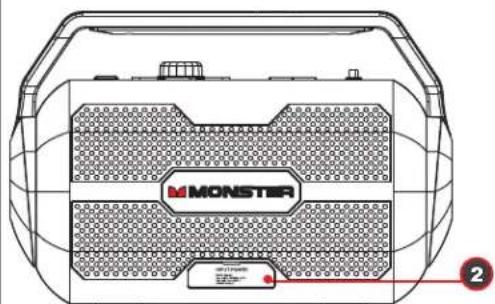
2 ....AC connection input
3 ....Mic/Guitar Volume Control
4 ....LED Interface
5 ....Mic/Guitar Port
6..... USB Port
7 ....Aux Input
8 ....Power On/Off
9 ....Source Select
10 ..Bluetooth Pairing Key
11...Battery Level Indicator
12 ..Radio Preset
13 ..Volume Knob
GETTING STARTED
Power Connection

natural_image
Technical line drawing of a device casing with 'MONSTER' branding and a yellow arrow pointing to a component (no text or symbols beyond branding)Wall outlet

- Connect the supplied AC cable to the speaker.
- Plug the AC cord into wall outlet.

Turn Power Switch On
Power On/Off Switch
- Press the Power switch to "ON" position on top panel of speaker
- The Power Red LED will turn On.
- The unit will enter into Bluetooth mode, Bluetooth LED will flash blue.
- If the 3.5mm Stereo Audio cable is plugged in during this Power On mode, it will automatically enter into AUX mode.
Charging Battery
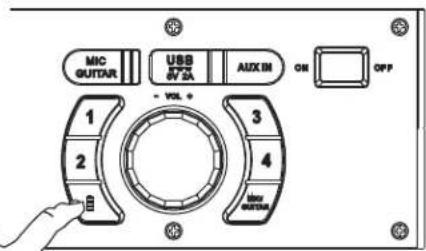
- By connecting AC power, battery will start charging
- Charge battery about 6 hours in Power off mode before you start using the unit for the first time
- Battery status by pushing battery button. 100,75,50,25 and battery low on LED display when press battery button.
- The Red Power LED will pulse off and on during battery charging.
- The RED power LED will turn solid when fully charged.
BLUETOOTH CONNECTION (Bluetooth Device)
Manual Bluetooth pairing
- Place Speaker and your Bluetooth device so they are no more than 3 feet apart.
- Press the Source button until "BT" mode is displayed on LED screen
- Press 📧 button on Speaker to enter into Bluetooth pairing mode. BT Blue LED will flash.
- Make sure Bluetooth function of your Bluetooth device is ON.
- Set your Bluetooth device to search for Bluetooth devices. You will recognize the unit by its Bluetooth name Monster Nomad
- Once selected, your Bluetooth device will indicate as "Connected", and you will hear confirmation tone from the speaker;
- Bluetooth LED turns solid upon completion of pairing.

PAIRING USING NFC

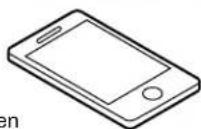
- Turn on NFC function on your Bluetooth enabled device.
- Place your Bluetooth device on the silkscreen "NFC" on the right side of Monster Nomad handle.
- Confirm Bluetooth connection on your Bluetooth device. Note: Blue LED indicator will be solid.
- Once paired you can play audio from your Bluetooth device and audio can be heard from the unit.
CONNECTION USING AUX INPUT
- Press the Source button until "Aux" mode is displayed on LED screen
- Plug in the 3.5mm Stereo Audio wire into the Aux-In input.
- You can connect any audio device that has 3.5mm audio output jack, and can playback any audio from this connected device.
- All playback functions (Play, Pause, Next, Previous, Volume Up & Volume Down) can be controlled from the connected Audio device.
Connect Microphone
Connect Microphone
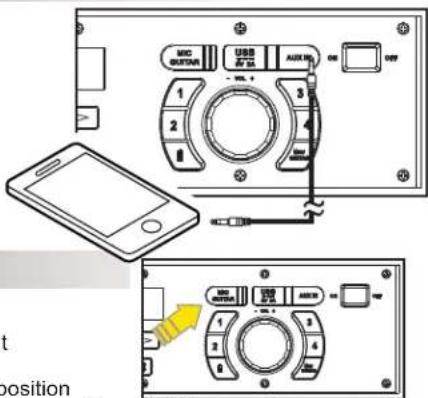
- First plug the supplied "Mic/Guitar" adapter (6.5mm to 3.5mm) to the input labeled "MIC/Guitar" above the Volume knob
- Once the microphone is plugged in select the "MIC/Guitar" button to Mic position
- Now control your microphone volume on the smaller knob on the far left of the dashboard of the speaker
*Make sure your microphone is also switched to "On"
FM / USB Charging
Listening to FM radio
- Press the "Source" button to select FM source, the radio station frequency will be displayed on the screen.
- Press and hold (◀ or ▶) to search a station with strongest reception automatically.
Store your favorite four radio stations manually
- Tune to the desired radio station.
- Press and hold a number key (1-4) to enter programming mode; the corresponding number blinks on the screen; and the station to save on the selected preset.
- Repeat above steps above to store additional stations.
Select a favorite radio station
- Press the "Source" button to select FM source.
- Press the number 1-4 keys to select one of your favorite radio stations to listen.
USB Charging (5V/2A)
- With the built in USB power bank, connect your USB cable to USB power ports. You can connect an iPhone, iPad, or any Android device. (USB cable not included)


The Power Red LED Signal will turn on and other LED Signals will turn off once the main unit is in Standby mode.
- Bluetooth: When there is no BT Connection, or there is a BT Connection failure, or if the BT has been disconnected for 15 Minutes, the set will go to standby mode and the BT LED Signal will turn off.
- AUX: The main unit will enter standby mode when the main unit is in Aux mode and no Aux cable has been detected for 15 minutes.
- Work Mode: When the main unit is in work mode, pressing and holding the volume knob key for 3 seconds will auto enter the unit to Standby Mode.
"Wake up" from standby mode:
If the main unit is in Standby mode, press and hold the volume knob for 1 second. The main unit will turn on and return to the latest source mode.
TROUBLESHOOTING
General
No power
- Check that the AC power cord is securely inserted in the unit and the electrical outlet.
- Check the Power On/Off switch is turn to On position.
- If battery is flat. Plug in the AC power cord to charge and operate.
Keys no response
- Turn the Power On/Off switch to Off, and then On again to reset the unit
- Unplug the AC power cord and plug it back again.
No sound heard
- Make sure the Aux connected device volume is turn to reasonable level.
- Make sure the Bluetooth connected device output the audio thru BT out.
- Make sure the Bluetooth connected device volume is turn to reasonable level.
- Make sure the Guitar is connected through Mic/Guitar converting the header, and Guitar mode is selected (Press Mic/Guitar button) and Mic/Guitar volume is turned to a reasonable level;
- Make sure the Mic is connected through Mic/Guitar converting the header, and Mic mode is selected (Press Mic/Guitar button) and Mic/Guitar volume is turned to a reasonable level;
Bluetooth Operations
Audio quality is poor
- Bluetooth reception is poor. Move the Bluetooth device nearer to the Speaker.
Cannot pair to Bluetooth device
- Make sure both Bluetooth device and Speaker is not connected to any other Bluetooth device.
- Make sure the Bluetooth On/Off switch located below Speaker is slide to On position.
- Make sure the Blue LED on the Speaker is fast flashing (Pairing mode).
- Turn Power switch to Off, and then On again. Press and hold BT button for 2 seconds to enter into pairing mode.
SPECIFICATIONS
General
Input Source: BT / AUX / FM / Micphone
Bluetooth Range: Bluetooth 10M (33ft)
AUX IN 3.5 mm
Control Buttons 1. Source (FM / BT / AUX)
-
BT (Pause / Play / Pairing)
-
Knob (Vol Up / Vol Down / Battery Status / Standby)
-
Arrows (Previous / Next / Seek FM Frequency)
-
Numerical Buttons (4 programmable FM stations store)
LED Indicator.....Power / Battery charging
Indicator: Red x1
Bluetooth : Blue x 1
Battery Status: 100, 75, 50, 25% on LED display when press battery button
Power Input AC 100-240V
Auto Standby....Within 15 minutes when BT / AUX has no signal
Auto Power Off No
Sound Channel Full Range x 2
Speaker output Wattage.... 15 W
Speaker driver size 3.5" Full-range x 2
Speaker grill finishing ...... Metal "M" - Black (0.8mm)
Max SPL 99dB 30cm pink noise
THD + Noise .... < 10%
S/N >75dB
Cabinet Material Plastic
Dimension (W x H X D) ...... W324.5*D138*H214.5
Weight (Kg) 2.9 kg
Operating Temperature
Operating Temperature Range ... 0 - 40 °C
Operating Humidity Range .....40\~90% RH
Storage Temperature Range.....-25 - 70 °C
Key
Power on/off key Rock Switch On/Off
Source key....Press to change source between FM / BT / AUX
Arrow key 1. On FM source, press to seek frequency
- On BT source, press for next or previous song
Volume knob 1. Turn knob for volume up and down
- Press and hold to power down unit for Standby
Bluetooth Pairing 1. Press for play and pause
- Press and hold for BT pairing
RF Characteristic
RF Frequency Range 2.402GHz - 2.480GHz
Number of Channel 79
First Channel 2.402GHz
Last Channel 2.480GHz
RF Output Power .... <4d8m
RF Sensitivity <==-85dBm
Data Rate 1 Mbps
Distance, Line of Sight ....>=10m
Battery Level indicated
LED on/off key....press to display battery level;
Bluetooth
NFC YES
Bluetooth version....3.0
Bluetooth Profile ......A2DP, AVRCP
Bluetooth Frequency Brand.....2.4GHz \~ 2.48 GHz
Bluetooth Range 10 m (33ft.)
Connections
3.5mm Aux in Yes
USB Port Yes
AC in.....Yes
Limited Warranty
Model: MNMD-S-C
This Monster-branded product, marketed as new, in the original carton to the original purchaser ("Product"), is warranted by Russell Distribution Company, LLC against manufacturing defects in materials and workmanship for a limited warranty period of Ninety (90) Days for Labor and One (1) year for Parts. This Limited Warranty is conditioned upon proper use of Product by you, the Purchaser.
This Limited Warranty does not apply to store display products and product sold as a "marked down" special, in "as is" condition, "close outs", "liquidation and clearance sales", "open box", products missing accessories, or no fault found.
Proof of purchase in the form of a Bill of Sale, Receipt or Receipted Invoice is evidence the Product is within the limited warranty period. The Bill of Sale, Receipt or Receipted Invoice must be presented as a pre-condition to obtaining the limited warranty service.
This limited warranty begins on the original date of purchase and is valid only on Products purchased through authorized dealers and used in the United States, and Puerto Rico, by the original Purchaser. To receive warranty service, the Purchaser must first contact us for problem determination and service procedures. The original dated bill of sale, receipt or receipted invoice must be presented upon request as proof of purchase.
We will repair your product or if repairs cannot be made, we will replace it at no charge with the same or similar product. If the Product is defective as specified in this limited warranty during the limited warranty period, we may use new or remanufactured parts to repair the Product. All replaced parts and products become our property and must be returned to us. Replacement parts and products assume the remaining original limited warranty, or ninety (90) days, whichever is longer.
Product freight must be prepaid by you, the original Purchaser and shipped in either its original packaging or packaging affording an equal degree of protection. We will not be responsible for or obligated to replace damaged Products.
If the Product is received damaged, it is your responsibility as the consumer to file a claim against the carrier. We will only store the damaged Product for 30 days and reserve the right, in our sole discretion, to dispose of the damaged Product or ship it back to you at your expense after 30 days.
This limited warranty covers manufacturing defects in materials and workmanship encountered in normal, and except to the extent otherwise expressly provided for in this statement, noncommercial use of this Product, and shall not apply to the following, including, but not limited to: Damage which occurs in shipment; delivery and installation; applications and uses for which this Product was not intended; altered Product or serial numbers; cosmetic damage or exterior finish; accidents, abuse, neglect, fire, water, lightning or other acts of nature; use of products, equipment, systems, utilities, services, hardware, supplies, accessories, applications, installations, repairs, external wiring or connectors not supplied or authorized by us or the manufacturer, which damage this Product or result in service problems; incorrect electrical line voltage, fluctuations and surges; customer adjustments and failure to follow operating instructions, cleaning, maintenance and environmental instructions that are covered and prescribed in the instruction book; reception problems and distortion related to noise, echo, interference or other signal transmission and delivery problems; burned-in images. Uninterrupted or error-free operation of the Product is not warranted.
THERE ARE NO EXPRESS OR IMPLIED WARRANTIES OTHER THAN THOSE LISTED AND DESCRIBED ABOVE, AND NO WARRANTIES WHETHER EXPRESS OR IMPLIED, INCLUDING, BUT NOT LIMITED TO, ANY IMPLIED WARRANTIES OF MERCHANTABILITY OR FITNESS FOR A PARTICULAR PURPOSE, SHALL APPLY AFTER THE EXPRESS WARRANTY PERIODS STATED ABOVE, AND NO OTHER EXPRESS WARRANTY OR GUARANTY GIVEN BY ANY PERSON, FIRM OR CORPORATION WITH RESPECT TO THIS PRODUCT SHALL BE BINDING ON US. REPAIR OR REPLACEMENT AS PROVIDED UNDER THIS LIMITED WARRANTY IS YOUR EXCLUSIVE REMEDY ASTHE CONSUMER. WE SHALL NOT BE LIABLE FOR ANY INCIDENTAL, OR CONSEQUENTIAL DAMAGES FOR BREACH OF ANY EXPRESS OR IMPLIED WARRANTY ON THIS PRODUCT; EXCEPT TO THE EXTENT PROHIBITED BY APPLICABLE LAW, ANY IMPLIED WARRANTY OF MERCHANTABILITY OR FITNESS FOR A PARTICULAR PURPOSE ON THIS PRODUCT IS LIMITED FOR THE DURATION OF THIS LIMITED WARRANTY. THIS LIMITED WARRANTY SHALL NOT EXTEND TO ANYONE OTHER THAN THE ORIGINAL PURCHASER OF THIS PRODUCT, IS NONTRANSFERABLE AND STATES YOUR EXCLUSIVE REMEDY.
Some states do not allow limitations on how long an implied warranty lasts, or the exclusion or limitation of incidental or consequential damages, so the above limitations or exclusions may not apply to you. This limited warranty gives you specific legal rights, and you may also have other rights which vary from state to state. Any provision contained herein which is found contrary to state or local laws shall be deemed null and void and the remaining provisions shall continue in full force and effect.
To obtain warranty service:
Telephone: 800-976-0677
Ver. 130828-1
MONSTER®
Monster and the M Monster logo are registered trademarks of Monster, Inc. and its subsidiaries in the U.S. and other countries, used under license. Pure Monster Sound is a trademark of Monster, Inc. and its subsidiaries in the U.S. and other countries, used with permission.
The Bluetooth ^® word mark and logos are registered trademarks owned by Bluetooth SIG, Inc. Other trademarks and trade names are those of their respective owners.


- TABLE OF CONTENTS
- IMPORTANT SAFETY INSTRUCTIONS
- WARNING
- CAUTION
- FCC Warning Statement
- UNPACKING
- GETTING STARTED
- Power On/Off Switch
- Charging Battery
- BLUETOOTH CONNECTION (Bluetooth Device)
- Manual Bluetooth pairing
- PAIRING USING NFC
- CONNECTION USING AUX INPUT
- Connect Microphone
- FM / USB Charging
- Listening to FM radio
- Store your favorite four radio stations manually
- Select a favorite radio station
- USB Charging (5V/2A)
- "Wake up" from standby mode:
- TROUBLESHOOTING
- General
- No power
- Keys no response
- No sound heard
- Bluetooth Operations
- Audio quality is poor
- Cannot pair to Bluetooth device
- SPECIFICATIONS
- Operating Temperature
- Key
- RF Characteristic
- Battery Level indicated
- Bluetooth
- Connections
- Limited Warranty
- Model: MNMD-S-C
- MONSTER®
Brand : MONSTER
Model : Nomad
Category : Bluetooth speaker