Volcano Jager - Mouse ModeCom - Free user manual and instructions
Find the device manual for free Volcano Jager ModeCom in PDF.


| Product Type | Mouse |
| Brand | ModeCom |
| Model | Volcano Jager |
| Connection | Wired (USB) |
| Sensor Type | Optical |
| DPI | 1600 DPI (adjustable) |
| Number of Buttons | 6 |
| Scroll Wheel | Yes |
| Back Cover | Detachable, customizable |
| Cable Length | 1.8 m |
| Weight | 150 g |
| Dimensions (L x W x H) | 125 x 70 x 40 mm |
| Power Source | USB bus power |
| Compatibility | Windows 7/8/10/11, macOS |
| Material | Plastic |
| Color | Black and Yellow |
| Main Functions | Left/right click, scroll, DPI adjustment, back/forward buttons |
| Cleaning | Wipe with a dry cloth |
| Safety Precautions | Do not expose to liquids; avoid extreme temperatures |
| Spare Parts | Back cover may be available (check retailer) |
| Repairability | Easy disassembly for switch replacement (see manual) |
Frequently Asked Questions - Volcano Jager ModeCom
User questions about Volcano Jager ModeCom
0 question about this device. Answer the ones you know or ask your own.
Ask a new question about this device
Download the instructions for your Mouse in PDF format for free! Find your manual Volcano Jager - ModeCom and take your electronic device back in hand. On this page are published all the documents necessary for the use of your device. Volcano Jager by ModeCom.
USER MANUAL Volcano Jager ModeCom
natural_image
Black and yellow computer mouse with a triangular logo on the front wheel, set against a solid red background (no text or symbols visible)VOLCANO
MODECOM
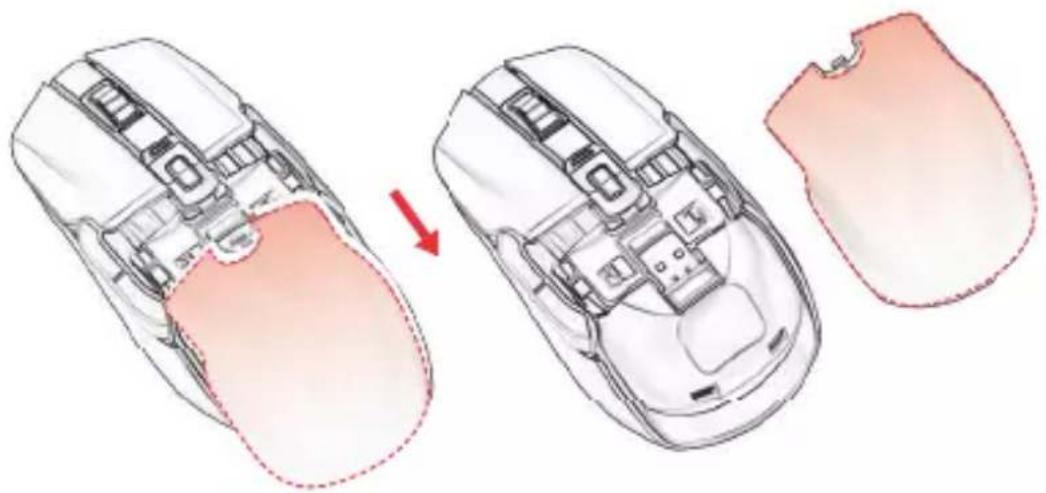
1 BACK COVER DETACHABLE INSTRUCTIONS.
INSTRUKCJA ZDEJMOWANIA TYLNEJ CZĘŚCI KORPUSU MYSZY.
natural_image
Diagram showing a computer mouse with internal components before and after disassembly, illustrating the process (no text or labels present)natural_image
Top-down schematic of a car interior showing internal compartments and red arrows indicating specific areas (no text or symbols present)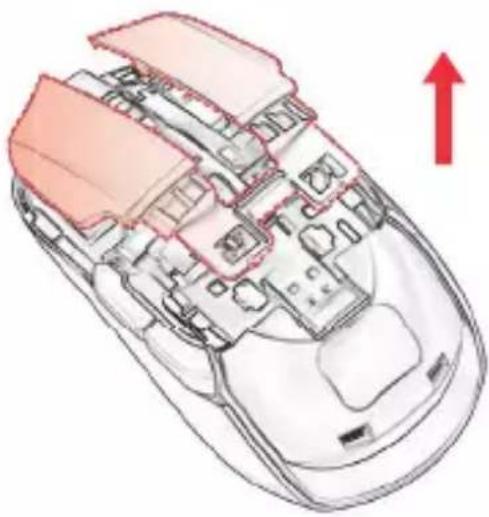
natural_image
Cross-sectional diagram of a computer mouse showing internal components and a red upward arrow (no text or symbols)natural_image
Technical line drawing of two computer mouse head plans showing internal circuitry and mounting points (no text or labels)Two fingers clasp the switch, gently pull up.
Align front buckle with mouse, then press buckle into right position.
Front-end buckle position.
Back-end buckle position.
Front-end buckle position.
This device was designed and made of high-quality reusable materials and components. If the device, its packaging, user's manual, etc. are marked with crossed waste container, it means they are subject to segregated household waste collection in compliance with the Directive 2012/19/UE of the European Parliament and of the Council. This marking informs that electric and electronic equipment shall not be thrown away together with household waste after it's been utilised. The user is obliged to bring the utilised equipment to electric and electronic waste collection point. Those running such collection points, including local collection points, shops or commune units, provide convenient system enabling to scrap such equipment. Appropriate waste management aids in avoiding consequences which are harmful for people and environment and result from dangerous materials used in the device, as well as improper storage and processing. Segregated household waste collection aids recycle materials and components of which the device was made. A household plays crucial role in contributing to recycling and reusing the waste equipment. This is the stage where the basics are shaped which largely influence the environment being our common good. Households are also one of the biggest users of small electrical equipment. Reasonable management at this stage aids and favours recycling. In the case of improper waste management, fixed penalties may be imposed in accordance with national legal regulations.
Brand : ModeCom
Model : Volcano Jager
Category : Mouse