
3.1S - Fitness Equipment BOWFLEX - Free user manual and instructions
Find the device manual for free 3.1S BOWFLEX in PDF.


| Product Type | Folding Treadmill |
| Motor Power | 2.5 CHP |
| Speed Range | 0 – 10 mph |
| Incline Range | 0 – 10% |
| Running Surface | 20" x 60" |
| User Weight Capacity | 300 lbs (136 kg) |
| Dimensions (Assembled) | 77" L x 35" W x 55" H (196 x 89 x 140 cm) |
| Dimensions (Folded) | 60" L x 35" W x 5" H (152 x 89 x 13 cm) |
| Product Weight | 200 lbs (91 kg) |
| Power Requirements | 120 V, 15 A |
| Display | 6.5" LCD with metrics (time, distance, speed, incline, heart rate, calories) |
| Heart Rate Monitoring | Pulse grip sensors on handlebars |
| Connectivity | Bluetooth (compatible with JRNY app) |
| Workout Programs | 10+ preset workouts (intervals, hills, fat burn, etc.) |
| Folding Mechanism | SoftDrop folding system for easy storage |
| Transport Wheels | Yes, built-in for mobility |
| Safety Key | Included emergency stop clip |
| Cleaning | Wipe with damp cloth; dry thoroughly; avoid solvents |
| Maintenance | Lubricate deck every 6 months; check belt tension |
| Warranty | 10 years frame, 2 years parts, 1 year labor |
Frequently Asked Questions - 3.1S BOWFLEX
User questions about 3.1S BOWFLEX
0 question about this device. Answer the ones you know or ask your own.
Ask a new question about this device
Download the instructions for your Fitness Equipment in PDF format for free! Find your manual 3.1S - BOWFLEX and take your electronic device back in hand. On this page are published all the documents necessary for the use of your device. 3.1S by BOWFLEX.
USER MANUAL 3.1S BOWFLEX
Important Safety Instructions - Before using this equipment, obey the following warnings:
This icon means a potentially hazardous situation which, if not avoided, could result in death or serious injury. Read and understand all Warnings on this equipment.
- Children must not be let on or near to this equipment. Moving parts and other features of the equipment can be dangerous to children. • Not intended for use by anyone under 14 years of age. • Not intended for use by persons with medical conditions where those conditions may impact the safe operation of the equipment or pose a risk of injury to the user. • Consult a physician before starting an exercise program. Stop exercising if you feel pain or tightness in your chest, become short of breath, or feel faint. Contact your doctor before using the equipment again. • Keep your body weight centered on the bench while exercising. • Set up and operate bench only on a hard, level surface. • Do not wear loose clothing while you are near the bench. • Maximum user weight limit: 136 kg (300 lb). Do not use if you are over this weight. • Do not exceed the maximum lifting weight of 82 kg (180 lb). • Keep at least 1.3 m (50 in) clear on each side of the bench. This is the recommended safe distance for access and passage around the bench. • This bench is for home use only. • Before exercising, make sure the back and seat supports are securely fastened and the bench is firmly in place. • Examine this bench for loose parts or signs of wear. Tighten or replace any worn or loose components before use. Examine all fasteners carefully. Contact your local distributor (or Nautilus Customer Service if purchased in the United States or Canada) for repair information. • Never lift more weight than you can safely and comfortably handle. • Never attempt to exercise with more resistance than you are physically able to handle. • For safety, it is recommended that you exercise with a training partner or spotter. • Do not use the bench if any component is found worn or damaged.
SAVE THESE INSTRUCTIONS.
Nautilus, Inc., 5415 Centerpoint Parkway, Groveport, OH 43125 USA, www.NautilusInc.com - Customer Service: North America (800) 605-3369, csnls@nautilus.com | Nautilus (Shanghai) Fitness Equipments Co, Ltd, Room 1701 &1702, 1018 Changning Road, Changning District, Shanghai, China 200042, www.nautilus.cn - 86 21 6115 9668 | outside U.S. www.nautilusinternational.com | Printed in China | © 2020 Nautilus, Inc. | Bowflex and the B logo are trademarks owned or licensed by Nautilus, Inc., registered or otherwise protected by common law in the U.S. and other countries.
ORIGINAL MANUAL - ENGLISH VERSION ONLY
Specifications
Bench Weight: approx. 26.3 kg (58 lb)
Total Surface Area (footprint) of equipment: 10695 cm² (1653.1 in²)


WARNING!
- Read and understand the complete user guide. Keep manual for future reference.
- Read and understand all warnings on this device. If at any time the warning stickers become loose, unreadable or dislodged, contact Nautilus Customer Service for replacement stickers.
• Children must not be allowed on or near to this device.
• This device is for home use only.
- Set up and operate this device on a solid, level, horizontal surface.
• Make sure that you give users enough free space around the device for safe operation. (Keep at least 1.3 m (50 in) clear on each side of the bench.).
- Injury or death are possible if Caution is not used while operating this equipment.
• The maximum user weight for this machine is 300 lb (136 kg).
• The maximum weight to be lifted on this bench is 180 lb (82 kg).
(Label is available in English and French Canadian only.)

Serial Number label
Stowed Dimensions: 69 cm x 59.5 cm x 135.2 cm
(27.2 in x 23.4 in x 53.2 in)
Maintenance

The safety and performance of this product can be maintained only if it is examined regularly for damage and wear.
Examine the bench before each use for damage and wear. Replace broken components immediately or put the bench out of use until repaired.
Daily/Before Each Use: Examine bench. Make sure it looks in good condition and operates smoothly. If you find damage, DO NOT USE. Contact your local distributor, or Customer Service if purchased within the United States or Canada, for servicing.
Daily/After Each Use: After each use, wipe bench free of sweat with a clean, dry cloth. Upholstery can be cleaned with a mild detergent or spray cleaner.
Weekly: If used often, your bench should be thoroughly cleaned using a clean cloth and an ammonia based cleanser. Wipe bench down completely and be sure to touch up any scratches with touch up paint to prevent rusting.
Monthly: Check the frame of the bench for any sign of cracking or permanent bending. Do not use the bench if you see this. Contact your local distributor, or Customer Service if purchased within the United States or Canada, immediately.
If you have any questions on the correct use or maintenance of this equipment, contact your local distributor (or Customer Service if purchased within the United States or Canada at (800) 605-3369). Only Nautilus-trained or Nautilus-authorized personnel should make extensions, readjustments, modifications, or repairs.
Parts and Hardware
Note: Install the Parts in numerical order.
| Item Qty | Description | |
| 1 1 | Frame Weldment | |
| 2 1 | Rear Stabilizer | |
| 3 1 | Front Stabilizer | |
| 4 1 | Seat | |
| 5 1 | Seat Back | |
| 6 1 | Leg Extension | |
| 7 1 | Foam Roller Tube | |
| 8 2 | Foam Roller |
| Item Qty | Description |
| A 2 Leveler | |
| B 12 Flat Washer, M8 Narrow | |
| C 5 Socket Head | Cap Screw, M8x1.25x25 |
| D 5 Lock Washer, M8 | |
| E 5 Flat Washer, M8 | |
| F 12 Socket Head | Cap Screw, M8x1.25x60 |
| G 2 Cap | |
Note: Select pieces of Hardware have been provided as spares on the Hardware Card. Be aware that there may be remaining Hardware after the proper assembly of the equipment.
Tools (included)
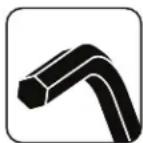
(2) 4mm 5mm
Step 1.
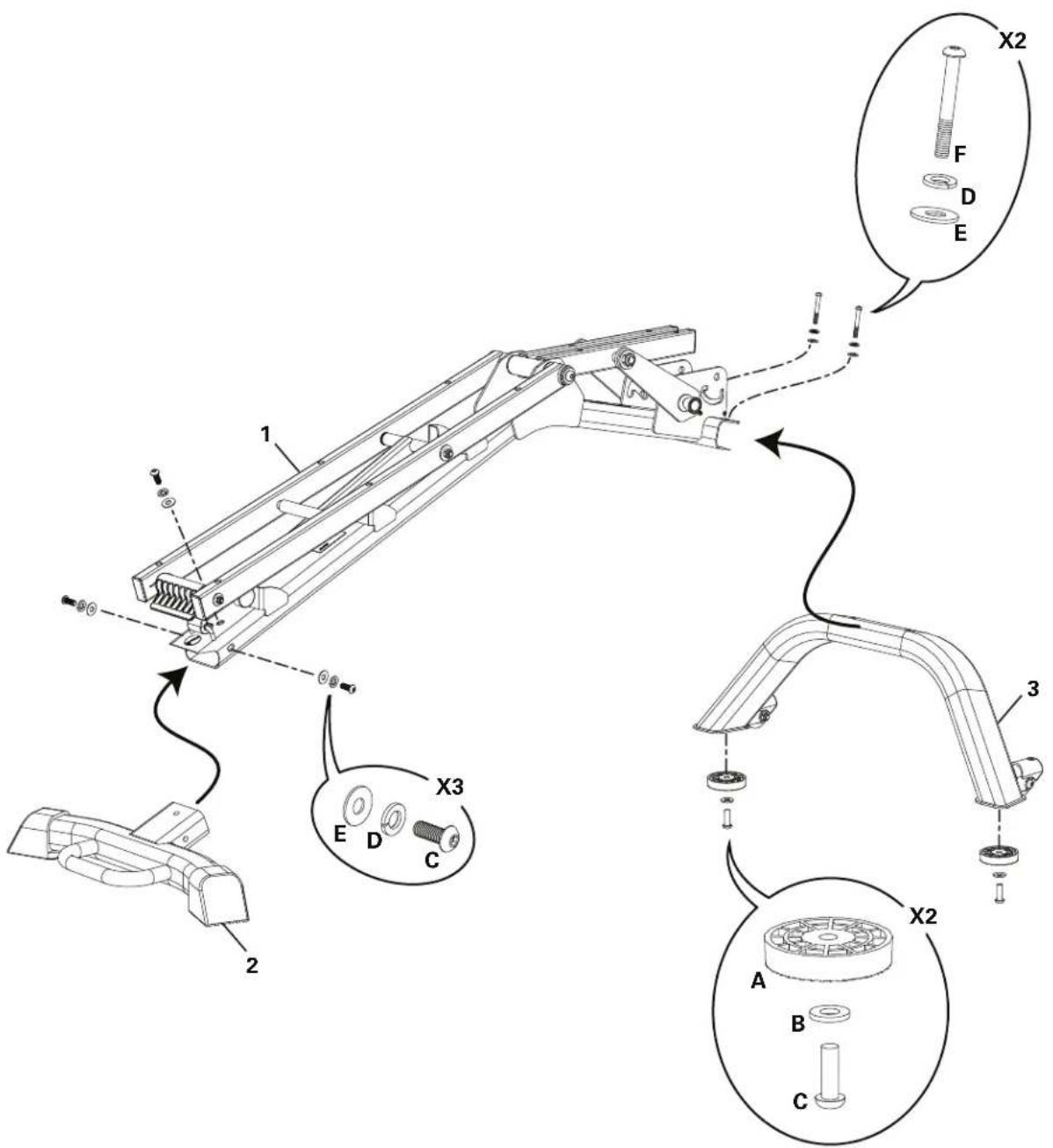
Step 2.

Step 3.
(*) Hardware is pre-installed and not on the Hardware Card.

Step 4. Final Inspection
Inspect your equipment to ensure that all fasteners are tight and components are properly assembled.

Do not use or put the equipment into service until the equipment has been fully assembled and inspected for correct performance in accordance with the User's Guide. Review all warnings affixed to the equipment.
Adjusting the Bench
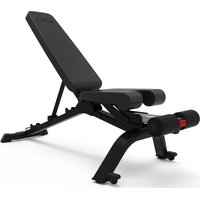
If the Seat Back is fully lowered and locked, it must be released. To release the Seat Back, slightly push down on the end of the Seat Back while pulling firmly upward on the Release Tab. Adjust the Seat Back to the desired angle with the Seat Back Support Bar placed into one of the channels. Be sure that the Bench Support Bar is fully engaged in the channel before using the bench.
Bench Positions

Positions of Seat Back

natural_image
Technical line drawing of a mechanical device with an arrow indicating assembly or force (no text or symbols present)
natural_image
Technical line drawing of a mechanical lever assembly (no text or symbols)20 degree Decline with Raised Seat
Adjusting the Seat
The Seat has two positions, fl at or raised. To raise the Seat, lift up on it until the locking mechanism engages.

natural_image
Technical line drawing of a mechanical arm with rotational arrow indicating motion (no text or symbols)To lower the Seat, slightly lift the Seat and guide the locking mechanism to the lower setting. Safely lower the Seat into the fl at position.
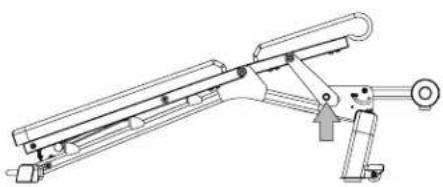
natural_image
Technical line drawing of a mechanical assembly with no visible text or symbols
natural_image
Technical diagram of a mechanical assembly with no visible text or symbolsMoving the Bench
The Front Stabilizer has two Transport Wheels to assist with moving the bench. With the Seat and Bench fully lowered, grasp the Handle and slightly lift until the weight of the Bench is on the Transport Wheels. Push the Bench into position, and safely lower into place.
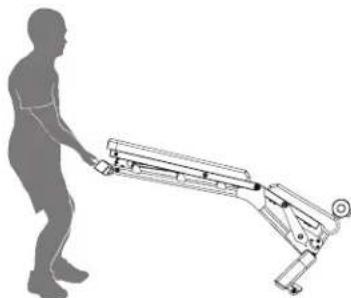
natural_image
Silhouette of a person pushing a wheeled robotic arm (no text or symbols visible)Stowing the Bench
The Bench can be stowed to occupy less floor space and to be safely stored.
- Fully lower the Seat and Seat Back. Push upward on the Release Tab while pushing fully downward on the Seat Back until the Release Tab hooks onto the locking bar.
- Push the release button on the end of the Leg Extension and flip upward until it locks into place.
- Safely pivot the entire bench forward to rest on the Leg Extension and Front Stabilizer.

flowchart
graph TD
    A["Step 1: Initial arm with rotational arrows"] --> B["Step 2: Internal component with internal cable"]
    B --> C["Step 3: Rotation arrow, clockwise"]
    C --> D["Step 4: Rotation arrow, clockwise"]
    D --> E["Step 5: Rotation arrow, clockwise"]
To validate warranty support, keep the original proof of purchase and record the following information:
Serial Number
Date of Purchase ____
If purchased in US/Canada: To register your product warranty, go to: www.bowflex.com/register or call 1 (800) 605-3369.
If purchased outside US/Canada: To register your product warranty, contact your local distributor.
For warranty and service of products purchased outside US/Canada, please contact your local distributor. Nautilus, Inc. will cover the frame. Contact your local distributor for key details. To find your local international distributor, go to: www.nautilusinternational.com.
Who Is Covered
This warranty is valid only to the original purchaser and is not transferable or applicable to any other person(s).
What Is Covered
Nautilus, Inc. warrants that this product is free from defects in materials and workmanship, when used for the purpose intended, under normal conditions, and provided it receives proper care and maintenance as described in the Product's Assembly and Owner's manual. This warranty is good only for authentic, original, legitimate machines manufactured by Nautilus, Inc. and sold through an authorized agent and used in the United States or Canada.
Terms
Warranty terms for products purchased in US/Canada are as stated below.
- Frame 15 years
• Upholstery and Parts 1 year
For warranty & service of products purchased outside US/Canada, please contact your local distributor. To find your local international distributor, go to: www.nautilusinternational.com
How Nautilus Will Support the Warranty
Throughout the terms of the warranty coverage, Nautilus, Inc. will repair any machine that proves to be defective in materials or workmanship. Nautilus reserves the right to replace the product in the event a repair is not possible. When Nautilus determines replacement is the correct remedy, Nautilus may apply a limited credit reimbursement toward another Nautilus, Inc. brand Product, at our discretion. This reimbursement may be prorated based on length of ownership. Nautilus, Inc. is not responsible for dealer labor or maintenance charges beyond the applicable warranty period(s) stated herein. Nautilus, Inc. reserves the right to substitute material, parts or products of equal or better quality if identical materials or products are not available at the time of service under this warranty. Any replacement of the product under the terms of the Warranty in no way extends the original Warranty period. Any limited credit reimbursement may be prorated based on length of ownership. THESE REMEDIES ARE THE EXCLUSIVE AND SOLE REMEDIES FOR ANY BREACH OF WARRANTY.
What You Must Do
- Retain appropriate and acceptable Proof of Purchase.
• Operate, maintain, and inspect the product as specified in the Product Documentation (Assembly, Owner's Manuals, etc.). - Product must be used exclusively for the purpose intended.
- Notify Nautilus within 30 days after detecting an issue with the product.
• Install replacement parts or components in accordance with any Nautilus instructions. - Perform diagnostic procedures with a trained Nautilus, Inc representative if requested.
- This warranty does not cover in home repair costs (labor, etc) or related charges.
What Is Not Covered
- Damage due to abuse, tampering or modification of the Product, failure to properly follow assembly instructions, maintenance instructions, or safety warnings as stated in the Product Documentation (Assembly, Owner's Manuals, etc), damage due to improper storage or the effect of environmental conditions such as moisture or weather, misuse, mishandling, accident, natural disasters, power surges.
• A machine placed or used in a commercial or institutional setting. This includes gyms, corporations, work places, clubs, fitness centers and any public or private entity that has a machine for use by its members, customers, employees or affiliates.
• Damage caused by exceeding maximum user weights as defined in Products Owner's Manual or on the warning label.
• Damage due to normal usage and wear and tear.
• This warranty does not extend to any territories or countries outside the United States and Canada.
How to Obtain Warranty Support
For Products purchased directly from Nautilus, Inc. contact the Nautilus office listed on the Contacts page of the Product's Owner's manual. You may be required to return the defective component to a specified address for repair or inspection, at your expense. Standard ground shipping of any warranty replacement parts will be paid by Nautilus, Inc. For products purchased from a retail outlet, you may be asked to contact your retailer for warranty support.
Exclusions
The preceding warranties are the sole and exclusive express warranties made by Nautilus, Inc. They supersede any prior, contrary or additional representations, whether oral or written. No agent, representative, dealer, person or employee has the authority to alter or increase the obligations or limitations of this warranty. Any implied warranties, including the WARRANTY OF MERCHANTABILITY and any WARRANTY OF FITNESS FOR A PARTICULAR PURPOSE, are limited in duration to the term of the applicable express warranty provided above, whichever is longer. Some states do not allow limitations on how long an implied warranty lasts, so the above limitation may not apply to you.
Limitation of Remedies
EXCEPT AS OTHERWISE REQUIRED BY APPLICABLE LAW, THE PURCHASER'S EXCLUSIVE REMEDY IS LIMITED TO REPAIR OR REPLACEMENT OF ANY COMPONENT DEEMED BY NAUTILUS, INC. TO BE DEFECTIVE UNDER THE TERMS AND CONDITIONS STATED HEREIN. IN NO EVENT WILL NAUTILUS, INC. BE LIABLE FOR ANY SPECIAL, CONSEQUENTIAL, INCIDENTAL, INDIRECT OR ECONOMIC DAMAGES, REGARDLESS OF THE THEORY OF LIABILITY (INCLUDING, WITHOUT LIMITATION, PRODUCT LIABILITY, NEGLIGENCE OR OTHER TORT) OR FOR ANY LOST REVENUE, PROFIT, DATA, PRIVACY OR FOR ANY PUNITIVE DAMAGES ARISING OUT OF OR RELATED TO THE USE OF THE FITNESS MACHINE EVEN IF NAUTILUS, INC. HAS BEEN ADVISED OF THE POSSIBILITY OF SUCH DAMAGES. THIS EXCLUSION AND LIMITATION SHALL APPLY EVEN IF ANY REMEDY FAILS OF ITS ESSENTIAL PURPOSE. SOME STATES DO NOT ALLOW THE EXCLUSION OR LIMITATION OF CONSEQUENTIAL OR INCIDENTAL TYPE DAMAGES SO THE ABOVE LIMITATION MAY NOT APPLY TO YOU.
State Laws
This warranty gives you specific legal rights. You may also have other rights, which vary from state to state.
Expirations
If the warranty has expired, Nautilus, Inc. may assist with replacements or repairs to parts and labor, but there will be a charge for these services. Contact a Nautilus office for information on post-warranty parts and services. Nautilus does not guarantee availability of spare parts after expiration of warranty period.
International Purchases
If you purchased your machine outside of the United States consult your local distributor or dealer for warranty coverage.


- Important Safety Instructions - Before using this equipment, obey the following warnings:
- SAVE THESE INSTRUCTIONS.
- Specifications
- WARNING!
- Maintenance
- Parts and Hardware
- Tools (included)
- Step 3.
- Step 4. Final Inspection
- Adjusting the Bench
- Adjusting the Seat
- Moving the Bench
- Stowing the Bench
- Who Is Covered
- What Is Covered
- Terms
- How Nautilus Will Support the Warranty
- What You Must Do
- What Is Not Covered
- How to Obtain Warranty Support
- Exclusions
- Limitation of Remedies
- State Laws
- Expirations
- International Purchases
Brand : BOWFLEX
Model : 3.1S
Category : Fitness Equipment