
JVCU435 - Webcam j5create - Free user manual and instructions
Find the device manual for free JVCU435 j5create in PDF.


| Product Type | USB 4K Ultra HD Webcam with 5x Digital Zoom Remote Control |
| Brand | j5create |
| Model | JVCU435 |
| Video Resolution | 4K Ultra HD |
| Digital Zoom | 5x |
| Remote Control | Yes, included (requires CR252 battery) |
| Built-in Microphone | Yes |
| Rotation | 360° |
| Connection Interface | USB 3.1 |
| Companion App | Yes, for Windows and macOS |
| Cable Length | Approximately 1.5 m |
| Product Dimensions (W x L x H) | 13.5 cm x 4.07 cm x 5.4 cm |
| Weight | Approximately 150 g |
| Power Source | USB bus-powered |
| Mounting | Clip or tripod compatible (base with 360° rotation) |
| Compatible Operating Systems | Windows, macOS |
| Technical Support | Phone: 888-689-4088, Email: service@j5create.com |
| Warranty | Limited warranty included |
Frequently Asked Questions - JVCU435 j5create
User questions about JVCU435 j5create
0 question about this device. Answer the ones you know or ask your own.
Ask a new question about this device
Download the instructions for your Webcam in PDF format for free! Find your manual JVCU435 - j5create and take your electronic device back in hand. On this page are published all the documents necessary for the use of your device. JVCU435 by j5create.
USER MANUAL JVCU435 j5create
natural_image
Exterior view of a black handheld device with a screen and control panel, no visible text or symbols on the device itself.EN: Quick Installation Guide
繁中文: 快速安装手册
简中文: 快速安装手册
日本語:
ES: Guía de instalación rápido
DE: Kurzinstallationsanlebitur
III: Guide d'installation rapide
N: Snelle installategids
II: Guida rapida all'installazione
III: Guia de instalação rápida
IV: Snabbinstallationsguide
VII: Руководство по быстрой установке
■ Description


Product Dimensions : 13.5(W) x 4.87(D) x 5.48(H) cm
STOP!
If you have any problems with this product, please contact our technical support team for assistance.
TECHNICAL SUPPORT
Customer Service:888-988-0488
Technical Support:888-689-4088
service@j5create.com
Service Hours: Mon. - Fri. 10:00 - 18:00 E.S.T
SOPORTE TÉCNICO
Please install the battery before use. Recommended battery: CR2032
■ Optional
Please download the "jScreate image setting tool" on the jScreate.com support page.
■ Webcam Companion App


natural_image
Black-and-white photo of a smiling couple in front of a wall, no visible text or symbolsEnglish
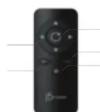
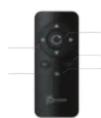
■ Remote Controller
- Zoom in: makes the image appear bigger and closer
-
Zoom out: makes the image appear smaller and farther
-
Electronic Pan-Tilt-Zoom control (ePTZ): After zooming in, the Pan/Tilt function can be
used to control the angle of the image. 4. Home: reverts the image back to its original state
- Digital privacy: turns off your camera and the privacy cover helps protect your video from hackers, giving you privacy, security, and peace of mind.

■ Start a video call with your USB™ 4K Ultra HD Webcam
Ensure your PC, Mac ^® , or Chromebook ^™ has Internet service, and that both you and the person you need to call are using a video calling application (e.g. Zoom ^™ , Microsoft Teams ^™ , etc.). Select the
Need to test are using a video calling application (e.g. zoom -), print sheet "intra" (e.g. text) correct video device and microphone in the settings menu of the video calling application.
-
The NCD435 provides 4K video calling. For optimal performance we recommend having a minimum of 8 Mbps upload speed.
-
4K calling may be affected by available network bandwidth, CPU speed, type of video calling application, etc.
-
Wide Compatibility: Zoom™, Google™ Hangouts™, Skype™, Microsoft Teams™, etc. For Windows 10
-
Go to Start > Settings > Privacy > Camera/Microphone
-
Choose your preferred settings to allow apps to access your camera and microphone
- Turn on your camera and microphone from within the settings of your video calling a
Privacy settings for macOS®
-
On your Mac ^® choose the Apple ^® menu > System Preferences, click Security & Privacy, then click Privacy.
-
Select Camera/Microphone.
-
Select the checkbox next to an app to allow it to access the camera and microphone. Deselect the checkbox to turn off access for that app. If you turn off access for an app, you will be asked to turn
it on again the next time that app tries to use your camera or microphone.
■ Special Notes
- If the Model: JVCU43S's IR receiver is covered, the remote controller may not work properly.
- To prevent 8% eliminate microphone/audio feedback, the recommended distance between the
microphone and the speaker is 5 to 10 ft. depending on the space and layout of your area.
- Designed with medium to large groups in mind.
Español Français
■ Control Remoto
In mind of time, the media app is a system-based tool for developing an industry, an vervolgers of Privacy.
This equipment has been tested and found to comply with FCC Part 15, Subpart B, ANSI C63.4-2014,
ICES-003 Issue 6, January 2016 (Updated April 2019).
Operation is subject to the following two conditions:
The following section of the
•This device may not cause harmful interference
•This device must accept any interference, including interference that may cause undesired
operation of the device.
Disclaimer
Information in this document is subject to change without notice. The manufacturer does not make
any representations or warranties (implied or otherwise) regarding the accuracy and completeness
of this document and shall in no event be liable for any loss of profit or any commercial damage.
including but not limited to special, incidental, consequential, or other damage. No part of this
document may be reproduced or transmitted in any form by any means, electronic or mechanical,
including photocopying, recording or information recording and retrieval systems without the
expressed written permission of the manufacturer.
LIMITED WARRANTY
LIMITATION OF WARRANTY
THIS WARRANTY GIVES YOU SPECIFIC LEGAL RIGHTS, AND YOU MAY HAVE OTHER RIGHTS THAT
VARY FROM STATE TO STATE (OR BY COUNTRY OR PROVINCE). OTHER THAN AS PERMITTED BY
LAW, J5CREATE DOES NOT EXCLUDE, LIMIT OR SUSPEND OTHER RIGHTS YOU MAY HAVE,
INCLUDING THOSE THAT MAY ARISE FROM THE NONCONFORMITY OF A SALES CONTRACT. FOR A
FULL UNDERSTANDING OF YOUR RIGHTS YOU SHOULD CONSULT THE LAWS OF YOUR COUNTRY,
PROVINCE OR STATE. TO THE EXTENT NOT PROHIBITED BY LAW IN YOUR STATE, PROVINCE,
JURISDICTION OR COUNTRY, THIS WARRANTY AND THE REMEDIES SET FORTH ARE EXCLUSIVE
AND IN LIEU OF ALL OTHER WARRANTIES, REMEDIES AND CONDITIONS, WHETHER ORAL,
WRITTEN, STATUTORY, EXPRESS OR IMPLIED.
J5CREATE'S RESPONSIBILITY FOR MALFUNCTIONS AND DEFECTS IN HARDWARE AND/OR
SOFTWARE IS LIMITED TO REPAIR OR REPLACEMENT AS SET FORTH IN THIS WARRANTY.
JSCREATE'S LIABILITY DOES NOT EXTEND BEYOND THE REMEDIES PROVIDED FOR IN THIS LIMITED
WARRANTY, AND JSCREATE DOES NOT ACCEPT LIABILITY FOR CONSEQUENTIAL OR INCIDENTAL
DAMAGES, FOR THIRD-PARTY CLAIMS AGAINST YOU FOR DAMAGES, FOR PRODUCTS NOT BEI
AVAILABLE FOR USE, OR FOR LOST OR DAMAGED DATA OR SOFTWARE. J5CREATE DOES NOT
WARRANT THAT THE OPERATION OF ANY /5CREATE PRODUCT WILL BE UNINTERRUPTED OR
ERROR. FREE.
J5CREATE'S LIABILITY IN ANY SITUATION WILL BE NO MORE THAN THE AMOUNT YOU PAID FOR
THE SPECIFIC PRODUCT THAT IS THE SUBJECT OF A CLAIM. THIS IS THE MAXIMUM AMOUNT FOR
WHICH WE ARE RESPONSIBLE.
EXCEPT FOR THE EXPRESS WARRANTIES CONTAINED IN THIS WARRANTY AND TO THE EXTENT
NOT PROHIBITED BY LAW. ISCREATE DISCLAIMS ALL OTHER WARRANTIES AND CONDITIONS
NOT FINISHED BY LAW, EXERCISE DISCREMS ALL OTHER WEALTHS (AND CONDITIONS), EXPRESS OR IMPLIED. STATUTORY OR OTHERWISE, INCLUDING WITHOUT LIMITATION.
WARRANTIES OF MERCHANTABILITY. MERCHANTABLE QUALITY AND FITNESS FOR A PARTICULAR
PURPOSE AND WARRANTIES AND CONDITIONS AGAINST HIDDEN OR LATENT DEFECTS. SOME
STATES, PROVINCES, JURISDICTIONS OR COUNTRIES DO NOT ALLOW DISCLAIMERS OF IMPLIED
WARRANTIES AND CONDITIONS, SO THIS DISCLAIMER MAY NOT APPLY TO YOU.
TO THE EXTENT EIGHT WARRANTIES AND CONDITIONS CANNOT BE DISCLAIMED UNDER THE
TO THE EXTENT SUCH WARRANTIES AND CONDITIONS CANNOT BE DISCLAIMED UNDER THE LAWS OF THE UNITED STATES, CANADA (AND ITS PROVINCES) OR OTHERWISE. ISCREATE LIMIT
THE DURATION AND REMEDIES OF SUCH WARRANTIES AND CONDITIONS TO THE DURATION.
THIS EXPRESS LIMITED WARRANTY AND AT ISCREATE'S OPTION, REPAIR OR REPLACEMENT
THIS EXPRESS LIMITED WITHOUT THIS ESSENCE OF THE, HER FAIR OR HER BASEMENT SERVICES. SOME STATES, PROVINCES, JURISDICTIONS OR COUNTRIES MAY NOT ALLOW
LIMITATIONS ON HOW LONG AN IMPLIED WARRANTY OR CONDITION MAY LAST. SO THE
LIMITATION DESCRIBED ABOVE MAY NOT APPLY TO YOU
NO WARRANTIES OR CONDITIONS, WHETHER EXPRESS OR IMPLIED WILL APPLY AFTER THE
NO WARRANTIES OR CONDITIONS, WHETHER tariffs OR IMPIED, WILL AFTER AFTER THE LIMITED WARRANTY PERIOD HAS EXPIRED SOME STATES, PROVINCES, JURISDICTIONS OR
LIMITED WARRANTY PERIOD HAS EXHIBED. SOME STATES, PROVINCES, JOURISCHIONS OF COUNTRIES DO NOT ALLOW LIMITATIONS ON HOW LONG AN IMPLIED WARRANTY OR
CONDITIONS ARE NOT REEVE FINISHING ON NEW EARNINGS AND QUANTITY ON CONDITION LASTS. SO THIS LIMITATION MAY NOT APPLY TO YOU.
WARRANTY SUPPORT ONLY APPLIES WHEN THE COVERED PRODUCT IS LOCATED WITHIN THE
COUNTRY IN WHICH ISCREATE ORIGINALLY SOLD THE SYSTEM, AS REFLECTED IN ISCREATE'S
RECORDS. IF YOU NEED SUPPORT FOR THE PRODUCT OUTSIDE OF THE COUNTRY OF ORIGIN (
EXAMPLE, WHILE TRAVELING, OR IF THE SYSTEM HAS BEEN RELOCATED TO A NEW COUNTRY], THEN I DESATE ANY OFFER WILL OTHER SUPPORT OPTIONS FOR AN ADDITIONAL SURFACE.
THEN IS CREATE MAY OFFER YOU OTHER SUPPORT OPTIONS FOR AN ADDITIONAL CHAM
For more information please visit our website at http://www.j5create.com
Copyright© 2021 j5create. All rights reserved. All trade names are registered trademarks of their
respective owners. Features and specifications are subject to change without notice. Product may
not be exactly as shown in the diagrams.
[Non-Text]
■
■
■
Windows, Skype, and Microsoft Teams are trademarks of Microsoft Corp., its affiliates or its
respective owners, registered or used in many jurisdictions worldwide. MacUs, Mac, and Apple are trademarks of Apple Inc., its affiliates or its respective owners, registered or used in many
jurisdictions worldwide. USB and USB-C are trademarks of USB Implementars Forum Inc., its
affiliates or its respective owners, registered or used in many jurisdictions worldwide. Zoom is a
trademark of Zoom Video Communications, Inc., its affiliates or its respective owners, registered or
used in many jurisdictions worldwide. Google, Hangouts, and Chromebook are trademarks of
Google LLC, its affiliates or its respective owners, registered or used in many jurisdictions worldwide. Other trademarks and trade names may be used in this document to refer to other
worldwide. Other trademarks and trade names may be used in this document to refer to either the entities claiming the marks and/or names or their products and are the property of their
choices claiming the marks and/or names of their products and are the property of their respective owners. All company, product and service names used are for identification purposes.
only. Use of these names, logos, and brands does not imply endorsement. We disclaim any
interest in the marks of others.
or implied.
LIMITED WARRANTY
j5create offers a limited 1-year warranty. User's wear & tear damage is not included. The user shall
call or email j5create customer service with the defect information of the product and obtain a
return authorization number. Users are responsible for one-way return freight cost and we will take
care of one-way freight back. In order to obtain a return authorization number, users should have
the following information handy when calling or emailing the service team:
(i) a copy of the original purchase invoice to verify your warranty.
(3) a product serial number
(ii) a product serial number
(iii) a description of the problem
(iv) customer's name, address, and telephone number
j5create does not warrant that the operation of the product will be uninterrupted or error-free.
j5create is not responsible for damage arising from failure to follow instructions relating to the
product's use. This warranty does not apply to: (a) consumable parts, unless damage has occur
due to a defect in materials or workmanship; (b) cosmetic damage, including but not limited to
scratches, dents, and broken plastic on ports; (c) damage caused by use with non-jScreate products;
(d) damage caused by natural disasters; (e) damage caused by human misuse (lost, accident, abuse,
misuse or other external causes); (f) damage caused by operating the product outside the permitted
or intended uses described by j5create; [g] damage caused by service (including upgrades and
expansions) performed by anyone who is not a representative of jScreate or a jScreate Authorized
Service Provider; (h) a product or part that has been modified to alter functionality or capability
without the written permission of j5create; or (i) if any j5create serial number on the product has
been removed or defaced. If such a situation occurs, βcreate will calculate the cost of materials and
repair for y
without the written permission of jScreate; or (i) if any jScreate serial number on the product has been removed or defaced. If such a situation occurs, jScreate will calculate the cost of materials and repair for your reference. This warranty is given by jScreate in lieu of any other warranties expressed or implied.
jScreate offers a limited 1-year warranty. User's wear & tear damage is not included. The user shall
call or email j5create customer service with the defect information of the product and obtain a
return authorization number. Users are responsible for one-way return freight cost and we will take
care of one-way freight back. In order to obtain a return authorization number, users should have
(i) a copy of the original purchase invoice to verify your warranty.
(3) a product serial number
(ii) a product serial number
(iii) a description of the problem
j5create does not warrant that the operation of the product will be uninterrupted or error-free.
j5create is not responsible for damage arising from failure to follow instructions relating to the
product's use. This warranty does not apply to: (a) consumable parts, unless damage has occur
due to a defect in materials or workmanship (b) cosmetic damage, including but not fined to

Brand : j5create
Model : JVCU435
Category : Webcam