
13239 - Clock AcuRite - Free user manual and instructions
Find the device manual for free 13239 AcuRite in PDF.


| Product Type | Projection Alarm Clock with Atomic Clock |
| Brand | AcuRite |
| Model | 13239 |
| Power Supply | AC power adapter (included) and 3 x AA alkaline batteries (backup) |
| Display | LCD with time, date, and indoor temperature |
| Atomic Clock | Yes, radio-controlled with automatic DST adjustment |
| Time Format | 12-hour or 24-hour selectable |
| Alarm | Adjustable with ON/OFF toggle |
| Snooze | 5 minutes when alarm is sounding |
| Projector | Projects time and indoor temperature; focus adjustable and flip function |
| Temperature Units | °F or °C selectable |
| Backup Battery | 3 x AA batteries maintain clock and alarm during power outage |
| Warranty | Limited one year |
| FCC Compliance | Class B digital device, Part 15 |
| Customer Support | Chaney Instrument Company, (877) 221-1252, www.AcuRite.com |
Frequently Asked Questions - 13239 AcuRite
User questions about 13239 AcuRite
0 question about this device. Answer the ones you know or ask your own.
Ask a new question about this device
Download the instructions for your Clock in PDF format for free! Find your manual 13239 - AcuRite and take your electronic device back in hand. On this page are published all the documents necessary for the use of your device. 13239 by AcuRite.
USER MANUAL 13239 AcuRite
LIMITED ONE YEAR WARRANTY
Chaney Instrument Company warrants that all products it manufactures to be of good material and workmanship and to be free of defects if properly installed and operated for a period of one year from date of purchase. REMEDY FOR BREACH OF THIS WARRANTY IS EXPRESSLY LIMITED TO REPAIR OR REPLACEMENT OF DEFECTIVE ITEMS. Any product which, under normal use and service, is proven to breach the warranty contained herein within ONE YEAR from date of sale will, upon examination by Chaney, and at its sole option, be repaired or replaced by Chaney. In all cases, transportation costs and charges for returned goods shall be paid for by the purchaser. Chaney hereby disclaims all responsibility for such transportation costs and charges. This warranty will not be breached, and Chaney will give no credit for products it manufactures which shall have received normal wear and tear, been damaged, tampered, abused, improperly installed, damaged in shipping, or repaired or altered by others than authorized representatives of Chaney.
THE ABOVE-DESCRIBED WARRANTY IS EXPRESSLY IN LIEU OF ALL OTHER WARRANTIES, EXPRESS OR IMPLIED, AND ALL OTHER WARRANTIES ARE HEREBY EXPRESSLY DISCLAIMED, INCLUDING WITHOUT LIMITATION THE IMPLIED WARRANTY OF MERCHANTABILITY AND THE IMPLIED WARRANTY OF FITNESS FOR A PARTICULAR PURPOSE. CHANEY EXPRESSLY DISCLAIMS ALL LIABILITY FOR SPECIAL, CONSEQUENTIAL OR INCIDENTAL DAMAGES, WHETHER ARISING IN TORT OR BY CONTRACT FROM ANY BREACH OF THIS WARRANTY. SOME STATES DO NOT ALLOW THE EXCLUSION OR LIMITATION OF INCIDENTAL OR CONSEQUENTIAL DAMAGES, SO THE ABOVE LIMITATION OR EXCLUSION MAY NOT APPLY TO YOU. CHANEY FURTHER DISCLAIMS ALL LIABILITY FROM PERSONAL INJURY RELATING TO ITS PRODUCTS TO THE EXTENT PERMITTED BY LAW. BY ACCEPTANCE OF ANY OF CHANEY'S EQUIPMENT OR PRODUCTS, THE PURCHASER ASSUMES ALL LIABILITY FOR THE CONSEQUENCES ARISING FROM THEIR USE OR OTHER ASSEMBLICING, NO PERSON, FIRM OR CORPORATION IS AUTHORIZED TO ASSUME FOR CHANEY ANY OTHER LIABILITY IN CONNECTION WITH THE SALE OF ITS PRODUCTS. FURTHERMORE, NO PERSON, FIRM OR CORPORATION IS AUTHORIZED TO MODIFY OR WAIVE THE TERMS OF THIS PARAGRAPH, AND THE PRECEDING PARAGRAPH, UNLESS DONE IN WRITING AND SIGNED BY A DULY AUTHORIZED AGENT OF CHANEY. THIS WARRANTY GIVES YOU SPECIFIC LEGAL RIGHTS, AND YOU MAY ALSO HAVE OTHER RIGHTS WHICH VARY FROM STATE TO STATE.
For in-warranty repair, please contact:
Customer Care Department
Chaney Instrument Company
965 Wells Street
Lake Geneva, WI 53147
This device complies with part 15 of the FCC rules. Operation is subject to the following two conditions:
1- This device may NOT cause harmful interference, and
2- This device must accept any interference received, including interference that may cause undesired operation.
NOTE: This equipment has been tested and found to comply with the limits for a Class B digital device, pursuant to Part 15 of the FCC rules. These limits are designed to provide reasonable protection against harmful interference in a residential installation. This equipment generates, uses and can radiate radio frequency energy and, if not installed and used in accordance with the instructions, may cause harmful interference to radio communications. However, There is no guarantee that interference will not occur in a particular installation. If this equipment does cause harmful interference to radio or television reception, which can be determined by turning the equipment off and on, the user is encouraged to try to correct the interference by one or more of the following measures:
- Reorient or relocate the receiving antenna.
- Increase the separation between the equipment and the receiver.
- Connect the equipment into an outlet on a circuit different from that to which the receiver is connected.
- Consult the dealer or an experienced radio/TV technician for help.
NOTE: The manufacturer is not responsible for any radio or TV interference caused by unauthorized modifications to this equipment. Such modifications could void the user authority to operate the equipment.

www.AcuRite.com

(877) 221-1252
▲ YOUR PRODUCT MUST BE REGISTERED TO RECEIVE WARRANTY SERVICE ▲
PRODUCT REGISTRATION
Visit us online to
activate your
product warranty
www.AcuRite.com
SUPPORT

▶ Register a Product

13239CCDI 061912
ACURITE®
DESIGNED TO WORK FOR YOU
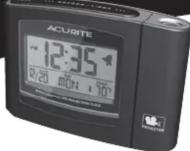
Projection Alarm Clock
with Atomic Clock
13239CCDI
Instruction Manual
Package Contents:
(1) Alarm Clock
(1) Instruction Manual
Thank You for purchasing this AcuRite product. This alarm clock features Atomic clock technology, which maintains split second accuracy and automatically changes for Daylight Saving Time. Please read this manual to fully enjoy the benefits and features of this product. Please keep this manual for future reference.
NOTE: A protective film is applied to the display at the factory that must be removed prior to using this product. Locate a corner and peel to remove.
OVERVIEW OF FEATURES

About the Atomic Clock
In North America, the National Institute of Standards and Technologies operates an atomic clock transmitter which transmits the time codes via radio frequency. This AcuRite clock features a receiver which receives the signal, allowing the clock to maintain super-accurate time. NOTE: Due to solar radiation in the atmosphere, the atomic clock signal is weaker during the day. Synchronization with the atomic clock signal is likely to be more successful late at night when there is less atmospheric interference.
SETUP
AC Power Adaptor
Plug in the included AC Power adaptor to a standard power outlet to provide constant power to the alarm clock.

Basic Setup
After powering on the alarm clock, it is recommended that the time and date be manually set initially. After the initial manual time setting, the radio controlled atomic clock will maintain its accuracy and adjust for DST automatically.*
PRESS the "CLOCK ADJUST" button to enter into setting mode
Press “▼” or “▲” to adjust the currently selection. Then press the “CLOCK ADJUST” button to save your adjustments and continue.
TIME FORMAT (12 or 24 hour clock)
TIME ZONE
HOURS
MINUTES
MONTH
DATE
YEAR
ALL DONE? The clock will return to normal display mode when no buttons are pressed for 10 seconds.
Select °F or °C Indoor Temperature
Make sure you are in current time display mode, then press the “▲” button to toggle between °F and °C indoor temperature display.
DST ON/OFF
The atomic clock will automatically adjust for Daylight Saving Time (DST) if the "DST" switch located on the back of the clock is "ON." Switch the "DST" switch to the "OFF" position if your area does not observe any DST changes.
Turn Off Atomic (Radio Controlled) Clock Function
The atomic clock can be turned Off by pressing AND HOLDING the "CLOCK ADJUST" button for 10 seconds. "RCC OFF" will display, confirming you have disabled the radio controlled clock function. Now the clock will function as a standard digital clock. Repeat the same process to enable the Atomic Clock.
OPERATION
Set the Alarm Time
-
Press the "ALARM ADJUST" button. The HOUR will flash.
-
Press the "▼" or "▲" buttons to adjust the alarm time HOUR.
Press the "ALARM ADJUST" button to save your adjustments and continue.
- Press the "▼" or "▲" buttons to adjust the alarm time MINUTES.
Press the "ALARM ADJUST" button to save your adjustments and exit.
Turn the Alarm ON or OFF
TO TURN ALARM ON: Press the "ALARM ON/OFF" button. The "◀" icon will appear on the screen, verifying that you have turned the alarm "ON".
TO TURN ALARM COMPLETELY OFF: Press the "ALARM ON/OFF" button. The "◀" icon will not be present, verifying that you have turned the alarm "OFF".
zz Alarm Clock Snooze Function
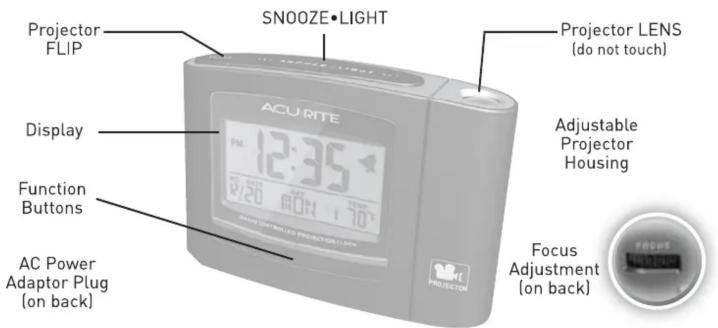
When the ALARM is sounding, pressing the "SNOOZE•LIGHT" button will silence (SNOOZE) the alarm sound for 5 minutes.
Time Projector
BATTERY POWER: Press the "SNOOZE•LIGHT" button to momentarily turn on the projector for 4 seconds at a time. This is done to conserve battery power.
WHEN PLUGGED IN: The projector is on constantly by default. Slide the ON/OFF switch located on the back of the projector to "OFF" if you wish to turn the projector off.
FOCUS: Aim the projector at the area you would like to display the time and indoor temperature, then focus the image by turning the "FOCUS" dial on the back of the clock.
FLIP THE PROJECTOR DISPLAY: You may want to flip the projected TIME info to allow it to read normally on the desired surface. To flip the time display, press the “ [FLIP] button.
BACKUP BATTERIES
Install 3 "AA" Alkaline batteries to power the clock and alarm functions during a power outage. The Alarm Clock will function powered by batteries alone, but the projector and backlight can only be activated momentarily (to conserve batteries) by pressing the "SNOOZE/LIGHT" button.
* the clock will maintain it's accuracy and automatically switch for daylight saving time, provided the atomic (radio controlled) clock is enabled (ON) and the signal is being successfully received.

- ▲ YOUR PRODUCT MUST BE REGISTERED TO RECEIVE WARRANTY SERVICE ▲
- PRODUCT REGISTRATION
- SUPPORT
- ACURITE®
- Projection Alarm Clock
- 13239CCDI
- Instruction Manual
- About the Atomic Clock
- SETUP
- AC Power Adaptor
- Basic Setup
- Select °F or °C Indoor Temperature
- DST ON/OFF
- Turn Off Atomic (Radio Controlled) Clock Function
- OPERATION
- Set the Alarm Time
- Turn the Alarm ON or OFF
- zz Alarm Clock Snooze Function
- Time Projector
- BACKUP BATTERIES
Brand : AcuRite
Model : 13239
Category : Clock