
The Smart Dry Connect Dehumidifier LAD208 - Dehumidifier BREVILLE - Free user manual and instructions
Find the device manual for free The Smart Dry Connect Dehumidifier LAD208 BREVILLE in PDF.


| Product Type | Composting Dehumidifier |
| Brand | Breville |
| Model | The Smart Dry Connect Dehumidifier LAD208 |
| Color | White |
| Dimensions (H x W x D) | 460 mm x 250 mm x 250 mm |
| Weight | 9.5 kg |
| Power Consumption | 220 W |
| Water Tank Capacity | 2.5 L |
| Dehumidification Capacity (30°C, 80% RH) | 10 L/day |
| Dehumidification Capacity (27°C, 60% RH) | 5 L/day |
| Recommended Room Size | Up to 30 m² |
| Noise Level | 40 dB |
| Refrigerant | R134a (60 g) |
| Operating Modes | Auto, Continuous, Ventilation, Laundry |
| Fan Speeds | Low & High (Auto and Ventilation modes) |
| Humidity Range | 30%-80% (Auto mode, in 5% increments) |
| Filter Type | Mesh dust filter + Carbon filter |
| Connectivity | Wi-Fi & Bluetooth |
| Voice Assistant Compatibility | Amazon Alexa, Google Assistant |
| Continuous Drainage | Yes (gravity-fed hose included) |
| Auto Defrost | Yes (operates below 23°C) |
| Control Panel | Touch buttons with LED display |
| Power Cord Length | Approx. 1.8 m |
| Safety Features | Auto shut-off when tank full, overheat protection |
Frequently Asked Questions - The Smart Dry Connect Dehumidifier LAD208 BREVILLE
User questions about The Smart Dry Connect Dehumidifier LAD208 BREVILLE
0 question about this device. Answer the ones you know or ask your own.
Ask a new question about this device
Download the instructions for your Dehumidifier in PDF format for free! Find your manual The Smart Dry Connect Dehumidifier LAD208 - BREVILLE and take your electronic device back in hand. On this page are published all the documents necessary for the use of your device. The Smart Dry Connect Dehumidifier LAD208 by BREVILLE.
USER MANUAL The Smart Dry Connect Dehumidifier LAD208 BREVILLE
the Smart Dry ^™ Connect Dehumidifier & the Smart Dry Plus ^™ Connect Dehumidifier
Instruction Book - LAD208 & LAD308
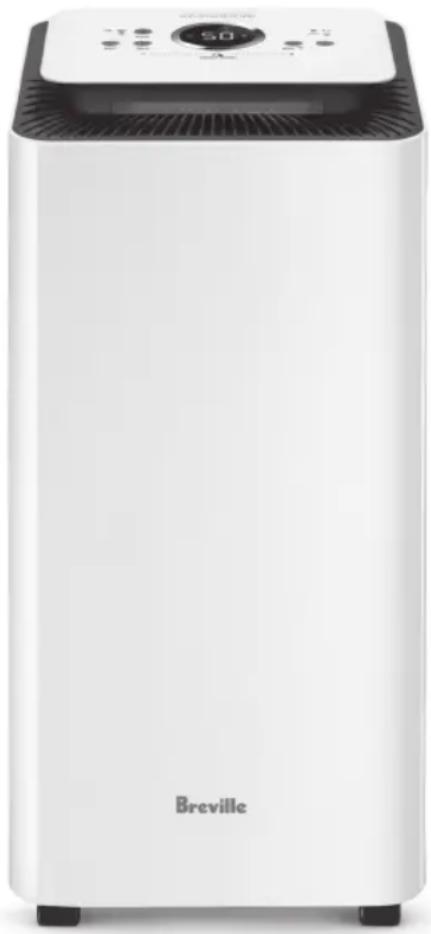
natural_image
White Breville air purifier with control panel and ventilation grille (no visible text or symbols on device body)Breville®

Contents
2 Breville Recommends Safety First
6 Components
7 Control Panel
8 Features
8 Assembly
9 Functions
12 Wi-Fi Connectivity & Voice Assistants
15 Care, Cleaning & Storage
17 Troubleshooting
BREVILLE RECOMMENDS SAFETY FIRST
At Breville we are very safety conscious. We design and manufacture consumer products with the safety of you, our valued customer, foremost in mind. In addition, we ask that you exercise a degree of care and adhere to the following precautions.
IMPORTANT SAFEGUARDS
READ ALL INSTRUCTIONS BEFORE USE AND SAVE FOR FUTURE REFERENCE
- Carefully read all instructions before operation and save for future reference.
- Remove and safely discard any packaging material and promotional labels before using the oven for the first time.
• To eliminate a choking hazard for young children, remove and safely discard the protective cover fitted to the power plug of this dehumidifier. - When unpacking the dehumidifier, check to see you have received all the items listed in the parts list before discarding the packaging.
- The dehumidifier is intended for household use only and not for commercial or industrial use. Do not use outdoors.
• Always ensure the dehumidifier is properly assembled before use. Follow the instructions provided in this book. - Do not place the dehumidifier near the edge of a bench or table during operation. Ensure the surface is level, clean and free of water.
- Do not run the power cord under carpeting or cover the cord with rugs, runners or the like. Arrange the cord away from traffic areas and where it will not be tripped over.
- Do not route the power cord under furniture or appliances.
• To protect against electrical hazards, do not immerse any part of the dehumidifier in water or other liquids.
Do not use the dehumidifier in the immediate surroundings of a bath, shower or swimming pool.
• Water in the water tank is not suitable for drinking. Do not drink this water, and do not serve to animals or use to water plants. When you empty the water tank, pour the water in the water tank down a drain.
• Always turn off and unplug the dehumidifier before moving, removing the water tank, changing filters, cleaning or whenever the dehumidifier is not in use.
- Do not unplug the dehumidifier by pulling on the cord.
- Never insert fingers, pencils or any other objects through the guards whenever the power plug is connected,
and in particular, when the dehumidifier is switched on.
- Do not operate the dehumidifier with a damaged cord or plug, or if the dehumidifier has been dropped or damaged in any manner. Return the dehumidifier to your nearest Breville service centre for examination, electrical or mechanical adjustment or repair.
- Do not use the dehumidifier with an external timer, programmer or any other device that switches the dehumidifier on automatically since a fire risk may exist if the dehumidifier is covered or positioned incorrectly.
- Do not place anything on top of the dehumidifier when assembled, when in use and when stored.
- Never block the air openings, grilles and outlets, or place on a soft surface such as a bed or sofa as this could cause the unit to tip over, blocking the air inlet or outlet.
- Do not attempt to repair or adjust any electrical or mechanical functions on this unit. Doing so will void your warranty. The inside of the unit contains no user serviceable parts.
All servicing should be performed by qualified personnel only.
- If the dehumidifier ever tips or falls over when the water reservoir is full, immediately unplug the power cord. Ensure the unit is dried thoroughly before resuming operation.
- Keep the dehumidifier and dust filters clean. Follow the cleaning instructions provided in this book.
| LAD208 LAD308 | ||
| Dehumidification Capacity | 10 Litres/day (30°C 80%)5 Litres/day (27°C 60%) | 20 Litres/day (30°C 80%)10 Litres/day (27°C 60%) |
| Product Dimension | 250x250x460mm 262x262x590mm | |
| Water Capacity | 2.5L 3.5L | |
| For Room Size | Up to 30m ^2 Up to 50m ^2 | |
| Noise Level | 40dB 48dB | |
| Power Consumption | 220W 350W | |
| Weight | 9.5kg 13.5kg | |
| Refrigerant | R134a (60g) R134a (1.0g) | |
| OS Compatibility | Android® 5.0 or later and iOS 9.0 or later | |
IMPORTANT SAFEGUARDS FOR ALL ELECTRICAL APPLIANCES
- Fully unwind the power cord before use.
- Connect only to a 230V or 240V power outlet.
- Do not let the power cord hang over the edge of a bench or table, touch hot surfaces or become knotted.
• To protect against electric shock, do not immerse the power cord, power plug or appliance in water or any other liquid or allow moisture to come in contact with the part, unless it is recommended in the cleaning instructions. - The appliance is not intended for use by persons (including children) with reduced physical, sensory or mental capabilities, or lack of experience and knowledge, unless they have been given supervision or instruction concerning use of the appliance by a person responsible for their safety.
• Children should be supervised to ensure that they do not play with the appliance. -
It is recommended to regularly inspect the appliance. To avoid a hazard, do not use the appliance if power cord, power plug or appliance becomes damaged in any way. Return the entire appliance to the nearest authorized Breville Service Centre for examination and/or repair.
-
Any maintenance other than cleaning should be performed at an authorised Breville Service Centre.
• This appliance is for household use only. Do not use this appliance for anything other than its intended use. Do not use in moving vehicles or boats. Do not use outdoors.
Misuse may cause injury.
- The installation of a residual current device (safety switch) is recommended to provide additional safety protection when using electrical appliances. It is advisable that a safety switch with a rated residual operating current not exceeding 30mA be installed in the electrical circuit supplying the appliance.
• See your electrician for professional advice.
- During electrical storms, the appliance should be disconnected from the power source at the wall socket to prevent any electrical surges that may arise during the storm and which may
inadvertently cause damage to the appliance and its electronic componentry.
• Always turn the appliance to the OFF position, switch off at the power outlet and unplug at the power outlet when the appliance is not in use.
- Before cleaning, always turn the appliance to the OFF position, switch off at the power outlet, unplug at the power outlet and remove the power cord, if detachable, from the appliance and allow all parts to cool.
- Do not place this appliance on or near a heat source, such as hot plate, oven or heaters.
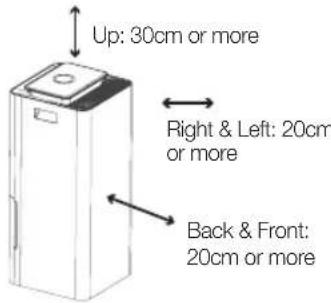
- Position the appliance at a minimum distance of 20cm away from walls, curtains and other heat or steam sensitive materials and provide adequate space above and on all sides for air circulation.

WARNING
To avoid electric shock, do not connect the plug to the power outlet when hands are wet.
FOR HOUSEHOLD USE ONLY SAVE THESE INSTRUCTIONS
Components
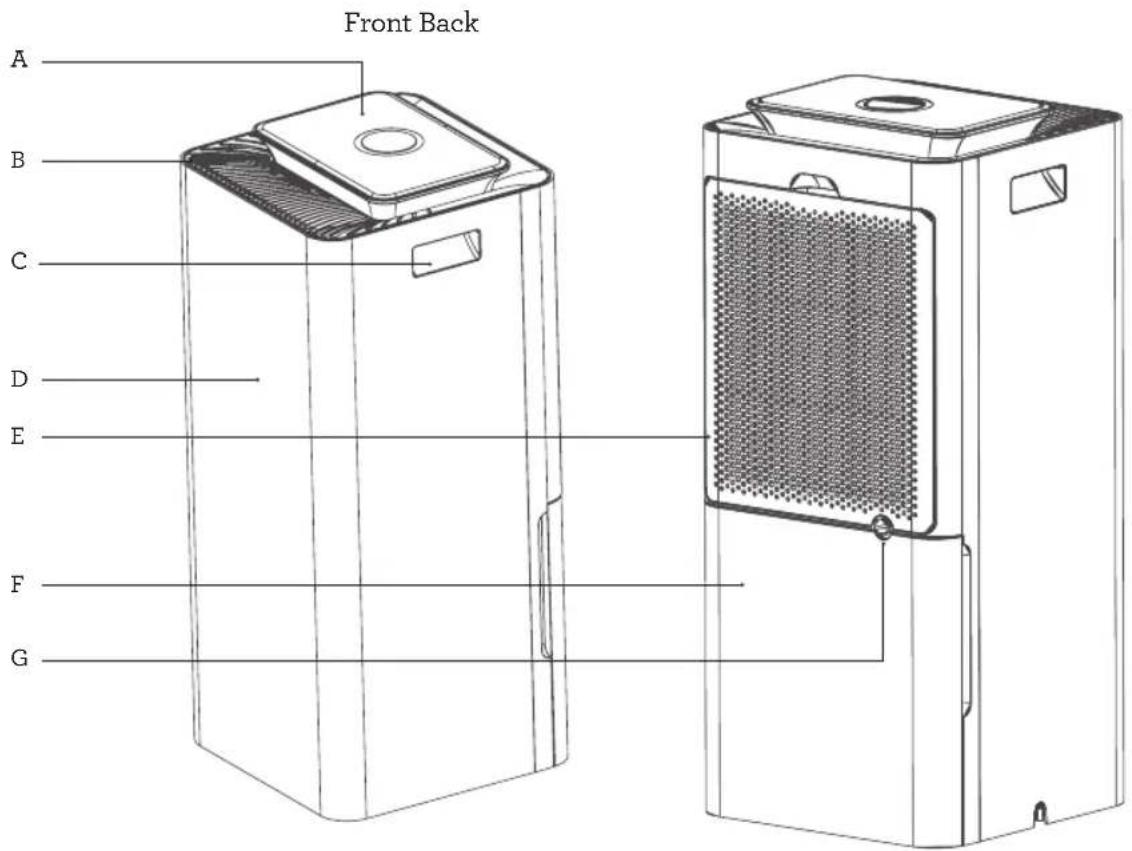
A. Control Panel
B. Air Outlet
C. Carry Handles
D. Housing Body
E. Air Inlet and Filter
F. Water Tank
G. Continuous Drainage Outlet
Not pictured
Power Cord
Drainage Hose (gravity-fed)
Wheels
Carbon Filter
Water Level Indicator
Water Tank Lid (LAD308 only)
Control Panel
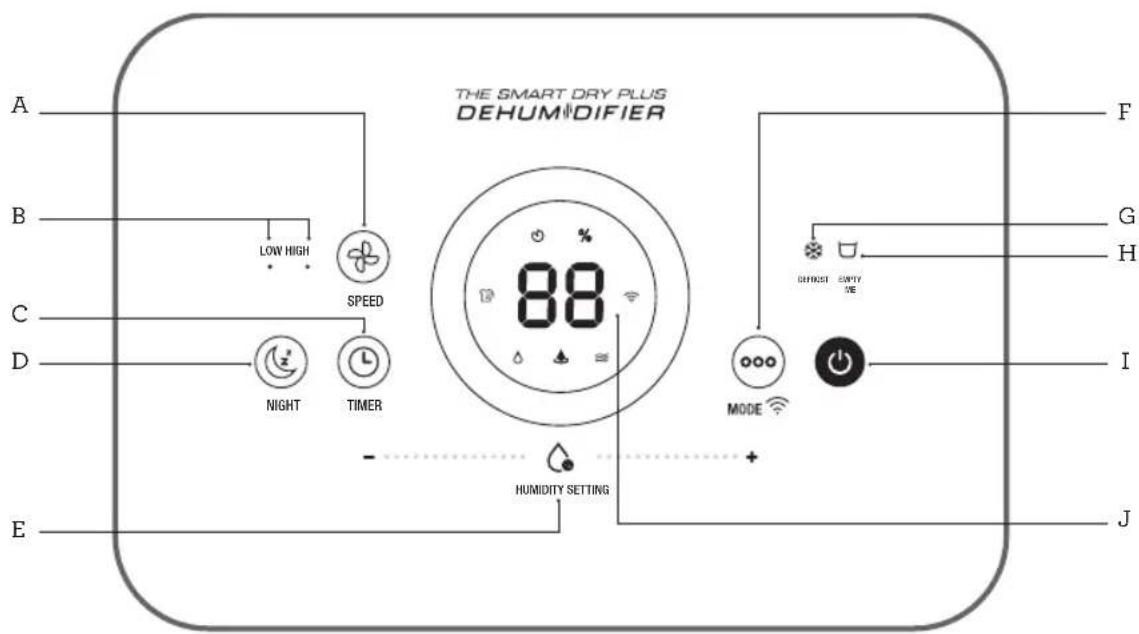
A. Fan Speed
B. Low & High Fan Light
C. Timer
D. Night Mode
E. Humidity Setting
F. Mode and Wi-Fi Hold for 5 seconds to initiate Wi-Fi paring
G. Defrost Light
H. Empty Me Light
I. Power On/Off
J. Display Screen
Display Screen Icons
% Relative Humidity Level (%)
Timer
≈ Ventilation Mode
Laundry
Continuous Dehumidification
Auto Dehumidification
Wi-Fi
Features
WHAT IS A DEHUMIDIFIER?
Your Breville dehumidifier is designed to reduce and maintain the level of humidity in the air, as well as to prevent condensation and mildew on the ceilings and walls.
HOW DOES A DEHUMIDIFIER WORK?
Your Breville dehumidifier regulates the relative humidity of your home by drawing moist, humid air from the surrounding area and passing it over cooled evaporator coils causing the moisture to condense into water. The water is dispensed into the water tank or drainage hose, while the now non-humid air is rewarmed and passed back into the room.
WHAT IS RELATIVE HUMIDITY?
Relative humidity is the amount of water vapour in the air and it is commonly expressed as a percentage of the maximum amount of water vapour that the air can hold at a given temperature. A comfortable %RH level is commonly considered to be between 40-60%RH.
Assembly
BEFORE FIRST USE
- Before using your dehumidifier for the first time, remove all packaging material and promotional labels.
- Check for any missing or damaged parts as per the components list.
- Clean all parts according to the Care, Cleaning & Storage section of this book.
- Use the carry handles and wheels to move the dehumidifier.
- Position the dehumidifier away from walls, furniture and other appliances as per the illustration below.
- Ensure that the filter, water tank and drainage hose (if applicable), are correctly installed before use.
- Connect the power plug to a 230V or 240V outlet and switch the outlet on.

Functions
USING YOUR BREVILLE DEHUMIDIFIER
- To operate the dehumidifier, press the ⏻ POWER button.
- The icon for the last mode used will illuminate on the display screen or another mode can be selected.
- If in Auto mode, adjust the humidity level if desired (see Humidity Setting).
- The unit will start to operate within 5 seconds.
- Press the ⏻ POWER button again to turn off.

NOTE
The dehumidifier cannot operate if the water tank is full or is not installed correctly.
SENSAIR™ LIVE HUMIDITY CONTROL
- Your Breville Smart Dry™ and Smart Dry Plus™ Dehumidifier has a built-in sensor to detect changes in the humidity level in the air.
- The SensAir™ live humidity indicator light will change colour according to the relevant humidity (%).
- The LED screen provides real-time indication of the relative humidity in the air.
TO SELECT ONE OF THE FOUR OPERATING MODES:
Press the ⬆MODE button on the control panel until the corresponding icon flashes on the display screen.

AUTO MODE
The dehumidifier will operate to reach, then maintain, the humidity setting.

CONTINUOUS MODE
The dehumidifier will operate on Low speed until it is manually turned off.

VENTILATION MODE
Circulates ambient air without dehumidification.

LAUNDRY MODE
Laundry mode operates at a High speed and a Low humidity setting. This assists with drying wet clothes faster when hanging indoors. It is also useful in drying wet carpets or rugs.
The chosen mode will start within 5 seconds of selection.

NOTE
This dehumidifier produces heat during operation which may cause room temperatures to rise by 1^ C to 4^ C, especially if used in an enclosed space.

HUMIDITY SETTING
When the dehumidifier is turned on, the current humidity level (\%) will show on the display screen and the \% icon will illuminate. This number will adjust as the dehumidifier operates.
The Humidity Setting allows you to manually set the relative humidity (%RH) between 30% - 80% (in 5% increments) when the unit is operating in Auto mode only.
- To manually adjust the humidity level, scroll your finger left or right on the Humidity Setting bar until the desired level flashes, then illuminates on the display screen.


FAN SPEED
In both Auto and Ventilation modes, the Fan Speed can be manually selected.
- Press the ⚡ FAN SPEED button to select between Low or High. The light will illuminate under the selected speed.

NOTE
The fan will only operate on Low speed in Continuous mode and on High speed in Laundry mode.

NIGHT MODE
The night mode will automatically turn off all lights on the control panel (except the Night button light) and operate in the last setting.
- Press the Ⓕ NIGHT button on the control panel.
- Within 5 seconds, the lights on the control panel will turn off, except the ⏻ NIGHT button light.
- Press once to view current humidity level.
- Press the Ⓐ NIGHT button twice to exit Night mode.

TIMER
The Timer operates in two ways.
- Auto Off, where the timer determines when to turn the unit OFF, can be set when the dehumidifier is turned on.
-
Delayed Start, where the timer determines when to turn the unit ON, can be set when the dehumidifier is turned off.
-
Press the ⏻ TIMER button.
-
The display screen will flash '00' and the icon will illuminate.
-
Press the Ⓤ TIMER button to increase the time in one-hour increments, up to 24 hours.
-
The time will countdown each hour, automatically turning the dehumidifier ON or OFF when it reaches '00'.
-
To cancel Auto Off or Delayed Start, press the ⏻ POWER button or continue to press the ⏻ TIMER button until it reaches '00'.

WARNING
As a safety feature, the dehumidifier will automatically turn off if the water tank is full, even if the countdown timer has not reached '00'. The dehumidifier will not turn on in Delayed Start if the water tank is full.
WATER DRAINAGE
During the process of dehumidification, water is created and needs to be expelled from the dehumidifier. This dehumidifier offers two options to drain this water.
REMOVABLE WATER TANK (with Empty Me warning)
The removable water tank will collect water until it reaches the water level indicator when the tank is full. Once full, the ☐ EMPTY ME light on the control panel will illuminate red and the dehumidifier will cease dehumidification until the water tank is emptied.
- Remove the water tank as per the water tank cleaning instructions in the Care, Cleaning & Storage section of this book.

NOTE
The dehumidifier will not operate if the tank is not installed correctly, even if the drainage hose is in use.

WARNING
Water from the dehumidifier is not suitable for drinking. Do not drink this water and do not serve it to animals or use to water plants.
CONTINUOUS DRAINAGE (hose drainage using gravity)
The continuous drainage outlet allows water to drain without having to monitor and empty the water tank. Ensure the hose (included) is properly inserted before starting the dehumidifier.
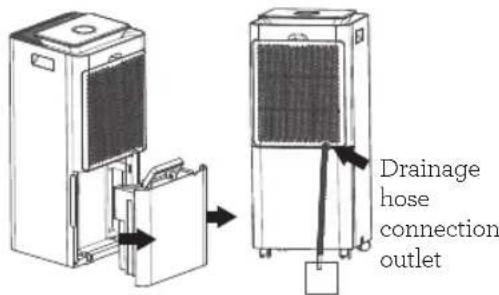
- Remove the water tank to access the hose connection outlet located at the back of the unit.
- Insert the hose into the connection outlet, ensuring that the hose is slid right to the back of the connection outlet.
- As the drainage is dependent on gravity, for the dehumidifier to drain correctly, no part of the hose should sit higher than the hose connection outlet.
- Place the other end of the hose into a water drain, being careful that it cannot inadvertently come loose when water starts to drain.
- Carefully replace the water tank with the hose situated into the hose groove.
- The dehumidifier will drain through the hose while installed.

WARNING
Ensure the hose is secure in both the hose connection and the drainage outlet.
DEFROST
This dehumidifier is equipped with an automatic defrost. The evaporator may start auto-defrosting if operating in a room temperature that is less than 23^ C.
-
If the ✿ DEFROST light turns on, defrosting has automatically started. The fan will operate on HIGH during defrost and dehumidification will stop.
-
Automatic defrost will operate for up to 5 minutes.

WARNING
Do not disconnect the power or turn off the unit during defrost.
Wi-Fi Connectivity
This Breville Home connected product can be controlled both through Wi-Fi and Bluetooth. While Wi-Fi allows for connectivity and control remotely, Bluetooth allows for control within range of the product, even without Wi-Fi.
The Breville Smart Dry™ Connect & Smart Dry Plus™ Connect dehumidifiers can offer remote operation by using a home Wi-Fi connection and the Breville Home Connect™ app downloaded to a compatible mobile phone through the Google Play store or Apple App store.
To go straight to the appropriate app store, scan the QR code below.
For instructions on how to use the app, scan the QR code below, refer to the Quick Start Guide that can be found in the box or go to tinyurl.com/HomeConnectQuickStart.


NOTE
The Breville Home Connect™ app is compatible with mobile phones running Android® 5.0 or later and iOS devices 9.0 or later.

NOTE
To control the dehumidifier using the app, the dehumidifier must be plugged into an active power outlet.
CONNECT YOUR DEHUMIDIFIER TO WI-FI
Choose from the options available to allow for easy pairing and use.
Bluetooth connection has also been activated for this appliance, which will aid in the pairing process, providing a higher success rate when pairing.
- Ensure the mobile device is connected to a home Wi-Fi network.
- The dehumidifier must be on standby mode. Once on standby mode, the ⏻ symbol will flash fast on the display panel. The dehumidifier is now ready to connect.
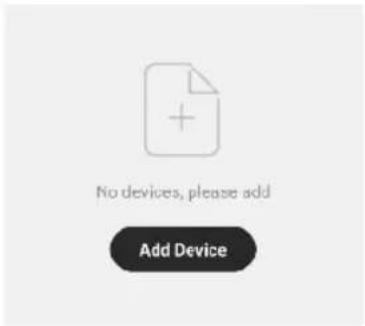
- Log into your Breville Home Connect™ app account and stay on the "Home" page. To add the dehumidifier to the list, touch 'Add Device' or the symbol found in the top right-hand corner of the screen. Follow the prompts in the app.
-
If the connection is successful, the dehumidifier will appear in the main page of the app and the symbol on the dehumidifier will illuminate.
-
If connection is unsuccessful, touch and hold the 🔊 button for 5 seconds until the ⏚ light is flashing slowly. Follow the prompts in the app to connect in a different mode.
BLUETOOTH
Bluetooth connectivity is an added feature of the Breville Home connected dehumidifiers. When the 🔊 is flashing fast when attempting to connect, the Breville Home Connect™ app should quickly recognise the unit without having to complete extra prompts. Refer to the Quickstart Guide in the box or on Breville.com for specific details on how to connect through Bluetooth.

Voice Assistants
The Breville Smart Dry™ Connect & Smart Dry Plus™ Connect come with the added feature of voice assistance, allowing you to control your dehumidifier using your voice by linking your Breville Home Connect™ app with Amazon Alexa and Google Home/Assistant.
To link your Breville Home Connect™ app account with either Google Home/Assistant or Amazon Alexa, refer to the instructions on www.Breville.com or follow instructions found in the Breville Home Connect™ app under Me > Third-Party Voice Services > View more ways to link.

IMPORTANT NOTE
The recommended voice commands to operate the appliance's functions differ between Amazon Alexa and Google Home/Assistant as listed. Variations of these commands may also be recognised, however, if a command fails, check against the recommended voice command.

NOTE
To control the dehumidifier using the Amazon Alexa or Google Home/Assistant app, the dehumidifier must be plugged in to an active power outlet and turned on.
VOICE CONTROL WITH AMAZON ALEXA
Before you can voice control your Breville Smart Dry™ Connect or Smart Dry Plus™ Connect dehumidifier with Amazon Alexa, you need to link the Breville Home Connect™ account to the Amazon Alexa app as per the instructions.
Amazon Alexa Recommended Voice Commands for the Breville Smart Dry™ Connect and Smart Dry Plus™ Connect
Supported Settings Amazon Alexa Voice Commands
| Power | Turn ON DEVICENAME |
| Turn OFF DEVICENAME | |
| Mode | Set DEVICENAME to Auto mode |
| Set DEVICENAME to Continuous mode | |
| Set DEVICENAME to Laundry mode | |
| Set DEVICENAME to Ventilate mode | |
| Fan Speed - Auto and Ventilation modes only | Set DEVICENAME fan speed to low |
| Set DEVICENAME fan speed to high | |
| Humidity Level(30-80% - Auto mode only) Set DEVICENAME to 35 Set DEVICENAME to 65 | Set DEVICENAME to 30 Set DEVICENAME to 60 |
| Set DEVICENAME to 40 Set DEVICENAME to 70 | |
| Set DEVICENAME to 45 Set DEVICENAME to 75 | |
| Set DEVICENAME to 50 Set DEVICENAME to 80 | |
| Set DEVICENAME to 55 | |
| Night Mode | Turn OFF the light on DEVICENAME (Night Mode ON) |
| Turn ON the light on DEVICENAME (Night Mode OFF) |

NOTE
Currently, Amazon Alexa does not support the following settings:
- Timer.
VOICE CONTROL WITH GOOGLE HOME/ASSISTANT
Before you can voice control your Breville Smart Dry™ Connect or Smart Dry Plus™ Connect dehumidifier with Google Home/Assistant, you need to link the Breville Home Connect™ account to the Google Home/Assistant app as per the instructions.
Google Home/Assistant Recommended Voice Commands for the Breville Smart Dry™ Connect and Smart Dry Plus™ Connect
Supported Settings Google Home/Assistant Voice Commands
| Power | Turn ON DEVICENAME | |
| Turn OFF DEVICENAME | ||
| Mode | Set DEVICENAME to Auto | |
| Set DEVICENAME to Continuous | ||
| Set DEVICENAME to Laundry | ||
| Set DEVICENAME to Ventilate | ||
| Fan Speed - Auto and Ventilation modes only | Set fan speed to low on DEVICENAME | |
| Set fan speed to high on DEVICENAME | ||
| Humidity Setting(30-80% - Auto mode only) Set DEVICENAME | Set DEVICENAME humidity to 30 Set DEVICENAME humidity to 60 | |
| humidity to 35 Set DEVICENAME humidity to 65 | ||
| Set DEVICENAME humidity to 40 Set DEVICENAME humidity to 70 | ||
| Set DEVICENAME humidity to 45 Set DEVICENAME humidity to 75 | ||
| Set DEVICENAME humidity to 50 Set DEVICENAME humidity to 80 | ||
| Set DEVICENAME humidity to 55 | ||
| Night Mode | Turn OFF the light on DEVICENAME (Night Mode ON) | |
| Turn ON the light on DEVICENAME (Night Mode OFF) | ||

NOTE
Currently, Google Home/Assistant does not support the following settings:
- Timer.

TIPS for Amazon Alexa and Google Home/Assistants
- Configure your Amazon Alexa or Google Home/Assistant compatible devices with the "Alexa" or "Google Home/Assistant" app if using, or simply download onto your phone.
- You will find your device listed as the Breville product name in your Breville Home Connect™ app account. Tap on the device in the app to rename your device for more convenient voice commands, e.g. "Dehumidifier Living Room" or give it a name, e.g. "Kenny".
- Training your voice assistant - Voice Match - Teach your assistant to recognise your voice. This isn't training it to understand English, but rather to recognise your voice as belonging to you. You can do this by going to the Settings menu in the voice assistant app on your phone.
- Routines - Amazon Alexa and Google Home/Assistant allow you to combine multiple actions in one voice command, to create a Routine, tap on the 'Routines' option via settings and follow the steps.
- Ensure the primary language is set to English (United States) for all apps.
Care, Cleaning & Storage

WARNING
Before cleaning or maintenance of the dehumidifier, ensure the power is switched off at the outlet and the plug is removed.
CLEANING YOUR DEHUMIDIFIER
- Keep the unit upright when cleaning.
- Wipe the dehumidifier housing, control panel and air inlet and outlet grilles with a soft, dry cloth.
- To remove dirt that may have built up on the housing body and air inlet grille, wipe with a damp cloth only. Do not use on the control panel.

WARNING
Do not clean the control panel with a damp cloth. Do not clean the unit with gasoline, thinner or liquid detergent as chemical substances may damage the dehumidifier screen or change the colour of the dehumidifier.

NOTE
Using a brush may scratch the dehumidifier. Do not use any objects that may scratch the unit.
WATER TANK CLEANING

NOTE
The dehumidifier cannot operate if the tank is full or is not installed correctly. Clean the water tank once a week if used regularly.
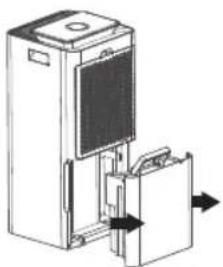
- Remove the water tank from the back of the dehumidifier by holding the sides and pulling outwards.
natural_image
Diagram of a device with a door and internal components, showing directional arrows (no text or symbols)- For the Smart Dry Plus™ Dehumidifier only (LAD308) remove the lid before cleaning. Place the tank on a dry, level surface. Flip the handle on the water tank cover until the grooves in the handle match the grooves in the handle holders. Pull outwards on both sides of the handle to disengage. Once the handle has been removed, carefully pull upwards on the tank lid to remove.
- Tip any excess water from the water tank into a sink or drain, then rinse the inside of the tank with clean water.
- Wipe any water on the outside of the tank with a dry cloth and replace the water tank lid and handle back onto the water tank (LAD308 only).
- Replace the water tank back into the dehumidifier.

WARNING
Water in the water tank is not suitable for drinking. Do not drink this water, and do not serve to animals or use to water plants.
FILTER CLEANING
The air inlet grille at the back of the dehumidifier also acts as the filter holder. The filter includes a mesh dust filter to capture larger airborne particles, and a black carbon filter for finer debris and to help reduce odours and smoke.

WARNING
It is important to keep the filter clean as a dirty filter may cause a reduction in the dehumidifiers performance.

NOTE
Clean the filter at least monthly, or more often if in frequent use.
FILTER FREQUENT CLEANING
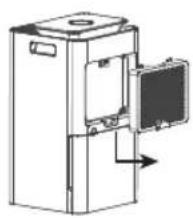
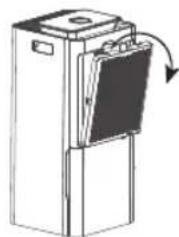
- Remove the air inlet grille from the back of the dehumidifier as per the illustration below.
natural_image
Line drawing of a refrigerator with an open door and internal compartments (no text or symbols)LAD208 grille removalfrombottom
natural_image
Diagram of a refrigerator with a door and open lid, showing airflow direction (no text or symbols)LAD308 grille removal from top
- With the dust filter and carbon filter still attached to the air inlet grille, use a hand-tool on a vacuum cleaner (such as a brush or upholstery tool) to clean both sides. Alternatively, lightly tap the grille over a garbage receptacle to loosen the dust.
- Replace the air inlet grille onto the dehumidifier. Ensure the grille clicks into place correctly before using the dehumidifier.
FILTER HEAVY-DUTY CLEANING
If dirt and dust has built up, and a simple clean (as instructed above) does not remove all the debris, it is recommended that the filters be separated for cleaning.
-
Remove the air inlet grille from the back of the dehumidifier.
-
To separate the mesh dust filter from the grille, pull outwards using the tab in the middle of the filter to disengage from the clips on the grille.
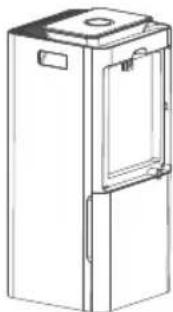
natural_image
Line drawing of a rectangular industrial container with a side panel and lid (no text or symbols)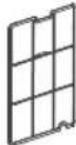
Dust Filter
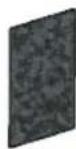
Carbon Filter
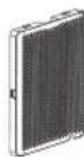
Air Inlet
Grille
- The black carbon filter sits between the dust filter and the air inlet grille as per the above illustration.
- Use a hand-tool on a vacuum cleaner (such as a brush or upholstery tool) to clean the dust from both filters, or tap the filters lightly over a garbage receptacle to loosen the dust from the filter.
- If the dirt and dust has built up on the mesh dust filter, hand wash in warm, soapy water, then rinse well and dry before replacing.

WARNING
Never wet the carbon filter. This filter can be cleaned by simply tapping over a garbage receptacle.
- Place the carbon filter back into the air inlet grille, then place the dust filter over the carbon filter by pressing firmly downwards to clip into the grille.
- Replace the air inlet grille back onto the dehumidifier.
STORAGE
- Disconnect the dehumidifier from the power outlet.
- Ensure the water tank is empty and cleaned as per instruction.
- Clean the dehumidifier as per instructions.
- Store the dehumidifier upright and avoid standing in direct sunlight if leaving for long periods.
- Never store anything on top of the dehumidifier.
TROUBLESHOOTING GUIDE
Before carrying out any of the following service checks, unplug the unit from the power outlet.
| PROBLEM | POSSIBLE CAUSES | WHAT TO DO |
| Not working. | Power plug is disconnected.The tank is full of water.The tank is not in the right position. | Plug the power cord into the power socket.Empty the water tank.Position the water tank correctly in the unit. |
| Dehumidification strength has decreased. | The filter is too dirty.The air inlet or outlet is blocked. | Clean the filter.Remove the object that is blocking the air inlet or outlet. |
| Loud noises coming from the dehumidifier. | The dehumidifier is on an uneven surface. | Position the dehumidifier on a smooth and stable surface. |
| The dehumidifier suddenly stops. | The room temperature may be outside of the zone of the dehumidifier. | The dehumidifier will start automatically when it can read the room temperature again. |
| Clothing dries very slowly. | The room temperature is too low. | If the room temperature is too low, the clothing will dry slower than usual. |
| No reduction of humidity in the room. | The room is too large for the unit.Doors and/or windows in the room are not closed. | Move to a smaller room.Close any doors or windows in the room. |
| A noise keeps turning on and off during operation. | Similar to a refrigerator noise, the compressor will turn off and on during operation. | This is normal. |
| The dehumidifier seems to shudder at times. | The unit will shudder slightly as the compressor turns on and off. | This is normal. |
ERROR CODES
| ERROR CODE | POSSIBLE CAUSES | WHAT TO DO |
| E2 is on the display screen. | The humidity sensor is not working. | Contact Breville customer service. |
| E3 is on the display screen. | There is damage to the automatic defrost sensor. | Contact Breville customer service. |
| E6 is on the display screen. | The pump is not working. | Contact Breville customer service. |
TROUBLESHOOTING GUIDE FOR AMAZON ALEXA AND GOOGLE HOME/ASSISTANT
PROBLEM WHAT TO DO
| Why is Amazon Alexa or Google Home/Assistant not responding to my voice commands. | Check the internet connection.Restart your device & mobile phone.Restart your modem and router.Make sure your Amazon Alexa or Google-enabled device or mobile phone is in Wi-Fi range.When you are giving a command to Amazon Alexa or Google Home/Assistant make sure you are clear and there is no unwanted noise in the background.While the voice assistant is always on in the background, only an activation phrase will allow for the voice assistant to start. registering the commands being relayed. The activation phrase depends on the application being used; For Amazon Alexa, use “Alexa”, while “OK Google” is for Google Home/Assistant.Ensure your voice is clear and distinct to allow the assistant to accurately record and process the command.Ask direct questions. Refer to the commands list for recommended commands. |
If the problem is not listed, please contact Breville Customer Service Centre (see back cover for contact details)
Notes
Breville Customer Service Centre
Australian Customers
Phone: 1300 139 798
Web: www.breville.com
New Zealand Customers
Phone: 0800 273 845
Web: www.breville.com
Breville®
Master Every Moment™
Breville, the Breville logo, Master Every Moment, Smart Dry, Smart Dry Plus and SensAir are trademarks of Breville Pty. Ltd. A.B.N. 98 000 092 928.
Copyright Breville Pty. Ltd. 2021.
Due to continued product improvement, the products illustrated/photographed in this booklet may vary slightly from the actual product.
LAD208/308 ANZ A21
- the Smart Dry ™ Connect Dehumidifier & the Smart Dry Plus ™ Connect Dehumidifier
- Contents
- BREVILLE RECOMMENDS SAFETY FIRST
- IMPORTANT SAFEGUARDS
- READ ALL INSTRUCTIONS BEFORE USE AND SAVE FOR FUTURE REFERENCE
- IMPORTANT SAFEGUARDS FOR ALL ELECTRICAL APPLIANCES
- Misuse may cause injury.
- WARNING
- FOR HOUSEHOLD USE ONLY SAVE THESE INSTRUCTIONS
- Components
- Not pictured
- Control Panel
- Features
- WHAT IS A DEHUMIDIFIER?
- HOW DOES A DEHUMIDIFIER WORK?
- WHAT IS RELATIVE HUMIDITY?
- Assembly
- BEFORE FIRST USE
- Functions
- USING YOUR BREVILLE DEHUMIDIFIER
- NOTE
- SENSAIR™ LIVE HUMIDITY CONTROL
- TO SELECT ONE OF THE FOUR OPERATING MODES:
- AUTO MODE
- CONTINUOUS MODE
- VENTILATION MODE
- LAUNDRY MODE
- HUMIDITY SETTING
- FAN SPEED
- NIGHT MODE
- TIMER
- WATER DRAINAGE
- REMOVABLE WATER TANK (with Empty Me warning)
- CONTINUOUS DRAINAGE (hose drainage using gravity)
- DEFROST
- Wi-Fi Connectivity
- CONNECT YOUR DEHUMIDIFIER TO WI-FI
- BLUETOOTH
- Voice Assistants
- IMPORTANT NOTE
- VOICE CONTROL WITH AMAZON ALEXA
- VOICE CONTROL WITH GOOGLE HOME/ASSISTANT
- TIPS for Amazon Alexa and Google Home/Assistants
- Care, Cleaning & Storage
- CLEANING YOUR DEHUMIDIFIER
- WATER TANK CLEANING
- FILTER CLEANING
- FILTER FREQUENT CLEANING
- FILTER HEAVY-DUTY CLEANING
- STORAGE
- TROUBLESHOOTING GUIDE
- TROUBLESHOOTING GUIDE FOR AMAZON ALEXA AND GOOGLE HOME/ASSISTANT
- Breville Customer Service Centre
Brand : BREVILLE
Model : The Smart Dry Connect Dehumidifier LAD208
Category : Dehumidifier