
CX-61 - Radio COBY - Free user manual and instructions
Find the device manual for free CX-61 COBY in PDF.


| Product Type | Mini FM Radio |
| Brand | Coby |
| Model | CX-61 |
| Dimensions | 90 x 25 mm (diameter x height) |
| Weight | 40 g (without batteries) |
| Power Supply | 2 x R03/AAA batteries (not included) |
| Frequency Range | 88 – 108 MHz (FM) |
| Display Type | LCD with backlight |
| Backlight Duration | 10 seconds after button press |
| Headphone Jack | 3.5 mm output |
| Auto Station Search | Yes, via SCAN button |
| Clock Function | Yes, with hour and minute setting |
| Volume Control | Rotary knob (also on/off) |
| Reset Button | Yes, to restart station search |
| Strap Holder | Yes, for carrying |
| Material | Plastic casing |
| Cleaning Instructions | Wipe with a dry, soft cloth; do not use liquids or solvents |
| Safety Precautions | Keep away from moisture; do not disassemble; use only specified batteries |
| Spare Parts / Repair | No user-serviceable parts; only replace batteries |
| Warranty | Standard 1-year limited warranty (varies by region) |
| Disposal | Follow local regulations for electronic waste |
Frequently Asked Questions - CX-61 COBY
User questions about CX-61 COBY
0 question about this device. Answer the ones you know or ask your own.
Ask a new question about this device
Download the instructions for your Radio in PDF format for free! Find your manual CX-61 - COBY and take your electronic device back in hand. On this page are published all the documents necessary for the use of your device. CX-61 by COBY.
USER MANUAL CX-61 COBY
Mini Radio, article number 38-2088, model CX-61
Please read the entire instruction manual before using and save it for future use. We apologise for any text or photo errors and any changes of technical data. If you have any questions concerning technical problems please contact our Customer Service Department.
Product Description
Digital FM mini radio with automatic search function, clock and background lit display. Operates on 2 x R03/AAA batteries (not included).
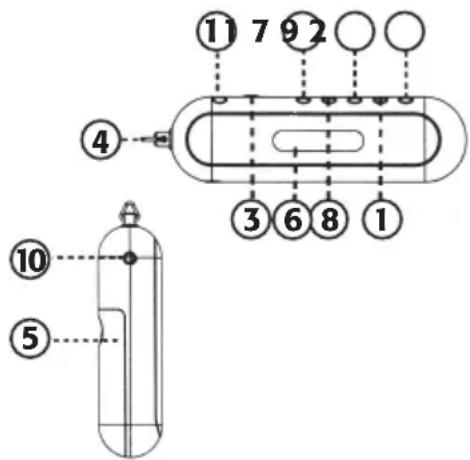
- Reset button
- Station search
- Volume control – on/off button
- Holder for strap
- Battery cover
-
Display
-
Setting the time:
- Setting hour display
- Setting minute display
- Headphone outlet
- Button for back ground light
Getting Started
Inserting batteries
- Remove the battery cover [5] by sliding it to the side.
- Insert 2x RO3/AAA batteries according to the markings on the bottom of the battery compartment. Make sure that the battery is correctly aligned.
- Replace the battery cover [5].
Setting the time:
The time is displayed when the radio is turned off.
- Shut off the radio by turning the volume control [3] to the OFF position.
- Hold the TIME button at the same time as the HOUR button for hours, or the MIN button for setting of minutes.
- Release the buttons when the time is set.
Use
Search for stations
- Turn the radion on by turning the volume control [3] to the left. The display will go from displaying the time to indicating FM and frequency.
- Press the SCAN button.
- The search starts and stops when a station can be received.
- Press the SCAN button again to continue the search.
- Press the RESET button and then SCAN to start the search over again.
Adjusting the volume
- Turn the volume control [3] left or right to increase or decrease the volume respectively.
Backlight
- The background light will be lit for 10 seconds after the button [11] has been pressed.
Disposal
Follow local ordinances when disposing of this product. If you are unsure about how to dispose of this product contact your municipality.
Specifications
Frequency 88 – 108 MHz
Power supply 2 x R03/AAA batteries
Size 90 x 25 mm
Weight 40 grams (batteries not included)
Miniradio, artikelnummer 38-2088, modell CX-61
Brand : COBY
Model : CX-61
Category : Radio