LPHFD31 - Audio converter PAC - Free user manual and instructions
Find the device manual for free LPHFD31 PAC in PDF.


| Product Type | Remote Control |
| Brand | PAC |
| Model | LPHFD31 |
| Dimensions | 5.5 x 2.0 x 0.8 inches (140 x 50 x 20 mm) |
| Weight | 2.8 oz (80 g) |
| Power Source | 2 x AAA batteries (not included) |
| Operating Range | Up to 30 ft (10 m) |
| Transmission Type | Infrared (IR) |
| Compatibility | Universal (TV, DVD, etc.) |
| Number of Buttons | 20 |
| Key Functions | Power, Volume, Channel, Input, Menu, Navigation, Mute |
| Special Features | Programmable, Learning function, Macro support |
| LED Indicator | Yes (transmission indicator) |
| Material | Plastic |
| Color | Black |
| Country of Origin | China |
| Certifications | CE, RoHS |
| Package Contents | Remote control, user manual (digital) |
| Warranty | 1 year limited |
| Repair Information | Contact manufacturer or authorized service center |
Frequently Asked Questions - LPHFD31 PAC
User questions about LPHFD31 PAC
0 question about this device. Answer the ones you know or ask your own.
Ask a new question about this device
Download the instructions for your Audio converter in PDF format for free! Find your manual LPHFD31 - PAC and take your electronic device back in hand. On this page are published all the documents necessary for the use of your device. LPHFD31 by PAC.
USER MANUAL LPHFD31 PAC
Wiring Connection Chart (All Models)
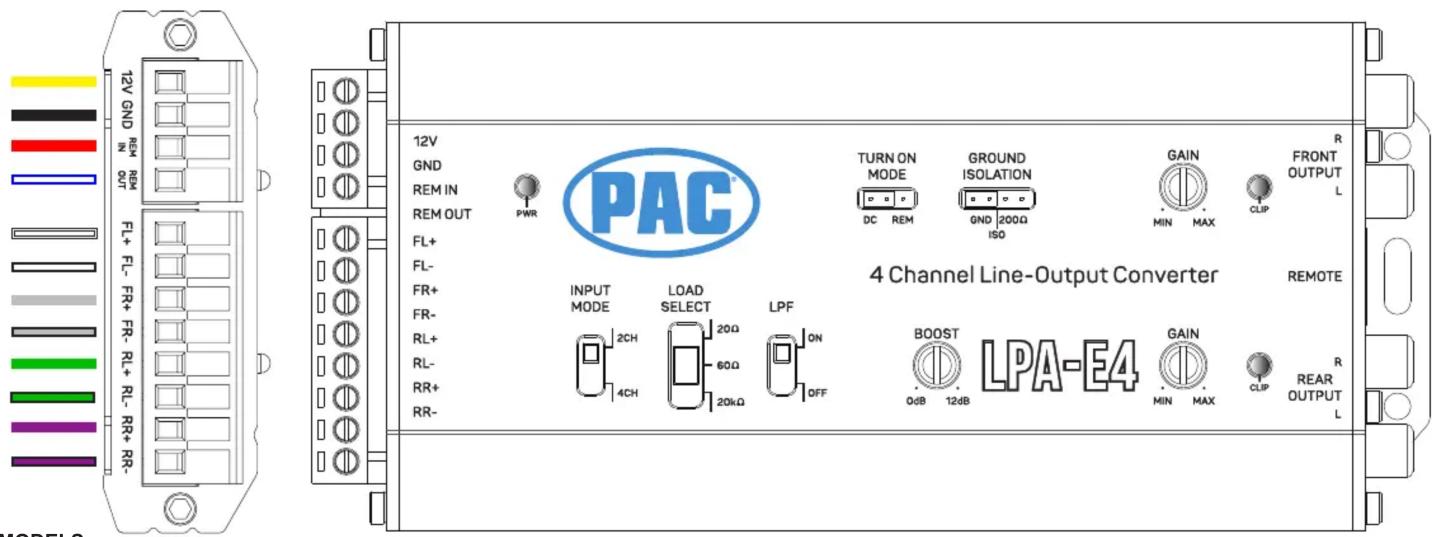
MODELS:
- LPA-E4
• LPA2.4 / LPA2.2
- LPA1.4 / LPA1.2
Important Note: This harness is provided with a inline fuse installed. Please remove prior to install and reinsert once finished.
If your vehicle does not provide ACC source your harness will not have a "RED" wire to connect.
It will use DC Offset to turn on as well as trigger the "REM OUT" on the LPA. On LPA-E4 there will be a jumper that you can move based on your application.
This harness is designed to work on OEM NON-AMPLIFIED systems.
Connect the RED BUTT Connector to the aftermarket system turn on for your amplifiers.
| Wire Color | Function |
| Yellow | Constant 12V + |
| Black | Ground |
| Red | ACC / Rem Input |
| Blue/White | Amp Turn On + |
| White | Front Left + |
| White/Black | Front Left - |
| Gray | Front Right + |
| Gray/Black | Front Right - |
| Green | Rear Left + |
| Green/Black | Rear Left - |
| Purple | Rear Right + |
| Purple/Black | Rear Right - |


Example Installation - 4-Channel Amplifier - (HARNESS CUT REQUIRED)
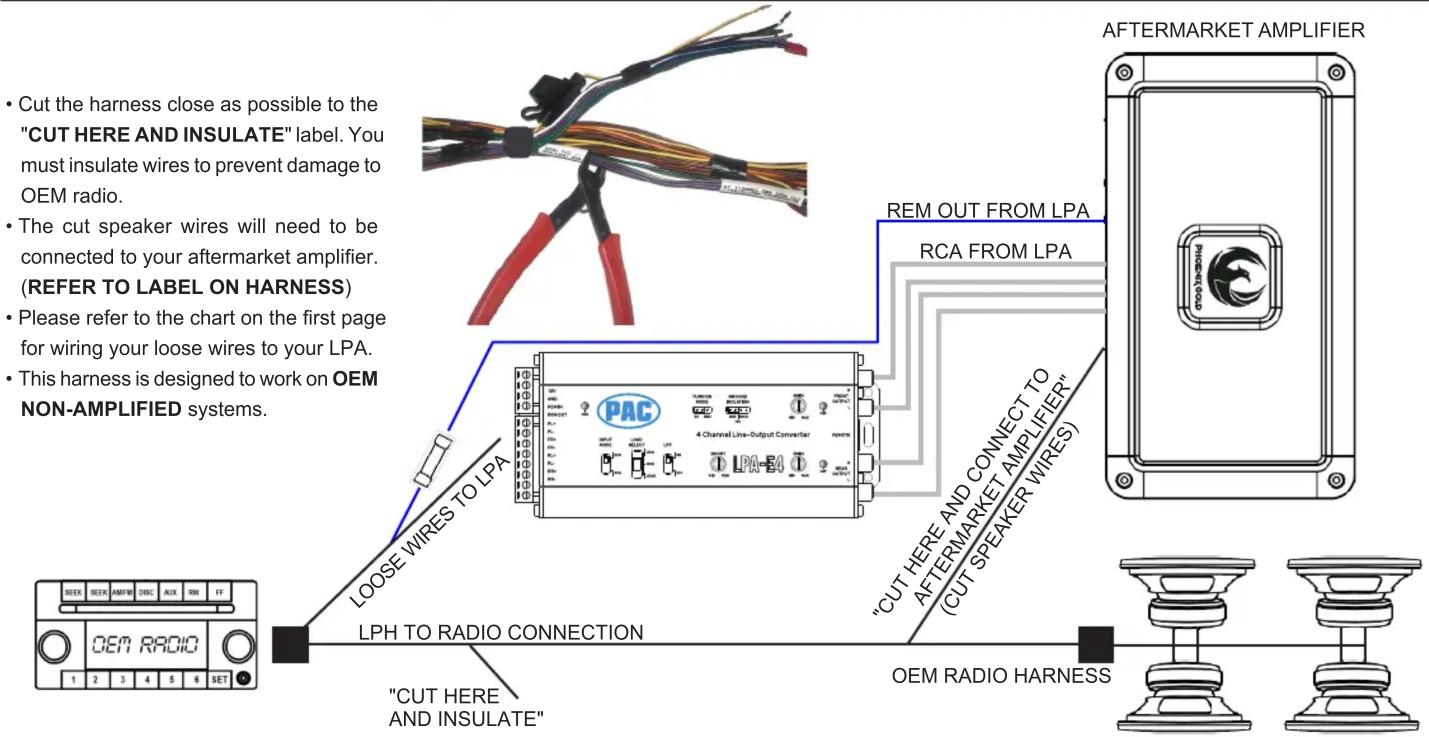
flowchart
graph TD
    A["OEM RADIO"] -->|LPH TO RADIO CONNECTION| B["PAC 4-Channel Line-Output Converter"]
    B -->|LOOSE WIRE S TO LPA| C["REMEM OUT FROM LPA"]
    C --> D["Aftermarket Amplifier"]
    D -->|CUT HERE AND INSULATE"| E["OUT OF LPA"]
    D -->|CUT HERE AND CONNECT TO AFTERMARKET AMPLIFIER" (CUT SPEAKER WIRE S)| F["OUT OF LPA"]
    F --> G["OUT OF LPA"]
    style A fill:#f9f,stroke:#333
    style B fill:#ccf,stroke:#333
    style C fill:#cfc,stroke:#333
    style D fill:#fcc,stroke:#333
    style E fill:#ffc,stroke:#333
    style F fill:#fcc,stroke:#333
    style G fill:#ffc,stroke:#333
Example Installation - Mono Amplifier - (HARNESS CUT NOT REQUIRED)

flowchart
graph TD
    A["SEER SEER AMPER DSC AUX RN FF"] --> B["CUT HERE AND INSULATE"]
    B --> C["DO NOT CUT!!"]
    C --> D["CUT HERE AND CONNECT TO AFTERMARKET AMPLIFIER"]
    D --> E["OEM RADIO HARNESS"]
    B --> F["LPH TO RADIO CONNECTION"]
    F --> G["LOOSE WIRES TO LPA"]
    G --> H["CREAMKET AMPLIFIER"]
    H --> I["RCA FROM LPA"]
    I --> J["REMO OUT FROM LPA"]
    J --> K["AFTERMARKET AMPLIFIER"]
    K --> L["PAC LPI-2.2"]
    L --> M["If using a 2-Channel input LPA use the front speaker wires and insulate the remaining rear speaker wires."]
    L --> N["DO NOT CUT the speaker wires inbetween the "CUT HERE" Lables in order to keep the factory speakers functional."]
    L --> O["This harness is designed to work on OEM NON-AMPLIFIED systems."]


Brand : PAC
Model : LPHFD31
Category : Audio converter