PTMLTCM01 - Uncategorized AVer - Free user manual and instructions
Find the device manual for free PTMLTCM01 AVer in PDF.


| Product Type | Ceiling Mount Bracket |
| Brand | AVer |
| Model | PTMLTCM01 |
| Compatible Devices | AVer PTZ cameras (e.g., PTM series) |
| Material | Metal (steel or aluminum alloy) |
| Color | Black or white (typical) |
| Dimensions (W x D x H) | 199.5 mm x 153 mm x 31.5 mm (approx.) |
| Weight | Approximately 0.5 kg (estimated) |
| Mount Type | Ceiling mount, fixed |
| Screw Type Included | 1/4")-20 L=6.5mm screw, M3 x 6mm screws |
| Number of Screws Included | 4 (1 large + 3 small) |
| Ceiling Installation Required | Yes, with M4 x 10mm screws (not included) |
| Application | Indoor ceiling mounting for PTZ cameras |
| Package Contents | Mount bracket, 1/4")-20 screw (x1), M3 x 6mm screws (x3), manual |
| Warranty | 2 years (standard AVer warranty) |
| Manual Languages | English, multiple translations available |
Frequently Asked Questions - PTMLTCM01 AVer
User questions about PTMLTCM01 AVer
0 question about this device. Answer the ones you know or ask your own.
Ask a new question about this device
Download the instructions for your Uncategorized in PDF format for free! Find your manual PTMLTCM01 - AVer and take your electronic device back in hand. On this page are published all the documents necessary for the use of your device. PTMLTCM01 by AVer.
USER MANUAL PTMLTCM01 AVer

1/4"-20L=6.5mm Screw(x1)

M3 x 6mm
Screw(x3)
Dimensions
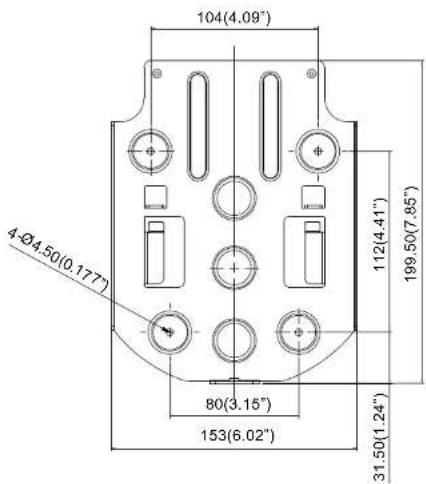
©2020 AVer Information Inc. All rights reserved.
Ceiling installation
- Secure the mount bracket on the ceiling. Screw: 4 screws, M4 x 10mm (Not Included in the package)
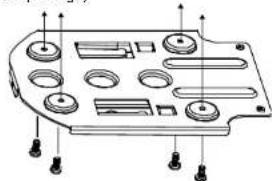
natural_image
Technical line drawing of a mechanical component with multiple circular features and mounting holes (no text or symbols)- Install the mount bracket on the camera. Screw: 1 screw, 1/4"-20 L=6.5mm(Included in the package)
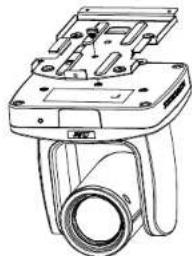
natural_image
Technical line drawing of a mechanical component with mounting flanges and a cylindrical housing (no text or symbols)- Slide the mount bracket with the camera into the mount bracket which secured on the ceiling.
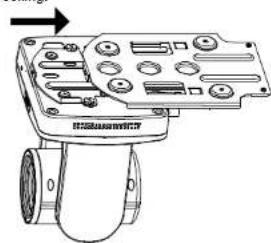
natural_image
Technical line drawing of a mechanical device with no visible text or symbols- Secure the camera with screws. Screw: 3 screws, M3 x 6mm (Included in the package)
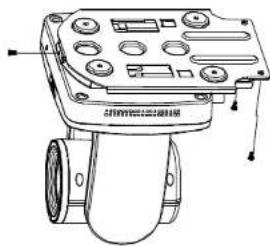
natural_image
Technical line drawing of a mechanical device with no visible text or symbols[Note] Connects necessary cables after sliding the camera into the mount bracket.
Brand : AVer
Model : PTMLTCM01
Category : Uncategorized