
ZM-9012 - Controller TOA - Free user manual and instructions
Find the device manual for free ZM-9012 TOA in PDF.


| Product Type | Zone Controller |
| Brand | TOA |
| Model | ZM-9012 |
| Dimensions (W x H x D) | 482 mm x 44 mm x 300 mm (19-inch rack mount, 1U) |
| Weight | 3.5 kg |
| Power Supply | AC 100-240 V, 50/60 Hz |
| Power Consumption | 30 W |
| Input Channels | 12 balanced mic/line inputs |
| Output Zones | 6 independent zone outputs |
| Frequency Response | 20 Hz - 20 kHz ±1 dB |
| Signal-to-Noise Ratio | >90 dB |
| Total Harmonic Distortion | <0.05% |
| Control Interface | RS-232C, Ethernet (TCP/IP) |
| Main Functions | Zone selection, volume control, priority override, audio routing, paging |
| Maintenance & Cleaning | Clean with dry cloth; avoid solvents; check ventilation regularly |
| Safety Features | Overload protection, short-circuit protection, surge protection |
| Spare Parts & Repairability | Replaceable power supply module, firmware update via USB, service center support |
| Operating Temperature | 0°C to 40°C |
| Certifications | CE, FCC, RoHS |
Frequently Asked Questions - ZM-9012 TOA
User questions about ZM-9012 TOA
0 question about this device. Answer the ones you know or ask your own.
Ask a new question about this device
Download the instructions for your Controller in PDF format for free! Find your manual ZM-9012 - TOA and take your electronic device back in hand. On this page are published all the documents necessary for the use of your device. ZM-9012 by TOA.
USER MANUAL ZM-9012 TOA
ZM REMOTE CONTROLLER CONNECTION INSTRUCTIONS (Supplementary)
When using the ZM Remote controller (ZM-9011, ZM-9012, ZM-9013, or ZM-9014 Remote Control Panel), be sure to read the separate instruction manual in conjunction with this supplementary manual.
- CONNECTION
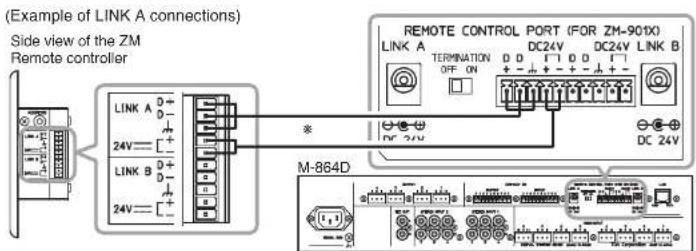
Notes
- Use the shielded Category 5 twisted pair LAN cable for connections between the ZM Remote controller and the M-864D Digital Stereo Mixer (※ mark as shown above).
- Connect all cables as shown in the wiring diagram below.
![ZM 9011/9012/9013/9014 LINK A D+ 24V---[+] LINK B D+ 24V---[+] Shielded wire Shield M-864D D D DC24V D D DC24V Terminal Cable (Color) D+ White/Orange D- Orange White/ Green Green Shield 24V+ White/Blue White/Brown 24V- Blue Brown](/content/2026/05/954556/images/31abbc838775abaead0ff63893bc8401eada0e840dbf20fc9fdfa2b4208ca09d.jpg)
TOA Corporation
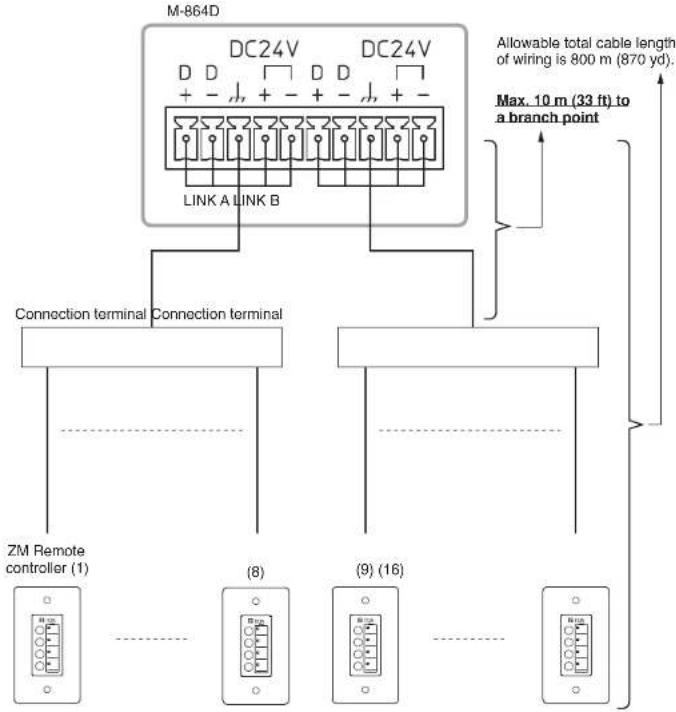
2. CABLE DISTANCE
Note
When 2 or more ZM Remote controllers are connected in a star topology, keep each cable length within 10 m (33 ft) from the M-864D to a branch point.
(When connecting 16 ZM Remote controllers)

TOA Corporation
URL: http://www.toa.jp/
133-05-00001-00

Brand : TOA
Model : ZM-9012
Category : Controller