
P2BT - Hi-Fi System PEAVEY - Free user manual and instructions
Find the device manual for free P2BT PEAVEY in PDF.


| Product Type | Column Powered Speaker System |
| Brand | Peavey |
| Model | P2BT |
| Dimensions (W x H x D) | 30" x 9.25" x 10.5" (762mm x 235mm x 267mm) |
| Weight | 33 lbs (15 kg) |
| Power Supply | 120VAC/60Hz or 230VAC/50Hz (selectable) |
| Power Consumption | 180 Wh |
| Peak Power | 200 Watts (130W LF / 70W HF) |
| Frequency Response | 50 - 19,000 Hz |
| Maximum SPL | 102 dB SPL (1W/1M) |
| Bluetooth Version | v5 with A2DP and Stereo Linking |
| Woofer | 3 x 6.5" (165mm) |
| Tweeter | 1" (25mm) High-Frequency Compression Driver |
| Inputs | 2 XLR (Mic/Line), 2 1/4" TRS (Line), 1 3.5mm Stereo, 1 RCA |
| Outputs | 2 XLR Sync (In/Out), 1 1/4" Subwoofer Out |
| Mixer Channels | 3 channels with Bass and Treble EQ (±15 dB) |
| Master Volume | Yes |
| Fuse Rating | F2.5AL/250V (5x20mm) |
| Safety Clearances | Top: 8", Sides: 12", Back: 12" from combustibles |
| Compliance | FCC Part 15, IC RSS, CE (implied) |
| Warranty | Register online at www.peavey.com/warranty |
| Cleaning | Wipe with a dry cloth. Do not use liquids or solvents. |
| Spare Parts | Fuse (5x20mm 250V F2.5AL) replaceable |
| Included Accessories | IEC power cord, user manual |
Frequently Asked Questions - P2BT PEAVEY
User questions about P2BT PEAVEY
0 question about this device. Answer the ones you know or ask your own.
Ask a new question about this device
Download the instructions for your Hi-Fi System in PDF format for free! Find your manual P2BT - PEAVEY and take your electronic device back in hand. On this page are published all the documents necessary for the use of your device. P2BT by PEAVEY.
USER MANUAL P2BT PEAVEY
P1BT/P2BT Column ARRAY
Specifications

natural_image
Black rectangular electronic device with rounded corners and a small logo at the bottom (no visible text or symbols)


natural_image
Black rectangular electronic device with a vertical handle and base, no visible text or symbols
FCC/ICES Compliancy Statement
This device complies with Part 15 of the FCC rules and Industry Canada license-exempt RSS Standard(s). Operation is subject to the following two conditions: (1) this device may not cause harmful interference, and (2) this device must accept any interference received, that may cause undesired operation.
Warning: Changes or modifications to the equipment not approved by Peavey Electronics Corp. can void the user's authority to use the equipment.
Note – This equipment has been tested and found to comply with the limits for a Class B digital device, pursuant to Part 15 of the FCC Rules. These limits are designed to provide reasonable protection against harmful interference in a residential installation. This equipment generates, uses, and can radiate radio frequency energy and, if not installed and used in accordance with the instructions, may cause harmful interference to radio communications. However, there is no guarantee that interference will not occur in a particular installation. If this equipment does cause harmful interference to radio or television reception, which can be determined by turning the equipment off and on, the user is encouraged to try and correct the interference by one or more of the following measures.
• Reorient or relocate the receiving antenna.
- Increase the separation between the equipment and receiver.
- Connect the equipment into an outlet on a circuit different from that to which the receiver is connected.
- Consult the dealer or an experienced radio/TV technician for help.
Caution
The equipment complies with FCC radiation exposure limits set forth for an uncontrolled environment.

Features and specifications are subject to change without notice.
Peavey Electronics Corporation • 711 A Street • Meridian, MS 39301
(601) 483-5365 • FAX (601) 486-1278 • www.peavey.com
©
2015
EX000030
FCC Radiation Exposure Statement
This equipment complied with FCC radiation exposure limits set forth for an uncontrolled environment. This equipment should be installed and operated with minimum distance 20cm between the radiator & your body.
IC Radiation Exposure Statement
This equipment complies with IC radiation exposure limits set forth for an uncontrolled environment. The antenna should be installed and operated with minimum distance of 20 cm between the radiator and your body. This transmitter must not be co-located or operating in conjunction with any other antenna or transmitter.
Column Powered Speaker Systems
Congratulations on purchasing the Peavey P1BT/P2BT Powered Speaker System. These compact, portable and powerful systems are a perfect solution for the weekend warrior, singer songwriter or DJ. With a simple and intuitive layout, the P Series BT is a great plug and play option.
- Bluetooth stereo linking
- Bluetooth audio input for streaming music from any Bluetooth device
- 3 Channel mixer
- 2 XLR mic inputs and 1/4'' Line Inputs
• RCA/3.5 mm Stereo input channel
• P1BT and P2BT have 180 Watts and 200 Watts
maximum power respectively.
- P1BT 2x6.5" Woofers with 1" (25mm) high-frequency compression driver
- P2BT 3x6.5" Woofers with 1" (25mm) high-frequency compression driver
Description:
The P Series BT is a compact, powerful, lightweight and low profile portable speaker system. Utilizing 180/200/260 watts of potential maximum power, the units contain custom designed high frequency and woofer drivers. The P Series is extremely easy to carry: an entire PA system that can be moved by one person in one trip.
The onboard mixer features 2 XLR and 1/4" inputs, two additional media channels feature stereo RCA/3.5mm inputs and streaming audio Bluetooth in. Units also have ability to link with other P Series units for stereo operation. Perfect for church, convention, DJ or club applications, the P Series offers the best-in-class feature-to-value and performance in the industry.

Installation Note:
This unit must have the following clearances from any combustible surface: top: 8", sides: 12", back: 12"
Top Panel

Input Panel
(1) XLR Mic Input (Ch 1&2)
Use this XLR connector to connect a microphone to the P1/2BT speaker.
(2) Line Input (Ch 1&2)
Use this 1/4" (6.5mm) connector to connect a line-level source to the P1/2BT speaker. The line input is typically used for sources like keyboards and CD players.
(3) RCA and 3.5mm Input (Ch 3)
These inputs, RCA and 3.5mm (1/8") accept a stereo input from the output of an MP3 player, CD player, phone or similar device.
(4) 3.5mm/RCA Input Selector (Ch 3)
This switch selects the source being sent to channel 3. In the upper position, the RCA inputs are sent to channel 3. In the lower position, the 3.5mm (1/8") connector is sent to channel 3.
(5) Level Control
Use this to adjust the source level in the corresponding channel.
(6) Low EQ (Bass)
This is an active tone control (shelving type: +/-15dB) that varies the level of the low frequency range.

Caution: Excessive low frequency boost causes greater power consumption and increases the possibility of speaker damage.
(7) High EQ (Treble)
This is an active tone control (shelving type: +/-15dB) that varies the level of the high frequency range.
(8) Master Volume
The master volume control adjusts the overall level of the speaker.
(9)Power LED
LED illuminates when power has been applied to the speaker.
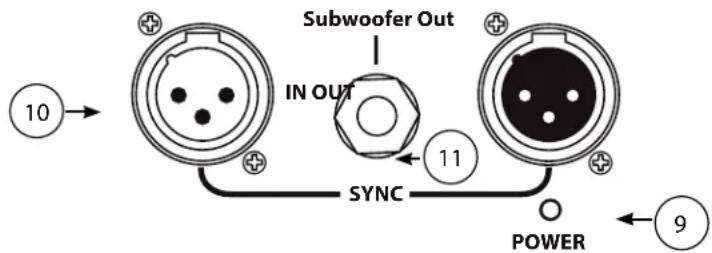
(10) Sync XLR In/Out
The sync XLR In/Out connectors are used to daisy chain multiple speakers. Using these inputs, the signal source can be fed to multiple speakers, while allowing the level of each speaker to be set by its own master volume control independent from the other speakers in the chain.
(11) Subwoofer Out
This 1/4" jack can be used to drive an external subwoofer amplifier or a power sub. The signal level is pre-master volume control. This allows the user to balance the signal between the speaker and the subwoofer.
Bluetooth
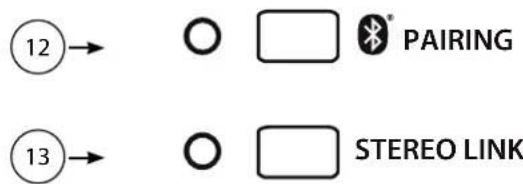
(12) Bluetooth Pairing
Use this button to link your Bluetooth source (phone, tablet, etc...) to the speaker. See Bluetooth operation below.
(13) Bluetooth Stereo Link
Use this button to link your speaker to second P1/2BT speaker. See Bluetooth operation below.
Bluetooth Operation:
Pairing: To pair your bluetooth source to the speaker, use the following steps:
-
Press mode button on the back of the speaker to make the speaker discoverable. The pairing LED should start blinking.
-
Go to your devices bluetooth screen and select the available Peavey speaker. Once paired, the pairing LED should light continuously.
Stereo Linking: To link two compatible P1/2BT speakers, use the following steps:
-
First, use the previous steps to pair your Bluetooth device to the first speaker.
-
Press Pairing on the second speaker to turn the Bluetooth on.
-
Press Stereo Link button on both speakers. Once the connection has been made, the Stereo Link LED 's on both speakers should be on continuously.
-
To disconnect, press the Stereo Link button again on either speaker.
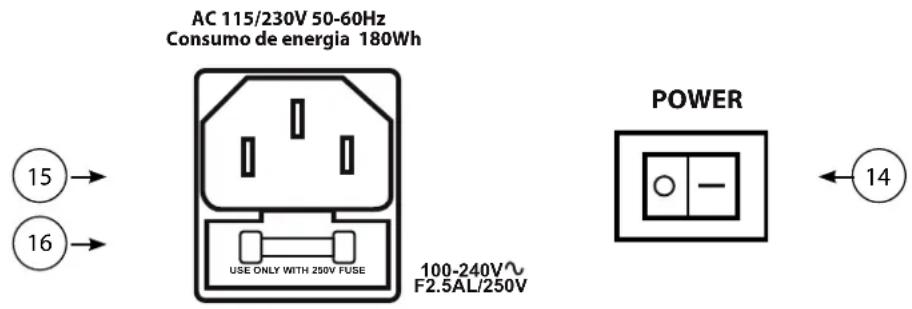
(14) Power Switch
The power switch is used to turn the speaker on and off
(15) AC Power Inlet
This is the receptacle for an IEC line cord, which provides AC power to the unit. Connect the line cord to this connector to provide power to the unit. Damage to the equipment may result if improper line voltage is used. (See line voltage marking on unit).
Never break off the ground pin on any equipment. It is provided for your safety. If the outlet used does not have
a ground pin, a suitable grounding adapter should be used and the third wire should be grounded properly. To prevent risk of shock or fire hazard, always make sure that the amplifier and all associated equipment is properly grounded.
(16) FUSE To replace
To replace the fuse, be sure to remove the IEC power cord from the IEC socket. The fuse holder tray is located beneath the IEC socket cavity. Pry the fuse holder tray out with a small flat blade screwdriver placed under the center of the top edge of the fuse tray, and gently lever the fuse tray out. The fuse is held in a clip in the fuse tray, and should be removed and replaced with a fresh 5 X 20mm 250V type fuse of the appropriate current rating. A spare fuse should be located in a hollow compartment in the fuse tray, below and behind the clip, this would be the one that is NOT clipped into the fuse tray clips.
Then, once the fresh fuse has been put in place, re-insert the fuse tray into the IEC connector assembly, and make sure it is fully seated and flush with the outside of the IEC connector assembly.
It is recommended that to assure future convenience of having a spare, that a spare fuse be obtained and placed in the hollow compartment at the earliest convenient time.
Specifications
Connections 2 - XLR input jacks (Ch 1&2)
2 - 1/4" (6.35mm) TRS input jacks (Ch 1&2)
1 - 1/8" (3.5mm) TRS/stereo input (Ch 3)
1 - RCA input (Ch 3)
2 - XLR SYNC (In/Out)
1 - 1/4" (6.35mm) TRS (Subwoofer Output)
Frequency Response
P1BT 60 - 19kHz
P2BT 50 - 19kHz
Peak Power P1BT 180 Watts (150W LF/30W HF)
P2BT 200 Watts (130W LF/70W HF)
Max Output SPL
P1BT 98dB SPL (1W/1M)
P2BT 102dB SPL (1W/1M)
Bluetooth v5 A2DP streaming, stereo linking with a second P1/2BT speaker
Woofer P1BT 2 x 6.5" (165mm) Woofer
P2BT 3 x 6.5" (165mm) Woofer
Tweeter P1BT 1" (25mm) high-frequency compression driver
P2BT 1" (25mm) high-frequency compression
Weight P1BT 15.4lbs (7kgs)
P2BT 33lbs (15kgs)
Dimensions (length x width x height) P1BT 23" x 9.25" x 10.5" (584mm x 235mm x 267mm)
P2BT 30" x 9.25" x 10.5" (762mm x 235mm x 267mm)
Power Supply 120VAC/60Hz or 230VAC/50Hz

www.peavey.com
Warranty registration and information for U.S. customers available online at
www.peavey.com/warranty
or use the QR tag below

Features and specifications subject to change without notice.
Peavey Electronics Corporation 5022 Hartley Peavey Drive Meridian, MS 39305 (601) 483-5365 FAX (601) 486-1278

Logo referenced in Directive 2002/96/EC Annex IV (OJ(L)37/38,13.02.03 and defined in EN 50419: 2005
he bar is the symbol for marking of new waste and is applied only to equipment manufactured after 13 August 2005


- P1BT/P2BT Column ARRAY
- FCC/ICES Compliancy Statement
- Caution
- FCC Radiation Exposure Statement
- IC Radiation Exposure Statement
- Description:
- Top Panel
- Input Panel
- XLR Mic Input (Ch 1&2)
- Line Input (Ch 1&2)
- RCA and 3.5mm Input (Ch 3)
- 3.5mm/RCA Input Selector (Ch 3)
- Level Control
- Low EQ (Bass)
- High EQ (Treble)
- Master Volume
- (9)Power LED
- Sync XLR In/Out
- Subwoofer Out
- Bluetooth
- Bluetooth Pairing
- Bluetooth Stereo Link
- Bluetooth Operation:
- Power Switch
- AC Power Inlet
- FUSE To replace
- Specifications
- www.peavey.com
Brand : PEAVEY
Model : P2BT
Category : Hi-Fi System