
Tides - Modulateur audio Mutable Instruments - Free user manual and instructions
Find the device manual for free Tides Mutable Instruments in PDF.


| Product Type | Eurorack module |
| Brand | Mutable Instruments |
| Model | Tides |
| Module Width | 12 HP |
| Module Depth | ~30 mm |
| Weight | ~100 g |
| Power Consumption | -12V: 5mA, +12V: 55mA |
| Power Connector | 2x5 pin 10-pin ribbon cable |
| Reverse Polarity Protection | Yes (red stripe orientation required) |
| Primary Function | Voltage-controlled AR/AD envelope generator or audio-rate oscillator with dynamic waveshaping |
| Modes | One-shot AD, looping, one-shot AR (selected via Mode button A) |
| Frequency Ranges | Very low (subsonic), low (LFO), audio (up to ~20kHz) via Range button B |
| PLL Mode | Phase-locked loop to synchronize frequency to external clock with division/multiplication |
| CV Inputs | Shape, Slope, Smoothness, V/Oct, FM (with attenuverter), Level (normalled to 8V), Freeze, Trigger/Gate, Clock |
| CV Outputs | Unipolar (0–8V), Bipolar (-5V to +5V), High Tide (end of attack), Low Tide (end of decay/release) |
| Calibration | Manual V/Oct calibration via Mode switch A with voltage source (C2=1V, C4=3V) |
| Waveshaping | Control: Shape (ascending/descending wave), Slope (ratio of attack to decay), Curve (2-pole low-pass filter or wavefolder) |
| Output Types | Bipolar output features two bumps: positive during attack, negative during release |
| Installation | Mount in Eurorack case with proper power connection, ensure red stripe alignment |
| Manual & Support | Online at mutable-instruments.net; forum at mutable-instruments.net/forum |
Frequently Asked Questions - Tides Mutable Instruments
User questions about Tides Mutable Instruments
0 question about this device. Answer the ones you know or ask your own.
Ask a new question about this device
Download the instructions for your Modulateur audio in PDF format for free! Find your manual Tides - Mutable Instruments and take your electronic device back in hand. On this page are published all the documents necessary for the use of your device. Tides by Mutable Instruments.
USER MANUAL Tides Mutable Instruments
About unipolar and bipolar outputs
The bipolar output is not a merely scaled and offset version of the unipolar output! It is made of two bumps, a positive one occurring during the attack, and a negative one occurring during the release.
Unipolar Bipolar

PLL mode
Hold the frequency range (B) button for 1s. Tides enters the PLL mode.
In PLL mode, a signal must be provided to the CLOCK input. Tides will adjust its output frequency to match the frequency of this signal or a multiple/division of it as set by the Frequency knob.
Hold the frequency range (B) button again to leave the PLL mode.
Tips and tricks:
- Tides works wonders as a master modulator for a classic analog VCO.
- When using Tides as an oscillator for bass sounds, try both the unipolar and bipolar outputs; and the medium and high ranges - they all sound different.
- Use the PLL mode to create just-intonation melodies on top of a drone sent to the CLOCK input.
- A different flavor of sync sounds can be obtained by patching a PWM or square source into the FREEZE input.
- Use the wavefolder on a low-frequency envelope to create bumps and bounces.
- Use the PLL mode, and trigger the CLOCK and TRIG inputs from a rhythmic sequencer.
- In typical Buchla fashion, the low/high tide outputs can be used to trigger another module to chain envelopes and create complex shapes.
Calibration
- Connect a patch cable to the FM input. Leave the other end of the cable unplugged (this prevents the normalling to +/-1 semitone to be activated).
- Connect a patch cable to the Level input. Leave the other end of the cable unplugged (this prevents the normalling to full amplitude to be activated).
- Connect a MIDI>CV interface or precision voltage source to the V/Oct input.
- Hold the Mode switch (A) for one second. All LEDs are lit in yellow.
- Play a C2 note, or send a 1V voltage from your CV source.
- Press the mode switch (A). All LEDs are lit in green.
-
Play a C4 note, or send a 3V voltage from your CV source.
-
Press the mode switch (A).
The module is now calibrated for accurate V/Oct operation!

Tidal modulator

About Tides
Tides is, depending on your point of view, a voltage-controlled (looping) AR/AD generator which can reach audio frequencies; or a dynamically waveshaped synth voice with the ability to go into subsonic territories.
Installation
Tides requires a -12V / +12V power supply (2x5 pins connector). The red stripe of the ribbon cable (-12V side) must be oriented on the same side as the "Red stripe" marking on the board.
The power consumption is as follows: -12V: 5mA ; +12V: 55mA.
Online manual and help
The manual can be found online at mutable-instruments.net/modules/tides/manual
For help and discussions, head to mutable-instruments.net/forum
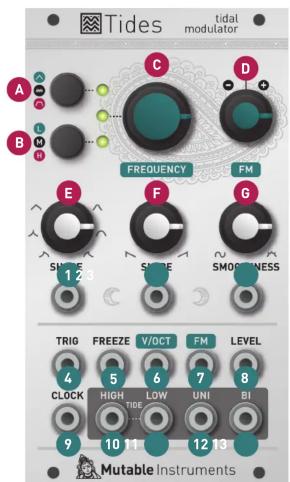
Front panel
Controls
A. Mode selection. Goes back and forth between one-shot AD (green LED), looping (LED off), and one-shot AR (red LED) modes.
B. Range selection. Goes back and forth between very low (green LED), low (LED off), and audio (red LED) range.
C. Frequency/rate control.
D. Attenuverter for the FM input. When no signal is patched into the FM input, serves as a fine tuning control.
E. Waveshape of the ascending and descending segments.
F. Ratio between the duration of the ascending and descending segments.
G. Curve transformation. From 12 o'clock to 7 o'clock (counter-clockwise), applies a 2-pole low-pass filter. From 12 o'clock to 5 o'clock (clockwise), applies a wavefolder.
Inputs and Outputs
-
-
- CV inputs for shape, slope, and smoothness controls.
-
-
Trigger/Gate input. On a rising edge, resets the waveform and starts the ascent. On a falling edge, and in AR mode, starts the descent.
-
Freeze input. A gate signal applied on this input can stop the envelope/oscillator and hold the signal.
-
V/Oct input. 1V/Oct frequency/rate control.
-
FM input, attenuated and inverted by the attenuverter (D).
-
Waveform amplitude CV - normalled to a constant 8V source.
-
Clock input for PLL or tap tempo operation.
-
- End of attack (high tide) and end of decay/release (low tide) logic outputs.
-
- Unipolar (0 to 8V) and bipolar (-5V to 5V) outputs.


Brand : Mutable Instruments
Model : Tides
Category : Modulateur audio