
XR1 lite - Video recorder EVGA - Free user manual and instructions
Find the device manual for free XR1 lite EVGA in PDF.


| Product Type | Video Capture Card |
| Brand | EVGA |
| Model | XR1 lite |
| Interface | USB 3.0 Type-C |
| Input | HDMI 2.0 (480p/576p/720p/1080i/1080p/2160p@60fps) |
| Pass-Through | HDMI 2.0 (480p/576p/720p/1080i/1080p/2160p@60fps) |
| Max Capture Resolution | 1080p@60fps |
| Encoding Format | RAW |
| Dimensions (L x W x H) | 100 mm x 73 mm x 15.6 mm |
| Weight | 75 g |
| LED Indicator | Multi-color status LED (Idle/Active/HDCP/Firmware) |
| Compatible Software | OBS (Open Broadcaster Software) |
| Power Source | Bus-powered via USB Type-C |
| Supported USB Modes | USB 3.0 and USB 2.0 (with reduced performance) |
| HDCP Support | Yes (red LED indicates HDCP protected content) |
| Included Accessories | Quick Guide, USB Type-C cable (estimated) |
| Operating Temperature | 0°C to 40°C (32°F to 104°F) - estimated |
| Storage Temperature | -20°C to 60°C (-4°F to 140°F) - estimated |
| Certifications | CE, FCC, RoHS (estimated) |
Frequently Asked Questions - XR1 lite EVGA
User questions about XR1 lite EVGA
0 question about this device. Answer the ones you know or ask your own.
Ask a new question about this device
Download the instructions for your Video recorder in PDF format for free! Find your manual XR1 lite - EVGA and take your electronic device back in hand. On this page are published all the documents necessary for the use of your device. XR1 lite by EVGA.
USER MANUAL XR1 lite EVGA
EVGA | XR1 ^lite
Quick Guide

Learn more...
Inside The Box
The following accessories are included with EVGA XR1 Lite.

Specification
Interface
USB 3.0 Type-C
Input & Output (Pass-Through)
HDMI 2.0
Input
480p/ 576p/ 720p/ 1080i/ 1080p/ 2160p@60fps
Pass Through
480p/ 576p/ 720p/ 1080i/ 1080p/ 2160p@60fps
Max Capture Resolution
1080p@60fps
Encoding Format
RAW
Dimension
100mm x 73mm x 15.6mm (L x W x H)
Weight
75g
LED Indications
| Status | Idle Mode | Active Mode | Remarks |
| Power On | Purple | N/A | |
| USB 3.0 Mode | Flashing Blue | Blue | * Defined by USB Port |
| USB 2.0 Mode | Purple | Flashing Purple | * Defined by USB Port |
| HDCP Protected | N/A | Red | OBS Notification |
| No Source Found | N/A | Red | OBS Notification |
| Scaling Not Supported | N/A | Red | OBS Notification |
| Firmware Update | Updating : Flashing RedSuccessfully Updated : Light OffUpdate Failed : Red | ||
Using your EVGA XR1 Lite with OBS (Open Broadcaster Software®)
OBS is a free and open source software solution for video recording and live streaming and is recommended by EVGA to utilize the EVGA XR1 Lite Capture Card.
You will need to download the OBS software to get started from:
https://obsproject.com/download
Once you've downloaded and installed OBS, an auto configuration wizard will run upon opening the program for the first time. It will attempt to find the most appropriate settings that your PC can handle. You can manually change these settings later. (Reference the EVGA XR1 Lite Capture Card's Quick Guide on how to connect your device to the EVGA XR1 Lite Capture Card and to your streaming device.)
OBS doesn't capture any video by default, you will need to enable your EVGA XR1 Lite Capture Card by adding it as a source. Either click on the + or right click inside the box labeled "Sources" and then add device and select your EVGA XR1 Lite Capture Card.
Device Layout


Configuration Set Up for Desktop/ Laptop
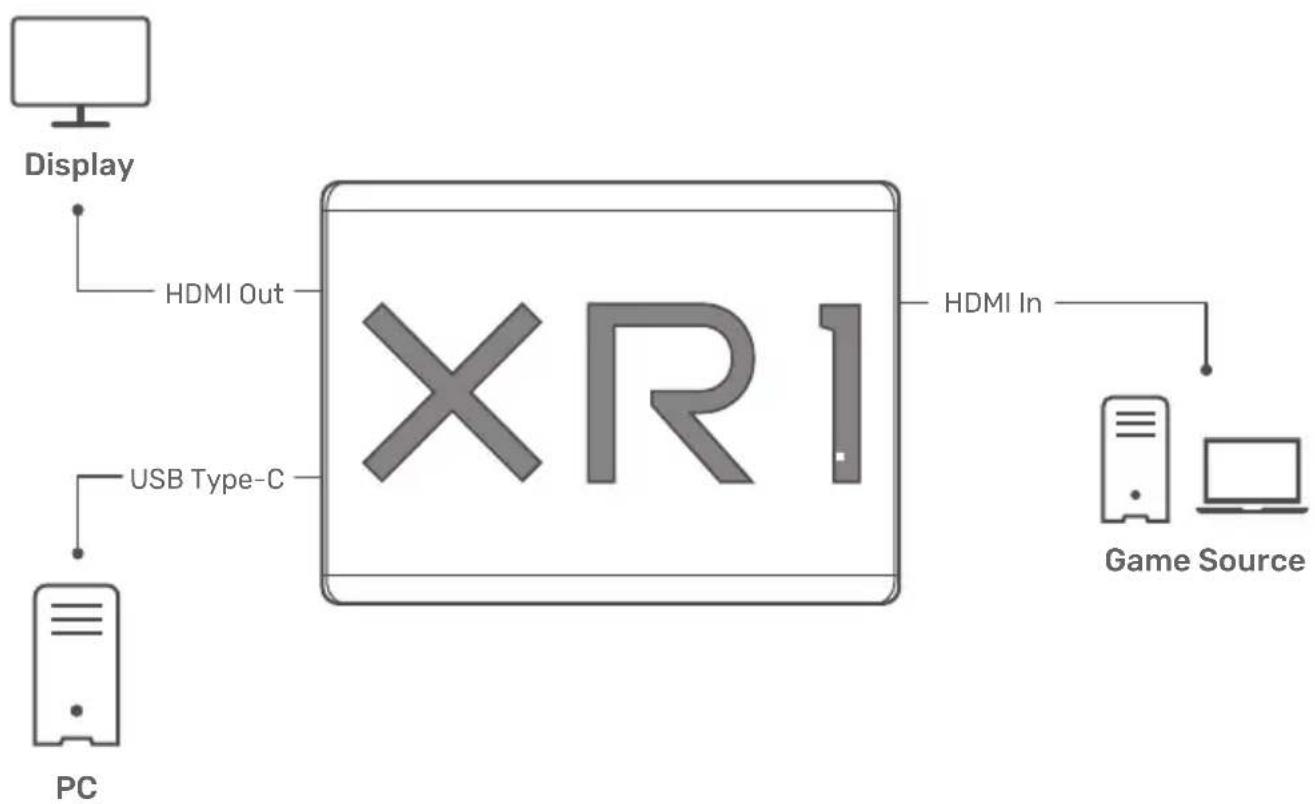
flowchart
graph LR
    PC["PC"] -->|USB Type-C| XR1["XR1"]
    Display["Display"] -->|HDMI Out| XR1
    XR1 -->|HDMI In| GameSource["Game Source"]
For Game Consoles

flowchart
graph LR
    PC["PC"] -->|USB Type-C| XR1["XR1"]
    Display["Display"] -->|HDMI Out| XR1
    XR1 -->|HDMI In| GameSource["Game Source"]
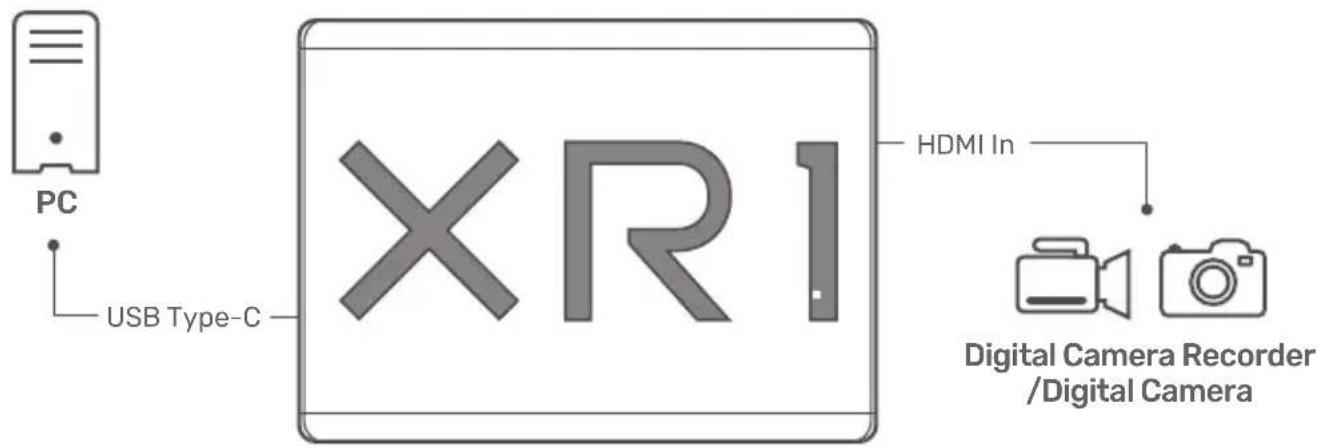
For Video Conference

www.evga.com


Brand : EVGA
Model : XR1 lite
Category : Video recorder