
FSBNN3MSR-BL - Soundbar Furrion - Free user manual and instructions
Find the device manual for free FSBNN3MSR-BL Furrion in PDF.


| Product Type | Soundbar |
| Brand | Furrion |
| Model | FSBNN3MSR-BL |
| Dimensions (W x H x D) | 30 x 3.5 x 2 inches |
| Weight | 3.5 lbs |
| Power Consumption | 50W |
| Power Supply | AC 100-240V, 50/60Hz |
| Audio Channels | 2.0 |
| Connectivity | Bluetooth, Optical, AUX |
| Bluetooth Version | 4.0 |
| Frequency Response | 60Hz - 20kHz |
| RMS Power Output | 50W total |
| Remote Control | Included |
| Wall Mountable | Yes |
| Warranty | 1 year |
| Cleaning | Use a soft dry cloth |
| Safety | Low voltage; keep away from moisture |
| Spare Parts Availability | Not available separately |
| Reparability | User not repairable |
| Package Contents | Soundbar, remote, power cord, user manual |
| Suitable For | TV, laptop, tablet, smartphone |
Frequently Asked Questions - FSBNN3MSR-BL Furrion
User questions about FSBNN3MSR-BL Furrion
0 question about this device. Answer the ones you know or ask your own.
Ask a new question about this device
Download the instructions for your Soundbar in PDF format for free! Find your manual FSBNN3MSR-BL - Furrion and take your electronic device back in hand. On this page are published all the documents necessary for the use of your device. FSBNN3MSR-BL by Furrion.
USER MANUAL FSBNN3MSR-BL Furrion
*Product picture is for reference only.
Model:FSBNN3MR-BL
FSBNN3MSR-BL
Welcome
Thank you for purchasing Furrion Aurora™ Bluetooth Soundbar. Before operating your new product, please read these instructions carefully. This instruction manual contains information for safe use, installation, introduction of the product.
The manufacturer does not accept responsibility for any damages due to not observing these instructions.
If you have any further questions regarding our products, please contact us at support@furrion.com.
Contents
Welcome....2
Contents....3
Safety Warnings....4
Before Operation ....7
What's in the box 7
Power Source 7
Prepare your Remote Control....8
Function Overview....9
Front/Side/Back panel of the Soundbar....9
Remote Control ....10
Connection....11
Installation....13
Operation 15
General Operation....15
Bluetooth Operation....15
Troubleshooting....16
Specifications....17
Safety Warnings
Precaution

CAUTION
RISK OF ELECTRIC SHOCK DO NOT OPEN

CAUTION: TO REDUCE THE RISK OF ELECTRIC SHOCK, DO NOT REMOVE COVER (OR BACK). NO USER-SERVICEABLE PARTS INSIDE. REFER SERVICING TO QUALIFIED SERVICE PERSONNEL.

This ‘bolt of lightning’ indicates uninsulated material within your unit may cause an electrical shock.
For the safety of everyone in your household, please do not remove product covering.

The ‘exclamation mark’ calls attention to features for which you should read the enclosed literature
closely to prevent operating an maintenance problems.
Safety precaution
- Read these instructions.
- Keep these instructions.
- Heed all warnings.
- Follow all instructions.
- Do not install near any heat sources such as radiators, heat registers, stoves or other devices (including amplifiers) that produce heat.
- To reduce the risk of fire or electric shock, do not expose this apparatus to rain or moisture.
- To prevent injury, this apparatus must be securely attached to the wall in accordance with the installation instruction.
-
Only use attachments/accessories specified by the manufacturer.
-
Refer all servicing to qualified service personnel. Servicing is required when the device has been damaged in any way, such as if objects have fallen into the device, or the device does not operate normally, or has been dropped.
-
Do not defeat the safety purpose of the polarized or grounding type plug. A polarized plug has two blades with one wider than the other. A grounding type plug has two blades and a third grounding prong. The wide blade or the third prong are provided for your safety. If the provided plug does not fit into your outlet, consult an electrician for replacement of the obsolete outlet.
-
The power cord must be routed properly to prevent people from stepping on it, or objects from resting on it. Check the cords at the plugs and product. Try to use a single, directly dedicated and rated GFI power socket for the product for safe operation.
-
Use properly rated power voltage. Use of non-rated voltage may cause fire, electric shock and severe damages to the product.
-
Do not touch power plugs with wet hands.
-
Do not disassemble the unit by yourself under any circumstances: Removal of the product cover may expose you to high voltage or other dangerous risks. Refer all servicing to a qualified service professional. Warranty will not be honored if you service the product yourself.
-
Do not touch this apparatus, antenna, power cables or power plugs during a thunder or lightning storm.
-
With your product unplugged, gently wipe the surface of the product with a damp (with water) microfiber, cotton or flannel cloth. Remove any dirt and salt deposits from the product, being careful to rinse the cloth frequently to avoid scratching the Soundbar. Avoid using harsh
Safety Warnings
chemicals, abrasives, or solvents when cleaning any surface on the unit.
- Any severe physical impact on the product may cause certain components to fall out of place within and break, which may cause fire or electric shock. In such event, do not operate the product. Contact the manufacturer for support.
- In case of product malfunction or unusual events such as electrical burning smell, smoke, or loss of content signals on Soundbar due to internal overheating, immediately turn off and unplug the power and contact the manufacturer.
- Adequate ventilation must be maintained to ensure reliable and continued operation and to protect the product from overheating.
- Do not mount this product near a motor or transformer where strong magnetism is generated.
- Do not place the product on an unstable place. Improper installation may cause the product to fall, resulting in potential serious personal injuries, as well as damage to the product. Follow mounting instructions properly for safe operation of the product.
- Do not move or transport the product with any cables (power cables, content connectivity cables) plugged in to the source devices. Damages may occur to the cables, plugs, or jointing connectors of the cables due to forcible bending and stress, which may cause damages to the waterproof seal of the product, making it subject to fire, electric shock, or shorted circuit.
- Do not submerge this product in water or pressure wash it. It is not designed to be submerged in water, withstand pressure washers, high-pressure water jets, or hurricane-type weather.
- The operation temperature for the unit is -20ircC ( -4ircF ) to +45ircC ( +113ircF ). The
storage temperature is -33ircC ( -27.4ircF ) to +58ircC ( +136.4ircF ). Protect the Soundbar from damage by the extreme temperature. This is not a commercial outdoor Soundbar.
- The mains plug is used as the disconnect and shall remain readily operable.
- Batteries (battery pack or batteries installed) shall not be exposed to excessive heat such as sunshine, fire or the like.
COMPLIANCE
FCC Statement
Note: This equipment has been tested and found to comply with the limits for a Class B digital device, pursuant to Part 15 of the FCC Rules. These limits are designed to provide reasonable protection against harmful interference in a residential installation. This equipment generates, uses and can radiate radio frequency energy and, if not installed and used in accordance with the instructions, may cause harmful interference to radio communications.
However, there is no guarantee that interference will not occur in a particular installation. If this equipment does cause harmful interference to radio or television reception, which can be determined by turning the equipment off and on, the user is encouraged to try to correct the interference by one or more of the following measures:
- Reorient or relocate the receiving antenna.
- Increase the separation between the equipment and receiver.
- Connect the equipment into an outlet on a circuit different from that to which the receiver is connected.
- Consult the dealer or an experienced radio/TV technician for help.
Safety Warnings
WARNING: Changes or modifications to this unit not expressly approved by the party responsible for compliance could void the user's authority to operate this equipment under FCC Rules.
IC Statement
This device complies with Industry Canada licence-exempt RSS standard(s). Operation is subject to the following two conditions: (1) this device may not cause interference, and (2) this device must accept any interference, including interference that may cause undesired operation of the device.
Important Battery Precautions
CAUTION: Danger of explosion if batteries are incorrectly replaced. Replace only with the same or equivalent type.
The batteries shall not be exposed to excessive heat such as sunshine, fire or the like.
WARNING:
- This device contains a button cell battery on the remote control.
- Do not ingest the battery contained within the remote control supplied with the unit as this battery represents a chemical burn hazard.
- If the coin/button cell battery is swallowed, it can cause severe internal burns in just 2 hours and can lead to death. If you think batteries might have been swallowed or placed inside any part of the body, seek immediate medical attention.
- Keep new and used batteries away from children. If the battery compartment does not close securely, stop using the product and keep it away from children.
Care of the Environment

Disposal of your old product and battery Your product is designed and manufactured with high quality materials and components, which can be recycled and reused.
- Never dispose of your product with other household waste. Please familiarize yourself with the local rules on the separate collection of electrical and electronic products and batteries.
- The correct disposal of these products helps prevent potentially negative consequences on the environment and human health.
- Your product contains batteries which cannot be disposed of with normal household waste. The battery must be recycled or disposed of properly. Contact your local waste management office for information on battery recycling or disposal.
All registered and unregistered trademarks are property of their respective owners.
CAUTION: Changes or modifications not expressly approved by the party responsible for compliance could void the user's authority to operate the equipment.
For all products with wireless operation
FURRION hereby declares that this equipment is in compliance with the essential requirement and other relevant provision of Directive 2014/53/EU and RoHS 2011/65/EU Directive. The declaration of conformity may be consulted in the support section of our Website, accessible from www.furrion.com.
Before Operation
What's in the box
Unpack the box carefully and check if the following parts are included. If any parts are missed or damaged, please contact the authorized retailer where you purchased immediately.
- Soundbar x 1
- Remote control x 1 & Button battery x 1
• Coaxial cable (1.6m) x 1 - Mounting bracket x 2
- Mounting screws: (M4*10mm) x 4; (ST 4.8/5.5*9.5mm) x 2
- Quick Start Guide x 1
- Warning Card x 1
• Warranty Manual x 1
Power Source
The Soundbar is designed for use with 100-240 volt, 60 Hz AC current. Connect the power cord to a GFCI protected AC outlet with an “in-use” waterproof cover.
CAUTION:
- Connection to a line voltage other than the specified voltage can create a fire hazard and may damage the unit.
- Damaged power cords should be replaced immediately by a qualified electrician with a cord that meets product specifications.
- We do not recommend to use the extension cords with this product. As with all electrical devices, do not run power cords under rugs or carpets, or place heavy objects on them.
- When this unit is not used for a long time, be sure to unplug it for the safety purpose.
- Do not plug/unplug the AC cord when your hands are wet. Doing this may cause electrical shock.
Before Operation
Prepare your Remote Control
BATTERY INSTALLATION
- Use a tool similar as a coin to rotate the battery cover counterclockwise until it is completely removed.
- Insert the button battery (Type: CR2025) with polarity + upside to the battery compartment.
- Put the battery cover into place and rotate clockwise to close the cover tightly to ensure the best waterproof effect.

flowchart
graph LR
    A["Device with Closed Sensor"] --> B["Close Operation"]
    B --> C["CR2025 Sensor with Open State"]
    C --> D["CR2025 Closed Sensor"]
    D --> E["Open State"]
    style A fill:#f9f,stroke:#333
    style B fill:#ccf,stroke:#333
    style C fill:#cfc,stroke:#333
    style D fill:#fcc,stroke:#333
    style E fill:#ffc,stroke:#333
BATTERY PRECAUTIONS
These precautions should be followed when using batteries in this device:
- Use only the size and type of batteries specified.
- Be sure to follow the correct polarity when installing the battery in the battery compartment. Reversed batteries may cause damage to the device.
- Improper use of a battery may cause overheating or an explosion that could result in injury or fire.
- If the device is not to be used for a long period of time, remove the batteries to prevent damage or injury from possible battery leakage.
- Do not ingest the battery contained within the remote control or supplied with the unit as this battery represents a chemical burn hazard.
- Do not throw the battery into the fire.
- To avoid the risk of accident, keep the new and used battery out of reach of children.
Function Overview
Front/Side/Back panel of the Soundbar

① Display Panel
Display the current mode or status.
| Source Input/ Mode Display | |
| Bluetooth input | 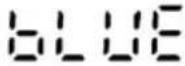 |
| AUX input | 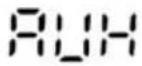 |
| RCA input |  |
| COAX input |  |
| MUSIC mode | 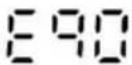 |
| CINEMA mode |  |
| TV mode | 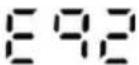 |
| SPORTS mode |  |
② COAX in
Connect to the Coaxial output on your TV or other AV devices.
③ RCA (L-R) in
Connect to the audio out on your TV or other AV device.
④ AUX in
Connect to the Analog output of an external audio device.
5
Play and pause in BT mode.
⑥ +/-
Increase or decrease the volume.
⑦ M
Select the audio source.
⑧
Press and hold for 2s to power on/off.
Note: The front/back panel view will vary by different models.
Function Overview
Remote Control
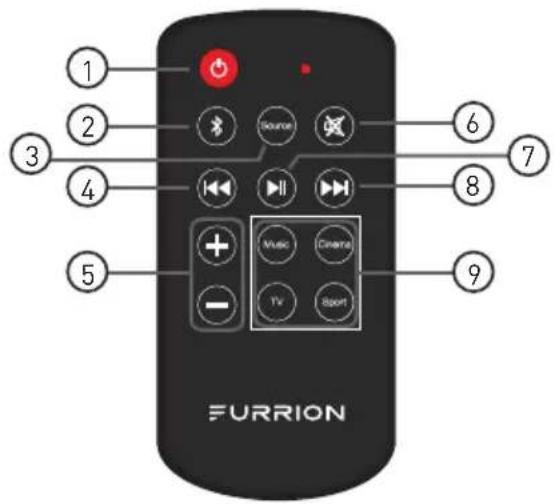
| Item | Button Function | |
| 1 | ∅ | Power on/off or switch to standby. |
| 2 | * | Press it briefly to enter Bluetooth pairing mode;Press and hold it for 3 seconds to unpair the connected device, then launch paring with a new device.* BT Name: Furrion SB 2.0 or Furrion SB 2.1 |
| 3 | Source | Select an input source for the Soundbar: AUX / RCA / COAX / BT. |
| 4 | |◄◄ | Skip to the previous track for Bluetooth or USB playback. |
| 5 | +/- | Increase or decrease volume. |
| 6 | ※ | Mute or un-mute the Soundbar audio. |
| 7 | ►|| | Start or pause Bluetooth or USB playback. |
| 8 | ►► | Skip to the next track for Bluetooth or USB playback. |
| 9 | Music | Select the preset EQ mode from Music/Cinema/TV/Sport. |
| Cinema | ||
| TV | ||
| Sport | ||
Connection
Before connecting, open the protective cover on the back of the Soundbar by removing the screws.
Warning: Disconnect power supply before you make or change any connections.
1. Connecting to your TV


2. Connecting to other devices

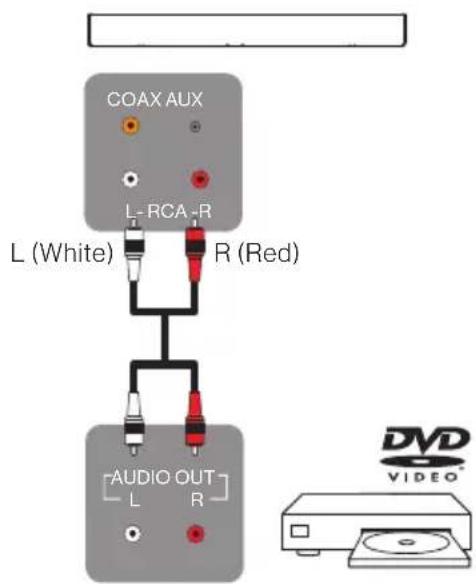
Connection

Cable Management
After the connections are completed, close the protective cover and tighten the screws for the best waterproof effect.

natural_image
Technical diagram of a cable installation with multiple sensors and a central panel (no text or labels)Installation
Warning:
- Screws must be tightly secured. Do not overtighten screws as the product may fall as a result of possible damages.
- Make sure the wall surface will support the combined load of the Soundbar, TV and other accessories.
- Be careful not to pinch fingers when operating the mount.
- Use at least 2 people to move or install the Soundbar to ensure no person injury and no product damage. We recommend you to contact a professional for installation.
- During the installation make sure the unit is powered off and unplugged. Otherwise, it may cause an electric shock.
Option 1. Fix the Soundbar on the compatible Furrion Aurora™ TV
(TV Model: FDUF43CBR/ FDUF49CBR/ FDUF55CBR/ FDUF65CBR/FDUP43CBR/ FDUP49CBR/ FDUP55CBR/ FDUP65CBR)
- Attach the supplied mounting brackets to the rear of the Soundbar and secure with 2 provided screws.

Screw: ST 4.8/5.5*9.5mm x 2
- Place the outdoor TV face down on a flat surface with a foam board protected. Mount the outdoor soundbar with brackets to the outdoor TV using the 4 provided screws. At least two people are required for installation to avoid any damage due to the heavy weight.

Screw: M4*10mm x4
- Wire the cables from the soundbar to the outdoor TV properly.
- Mount the TV with soundbar to the TV mount.
Installation
Option 2. Mount the Soundbar to wall separately
Caution: Before mounting on wall, make sure the wall can support the weight of this unit. Purchase and use the fixing screws and anchors appropriate for the type of wall (plaster board, iron board, wood, etc.) you have.
IMPORTANT: Connect all cables prior to mounting Soundbar on wall. The cable connection compartment in the rear panel will be obstructed once the Soundbar is mounted.
- Place the Soundbar against the wall and level it.
- Mark the two drilling holes on wall with a pencil.
- Drill holes as marked.
- Insert the appropriate anchors and screws into the holes.
- Tighten the screws securely but do not overtighten.
- Finally hook the Soundbar on the mounted screws directly.

Operation
General Operation
Power On/ Off
Press and hold button on the Soundbar for 2s or press on the remote control to turn the unit on. Press the button again to turn the unit off.
Mute or Unmute
Press button on the remote control to mute the audio. Press again to unmute.
Adjust the Volume
Press + button on the Soundbar or on the remote control to increase or decrease volume.
Select a Source
Press M button on the Soundbar or SOURCE button on the remote control to select AUX, RCA, COAX, BT mode. The source status will display on the LCD screen of front panel when selected.
Note: The defaulted source is COAX. After the first time use, the Soundbar will display the source used for the last time.
Select EQ Mode
Press Music /Cinema/TV/Sport button on the remote control to select different audio mode. The different mode (EQ 0/ EQ 1/ EQ 2/EQ 3) will display on the LCD screen of front panel when selected.
Note: The default EQ mode is TV.
Bluetooth Operation
Select BT mode
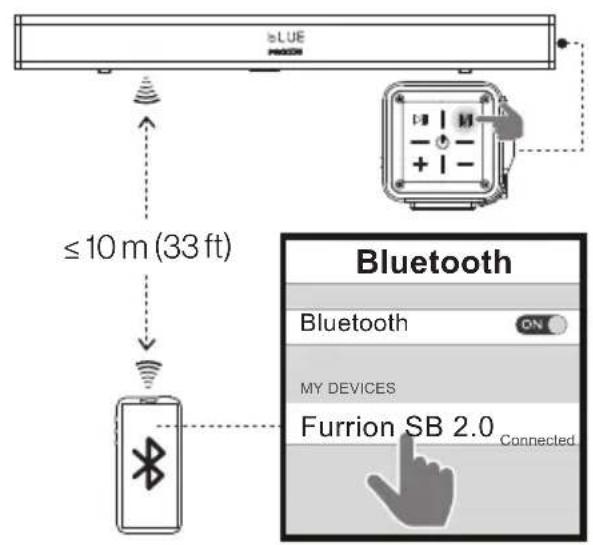
Press M button on the Soundbar or Source button on the remote control once or more to select BT mode.
Press ✝ on the remote control to enter Bluetooth mode directly.
Connect/Pair a Bluetooth device
After BT mode is selected, it will launch pairing mode automatically.
Activate the Bluetooth function on the mobile device and find the Soundbar BT name
Furrion SB 2.0 or Furrion SB 2.1 from the device list to connect.
Unpair
Press and hold ✦ on the remote control for 3s to unpair the Bluetooth.
Select a track
Press for on the remote control to skip to the previous or the next track.
Start or Pause playback
Press ▶In the remote control to start or pause playback.
Troubleshooting
Please read the user manual carefully before using the Soundbar If you have any problems with this product, please firstly refer to the below troubleshooting guide to help you resolve the issue.
| TROUBLE/SYMPTOM | SOLUTION |
| Distorted sound. | Ensure the TV is muted if you play audio from the TV through the Soundbar. |
| Ensure that the 3.5mm audio plug is fully inserted. | |
| No sound. | Make sure to select the correct audio input source. |
| Check whether the audio connector is damaged. | |
| Check whether you turned down the volume to zero. | |
| Ensure that the audio is not muted. | |
| Ensure the Soundbar is powered on. | |
| Fail to connect a Bluetooth device. | Ensure that you select the Bluetooth as the source mode. |
| Check if you enable the Bluetooth function of the device. | |
| Ensure that you select the right BT Name Furrion SB 2.0/ Furrion SB 2.1 on your device. | |
| If BT Name Furrion SB 2.0/ Furrion SB 2.1 is not present on the list, disconnect the Bluetooth on the device and launch pairing again to reconnect. | |
| If the Soundbar is already connected to another Bluetooth device, press and hold ➤ on remote control to disconnect and pair with a new device. | |
| Ensure that the distance between the Soundbar and the connecting Bluetooth device is within 10m. | |
| Poor audio quality from a connected Bluetooth device. | The Bluetooth reception is poor. Move the device closer to the Soundbar, or remove any obstacle between the device and the Soundbar. |
| Remote control does not work. | Check the battery of remote control and make sure that it is not dead. |
| Direct the remote control to the IR sensor of the device. | |
| Check whether there are obstacles between the remote control and IR sensor. |
Specifications
Item FSBNN3MR-BL (2.0) FSBNN3MSR-BL (2.1)
| Power supply | 100-240VAC 1.5A 60Hz 100- | 240VAC 1.5A 60Hz |
| Total power | 2x25W RMS (2 x 20W) | + 2 x 15W) RMS |
| Dimension(W x H x D) | 35 7/16" x 3 1/2" x 3 1/2"(900*88*88mm) | 39 7/16" x 3 1/2" x 3 1/2"(1000*88*88mm) |
| Input terminals | Stereo RCA Input (x 1)3.5mm Aux Input (x 1)Coax Input (x 1): Support and comply with PCM format. | |
| Frequency response | 40Hz-18KHz | |
| S/N ratio(Audio 1KHz 0dB) | 65dB | |
| Bluetooth Version | V4.2 (A2DP/AVRCP) | |
| BT Name | Furrion SB 2.0 Furrion SB 2.1 | |
FURRION
Furrion Innovation Center & Institute of Technology
• 52567 Independence Ct., Elkhart, IN 46514, USA • Toll free:1-888-354-5792
- Email: support@furrion.com
©2007-2019 Furrion Ltd. Furrion® and the Furrion logo are trademarks licensed for use by Furrion Ltd. and registered in the U.S. and other countries.


- Welcome
- Contents
- Safety Warnings
- Precaution
- CAUTION
- Safety precaution
- COMPLIANCE
- FCC Statement
- IC Statement
- Important Battery Precautions
- WARNING:
- Care of the Environment
- For all products with wireless operation
- Before Operation
- What's in the box
- Power Source
- CAUTION:
- Prepare your Remote Control
- BATTERY INSTALLATION
- BATTERY PRECAUTIONS
- Function Overview
- Front/Side/Back panel of the Soundbar
- ① Display Panel
- ② COAX in
- ③ RCA (L-R) in
- ④ AUX in
- 5
- ⑥ +/-
- ⑦ M
- ⑧
- Remote Control
- Connection
- Connecting to your TV
- Connecting to other devices
- Cable Management
- Installation
- Option 1. Fix the Soundbar on the compatible Furrion Aurora™ TV
- Option 2. Mount the Soundbar to wall separately
- Operation
- General Operation
- Power On/ Off
- Mute or Unmute
- Adjust the Volume
- Select a Source
- Select EQ Mode
- Bluetooth Operation
- Select BT mode
- Connect/Pair a Bluetooth device
- Unpair
- Select a track
- Start or Pause playback
- Troubleshooting
- Specifications
- FURRION
- Furrion Innovation Center & Institute of Technology
Brand : Furrion
Model : FSBNN3MSR-BL
Category : Soundbar