
FSBNN30MX - Soundbar Furrion - Free user manual and instructions
Find the device manual for free FSBNN30MX Furrion in PDF.


| Product Type | Soundbar |
| Brand | Furrion |
| Model | FSBNN30MX |
| Dimensions (W x H x D) | 40.0 x 3.0 x 2.5 inches |
| Weight | 6.2 lbs |
| Power Supply | AC 100-240V, 50/60Hz (external adapter) |
| Power Consumption | 45W (max) |
| Audio Output Power | 2 x 50W RMS (total 100W) |
| Speaker Configuration | 2.0 channel stereo |
| Bluetooth Version | 5.0 |
| Bluetooth Range | Up to 33 ft (10m) |
| Audio Inputs | Bluetooth, Optical (Toslink), 3.5mm AUX |
| Frequency Response | 60Hz - 20kHz |
| Driver Size | 2 x 2.5" full-range drivers |
| Mounting Options | Tabletop or wall-mount (bracket included) |
| Remote Control | Included (IR) |
| Supported Audio Formats | MP3, WAV, FLAC |
| Certifications | FCC, CE, RoHS |
| Compatible Devices | TV, smartphone, tablet, laptop |
| Cleaning Instructions | Wipe with dry soft cloth. Do not use liquids or sprays. |
| Safety Precautions | Do not expose to moisture. Unplug during storms. Keep ventilation slots clear. |
| Spare Parts Availability | Contact Furrion support for remote, power adapter, and brackets. |
| Repair Service | Authorized service centers. Do not open unit. |
| Warranty | 1 year limited warranty |
Frequently Asked Questions - FSBNN30MX Furrion
User questions about FSBNN30MX Furrion
0 question about this device. Answer the ones you know or ask your own.
Ask a new question about this device
Download the instructions for your Soundbar in PDF format for free! Find your manual FSBNN30MX - Furrion and take your electronic device back in hand. On this page are published all the documents necessary for the use of your device. FSBNN30MX by Furrion.
USER MANUAL FSBNN30MX Furrion
130W Aurora 2.1 Outdoor Sound System

natural_image
Two black rectangular objects with rounded tops, one horizontal and one square, against a plain background (no text or symbols visible)Quick Start Guide
Lippert Number:2022323660
Model: FSBNN30MX

https://support.lci1.com/ stereo-subwoofers- soundbars
This quick start guide will help you install and use the device properly. For further support and to download the complete user manual please visit https://support.lci1.com/stereo-subwoofers-soundbars.
WHAT'S IN THE BOX
Front

Back

natural_image
Front view of a server rack with two ports and an internal panel (no text or symbols visible)


natural_image
Front view of a Purrion air purifier with hexagonal mesh pattern (no text or symbols on body)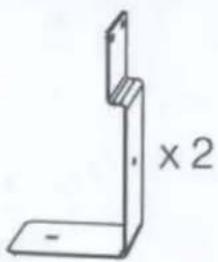
natural_image
Simple line drawing of a 3D L-shaped bracket with no text or symbols

8-3/8"×4 pcs

10-38×2pcs
NOTE: Product design and packaging may change without notice.
CONNECT
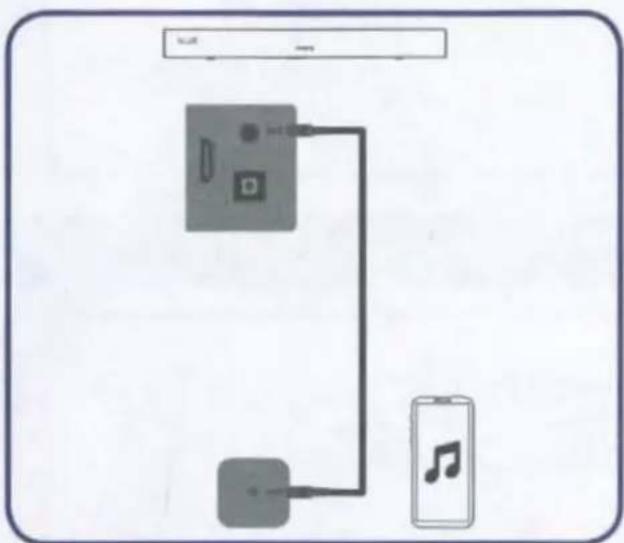
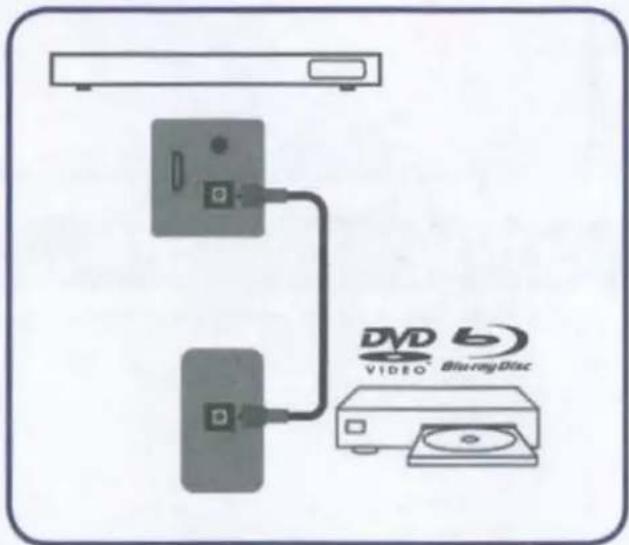
- Open the protective cover on the back by removing the screws then connect the cables.
Note: All external devices and cables shown in the diagram are for reference only and not included in the package.
1. Connect Soundbar with TV and Subwoofer
• Power on the soundbar by plugging it in and pressing the power button on the soundbar or on the remote.
• Power on the Subwoofer by plugging it in.
- Subwoofer will auto pair to the soundbar. Indicator light on the front of the Subwoofer will illuminate RED. Pairing begins when the Indicator light begins flashing BLUE. Pairing is complete when the Indicator Light illuminates solid BLUE.

flowchart
graph TD
    A["Blue"] -->|≤ 33 ft (10 m)| B["TV"]
    C["Red: Standby"] --> B
    D["Bluetooth"] -->|My Devices| E["Furrion SB 2.1 Connected"]
    B -->|≤ 33 ft (10 m)| D
    style B fill:#f9f,stroke:#333
    style A fill:#ccf,stroke:#333
    style C fill:#cfc,stroke:#333


flowchart
graph TD
    A["Device 1"] --> B["Device 2"]
    B --> C["TV"]
2. Connect Soundbar with other devices

flowchart
graph TD
    A["BLUE"] --> B["33 ft (10 m)"]
    B --> C["Bluetooth"]
    C --> D["My Devices: Furrion SB 2.0 Connected"]
    D --> E["Bluetooth"]
    E --> F["Output"]
flowchart
graph TD
    A["手机"] --> B["手机"]
    B --> C["声波器"]
    C --> D["手机"]
    style A fill:#f9f,stroke:#333
    style D fill:#ccf,stroke:#333
flowchart
graph TD
    A["Router"] --> B["Device 1"]
    A --> C["Device 2"]
    B --> D["Video"]
    C --> E["Blu-ray Disc"]
• After the connections are completed, close the protective cover and tighten the screws for the best weatherproof effect.

natural_image
Diagram of a mechanical assembly with multiple rotating components mounted on a base, no text or symbols presentINSTALL
IMPORTANT: Before final installation, check by powering the Soundbar on to make sure the unit operates properly.
- Install Soundbar to the compatible Furrion Aurora™ TV


- Mount on wall

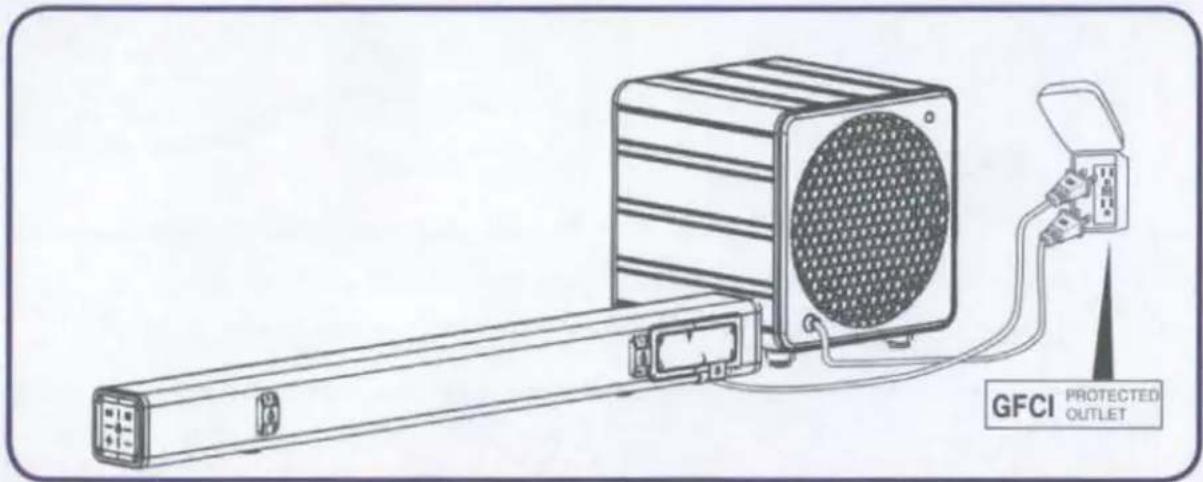
CONNECT POWER
INSTALL REMOTE CONTROL BATTERY
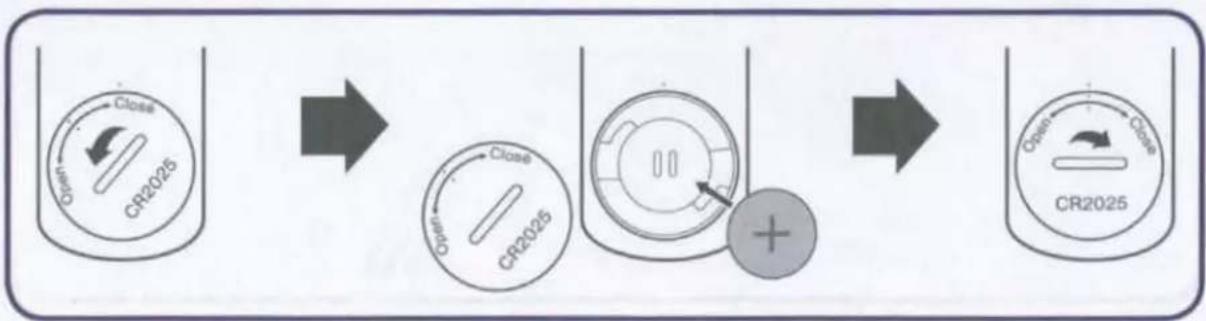
flowchart
graph LR
    A["Close\nOpen\nCR2025"] --> B["Close\nOpen\nCR2025"]
    B --> C["+"]
    C --> D["CR2025 Closed\nOpen\nClose"]
BASIC OPERATION
Soundbar Buttons

Soundbar Remote Control Operation
| Remote Control Button | Function |
 | Power on/off. |
 | Short press to switch the source mode to Bluetooth; Press and hold it for 3s to unpair and launch pairing again. (BT Name: Furrion SB 2.0/ Furrion SB 2.1) |
| Source | Select the audio source (OPT, HDMI, AUX, BLUE). |
 | Mute or un-mute the audio output. |
 | Skip to the previous track in BT mode. |
 | Start or pause playback in BT mode. |
 | Skip to the next track in BT mode. |
 | Adjust volume. |
| BASS/TREBLE▲ / ▼ | Adjust the EQ balance of treble and bass |
Tip: See the complete user manual online for detailed functional explanation.
TV Remote Control Operation
When the Soundbar is connected to the TV via HDMI, the TV remote may be used to control the soundbar. TV remotes differ based on brand and model, but general functionality is based on buttons found on most remotes.
• Power Button - Turns soundbar on/off with TV.
• Volume UP/DOWN - Adjusts the soundbar volume
- Mute - Mutes or unmutes the audio output.

natural_image
Abstract geometric pattern with three parallel gray bars on a light background (no text or symbols)FURRION
Furrion Ltd. (Furrion) is a wholly owned subsidiary of Lippert Components, Inc. (Lippert)
Furrion Innovation Center & Institute of Technology
• 22244 Innovation Drive, Elkhart, IN 46514-5514, USA
• Toll free: 1-800-789-3341
- Email: support@furrion.com
©2007-2023 Furrion Ltd. Furrion® and the Furrion logo are trademarks licensed for use by Furrion Ltd. and registered in the U.S. and other countries.
For Patent Info: www.Lippert.com/patentsFurrion.com

LIPPERT
The contents of this manual are proprietary and copyright protected by Lippert. Lippert prohibits the copying or dissemination of portions of this manual unless prior written consent from an authorized Lippert representative has been provided. Any unauthorized use shall void any applicable warranty. The information contained in this manual is subject to change without notice and at the sole discretion of Lippert. Revised editions are available for free download from lippert.com.
Please recycle all obsolete materials.
For all concerns or questions, please contact Lippert.
Ph:432-LIPPERT (432-547-7378) | Web: lippert.com | Email:customerservice@lci1.com
FURRION
130W
Furrion Aurora 2.1 Outdoor Soundbar with Wireless Subwoofer System
Product Information
Dimensions and Weight
Soundbar (FSBNN30MST):
Product Size (W x H x D)
393/8 × 311/16 × 313/16 (1000 x 93 x 97mm)
Net Weight
8.4 lbs / 3.8 kg
Subwoofer (C-FSBNN30MX-001):
Product Size (W x H x D)
117/16 × 123/8 × 111/2 (290 x 314 x 292 mm)
Net Weight
3.1 lbs / 1.4 kg
Soundbar with Subwoofer (FSBNN30MX):
Quantity Per Box
1 pc of soundbar and 1 pc of subwoofer
Packaging Dimensions (L x W x H)
433/4 × 51/2 × 55/8 (1106 × 538 × 370mm)
Gross Weight
13.2 lbs / 6.0 kg
Product Special Features
- Waterproof (IP45)
- Treble and Bass Control
- Auto Off
- Six speaker system with bass radiator for powerful sound output
• Universal design works with most TVs
Lippert # 2022323660 | FSBNN30MX
Sound Bar Top View

Subwoofer

Product Specifications
| Power Supply | AC 100-240V |
| Output Power | 70WRMS (Soundbar) + 60WRMS (Subwoofer) |
| Frequency Response | 20Hz-18kHz (Soundbar), 16Hz-256Hz (Subwoofer) |
| Signal & Noise Ratio | >80dB (Soundbar), >85dB (Subwoofer) |
| Operation temperature | -20°C (-4°F) to +45°C (+113°F) |
| Storage temperature | -33°C (-27.4°F) to +58°C (+136.4°F) |
Connections
# of 3.5mm Audio Inputs 1
# of Optical Input 1
# of HDMI inputs 1 (input); supports HDMI-CEC
Bluetooth √5.0
Accessories
Mounting brackets and waterproof remote control, HDMI cable x 1
Ver 1.3
FURRION
WARRANTY MANUAL...... ENGLISH (EN)
LIVRET DE GARANTIE...... FRANÇAIS (FR)
MANUAL DE GARANTÍA..... ESPAÑOL (ES)
FSBNN30MST

Serial NO.: 10001444206042300612
Made in China
LIMITED WARRANTY TERMS AND CONDITIONS
- Furrion warrants that this product will be free from defects in workmanship and materials for a period of 12 months with parts and labor, except the products in the following table, from date of retail purchase, by the original end-use purchaser ("you") when delivered to you in new condition, in original packaging, from a Furrion authorized reseller or dealer and used in normal conditions. If a valid claim is made under warranty, then you will only be entitled to claim in accordance with paragraph 6 below.
| Product Type | Warranty Period |
| AC/DC Power Centers | 24 months |
| Air Conditioner | 24 months |
| Arctic 12V 8 cu.ft. and 10 cu.ft. Refrigerators | 24 months |
| Aurora Outdoor Televisions | 24 months |
| eRove Portable Cooler | 24 months |
| Gas Water Heater | 24 months |
| Solar | 24 months |
| Marine Cordsets & Adapters, Power Inlets (RV, and Marine) | 60 months |
- The warranty only applies to Furrion products; with a valid serial number; used for consumer, private use and not for commercial or industrial use; and where you have validated the warranty in accordance with paragraph 4 below.
- The warranty does not cover damage or loss: caused by poor, faulty or incorrect use, installation or maintenance; caused by accident (including force majeure or natural forces), misuse, negligence, abrasion, improper storage following delivery, rot and/or infestation following delivery, leaks (or similar incidents); occurring during shipment (even when Furrion arranged or paid for shipping); caused by failure to follow instructions in the owner's guide, damaged; caused by normal wear and tear; caused by maintenance, repairs or modifications other than those carried out by an authorized dealer; caused to the decorative surface of the product; caused to any data, software or information. This warranty also excludes claims based on any misrepresentations by the seller; or if this product's serial number has been altered, defaced, removed or rendered unidentifiable. This warranty is only valid in the country of purchase. Please see section 14 for specific product details.
- To validate the warranty, you must: (a) complete the registration via www.furrion.com, or by call center; and (b) register the warranty covering this product within 6 months
of the date of the bill of sale; and (c) have the original bill of sale to validate warranty of this product.
- If you require warranty service on this product, please cease using the product when a fault arises and contact us directly. You will have to present your original bill of sale to establish warranty coverage. Furrion's customer service can be reached at: (i) For USA/Canada customers:
www.furrion.com
Email: customerservice@lci1.com
Toll-free Number: +1-432-547-7378
-
Following the filing of a claim, Furrion will investigate the claim. If we believe there is a defect covered by the warranty, we will at our option either repair or replace the defective product (or part). It is Furrion's right to replace with new or refurbished product. If the product is part of an advanced exchange program, you may be required to provide a credit authorization during the claiming process.
-
Please note in the event that no defect can be found, it is your responsibility to pay for the re-delivery of the replacement items. If a defect is found, Furrion will pay for the re-delivery of the replacement items.
-
Installation of any repaired or replaced product will not be Furrion's responsibility.
-
If you do not allow the authorized dealer to inspect the product which is the subject of the warranty claim, you will invalidate the warranty in respect of that claim.
-
Any repaired Furrion product parts shall be guaranteed on the terms of this warranty for the unexpired portion of the warranty period only.
-
This warranty is subject to the jurisdiction of the courts of the State where you purchased this product, and any dispute or claim arising out of, or in connection with it or its subject matter, shall be governed by, and construed in accordance with the laws of that State.
-
In the event of any difference between this warranty and the provisions in any owner's manuals, warranty manuals, or packaging cartons, the terms of this warranty shall prevail to the fullest extent allowed by law.
-
THIS WARRANTY AND REMEDIES SET FORTH ABOVE ARE EXCLUSIVE AND IN LIEU OF ALL OTHER WARRANTIES, REMEDIES AND CONDITIONS, WHETHER ORAL OR WRITTEN, EXPRESS OR IMPLIED. FURRION SPECIFICALLY DISCLAIMS ANY AND ALL IMPLIED WARRANTIES, INCLUDING, WITHOUT LIMITATION, WARRANTIES OF MERCHANTABILITY AND FITNESS FOR A PARTICULAR PURPOSE. IF FURRION CANNOT LAWFULLY DISCLAIM IMPLIED WARRANTIES UNDER THIS LIMITED WARRANTY, ALL SUCH WARRANTIES, INCLUDING WARRANTIES OF MERCHANTABILITY AND FITNESS FOR A PARTICULAR PURPOSE ARE LIMITED IN DURATION TO THE DURATION OF THIS WARRANTY. NO FURRION RESELLER, AGENT, OR EMPLOYEE IS AUTHORIZED TO MAKE ANY MODIFICATION, EXTENSION, OR ADDITION TO THIS WARRANTY. FURRION IS NOT RESPONSIBLE FOR DIRECT, INDIRECT, SPECIAL, INCIDENTAL OR CONSEQUENTIAL DAMAGES RESULTING FROM ANY BREACH OF WARRANTY OR CONDITION, OR UNDER ANY OTHER LEGAL THEORY, INCLUDING BUT NOT LIMITED TO LOST PROFITS, DOWNTIME, GOODWILL, DAMAGE TO OR REPLACEMENT OF ANY EQUIPMENT OR PROPERTY, ANY COSTS OF RECOVERING, REPROGRAMMING, OR REPRODUCING ANY PROGRAM OR DATA STORED IN OR USED WITH FURRION PRODUCTS. FURRION'S TOTAL LIABILITY IS LIMITED TO THE REPAIR OR REPLACEMENT OF THIS PRODUCT PURSUANT
TO THE TERMS OF THIS WARRANTY. SOME STATES DO NOT ALLOW THE EXCLUSION OR LIMITATION OF INCIDENTAL OR CONSEQUENTIAL DAMAGES OR EXCLUSIONS OR LIMITATIONS ON THE DURATION OF IMPLIED WARRANTIES OR CONDITIONS, SO THE ABOVE LIMITATIONS OR EXCLUSIONS MAY NOT APPLY TO YOU. THIS WARRANTY GIVES YOU SPECIFIC LEGAL RIGHTS, AND YOU MAY ALSO HAVE OTHER RIGHTS THAT VARY BY STATE OR (WHERE APPLICABLE IN THE COUNTRIES WHERE FURRION HAS NON-US/CANADIAN AUTHORIZED DEALERS) COUNTRY. NO ACTION OR CLAIM TO ENFORCE THIS WARRANTY SHALL BE COMMENCED AFTER THE EXPIRATION OF THE WARRANTY PERIOD.

natural_image
Abstract geometric pattern with three parallel gray shapes on white background (no text or symbols)FURRION
Important Safety Instructions
natural_image
Warning symbol: black triangle with white exclamation mark (no text or numbers)Important Safety Instructions
>>>
EN

CAUTION
RISK OF ELECTRIC SHOCK DO NOT OPEN

CAUTION: TO REDUCE THE RISK OF ELECTRIC SHOCK, DO NOT REMOVE COVER (OR BACK). NO USER-SERVICEABLE PARTS INSIDE. REFER SERVICING TO QUALIFIED SERVICE PERSONNEL.

This 'bolt of lightning' indicates uninsulated material within your unit may cause an electrical shock. For the safety of everyone in your household, please do not remove product covering.

The 'exclamation mark' calls attention to features for which you should read the enclosed literature closely to prevent operating and maintenance problems.
SAFETY PRECAUTION
- Read these instructions.
- Keep these instructions.
- Heed all warnings.
- Follow all instructions.
- Do not install near any heat sources such as radiators, heat registers, stoves or other devices (including amplifiers) that produce heat.
- Only use attachments/accessories specified by the manufacturer.
- Refer all servicing to qualified service personnel. Servicing is required when the device has been damaged in any way, such as if objects have fallen into the device, or the device does not operate normally, or has been dropped.
- Do not defeat the safety purpose of the polarized or grounding type plug. A polarized plug has two blades with one wider than the other. A grounding type plug has two blades and a third grounding prong. The wide blade or the third prong are provided for your safety. If the provided plug does not fit into your outlet, consult an electrician for replacement of the obsolete outlet.
- The power cord must be routed properly to prevent people from stepping on it, or objects from resting on it. Check the cords at the plugs and product. Try to use a single, directly dedicated and rated GFI power socket for the product for safe operation.
-
Use properly rated power voltage. Use of non-rated voltage may cause fire, electric shock and severe damages to the product.
-
Do not touch power plugs with wet hands.
- Do not disassemble the unit by yourself under any circumstances: Removal of the product cover may expose you to high voltage or other dangerous risks. Refer all servicing to a qualified service professional. Warranty will not be honored if you service the product yourself.
- Do not touch this apparatus, antenna, power cables or power plugs during a thunder or lightning storm.
- With your product unplugged, gently wipe the surface of the product with a damp (with water) microfiber, cotton or flannel cloth. Remove any dirt and salt deposits from the product, being careful to rinse the cloth frequently to avoid scratching the soundbar. Avoid using harsh chemicals, abrasives, or solvents when cleaning any surface on the unit.
- Any severe physical impact on the product may cause certain components to fall out of place within and break, which may cause fire or electric shock. In such event, do not operate the product. Contact the manufacturer for support.
- In case of product malfunction or unusual events such as electrical burning smell, smoke, or loss of content signals on soundbar due to internal overheating, immediately turn off and unplug the power and contact the manufacturer.
- Adequate ventilation must be maintained to ensure reliable and continued operation and to protect the product from overheating.
- Do not mount this product near a motor or transformer where strong magnetism is generated.
- Do not place the product on an unstable place. Improper installation may cause the product to fall, resulting in potential serious personal injuries, as well as damage to the product. Follow mounting instructions properly for safe operation of the product.
- Do not move or transport the product with any cables (power cables, content connectivity cables) plugged in to the source devices. Damages may occur to the cables, plugs, or jointing connectors of the cables due to forcible bending and stress, which may cause damages to the waterproof seal of the product, making it subject to fire, electric shock, or shorted circuit.
- Do not submerge this product in water or pressure wash it. This outdoor soundbar will resist water exposure from normal rain, sprinklers, garden hoses, etc. However, it won't allow ingress of water to the electrical components, doing so may cause damage to the drivers and void the warranty.
- If the temperature below -20irc C is expected, we recommend that you bring your product inside to prevent damage to the product.
Important Safety Instructions

EN
COMPLIANCE
FCC Statement
This device complies with part 15 of the FCC Rules. Operation is subject to the following two conditions: (1) this device may not cause harmful interference, and (2) this device must accept any interference received, including interference that may cause undesired operation.
Changes or modifications to this unit not expressly approved by the party responsible for compliance could void the user's authority to operate this equipment under FCC Rules. Note: This equipment has been tested and found to comply with the limits for a Class B digital device, pursuant to Part 15 of the FCC Rules. These limits are designed to provide reasonable protection against harmful interference in a residential installation. This equipment generates, uses and can radiate radio frequency energy and, if not installed and used in accordance with the instructions, may cause harmful interference to radio communications.
However, there is no guarantee that interference will not occur in a particular installation. If this equipment does cause harmful interference to radio or television reception, which can be determined by turning the equipment off and on, the user is encouraged to try to correct the interference by one or more of the following measures:
• Reorient or relocate the receiving antenna.
- Increase the separation between the equipment and receiver.
- Connect the equipment into an outlet on a circuit different from that to which the receiver is connected.
- Consult the dealer or an experienced radio/TV technician for help.
IC Statement
This device complies with Industry Canada licence-exempt RSS standard(s). Operation is subject to the following two conditions: (1) this device may not cause interference, and (2) this device must accept any interference, including interference that may cause undesired operation of the device.
IMPORTANT BATTERY PRECAUTIONS
CAUTION: Danger of explosion if batteries are incorrectly replaced. Replace only with the same or equivalent type. The batteries shall not be exposed to excessive heat such as sunshine, fire or the like.
WARNING:
• This device contains a button cell battery on the remote control.
- Do not ingest the battery contained within the remote control supplied with the unit as this battery represents a chemical burn hazard.
- If the coin/button cell battery is swallowed, it can cause severe internal burns in just 2 hours and can lead to death. If you think batteries might have been swallowed or placed inside any part of the body, seek immediate medical attention.
- Keep new and used batteries away from children. If the battery compartment does not close securely, stop using the product and keep it away from children.
CARE OF THE ENVIRONMENT
Disposal of your old product and battery

Your product is designed and manufactured with high quality materials and components, which can be recycled and reused.
- Never dispose of your product with other household waste. Please familiarize yourself with the local rules on the separate collection of electrical and electronic products and batteries.
- The correct disposal of these products helps prevent potentially negative consequences on the environment and human health.
- Your product contains batteries which cannot be disposed of with normal household waste. The battery must be recycled or disposed of properly. Contact your local waste management office for information on battery recycling or disposal.
All registered and unregistered trademarks are property of their respective owners.
CAUTION: Changes or modifications not expressly approved by the party responsible for compliance could void the user's authority to operate the equipment.
FOR ALL PRODUCTS WITH WIRELESS OPERATION
FURRION hereby declares that this equipment is in compliance with the essential requirement and other relevant provision of Directive 2014/53/EU and RoHS 2011/65/EU Directive. The declaration of conformity may be consulted in the support section of our Website, accessible from www.furrion.com.

natural_image
Abstract geometric pattern with three horizontal gray bars and a curved line (no text or symbols)

- 130W Aurora 2.1 Outdoor Sound System
- WHAT'S IN THE BOX
- 8-3/8"×4 pcs
- 10-38×2pcs
- CONNECT
- Connect Soundbar with TV and Subwoofer
- Connect Soundbar with other devices
- INSTALL
- BASIC OPERATION
- Soundbar Buttons
- Soundbar Remote Control Operation
- TV Remote Control Operation
- FURRION
- Furrion Innovation Center & Institute of Technology
- LIPPERT
- 130W
- Furrion Aurora 2.1 Outdoor Soundbar with Wireless Subwoofer System
- Product Information
- Product Special Features
- Product Specifications
- Connections
- Accessories
- LIMITED WARRANTY TERMS AND CONDITIONS
- Important Safety Instructions
- >>>
- EN
- CAUTION
- SAFETY PRECAUTION
- COMPLIANCE
- FCC Statement
- IC Statement
- IMPORTANT BATTERY PRECAUTIONS
- WARNING:
- CARE OF THE ENVIRONMENT
- Disposal of your old product and battery
- FOR ALL PRODUCTS WITH WIRELESS OPERATION
Brand : Furrion
Model : FSBNN30MX
Category : Soundbar