
MW-21 - Mouse Canyon - Free user manual and instructions
Find the device manual for free MW-21 Canyon in PDF.


| Type | Wireless Optical Mouse |
| Model | MW-21 |
| Brand | Canyon |
| Connectivity | 2.4 GHz Wireless via USB Nano Receiver |
| Number of Buttons | 3 (Left, Right, Middle/Scroll) |
| Scroll Wheel | Yes, clickable |
| Resolution / DPI | 800 / 1200 / 1600 DPI (selectable) |
| Sensor Type | Optical |
| Dimensions (approx.) | 100 x 60 x 35 mm |
| Weight (without batteries) | 55 g |
| Power Source | 1 x AA battery (not included) |
| Battery Life | Up to 12 months (depending on usage) |
| Range | Up to 10 m |
| Compatible Operating Systems | Windows 7/8/10/11, macOS, Linux |
| Cable Type (Receiver) | USB-A, cable length approx. 15 cm |
| Color | Black / Gray |
| Material | Plastic (ABS) |
| Maintenance & Cleaning | Wipe with a dry cloth; use compressed air for sensor |
| Safety | Low voltage; no risk of electric shock |
Frequently Asked Questions - MW-21 Canyon
User questions about MW-21 Canyon
0 question about this device. Answer the ones you know or ask your own.
Ask a new question about this device
Download the instructions for your Mouse in PDF format for free! Find your manual MW-21 - Canyon and take your electronic device back in hand. On this page are published all the documents necessary for the use of your device. MW-21 by Canyon.
USER MANUAL MW-21 Canyon
natural_image
Colorful pixelated grid pattern with no text or symbolsWireless optical mouse
MW-21
Quick Guide v 1.0
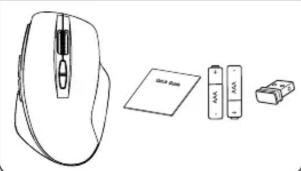
Package
natural_image
Line drawing of a computer mouse with a separate card and connector (no text or symbols)Inserting the Nano Receiver


Connection: wireless, 2.4 GHz
Number of buttons: 7
Min. / Max. Resolution
800/1200/1600 DPI
Superior optical sensor "Blue
LED
The energy saving technology
with deep sleep mode
User manual. Wireless optical mouse
Package contents: Connection
| Wireless optical mouseUSB receiverUser manualBatteries 2 pcs, AAA type | Connect USB receiver to computer, namely free USB port. |
Disposal: Deposit used electronic devices, batteries and
packaging materials to the special collection facilities.
BG
Характеристики:
Read carefully and follow all instructions before using this product.
-
Do not expose the mouse to excessive moisture, water or dust. Do not install in rooms with high humidity and dust level.
-
Do not expose the mouse to heat: do not place it close to heating appliances, and do not expose it to direct sun rays.
-
The product shall be connected to the power supply source of the type indicated in the operation manual only.
- Close the device with dry cloth only
Warning
1) It is forbidden to dismantle the device. Attempt to repair this device is not recommended and leads to warranty waste.
2) For optimum performance the device with batteries shall be kept at the temperature 15 to 25^ . Too high / low temperature leads to reduction in capacity and service life of the battery. Excessive heating/cooling may cause temporary non-operability of the device.
3) Do not destroy batteries by burning, they may explode.
| Problem Solution | |
| Mouse does not work | 1. Absence of signal from the transmitter installed in the USB port of the computer. Check the receiver, connecting it to another USB port.1.1. Remove the device from the system and install it again. |
Manufacturer: Asbisc Enterprises PLC, 43, Kolonakiou Street, Diamond Court 4103 Ayios Athanasios http://canyon.eu
If the above actions don't help, please contact Canyon support team: http://canyon.eu/ask-your-question/
The warranty period starts from the day of the product purchase from Canyon authorized Seller. The date of purchase is the date specified on your sales receipt or on the waybill. During the warranty period, repair, replacement or refund for the purchase shall be performed at the discretion of Canyon. In order to obtain warranty service, the goods must be returned to the Seller at the place of purchase together with proof of purchase (receipt or bill of landing). 2 years warranty from the date of purchase by the consumer. The service life is 2 years. Additional information about the use and warranty is available at https://canyon.eu/warranty-terms/
ГАРАНЦИЯ
canyon.eu/ask-your-question/
http://canyon.eu/ask-your-question/
Riešenie problémov
| Problém Riesenie | |
| Myš nefunguje. | 1. Chýba signál z vysielača pripojeného do USB portu počítača. Skontrolujte prijímač. Pripojte ho do iného USB portu.1.1. Zariadenie odstráňte zo systému a znova ho nainštalujte. |
Výrobca: ASBISc Enterprises PLC, 43 Kolonakiou street, Diamond
Court. 4103. Avios Athanasios. Limassol. Cyprus. http://canyon.eu
A1: 4,000.000.000.000.000.000.000.000.000.000.000.000.
The following table is in English:
KEPIIIDIK
The following table provides the information in a tabular format:

Brand : Canyon
Model : MW-21
Category : Mouse