
Puncher GM-20 - Mouse Canyon - Free user manual and instructions
Find the device manual for free Puncher GM-20 Canyon in PDF.


| Product Type | Gaming Mouse |
| Model | Canyon Puncher GM-20 |
| Weight | 65 g (ultralight) |
| Dimensions (L x W x H) | 126 mm x 67.5 mm x 39.5 mm |
| Sensor | Pixart PAW3360 optical sensor |
| Maximum DPI | 12000 DPI |
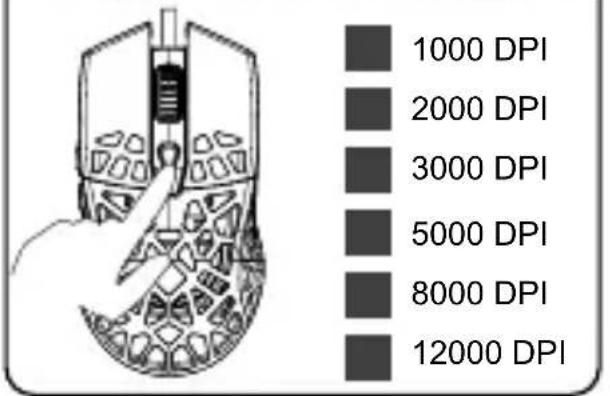
| Default DPI Levels | 6 (1000, 2000, 3000, 5000, 8000, 12000) |
| Programmable Buttons | 7 |
| Polling Rate | 125 / 250 / 500 / 1000 Hz |
| Feet Material | PTFE (smooth glide) |
| Cable Length and Type | 1.65 m USB ultraweave cable with ferrite ring |
| Button Lifespan | 10 million clicks |
| Backlight | Enhanced RGB with 10 modes of effects |
| Scanning Frequency | 12000 FPS |
| Maximum Acceleration | 50 G |
| Maximum Moving Speed | 250 ips |
| Software Support | Yes (additional software for settings and macro functions) |
| Onboard Memory | Yes (stores settings) |
| Operating System Compatibility | Windows and Mac OS |
| Design | Unique perforated, ergonomic |
| Package Contents | Mouse, user manual |
| Warranty | 24 months limited warranty |
| Driver Download | http://canyon.eu/drivers-and-manuals/ |
Frequently Asked Questions - Puncher GM-20 Canyon
User questions about Puncher GM-20 Canyon
0 question about this device. Answer the ones you know or ask your own.
Ask a new question about this device
Download the instructions for your Mouse in PDF format for free! Find your manual Puncher GM-20 - Canyon and take your electronic device back in hand. On this page are published all the documents necessary for the use of your device. Puncher GM-20 by Canyon.
USER MANUAL Puncher GM-20 Canyon
Congratulations for purchasing high quality CANYON product.
We are happy to present you our gaming accessories, which are the combination of new technology and fresh design.
Our own design bureau implements the latest trends in the technical design of gaming products, while our scrupulous quality control system ensures a long lifetime of CANYON products. To take full advantage of this product, we recommend that you read this manual completely.
www.gaming.canyon.eu

natural_image
Orange V-shaped arrow symbol on white background (no text or symbols)Package contents Conne

i

Available DPI settings
Compatibility

Physical characteristics


Driver
http://canyon.eu/drivers-and-manuals/
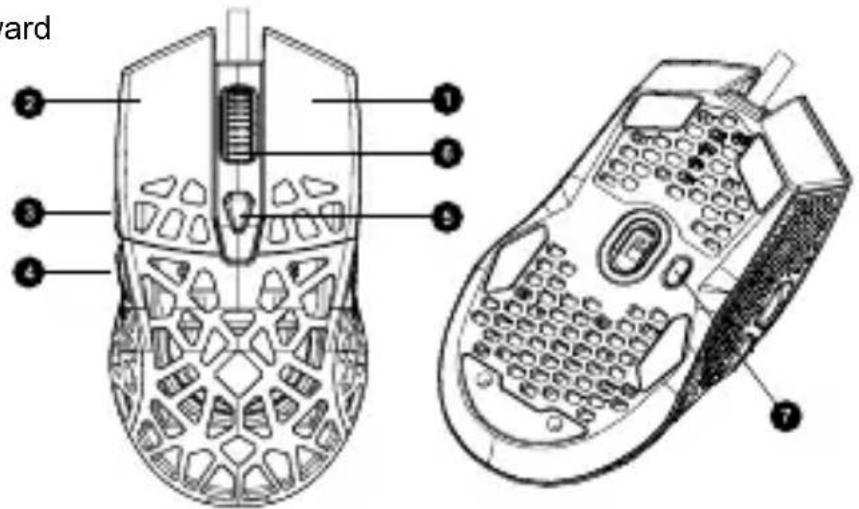
The functional buttons
-
Right key
-
DPI
-
Left key
-
Middle button & wheel
-
Forward
-
LED
-
Backward
Technical specifications
- Unique perforated design
- Ultralight - 65g
• High-quality Pixart PAW3360 Sensor - Max DPI 12000
- 6 levels of DPI as default (1000-2000-3000-5000-8000-12000)
- Ergonomic design
- PTFE feet
- 7 programmable buttons
- Polling rate:125/250/500/1000Hz
-
USB ultraweave cable 1.65 m with a ferrite ring
-
Button lifespan: 10 million clicks
- Enhanced RGB system of backlight
• 10 modes of backlight effects - Scanning frequency: 12000 FPS
• Max Acceleration - 50G
• Max Moving speed: 250 ips - Additional software to setup the settings
- Macro functions
- Onboard memory to storage your settings
Support and warranty
To avoid conflict, please uninstall other mouse drivers before installing the driver for this mouse.
Do not disassemble your product, or expose it to liquid, humidity, moisture or temperatures out of the specified operating range.
If your product is exposed to out-of-range temperatures, unplug it and wait until its temperature returns to the normal operating range.
This product comes with 24 months limited warranty.
For more information about usage and warranty, please refer to http://canyon.eu/ask-your-question/
Date of manufacture: (see at the package). Made in China.

Techniniai duomenys
- Desni taster
- Levi taster
- Napred
-
Nazad
-
DPI
- Srednji taster
- LED

Tehnička specifikacija:
• „Jedinstveni perforirani dizajn
- Ultralaki - 65g
- Visokokvalitetni senzor Pixart PAW3360
- Max DPI 12000
- 6 predefinisanih nivoa DPI (1000-2000-3000-5000-8000-12000)
- Ergonomski dizajn
- PTFE stope
- 7 tastera za programiranje
- Frenkvencija komunikacije sa računarom: 125/250/500 / 1000Hz
- USB pleteni kabl 1,65 m sa feritnim prstenom
- Životni vek tastera: 10 miliona klikova
- Poboljšani RGB sistem poza-
dinskog osvetljenja
• 10 efekata pozadinskog osvjetljenja
• Učestalost skeniranja: 12000 FPS
• Maksimalno ubrzanje - 50G - Maksimalna brzina kretanja: 250 ips
- Dodatni softver za podešavanje postavki
- Makro funkcije
- Ugrađena memorija za čuvanje postavki "
Podrška i garancija
» Pre instalacija drajvera za ovaj miš obrišite ranije instalirane drajvere koje su koristili
» Nemojte rastavljati naš proizvod, izlagati tečostima, vlazi ili temperaturama koje su drugačije od radnog opsega.
Ako je prouzvod izložen temperaturi van radnog opsega isključite ga i sačekajte da se temperatura vrati u normalan temperaturni opseg.
Ovaj proizvod ima garanciju 24 meseca. Za više informacija oko korišenja i garancije možete se informisati na: http://canyon.eu/ask-your-question/
Datum proizvodnje (vidi na pakovanju). Zemlja porekla: Kina
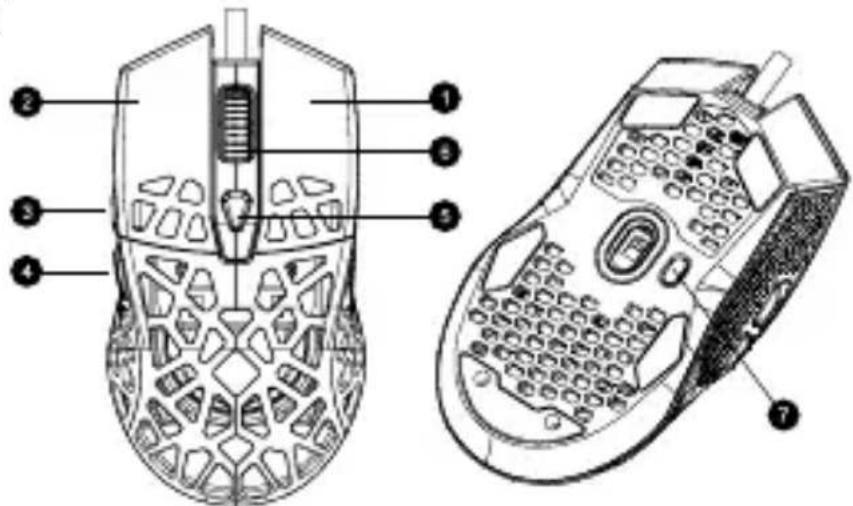
Funkcijski gumbi
- Desni gumb
- Levi gumb
- Naprej
-
Nazaj
-
DPI
- Srednji gumb in kolešček
- LED
Tehnična specifikacija
• "Edinstvena perforirana oblika
- Ultralahka - 65g
- Kakovosten senzor Pixart PAW3360
- Max DPI 12000
- privzeto 6 ravni DPI (1000-2000-3000-5000-8000-12000)
• Ergonomska zasnova
- PTFE noge
• 7 nastavljivih gumbov
- Stopnja ankete: 125/250/500 / 1000Hz
- USB ultraweave kabel 1,65 m s feritnim obročem
- Življenjska doba gumba: 10 milijonov klikov

Brand : Canyon
Model : Puncher GM-20
Category : Mouse