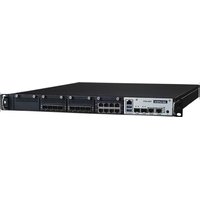
FWA-5070 - Network Equipment Advantech - Free user manual and instructions
Find the device manual for free FWA-5070 Advantech in PDF.


Pick your language and provide your email: we'll send you a specifically translated version.
| Product Type | Network Appliance / Firewall Appliance |
| Form Factor | 1U Rackmount |
| Dimensions (H x W x D) | 44.4 mm x 430 mm x 400 mm |
| Weight | Approximately 7 kg |
| Power Supply | AC 100-240V, 250W, 50/60Hz |
| Main Functions | Firewall, VPN, Routing, Intrusion Prevention, Content Filtering |
| Network Interfaces | 6 x Gigabit Ethernet, 2 x 10GbE SFP+ |
| Storage | 2 x M.2 SSD slots, 1 x 2.5" SATA bay |
| Memory | 8 GB/16 GB DDR4 (expandable) |
| Processor | Intel Celeron/Pentium/Core (varies by configuration) |
| Operating Temperature | 0°C to 40°C |
| Humidity | 10% to 90% non-condensing |
| Cooling | 2 x built-in fans |
| Mounting | Rackmount ears included |
| LED Indicators | Power, Status, LAN, Disk |
| Console Port | RJ45 serial console |
| USB Ports | 2 x USB 3.0 |
| Cleaning | Dust with a soft, dry cloth; avoid liquids |
| Safety | Follow local electrical codes; use grounded outlet |
| Spare Parts & Repairability | Contact Advantech support for replacement parts |
| General Information | Designed for network security applications; supports multiple OS (pfSense, Untangle, etc.) |
Frequently Asked Questions - FWA-5070 Advantech
How do I set up the FWA-5070 for the first time?
Connect the power cord and network cables to your LAN and WAN ports. Then connect a monitor and keyboard to the console port or use SSH. Power on the device and follow the on-screen setup wizard or install your preferred firewall OS.
What operating systems are supported on the FWA-5070?
The FWA-5070 supports various x86-based operating systems including pfSense, OPNsense, Untangle, Sophos XG, and standard Linux distributions. Check compatibility with your specific hardware configuration.
How many network ports does the FWA-5070 have?
It features six Gigabit Ethernet ports (RJ45) and two 10 Gigabit SFP+ ports, providing high-speed connectivity for demanding network environments.
Can I upgrade the RAM or storage on the FWA-5070?
Yes, the device has two SO-DIMM slots for DDR4 RAM (typically supports up to 32 GB) and storage options including two M.2 SSD slots and one 2.5-inch SATA bay for easy upgrades.
What are the dimensions of the FWA-5070?
It is a standard 1U rackmount appliance with dimensions of approximately 44.4 mm (H) x 430 mm (W) x 400 mm (D). Weight is around 7 kg.
How do I reset the FWA-5070 to factory defaults?
Look for a reset button or jumper on the motherboard. For most models, you can press and hold the reset button during power-on for 10 seconds, or use a console command if the OS allows.
Is the FWA-5070 fan noisy?
The device includes two fans that are controlled by temperature. Under normal load, they run at moderate speed and are reasonably quiet (around 35-40 dB). In high traffic or high temperature, fan speed increases.
What power supply does the FWA-5070 require?
It uses an internal AC power supply rated for 100-240V, 50/60Hz, with a maximum power consumption of about 250W. Use a grounded outlet to ensure safety.
Can I mount the FWA-5070 in a rack?
Yes, it comes with rackmount ears for mounting in a standard 19-inch rack. Ensure proper ventilation and secure fastening.
Where can I find the latest firmware or drivers?
Visit the official Advantech support website and search for FWA-5070. You may also contact your OS provider for software updates. Drivers for network chips (Intel i210/i350, etc.) are available from Intel.
User questions about FWA-5070 Advantech
0 question about this device. Answer the ones you know or ask your own.
Ask a new question about this device
No questions yet. Be the first to ask one.
Download the instructions for your Network Equipment in PDF format for free! Find your manual FWA-5070 - Advantech and take your electronic device back in hand. On this page are published all the documents necessary for the use of your device. FWA-5070 by Advantech.
USER MANUAL FWA-5070 Advantech


Manual assistant
Powered by Anthropic
Waiting for your message
Product information
Brand : Advantech
Model : FWA-5070
Category : Network Equipment