
SQ MADI - Hand blender ALLEN & HEATH - Free user manual and instructions
Find the device manual for free SQ MADI ALLEN & HEATH in PDF.


| Product Type | MADI Audio Interface Card for SQ Mixers |
| Compatible Mixers | Allen & Heath SQ Series (requires SQ Firmware V1.5.2 or later) |
| MADI Channels | 64x64 at 48 kHz; 32x32 at 96 kHz per link |
| Sample Rates | 48 kHz, 96 kHz |
| Connectors | 2 x BNC (75 ohm coaxial) for MADI, 1 x BNC for Word Clock I/O |
| Cable Length | Up to 150 meters (75 ohm coaxial) |
| Redundancy Support | Yes, Link 2 can be configured as redundant or second MADI port |
| Word Clock | Configurable as input or output; LED indicates mode |
| LED Indicators | Lnk/Err: yellow flash for activity, red for errors |
| Synchronization | Selectable internal, I/O Port, or Word clock |
| Installation | Slot-in card; secured with 2 Torx T8 screws; power off before installation |
| Form Factor | I/O Port blank panel replacement |
| Warranty | Limited 1 year manufacturer's warranty |
| Compliance | EU EMC Directive 2014/30/EU, Low Voltage Directive 2014/35/EU |
| Manufacturer | Allen & Heath Limited, Penryn, Cornwall, UK |
Frequently Asked Questions - SQ MADI ALLEN & HEATH
User questions about SQ MADI ALLEN & HEATH
0 question about this device. Answer the ones you know or ask your own.
Ask a new question about this device
Download the instructions for your Hand blender in PDF format for free! Find your manual SQ MADI - ALLEN & HEATH and take your electronic device back in hand. On this page are published all the documents necessary for the use of your device. SQ MADI by ALLEN & HEATH.
USER MANUAL SQ MADI ALLEN & HEATH
M-SQ-MADI-A is one of several audio networking options that can be fitted to an Allen & Heath SQ mixer. It provides 64x64ch of 48/96kHz AES MADI (AES10) over coaxial BNC.
SQ MADI requires SQ Firmware V1.5.2 or later.
To avoid damage to the BNC sockets, plug and unplug any cable with care and make sure the cables are terminated with standard BNC connectors (IEC 60169-8).
Fitting the card
- Switch the system off.
- Use a Torx T8 driver to remove the 2 screws securing the I/O Port blank panel to the SQ mixer.
- Slide the card into the slot and press it firmly into the mating connector.
- Refit the 2 screws to secure the card.
Front panel
Link 1
BNC connectors for 75ohm coaxial cables up to 150m. It gives access to: Input 1-64, output 1-64 @48kHz Input 1-32, output 1-32 @96kHz
Link 2
Can be configured as a Link 1 redundant connection or as a second MADI port. With Redundancy off, it gives access to:
Output 1-64 @48kHz.
Input 33-64 and output 33-64 @96kHz.
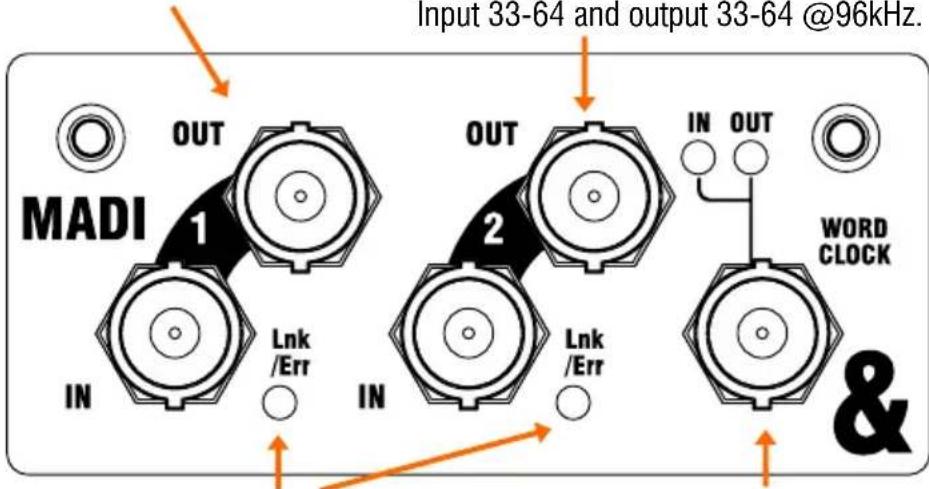
Lnk/Err flashes yellow to indicate network activity. Illuminates red when a connection or data error is detected.
Word clock Configurable as Word clock input or output. The LED indicates current mode.
Card setup and patching signals
Synchronising the SQ to a MADI clock source is a two-step process:
- Select the clock source for the mixer in the Setup / Audio / Audio Sync screen. Typically, this is set to internal, but select I/O Port to sync to the fitted option card.
- Select the clock source for the MADI card in the Setup / Audio / I/O Port screen. Either the wordclock input or a link input can be chosen.
Use the Setup / Audio / I/O Port screen to set the sample rate, sync source and redundancy mode for the MADI card.
Use the SQ I/O screen to patch signals to or from the I/O Port.
For more information on SQ setup and functions please refer to the latest SQ Firmware Reference Guide available for download from www.allen-heath.com.
A limited one year manufacturer's warranty applies to this product, the conditions of which can be found at: www.allen-heath.com/legal.

This product complies with the European Electromagnetic Compatibility directive 2014/30/EU and the European Low Voltage directive 2014/35/EU.
Copyright © 2020 Allen & Heath. All rights reserved.
ALLEN&HEATH
Allen & Heath Limited, Kernick Industrial Estate, Penryn, Cornwall, TR10 9LU, UK
http://www.allen-heath.com
Brand : ALLEN & HEATH
Model : SQ MADI
Category : Hand blender