
GMT980 - Beard trimmer Conair - Free user manual and instructions
Find the device manual for free GMT980 Conair in PDF.


| Product Type | Beard Trimmer |
| Brand | Conair |
| Model | GMT980 |
| Power Source | Rechargeable Li-ion Battery |
| Battery Voltage | 3.7V |
| Charging Time | 8 hours |
| Usage Time (Cordless) | 60 minutes |
| Adjustable Length Settings | 10 settings (1mm – 10mm) |
| Blade Material | Stainless Steel |
| Waterproof | Yes, shower safe (IPX7) |
| Weight | Approx. 150 g |
| Dimensions (H x W x D) | 180 x 40 x 30 mm |
| Motor Type | Rotary |
| Travel Lock | Yes |
| Low Battery Indicator | Yes (LED) |
| Cleaning | Rinse under running water |
| Included Accessories | Cleaning brush, oil, 2 guide combs |
| Warranty | 2 years |
Frequently Asked Questions - GMT980 Conair
User questions about GMT980 Conair
0 question about this device. Answer the ones you know or ask your own.
Ask a new question about this device
Download the instructions for your Beard trimmer in PDF format for free! Find your manual GMT980 - Conair and take your electronic device back in hand. On this page are published all the documents necessary for the use of your device. GMT980 by Conair.
USER MANUAL GMT980 Conair
IMPORTANT SAFETY INSTRUCTIONS
When using electrical appliances, especially when children are present, take basic safety precautions, including the following:
READ ALL INSTRUCTIONS BEFORE USING
KEEP AWAY FROM WATER
R HOUSEH USE ONLY
DANGER – Any appliance is electrically live, even when the switch is off
electrically live, even when the switch is on. To reduce the risk of death or injury by electric shock:
-
Unplug this appliance from electrical outlet immediately after using (except when charging unit).
-
Do not place or store appliance where it can fall or be pulled into a tub or sink.
-
Do not use while bathing or in the shower.
-
Do not place in, or drop into water or other liquids.
-
If appliance has fallen into water, do not reach for it. Unplug immediately.
DO NOT REACH NTO THE WATER
WARNING
WITHING TO reduce the risk of burns, electric shock, fire, or injury to persons: 1. Never leave a plugged-in appliance
unattended. 2. Use close supervision when the appli
-
Use close supervision which the appliance is used by, on or near children or individuals with certain disabilities.
-
Use this appliance only for its intended purpose as described in this manual. Do not
use attachments not recommended by the manufacturer. Do not use an extension cord to operate this appliance.
- Keep the cord away from heated surfaces.
-
Do not pull, twist or wrap the cord around
-
Never drop or insert any object into any opening on the appliance.
-
Do not use this appliance with a damaged or broken comb or with teeth missing from the
blades, as injury may occur. Before use, make certain blades are aligned properly and oiled. 8. Do not use outdoors or operate where
aerosol (spray) products are being used or where oxygen is being administered.
- Never operate the appliance with the air openings blocked or while on a soft surface, such as a bed or couch, where the air openings may be blocked. Keep the air openings free of
Int, hair, and other debris. 10. Always attach plug to appliance first, then
to outlet. To disconnect, turn all controls to OFF, then remove plug from outlet.
-
Avoid letting skin come into direct contact with moving blades.
-
Do not short the polarity (output cord); ensure that jack is plugged into the unit before
plugging the adapter into outlet.
- This power unit is intended to be correctly oriented in vertical floor mount position.
-
This appliance is not a toy. Keep away
-
This appliance is not a toy. Keep away from children.
-
For connection to a power supply not in the U.S.A., use an attachment plug adapter of the proper configuration for the power outlet.
FEDERAL COMMUNICATIONS
COMMISSION NOTICE
WARNING:
to this unit not expressly approved by the party responsible for compliance could void the user's authority to operate the equipment.
NOTE: This equipment has been tested and found to comply with the limits for a Class B digital device,
pursuant to Part 15 of the FCC Rules. These limits are designed to provide reasonable protection against harmful interference in a residential installation. This
equipment generates, uses and can radiate radio frequency energy and, if not installed and used in accordance with the instructions, may cause harmful interference to radio communications. However, there
is no guarantee that interference will not occur in a particular installation. If this equipment does cause
harmful interference to radio or television reception, which can be determined by turning the equipment off and on, the user is encouraged to try to correct the interference by one or more of the following
measures: - Reorient or relocate the receiving antenna.
- Increase the separation between the equipment and receiver.
- Connect the equipment into an outlet on a circuit different from that to which the receiv
connected.
- Consult the dealer or an experienced radio/TV technician for help
SUPPLIER'S DECLARATION OF CONFORMITY
Brand: Conairman Model No. + GMT080
Model No.: GM1500 Description: Trimmer
Responsible Party: Conair LLC, 1 Cummings Point Road,
Stamford, CT 06902 (203) 351-9000
Standard: PCC Part 15 Subpart B, ANSI C63.4-2014 This device consists with Part 15 of the 500
This device complies with Part 15 of the FCC Rules. Operation is subject to the following two conditions:
(1) This device may not cause harmful interference, and (2) This device must accept any interference received, including interference that
interiorhise reserved, including intercourse that may cause undesirable operation. DATE OF ISSUE: 09/17/2021
SAVE THESE NSTRUCTIONS OPERATING
INSTRUCTIONS USER MANUAL
USER MANUAL ing the Class 2 Days
Before using the Class 2 Power Supply, read these instructions carefully.
Use with adapter Dc11 Rated input voltage:
100-240V AC, 50/60Hz 0.2A Max Rated output: 3.6V DC 1000mA
rated output: 3.0V DC 1000mA
CAUTION: Dry location use only. Do not expose
to liquids, vapor or rain. Do not operate any appliance that has a damaged output cord or housing. Be sure voltage is correct before
plugging in. Maintain your look every day with the next
The Close Trim Precision Trimmer has 15 ultra-
precise length settings, so you can maintain your preferred facial hairstyle at all times.
Whether you're looking for a short shadow look, a longer stubble look, or even a short
beard, the Close Trim Precision Trimmer is the ultimate in stubble control. The digital
the ultimate in bubble control. The digital length control gives precise adjustment from a 0.4mm–5.0mm shadow so you can get exactly
the look you want. The unique floating, contouring head tracks the curves of your face for exceptional accuracy and comfort to give you
exceptional accuracy and comfort to give you an ultra-precise stubble shave. FEATURES
- Unique floating, contouring head tracks the curves of your face for exceptional accuracy and comfort.
- Digital length control from a 0.4mm–5.0mm shadow with precise automatic
- On the shadow with precise automatic adjustments for ultimate accuracy.
- Advanced power performance with long-lasting dual-battery system for reliable and fast
stubble shaving. Advanced khorls technology with electro
- Advanced blade technology with electrochemically formed blades for extreme sharpness and durability.
• LCD screen displays selected length and
charge level. • Protective comb guide delivers ultimate
length consistency and is removable for easy cleaning.
- Rapid charging system—90 minute charge
provides 60 minutes of use or 5-minute quick charge provides power for a single stubble shave.
- Ergonomic design provides curved body for easy control and complete comfort in use.
INSTRUCTIONS FOR USE
OILING THE BLADES 1. Oil the trimmer before first use and once a
- On the trimmer before first use and once month.
-
During the last month,
-
Over a piece of newspaper, turn the trimmer on.
-
Hold and point the blades downward.
-
Spread one drop of oil across the blades
- Turn the trimmer off and wipe away any
excess oil NOTE:
-
Do not over-oil the blades, as this can damage the motor.
-
Do not oil the motor bearing, as it is
permanently lubricated. 3. KEEP OIL AWAY EPC
- REEL GIE AWAY FROM CHILDREN. IMPORTANT: CHARGING
FIRST-TIME USE
The Close Trim Precision Trimmer is very easy to use, but before you do anything, you must
take the time to charge the unit for 16 hours prior to its first use. Even if you want to use it
plugged into your outlet, this initial super- charge ensures optimum power performance to
change onshore opsonium power performance to
give smooth, fast trimming every time. After the
first charge, a full charge should take 90 minutes. Maximum battery capacity will be reached only after 3 charging/discharging
cycles. To charge: - Connect the power adapter to the socket on
the underside of the trimmer.
- Plug the power adapter into a suitable outlet. - Always check that the charging indicator on
- Always check that the charging indicator on the LCD comes on when you connect the power load into the product.
lead into the product. REGULAR CHARGING
- A full charge should take 90 minutes and
will supply enough power for a minimum of 60 minutes of continuous cordless use.
The remaining battery life is shown on the LCD display.
• In order to maintain the optimum capacity of the rechargeable battery, the appliance should
the rechargeable battery, the appliance should be recharged for 16 hours approximately every
3 months. • The trimmer comes with a quick-charge
feature. A 5-minute charge will provide enough power for approximately 3 minutes of use.
POWER FOR APPROXIMATE OF MINDUS OPERATION WITH POWER CORD
(NOT CORDLESS) Connect the adar
- Connect the adapter to the base of the appliance, plug the adapter into a suitable
electrical outlet and the appliance is now ready for use.
• Always ensure the trimmer is switched off and unplanned after use unless you intend to
and unpragged them also announced you intend to charge the trimmer.
SWITCHING ON/OFF
To switch the trimmer on press the power ON/OFF button and release. The selected length will appear on the LCD display. To switch the
trimmer OFF, press the power ON/OFF button and release. This will display the battery time
remaining in minutes before it disappears.
TRAVEL LOCK
To ensure the trimmer does not accidentally turn on when traveling, it features a
travel lock:
To lock the trimmer, hold the ON/OFF button for 3 seconds, the comb guide will return to start
position and power will shut off. A countdown of an additional 3 seconds will appear on the LCD
display. After the 3 second countdown, a pad lock will appear on the screen.
To unlock the travel lock, hold the ON/OFF
button. A 3 second countdown will appear on the LCD screen. After 3 seconds the trimmer
will turn on. When charging the unit, the travel lock is
which charging the unit, the automatically deactivated
PREPARATION FOR USE
Always inspect the trimmer before use to ensure the cutting head is free of hair and
debris and is running smo
USING THE COMB GUIDE The comb guide allows you to change the
cutting length of your trimmer. You'll need to experiment to find your preferred length, but as
a guide, 0.4mm will give you very short stubble, and 1.6mm will give you a longer stubble ink.
and 1.6mm will give you a longer stubble look. 2mm+ will give you a short beard.
- Ensure the comb guide is correctly positioned by pushing the comb guide gently downward to
- Use the digital touch control UP or DOWN button to adjust the telegraph switch module to
button to adjust the telescopic comb guide to the required length.
- The cutting lengths are displayed on the LCD screen in millimeters (mm) – scroll through the
screen in minimotore (mm) – seven through the available length settings with the digital touch
controls. There are 15 length settings available: 0.4mm, 0.6, 0.8, 1.0, 1.2, 1.4, 1.6, 1.8, 2.0, 2.5, 3.0, 3.5, 4.0, 4.5, 5.0mm
- Select your desired length – the length setting
will then remain displayed on the LCD screen.
- Push the power button to switch the
thimmer on.
USING THE TRIMMER WITHOUT THE COMB GUIDE
Using the trimmer without the comb guide is ideal for detailing/shaping and general fitting.
ideal for detaining/shaping and general buying of edges.
• To detach the comb guide, gently hold the trimmer in one hand and with your thumb and
index finger, push up on each side of the comb guide (Fig. 1). Flip the comb guide to the back
guide (19): 1. Top and bottom guide to the block of the unit and lock it into position by clicking it
securely onto the fastener on the back of the handle (Fig. 2).

- Switch the trimmer on by pushing the power ON button. The LCD will illuminate and the
ON button. The LCD will illuminate and the blades will start to move.
- If you are looking for an ultra-close fi nish, you can use the trimmer without the comb guide. This will give you an extremely short cut.
IMPORTANT: Please note that when using the trimmer without the comb guide, the cutting length will be below 0.4mm. The length setting shown on the LCD screen will no longer be relevant when the comb guide is detached.
STUBBLE TRIM BEST TIPS
- Use on clean, dry hair.
- If possible, when using for the first time, try to grow your facial hair for a few days before cutting so you can trim down to a level that is best for you.
- Set the cutting length as desired
- It is always best to start cutting with a longer length first, then trim again if the length is longer than desired.
- Hold the trimmer against the hair. The teeth of the comb guide should be pointing upward and should be fl at against the face.
- Move the trimmer upward through the hair, a little at a time, against the direction of hair growth. The fl oating and contouring head will follow the curves of your face to ensure both accuracy and comfort.
- The trimmer will work most effectively when cutting through the hair at its own speed – never force it through the hair. You may experience a little resistance when trimming the neck area, where hair is thicker and grows in many different directions. This is completely normal. Just like when shaving, extra time should be given when trimming under the neck area.
- Never switch the trimmer off while in the hair.
CLEANING & MAINTENANCE
• Regular cleaning will maintain the high performance of your trimmer.
• Before cleaning or maintenance, switch off and remove the power need if connected.
and remove the power cord if connected. • Detach the comb guide by gently lifting the
Brought the comb guide by gomby ring the front of the comb guide from both sides and
flipping it over to the back of the unit. Lock it into position by clicking it securely onto the
fastener on the back of the handle.
- Use the cleaning brush supplied to brush away any hair and debris. Do not use a sharp object to clean the trimmer blade.
- The blades can be removed to aid cleaning.
• To remove the blades, hold the handle of the trimmer with one hand, place your thumb.
underneath the blades and push the blades away from the handle.
• Gently blow away any hair trapped beneath
the blades.
- The blades can be rinsed under the tap. After rinsing, the blades may need to be all
After rinsing, the blades may need to be oiled. See oiling instructions that follow.
- Be sure the blades are dry before reattaching to the trimmer body.
- Be sure to clean the
before storing.
- It is highly recommended to oil the blades once a month. This ensures optimum cutting performance
Month. This ensures opiuming cutting performance. Also, oil the blades before you use the trimmer for
the first time. To oil the blades, make sure the unit is switched on. Gently squeeze the oil tube and
is switched on. Damby squared the oil tube and apply 1 or 2 drops of oil onto the blades. Leave the
unit on for a few seconds more to allow the oil to thoroughly spread along the length of the blades.
Switch the unit off and remove any excess oil by
gently dabbing with a cloth.

CONTAINS MICKEL METAL HYDRIDE BATTERIES, MUST BE COLLECTED, RECYCLED OR DISPOSED OF PROPERLY. DO NOT DISPOSE OF IN THE MUNICIPAL WASTE.
BATTERY REMOVAL INSTRUCTIONS

LIMITED THREE-YEAR WARRANTY
(U.S. AND CANADA ONLY)
Conlan will repair or replace (at our option) your unit free of charge for 36 months from the date
of purchase if the appliance is defective in workmanship or materials.
In workmanship of materials. To obtain service under this v
to obtain service under this warranty, return the defective product to the service center listed.
together with your purchase receipt. California residents need only provide proof of purchase
residents need only provide proof of purchase and should call 1-800-3-CONAIR for shipping
instructions. In the absence of a purchase receipt, the warranty period shall be
36 months from the date of manufactu
ANY IMPLIED WARRANTIES, OBLIGATIONS, OR LIABILITIES, INCLUDING BUT NOT
OR LIABILITIES, INCLUDING BUT NOT LIMITED TO THE IMPLIED WARRANTY O
MERCHANTABILITY AND FITNESS FOR A
PARTICULAR PURPOSE, SHALL BE LIMITED IN DURATION TO THE 36-MONTH DURATION OF
THIS WRITTEN, LIMITED WARRANTY. Some status do not apply limitations on how long an
states do not allow limitations on how long an implied warranty lasts, so the above limitations
may not apply to you.
IN NO EVENT SHALL CONAIR BE LIABLE FOR ANY SPECIAL, INCIDENTIAL OR
FOR ANY SPECIAL, INCIDENTAL, OR CONSEQUENTIAL DAMAGES FOR BREACH OF
THIS OR ANY OTHER WARRANTY, EXPRESS OR IMPLIED, WHATSOEVER. Some states do
not allow the exclusion or limitation of special, incidental or consequential damages as the
incidental, or consequential damages, so above limitation may not apply to you.
This warranty gives you specific legal rights, and you may also have other rights, which
and you may also have other rights, which vary from state to state.
Please register this product at www.conal.com registration
www.conair.com
©2022 Conair LLC
Service Center Conair LLC
Service Department
7475 North Glen Harbor Blvd.
Glendale, AZ 8
21PG080813
CLOSE TRIM PRECISION
FLEX HE AD BEARD & STUBBLE TRIMMER WITH PREMIUM ETCHED BY AGES
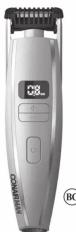
Instruction Booklet
For your safety and continued enjoyment of this product, always read the instruction
booklet carefully before using.
CONAIRMAN
Respect the Ritua
Model GMT980

Parte responsible: Conair LLC, 1 Cummings Point Road.
Stamford, CT 06902 (203) 351-9000 Normas: Normas de la FCC
GARANTÍA LIMITADA DE TRES AÑOS SÚLIDA EN LOS SE VIL Y EN
www.conair.com/registration@8882 Copyright LLC
Service Department 7475 North Glen Ha
Glendale, AZ 85307
21PG080813
CORTADORA DE BARBA
CLOSE TRIM PRECISION CORTADORA DE BARBA/BARBA CORTA CON CASEZAL FLEXIBLE Y CUCHILLAS


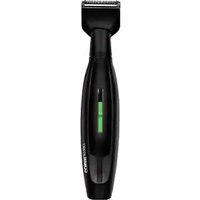

Brand : Conair
Model : GMT980
Category : Beard trimmer