
K50 - Uncategorized Infiniton - Free user manual and instructions
Find the device manual for free K50 Infiniton in PDF.


| Product Type | Portable Bluetooth Speaker with Karaoke Function |
| Brand | Infiniton |
| Model | K50 |
| Power Output | 50W |
| Speaker Configuration | 5.25" + 5.25" Full Range |
| Battery | Li-Ion 3.7V, 3600mAh |
| Charging Time | Approx. 2 hours |
| Charging Input | DC 5V (via included power cord) |
| Playback Sources | Bluetooth, USB, TF Card, AUX (3.5mm), FM Radio, Microphone Input |
| Wireless Connectivity | Bluetooth with TWS (True Wireless Stereo) support for pairing two speakers |
| Controls | Top panel: Mode, Previous, Play/Pause, Next, Volume, Source switches; Remote control included |
| Remote Control Functions | ON/OFF, Play/Pause, EQ, Numeric keys, Mode, Mute, Previous/Next, Volume +/- , Repeat, USB/SD |
| Display | LED display for mode/status |
| Lighting | LED light (on/off switchable) |
| Microphone | Wired microphone input (MIC) |
| Additional Features | FM radio tuner, EQ presets, Mute function, Repeat (1/All) |
| Color Options | Black, Pink, Blue, White |
| EAN (Black) | 8436546195221 |
| EAN (Pink) | 8436546195252 |
| EAN (Blue) | 8436546195245 |
| EAN (White) | 8436546195238 |
| Safety Certifications | RoHS, EU Battery Directive, CE |
| Usage Environment | Indoor and outdoor; keep away from water and heat sources |
Frequently Asked Questions - K50 Infiniton
User questions about K50 Infiniton
0 question about this device. Answer the ones you know or ask your own.
Ask a new question about this device
Download the instructions for your Uncategorized in PDF format for free! Find your manual K50 - Infiniton and take your electronic device back in hand. On this page are published all the documents necessary for the use of your device. K50 by Infiniton.
USER MANUAL K50 Infiniton
natural_image
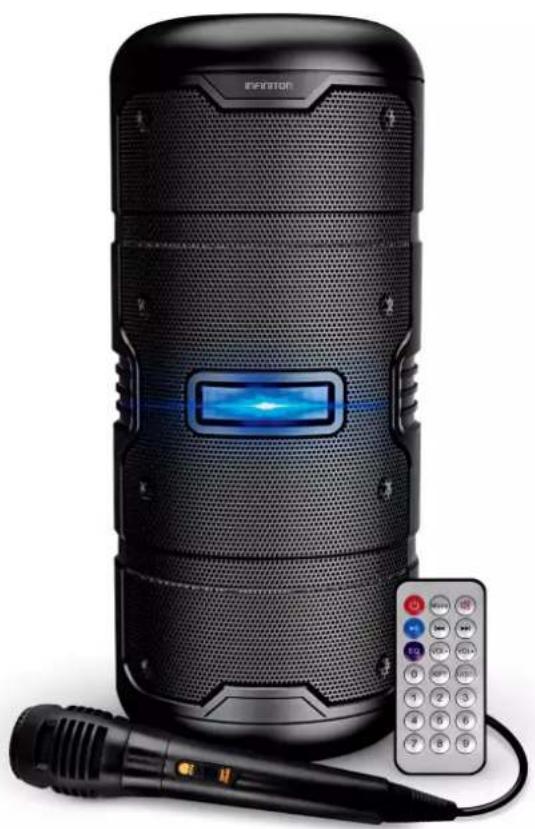
Black ERaser brand electronic device with a remote control and microphone, no visible text or symbols on the device itself.K50 black K50 pink K50 blue K50 white
ean: 8436546195221 ean: 8436546195252 ean: 8436546195245 ean: 8436546195238
natural_image
Symbol of a trash bin crossed with a diagonal line and a horizontal bar below (no text or labels)natural_image
Symbol of a trash bin crossed with two crossed lines, representing waste or discharge (no text or labels)A. ON/OFF
natural_image
Black ERITOR mobile phone with a remote control and microphone, no visible text or symbols on the device body.K50 black K50 pink K50 blue K50 white
ean: 8436546195221 ean: 8436546195252 ean: 8436546195245 ean: 8436546195238
Before using your new Infiniton product, please read this user manual carefully to learn how to safely and efficiently use the features offered by this device.
Index
English
Safety information 14
How to use 17
Cleaning & Maintenance 19
For your safety and to ensure correct use, before installing and using the device for the first time, please read this user manual carefully, including its tips and warnings. To avoid unnecessary errors and accidents, it is important to ensure that all persons using the device are thoroughly familiar with its operation and safety features. Keep these instructions and ensure that they remain with the device if it is moved or sold, so that all those who use it throughout its lifetime are adequately informed about the use and safety of the device.
For the safety of life and property, observe the precautions in these user instructions, as the manufacturer is not liable for damage caused by omission.
- Do not obstruct ventilation openings. Install in accordance with the manufacturer's instructions.
- Do not install near any heat sources such as radiators, heat registers, cookers, or other apparatus (including amplifiers) that produce heat.
- Do not defeat the safety purpose of the polarized or grounding-type plug. A polarized plug has two blades with one wider than the other. A grounding type plug has two blades and a grounding prong. The wide blade or the third prong is provided for your protection. If the provided plug does not fit into your outlet, consult an electrician for replacement of the obsolete outlet.
- Protect the power cord from being walked on or pinched particularly at plugs, convenience receptacles, and the point where they exit from the apparatus.
- Only use attachments/accessories specified by the manufacturer.
- Use only with the cart, stand, tripod, bracket, tripod, bracket, or table specified by the manufacturer, or sold with the apparatus. When a cart is used, use caution when moving the cart/apparatus combination to avoid injury from tip-over.
- Unplug this apparatus during lightning storms or when unused for long periods of time.
• To disconnect completely from the power cord, unplug the power plug from the electrical outlet. - The power plug of the power cord shall remain readily operable.
- Do not expose batteries to excessive heat such as sunshine, fire or the like.
- This appliance should only be used with the power cord and/or charger supplied by the manufacturer.
CAUTION
RISK OF ELECTRIC SHOCK. DO NOT OPEN THE APPLIANCE.
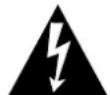
THE LIGHTNING FLASH WITH ARROWHEAD SYMBOL WITHIN AN EQUILATERAL TRIANGLE IS INTENDED TO ALERT THE USER TO THE PRESENCE OF UNINSULATED "DANGEROUS VOLTAGE" WITHIN THE PRODUCT'S ENCLOSURE THAT MAY BE OF SUFFICIENT MAGNITUDE TO CONSTITUTE A RISK OF ELECTRIC SHOCK TO PERSONS.

THE EXCLAMATION POINT WITHIN AN EQUILATERAL TRIANGLE ALERTS THE USER TO THE PRESENCE OF IMPORTANT OPERATING AND MAINTENANCE (SERVICING) INSTRUCTIONS. IMPORTANT OPERATING AND MAINTENANCE (SERVICING) INSTRUCTIONS IN THE INFORMATION ACCOMPANYING THE PRODUCT. INFORMATION ACCOMPANYING THE PRODUCT.
WARNING: TO REDUCE THE RISK OF FIRE OR ELECTRIC SHOCK, DO NOT EXPOSE THIS APPLIANCE TO RAIN OR MOISTURE.
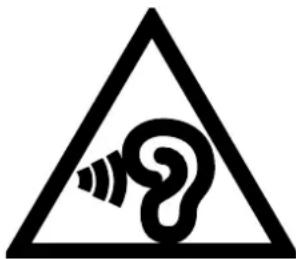
Caution: Use of headphones at high volume levels for prolonged periods of time may result in permanent hearing loss. For France, the products have been tested to ensure that they meet the sound pressure level requirement set out in the relevant NF EN 50332 L.5232-1.
Note: To avoid possible hearing damage, do not listen at high volumes for long periods of time.
Environment protection
This appliance does not contain gases that could damage the ozone layer, neither in its refrigerant circuit nor in the insulation materials. The appliance must not be disposed of with municipal waste and rubbish. The insulation foam contains flammable gases. The appliance must be disposed of in accordance with the regulations of the appliance to be obtained from the local authorities. Avoid damaging the cooling unit, especially the heat exchanger. The materials used in this appliance marked with the symbol are recyclable.
natural_image
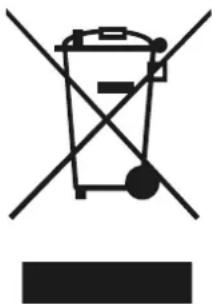
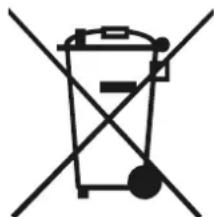
Symbol of a trash bin crossed with a diagonal line and a horizontal bar below (no text or labels)This symbol on the product or on its packaging indicates that this product must not be treated as household waste. Instead, it must be taken to the appropriate collection point for the recycling of electrical and electronic equipment.
By ensuring this product is disposed of correctly, you will help prevent potential negative consequences for the environment and human health, which could otherwise be caused by inappropriate waste handling of this product.
For more detailed information about recycling of this product, please contact your local authorities, your household waste disposal service or the shop where you purchased the product.
Packing materials
Materials with the symbol 📁 are recyclable. Dispose of the packaging in a suitable collection container for recycling.
Disposal of the appliance
- Disconnect the plug from the socket.
- Cut the power cord and discard it.
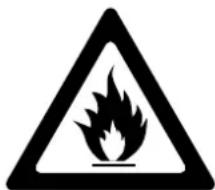
Warning! During use, service and disposal of the appliance, pay attention to this symbol, which is located on the back of the appliance (rear panel or compressor). This symbol will be yellow or orange in colour. It is a fire hazard warning sign. There are flammable materials in the refrigerant and compressor piping. Keep away from the source of fire during use, service and disposal..
RoHS Compliance
This equipment complies with Directive 2011/65/EU of the European Parliament and of the Council of 8 June 2011 on the restriction of the use of certain hazardous substances in electrical and electronic equipment.
For products including batteries
EU Battery Directive 2013/56/EU
On 01/07/2015 a new directive on batteries and accumulators, 2013/56/EU, came into force. The directive is applicable to all types of batteries and accumulators (AA, AAA, button cells, rechargeable rechargeable packs), including those incorporated in devices, except those for military, medical and power tool applications. The directive sets standards for the collection, treatment, recycling and disposal of batteries and aims to ban certain hazardous substances and improve the environmental performance of batteries and all operators in the supply chain.
Instructions for users on battery take-back, recycling and disposal.
To remove batteries from your equipment or remote control, reverse the procedure described in the owner's manual to insert the batteries. In the case of products with an integrated battery that lasts for the lifetime of the equipment, the user cannot remove the battery. In this case, for recycling or recovery, if the battery needs to be replaced, this procedure must be carried out by authorised service centres. In the European Union and other locations, it is illegal to dispose of any battery with household waste. All batteries must be disposed of in an environmentally safe manner. Contact your local waste management authorities for information on the environmentally safe collection, recycling and disposal of used batteries.
WARNING: Danger of explosion if battery is incorrectly replaced. To reduce the risk of fire or burns, do not disassemble, crush, puncture, short circuit, expose to temperatures above 60^ C or dispose of in fire or water. Replace only with specified batteries. The “separate collection” symbol for all batteries and accumulators is the crossed-out wheeled bin below:
natural_image
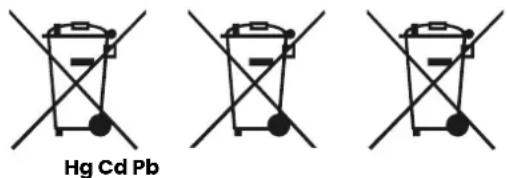
Symbol of a trash bin crossed with a diagonal line, representing no waste or discharge (no text or labels)Batteries, accumulators and button cells containing more than 0,0005 % mercury, more than 0,002 % cadmium or more than 0,004 % lead must be marked with the chemical symbol of the relevant metal: Hg, Cd or Pb respectively. Please pay attention to the following symbol:
WARNING: DO NOT SWALLOW BATTERIES, CHEMICAL BURN HAZARD [supplied with the remote control]
This product contains a button cell battery. If swallowed, it can cause severe internal burns in as little as two hours and result in death. Keep new and used batteries out of the reach of children. If you think batteries may have been swallowed or inserted into any part of the body, seek immediate medical attention.
![Infiniton K50 - WARNING: DO NOT SWALLOW BATTERIES, CHEMICAL BURN HAZARD [supplied with the remote control] - 1](/content/2026/05/953599/images/f1fa100ca7042ded809a64205985a5645b9a205af22ff74e7d574b98a7712f5f.jpg)
EPILEPSY
WARNING
Some people may experience epileptic seizures when viewing flashing lights.
Product description
Due to technological innovations, the product description in this manual may not completely match your appliance. More detailed information corresponds to the final product.
Technical specifications
- 5.25"+5.25" Full range
• Li Battery 3.7V / 3,600mA - Power: 50W
- Aux input (3.5–3.5mm)
• USB / TF input, Bluetooth, MIC input, 5V charging
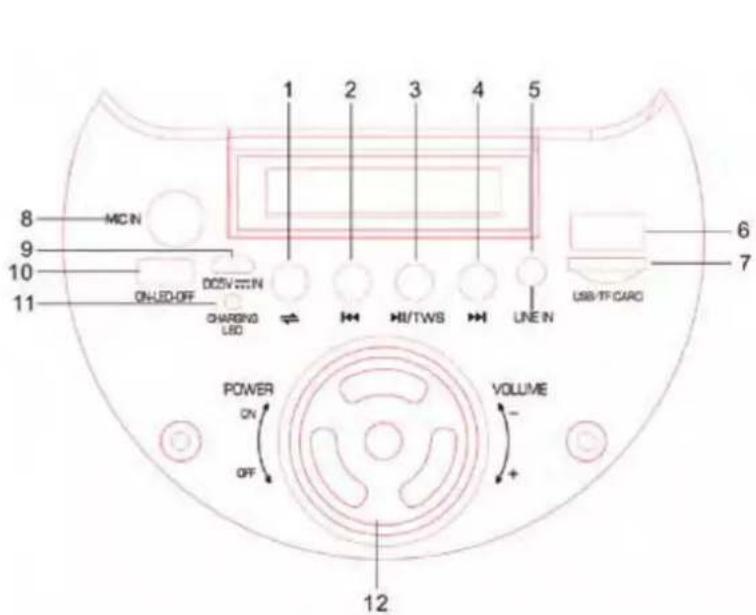
• LED light, LED display - Top control panel
| 1 Mode |
| 2 Previous song |
| 3 Pause / Play |
| 4 Next song |
| 5 Auxiliary input |
| 6 USB input |
| 7 TF card input |
| 8 Microphone input |
| 9 Charging socket (DC 5V) |
| 10 LED on/off |
| 11 Charging indicator |
| 12 Main volume control |
TWS Connection
For 2-speaker connection mode in Bluetooth mode, choose one speaker and press "NEXT SONG" button for 3 seconds, it will enter TWS mode. Then connect the Bluetooth to the phone and play music. 2 PC speakers can play music at the same time. Press and hold the "NEXT SONG" button of 1 speaker and it will turn off.
Installation and Location
When using this product, always install it in a dry and ventilated place.
This product is suitable for indoor and outdoor use.
Keep it away from heat sources.
Keep out of direct sunlight.
Keep the speaker away from splashes and drops of water.
The battery is important and needs special attention
Switch off the device before charging the battery.
The estimated charging time is 2 hours.
Charge the device when the sound is weak or jammed.
You must charge the device before the battery capacity is exhausted.
Remote control
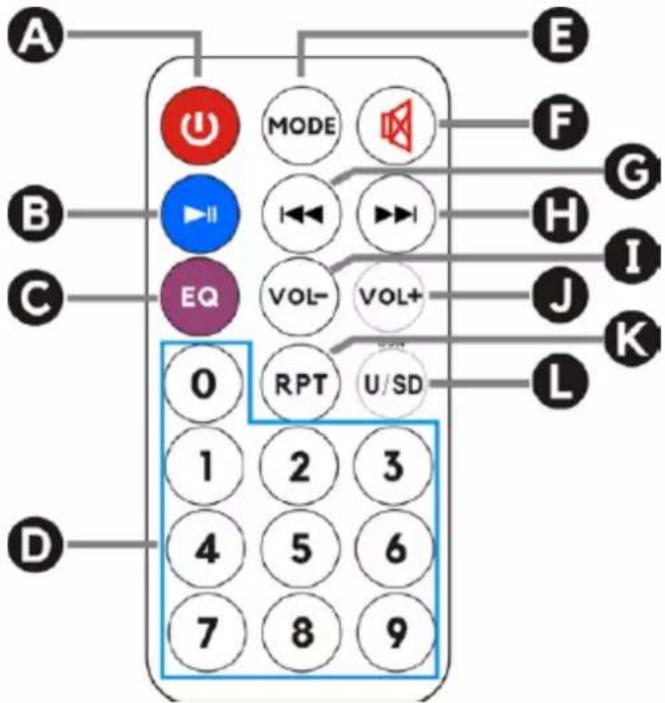
A. ON/OFF
Press once to turn the speaker on or off.
B. Pause / Play
In USB/TF/BLUETOOTH mode, press this button to start or pause playback.
C. EQ (Equalizer)
D. Numeric keypad
In USB/TF mode, press to select the song.
E.Mode
Press to select the following modes: LINE (Aux-In)/USB/TF/Bluetooth/FM Radio.
F. Mute
Press once to mute the sound in any mode.
G. Previous Music
In USB / TF mode, press once to go back to the previous song; press and hold for 3 seconds to go back to the current song.
In Bluetooth mode, press once to go back to the previous song.
H. Next song
In USB / TF mode, press once to skip to the next song; press and hold for 3 seconds to fast forward. In Bluetooth mode, press once to skip to the next song.
I. Volume
Press to decrease the volume in any mode.
J. Volume+
Press to increase the volume in any mode.
K. Repeat
In USB/TF playback mode, press to repeat one song or repeat all songs.
L. USB/SD
Press to change the USB/TD PLAY function.
WARNING! Before cleaning, unplug the power plug first; do not connect or disconnect the power plug with wet hands, as there is a risk of electric shock and injury.
injury. Do not spill water directly on the appliance, thus avoiding rust, electricity leakage and accidents.
External cleaning
Clean dust accumulated on the surface of the appliance frequently.
WARNING! Do not use bristle brushes, wire brushes, detergent, soap powder, alkaline detergent, benzene, gasoline, acid, hot water and other corrosive or soluble elements to clean the surface of the Device, plastic decorative parts, etc. to avoid damage.
Disconnect the power plug after using this product.
Be careful of accumulated dust and dirt.
If the sound is distorted, turn down the volume.
Safety checks after servicing
Is the power cord broken or damaged?
Is the plug firmly inserted into the socket?
Is the power outlet abnormally overheated?
Note:
Electric shock and fire may occur if the power cord and plug are damaged or stained.
plug are damaged or stained with dust. If there is any abnormality, unplug the power cord and contact your dealer.
INFINITON
SPEAKER
natural_image
Black Infiniton portable electronic device with a remote control and microphone, no visible text or symbols on the device itself.K50 black K50 pink K50 blue K50 white
ean: 8436546195221 ean: 8436546195252 ean: 8436546195245 ean: 8436546195238
natural_image
Symbol of a trash bin crossed with a diagonal line and a horizontal bar below (no text or labels)natural_image
Symbol of a trash bin crossed with a diagonal line, representing waste or discharge (no text or labels)A. ON/OFF
¿Necesitas ayuda?
natural_image
Silhouette icon of a person wearing a headset with a crossed wrench symbol (no text or numbers)
INFINITON
TÉRMINOS Y REGISTRO DE GARANTÍA
- Index
- CAUTION
- RISK OF ELECTRIC SHOCK. DO NOT OPEN THE APPLIANCE.
- Environment protection
- Packing materials
- Disposal of the appliance
- RoHS Compliance
- For products including batteries
- WARNING: DO NOT SWALLOW BATTERIES, CHEMICAL BURN HAZARD [supplied with the remote control]
- Product description
- Technical specifications
- TWS Connection
- Installation and Location
- The battery is important and needs special attention
- Remote control
- External cleaning
- INFINITON
- ¿Necesitas ayuda?
- TÉRMINOS Y REGISTRO DE GARANTÍA
Brand : Infiniton
Model : K50
Category : Uncategorized