
MGR150B - Lecteur audio Bluetooth BOSS - Free user manual and instructions
Find the device manual for free MGR150B BOSS in PDF.


| Product Type | Guitar Effects Pedal |
| Brand | BOSS |
| Model | MGR150B |
| Dimensions (W x D x H) | Approx. 73 x 129 x 59 mm |
| Weight | Approx. 420 g |
| Power Supply | DC 9V (alkaline battery or AC adapter) |
| Current Draw | 60 mA (typical) |
| Controls | Footswitch, knobs for level, tone, effect parameters |
| Inputs | 1/4" phone jack (instrument input) |
| Outputs | 1/4" phone jack (amp output) |
| Power Indicator | LED on when powered |
| Bypass Mode | True bypass or buffered (depends on model) |
| Housing Material | High-impact plastic |
| Battery Life | Approx. 20 hours (carbon) / 30 hours (alkaline) |
| Accessories | Owner's manual, battery, (adapter not included) |
| Cleaning | Wipe with dry cloth; avoid solvents |
| Storage Temperature | -20 to 60°C |
| Warranty | Limited lifetime warranty (varies by region) |
Frequently Asked Questions - MGR150B BOSS
User questions about MGR150B BOSS
0 question about this device. Answer the ones you know or ask your own.
Ask a new question about this device
Download the instructions for your Lecteur audio Bluetooth in PDF format for free! Find your manual MGR150B - BOSS and take your electronic device back in hand. On this page are published all the documents necessary for the use of your device. MGR150B by BOSS.
USER MANUAL MGR150B BOSS
Bluetooth Pairing and Connection:
Connecting MGR150B to your device
- Press and Hold ▶ for three seconds until power indicator lights Blue.
- The system will automatically go into pairing mode. The power indicator will turn Blue and the Bluetooth indicator will blink Blue while waiting for Bluetooth connection. Please be sure that Bluetooth is turned ON on your device, select "Boss Audio MGR150B" on your device to connect the Bluetooth controller (if the Bluetooth controller is connected the light will turn to solid Blue).
- When the device is out of Bluetooth range, Bluetooth will be disconnected automatically and automatically reconnect when detected in range again. (If not please just repeat steps 1 and 2).
- Input mode indicator --- Blue light for Bluetooth, Red light for AUX In, and Purple light for USB.
MGR150B Installation
Seamless Flush Mount

natural_image
Technical line drawing of a mechanical component with no visible text or symbolsSize: 3.8" (96 mm) (Out Diameter)
3.0" (76 mm) (Cutout Diameter)
3.5" (89 mm) (Depth)
BOSS® AUDIO SYSTEMS

BOSS Audio Systems
3451 Lunar Court · Oxnard, CA 93030
www.bossaudio.com
805-751-4853 Customer Service
Tech Support: www.bosssaudio.com/support

1020
BOSS® AUDIO SYSTEMS


MGR150B
USER'S MANUAL
QUICK INSTALLATION GUIDE
BLUETOOTH® (AUDIO STREAMING)
MARINE GAUGE DIGITAL MEDIA PLAYER
FEATURING BUILT-IN 2 CHANNEL AMPLIFIER
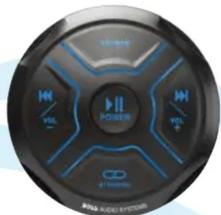

MGR150B
BLUETOOTH* (Audio Streaming)
Marine Gauge Digital Media Player
Featuring Built-In 2 Channel Amplifier
Congratulations on the purchase of the MGR150B. It has been designed, engineered and
manufactured for the highest level of performance and quality.
Features
Playback: BLUETOOTH® Audio Streaming Stream and Control your Favorite Music APPs
Inputs & Outputs: USB Port USB Charging (2A)* Aux-In Pre-Amp Outputs (1 pair)
General 2 Channel IPX6** Conformal Coated PCB Illuminated Controls
All specifications subject to change without notice
User's Manual
What's Included
After you have unpacked the marine gauge digital media player, check all the contents of package so it contains all of the items below. If something is missing, please call our customer service department.
• (1)MGR150B Marine Gauge Digital Media Player • (1)3.5mm Stereo Cable

Safety Considerations
While we have designed the mounting system to provide a safe and stable installation, it is important to remember these are objects that will be used in an environment that is extremely bumpy and turbulent. Please consider all possible scenarios where these will be placed and secured.
Power and Speaker Wiring

Wire @lor
Yellow
Black
Red Blue
White
White/Black
Gray
Gray/Black
Description
Battery (+), 12dc
Battery (-), Ground
ACC REMOTE
CH1 (+)
CH1 (-)
CH2 (+)
CH2 (-)

Playing Music:
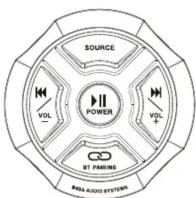
- Press and hold ▶I 3 seconds for Power ON or OFF
- Short press▶ to play music or pause
- Short press SOURCE to switch Bluetooth mode/Aux-in mode /USB mode
- Short press ▶▶|/+ for next track, press and hold ▶▶|/+ for volume up
- Short press|◀◀/- for previous track, press and hold|◀◀/- for volume down
- Press and hold CC BT PAIR for disconnect Bluetooth
Brand : BOSS
Model : MGR150B
Category : Lecteur audio Bluetooth