SP-HDCAT1X4 - Extendeur AV KanexPro - Free user manual and instructions
Find the device manual for free SP-HDCAT1X4 KanexPro in PDF.


| Product Type | HDMI 1x4 Distribution Amplifier with CAT5e/6 Outputs |
| Brand | KanexPro |
| Model | SP-HDCAT1X4 |
| Input Port | 1 x HDMI |
| Output Ports | 4 x RJ45 (CAT5e/6) |
| Maximum Extension Distance | 394 ft (120 m) via CAT6 |
| Supported Resolutions | 480i/p, 576i/p, 720p, 1080i, 1080p @ 50/60 Hz |
| Max Resolution | 1920 x 1080 @ 60 Hz |
| Audio Support | 5.1, 7.1 Digital Audio, LPCM (uncompressed) |
| HDCP Support | HDCP 1.4 |
| EDID Support | Yes |
| IR Control | Yes (20~60 KHz IR devices) |
| Enclosure Material | Metal |
| Dimensions (W x D x H) | 299 x 110.7 x 29.6 mm |
| Weight | 430 g |
| Power Supply | DC 12V / 3A |
| Power Consumption | < 24 W |
| Operating Temperature | 0°C to 60°C |
| Color | Black |
| Package Contents | 1 Transmitter, 4 Receivers, 1 Power Adapter, 1 IR Kit, 1 User Manual |
| Cable Requirement | UTP/STP CAT5/5e/6 (IEEE-568B) |
| Warranty | 36 months limited warranty |
Frequently Asked Questions - SP-HDCAT1X4 KanexPro
User questions about SP-HDCAT1X4 KanexPro
0 question about this device. Answer the ones you know or ask your own.
Ask a new question about this device
Download the instructions for your Extendeur AV in PDF format for free! Find your manual SP-HDCAT1X4 - KanexPro and take your electronic device back in hand. On this page are published all the documents necessary for the use of your device. SP-HDCAT1X4 by KanexPro.
USER MANUAL SP-HDCAT1X4 KanexPro
natural_image
Exterior view of a KanexPro network device with multiple ports and connectors (no visible text or symbols on the device itself)USER MANUAL
HDMI 1x4 Distribution Amplifier w/ CAT5e/6 outputs
up to 394ft. (120 meters)
1. Introduction:
The KanexPro SP-HDCAT1X4 is a 1x4 HDMI splitter with one transmitter and four receivers set amplifier that, enables HDMI or DVI signals to be routed over distances up to 394ft.(120m) significantly beyond the capability of standard HDMI or DVI cables. When connected together using four economical and installer friendly CAT5e/6 cables, the transmitter inputs the HDMI signal into four identical outputs carrying 393ft./1080p resolution simultaneously from the provided receivers.
This HDMI amplifier offers an ideal, cost effective means for extending digital video, multichannel audio, and control signals from HDMI equipped devices. Each receiver works with the splitter as a full functional unit enabling full 1920 x 1080p/60 resolution. This professional HDMI to CAT5e/6 splitter is optimized for a variety of installation environments including digital signage, classroom and medical imaging markets.
2. Features:
• Distribute HDMI over Single Cat5e/6 - High Resolution audio and video
- Includes 4-independent receivers
- Extend over single CAT5e/6 up to 394ft. (120 meters)
• Supports full HD 1080p (1920 x 1080@60Hz)
• Supports 5.1, 7.1 Digital Audio and uncompressed LPCM
• HDCP 1.4 & EDID support
- IR control
- Metal enclosure
- Quick and easy to set up
3. Package Includes:
• 1x SP-HDCAT1x4 Transmitter
• 4x SP-HDCAT1x4 Receivers
• 1x DC 12v/3A power adapter
• 1x IR transmission Kit
- 1X user manual
4. Installation Requirement:
• HDMI source device (computer graphics card, DVD, PS3, HD monitoring equipment etc)
• HDMI display device like SDTV, HDTV, and projector with HDMI port.
• HDMI extender RX which supports HDBiT transport protocol
- UTP/STP cat5/5e/6 cable, follow standard IEEE-568B Network cable length supported between every connection: CAT5 80m, CAT5E 100m and CAT6 120m
5. Panel Description:
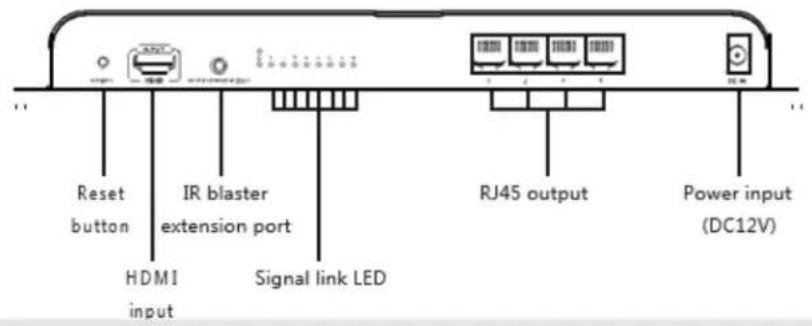
6. Connection and Operation:
- Network Cable:
Follow IEEE-568B
| 1. Orange/white | 5. Blue/white |
| 2. Orange | 6. Green |
| 3. Green/white | 7. Brown/white |
| 4. Blue | 8. Brown |
- Connection:
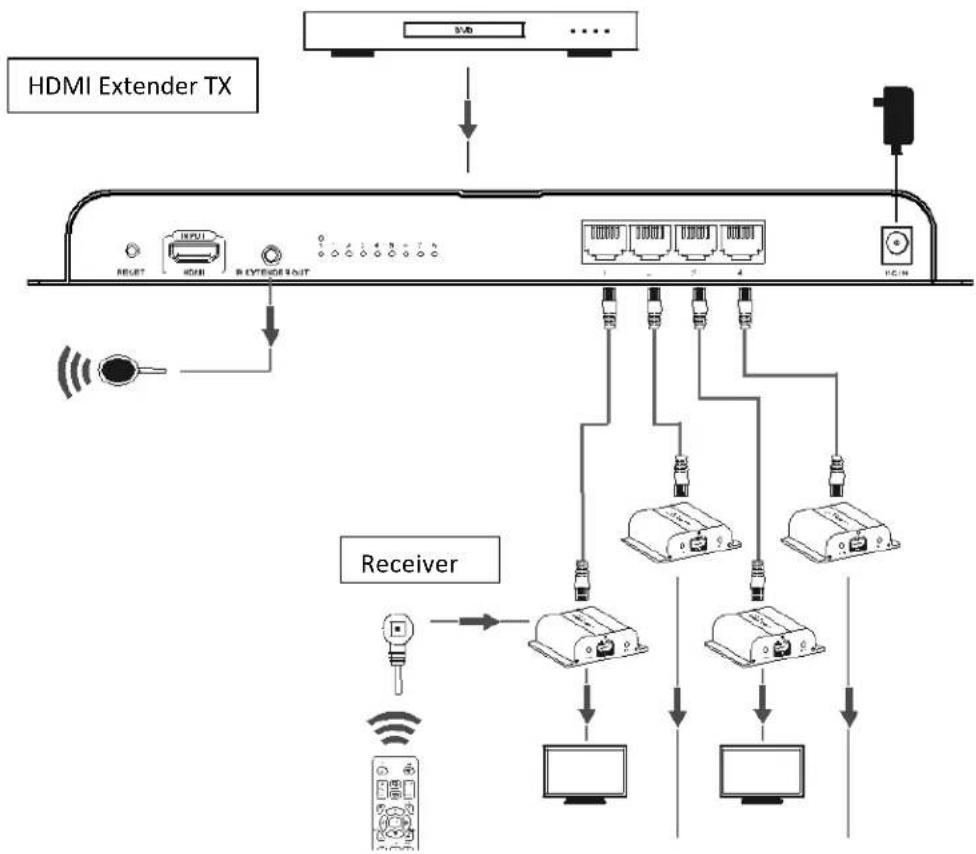
flowchart
graph TD
    A["Receiver"] --> B["Host 1"]
    A --> C["Host 2"]
    A --> D["Host 3"]
    A --> E["Host 4"]
    B --> F["Monitor 1"]
    C --> G["Monitor 2"]
    D --> H["Monitor 3"]
    E --> I["Monitor 4"]
    J["HDMI Extender TX"] --> K["Signal Line"]
    K --> L["Switch"]
    style A fill:#f9f,stroke:#333
    style J fill:#ccf,stroke:#333
- Connection Instruction
1). Connect HDMI input with HDMI output of source device.
2). Connect IR blaster extension cable to the IR extender out port.
3). Connect Cat5e/6 cable between Transmitter and receiver
4). Connect HDMI output of HDMI extender RX to HDMI input of HDTV and set the TV source input to correct HDMI input channel.
5). Power on the device (power indicator led lights) and it works.
7. Specifications
| Items | Specifications |
| HDMI Signals | Compatible with HDCP 1.4 |
| Transport protocol | HDBiT |
| Support resolutions | 480i@60Hz, 480p@60, 576i@50, 576P@50, 720p@50/60, 1080i@50/60, 1080p@50/60 |
| Transmit Distance | 394ft(120m) |
| IR Signal | Support 20~60KHz IR device |
| Input | 1xHDMI |
| Output | 4xRj45 |
| Connection Indicator Led | 4xled |
| Working Temperature | 0~60 c |
| Power supply | DC12V/3A |
| Power consumption | <24W |
| Dimensions | 299(W) x 110.7(D) x 29.6(H) mm |
| Weight | 430g |
| Color | Black |
8. FAQ
Q:TV display "waiting for connection" on the bottom right corner?
A:1) Please check if the power supply of TX (sender) and RX(receiver) is well connected and the power indicator led lights on.
2) Make sure all cables are firmly connected.
KANEXPRO SP-HDCAT1X4
Q: TV display "Please check the TX input signal"?
A:1) please check if there is an HDMI signal input of TX.
2) Try to connect the signal source directly to display device to see if there is signal output from source device or change the signal source, HDMI cables and try again.
Q: Display not fluent and stable?
A: 1) Please check the cable length between TX(sender) and RX (receiver) is within the required range.
2) Press "reset" button on the RX/RX panel, reset and reconnect.
9. Warranty
A. Limited Warranty
KanexPro ^™ warrants that (a) its products (the “Product”) will perform greatly in agreement with the accompanying written materials for a period of 36 months (3 full year) from the date of receipt and (b) that the product will be free from defects in materials and workmanship under normal use and service for a period of 3 years.
B. CUSTOMER REMEDIES
KanexPro entire liability and Customer's exclusive remedy shall be, at KanexPro option, either return of the price paid for the product, or repair or replacement of the Product that does not meet this Limited Warranty and which is returned to KanexPro with a copy of customers' receipt. This Limited Warranty is void if failure of the Product has resulted from accident, abuse, or misapplication. Any replacement Product will be warranted for the remainder of the original warranty period of 3 years, whichever is longer.
C. NO OTHER WARRANTIES
To the maximum extent permitted by applicable law, KanexPro disclaims all other warranties, either express or implied, including, but not limited to implied warranties of merchantability and fitness for a particular purpose, with regard to the product and any related written materials. This limited warranty gives customers specific legal rights. Customers may have other rights depending on the jurisdiction.
D. NO LIABILITY FOR DAMAGES
To the maximum extent permitted by applicable law, in no event shall KanexPro be liable for any damages whatsoever (including without limitation, special, incidental, consequential, or indirect damages for personal injury, loss of business profits, business interruption, loss of business information, or any other pecuniary loss) arising out of the use of or inability to use this product, even if KanexPro has been advised of the possibility of such damages.
Brand : KanexPro
Model : SP-HDCAT1X4
Category : Extendeur AV