EXT-100SL18G - AV Extender KanexPro - Free user manual and instructions
Find the device manual for free EXT-100SL18G KanexPro in PDF.


| Brand | KanexPro |
| Model | EXT-100SL18G |
| Product Type | AV Extender (HDMI over Ethernet) |
| Input Interface | 1 x HDMI (Type A female) |
| Output Interface | 1 x HDMI (Type A female), 1 x RJ45 (Ethernet) |
| Max Resolution | 4K@60Hz (3840x2160) with 18Gbps bandwidth |
| Transmission Distance | Up to 100m (330ft) over CAT6a/7 |
| HDCP Support | HDCP 2.2 |
| HDR Support | Yes, HDR10, Dolby Vision |
| EDID Management | Built-in EDID handling |
| Power Supply | 5V DC via USB or external adapter |
| Power Consumption | 2.5W (typical) |
| Dimensions (W x D x H) | 100mm x 60mm x 20mm |
| Weight | 200g |
| Operating Temperature | 0°C to 45°C |
| Storage Temperature | -20°C to 60°C |
| Humidity | 10% to 90% RH (non-condensing) |
| Cable Requirements | Shielded CAT6a or CAT7 for best performance |
| LED Indicators | Power and Link status |
| Maintenance | Clean with soft, dry cloth; avoid liquids |
| Safety | Keep away from moisture and extreme temperatures |
| Warranty | 1 year limited |
Frequently Asked Questions - EXT-100SL18G KanexPro
User questions about EXT-100SL18G KanexPro
0 question about this device. Answer the ones you know or ask your own.
Ask a new question about this device
Download the instructions for your AV Extender in PDF format for free! Find your manual EXT-100SL18G - KanexPro and take your electronic device back in hand. On this page are published all the documents necessary for the use of your device. EXT-100SL18G by KanexPro.
USER MANUAL EXT-100SL18G KanexPro
Version: EXT-100SL18G_2017V1.0
Statement
Read this user manual carefully before using this product. Pictures shown in this manual is for reference only, different model and specifications are subject to real product. This manual is only for operation instruction only, not for any maintenance usage. The functions described in this version are updated till December 27, 2017. In the constant effort to improve our product, we reserve the right to make functions or parameters changes without notice or obligation. Please refer to the dealers for the latest details.
Safety Precaution
To insure the best from the product, please read all instructions carefully before using the device. Save this manual for further reference.
● Follow basic safety precautions to reduce the risk of fire, electrical shock and injury to persons.
- Do not dismantle the housing or modify the module to avoid electrical shock or burn.
- Using supplies or parts not meeting the products' specifications may cause damage, deterioration or malfunction.
- Do not expose the unit to rain, moisture or install this product near water.
● Install the device in a place with fine ventilation.
- Do not twist or pull by force ends of the optical cable. It can cause malfunction.
- Do not use liquid or aerosol cleaners to clean this unit. Always unplug the power to the device before cleaning.
● Unplug the power cord when left unused for a long period of time.
● Refer all servicing to qualified service personnel.
After-sales Service
We provide limited warranty for the product within three years counting from the first day you buy this product (The purchase invoice shall prevail).
Introduction
The KanexPro EXT-100SL18G extender is an UltraSlim 4K /60Hz transmitter - receiver set designed to extend natural and uncompressed ultra HD 4K signals from your HDMI source device to a 4K display remotely located 230 feet away and full HD 1080p signals up to 330ft.(100m). It also supports PoH (power over HDBaseT) requiring you to power only from one side, either the sender or receiver. For dynamic range and wide color range (gamut) HDR and 4:4:4 Chroma color sampling are one of the key features of these extenders. It also adds 2x Ethernet ports for LAN access and connecting to devices to internet.
Features
- Ultra Slim 330ft. (100m) HDMI extender over HDBaseT w/ PoH
- Extend up to 70m for 4K/60 video w/ 4:4:4 Chroma
● HDR (high dynamic range) & wider color gamut support
● Supports Ultra HD 4K@60Hz resolutions &
● Video resolutions from 1080p/60@48bit - 18 Gbps bandwidth
● Bi-directional PoH (power over HDBaseT)
● HDCP 2.2 and EDID compliant - CEC Pass-thru
- IR input/output - embedded over CATx extension
● Dolby TrueHD & DTS Master Audio ready
● Supports uncompressed audio - LPCM
● Bi-directional RS-232 & IR control - Ultra Slim enclosure w/ separate mounting ears
● One locking power supply included
● Backed by KanexPro 3-year parts and labor warranty
Note: Please use a CAT5e/6 cable with low impedance (Shielded twisted pair is recommended with proper grounding) for excellent transmission of AV signals.
Package List
- 1 x Transmitter
- 4 x Mounting ears & 4 x Screws
- 2 x RS232 Cables (3-pin to DB9)
● 1 x IR Receiver (5V, optional) -
1 x User Manual
-
1 x Receiver
- 8 x Plastic Cushions
● 1 x Power adaptor (24VDC,1.25A) - 1 x IR Emitter (5V, optional)
Panel Description
Transmitter
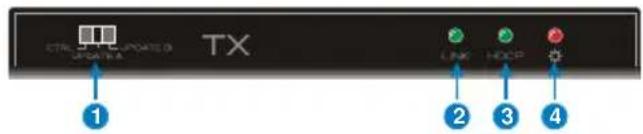
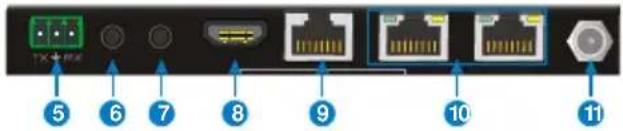
Receiver
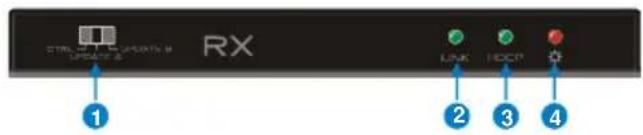
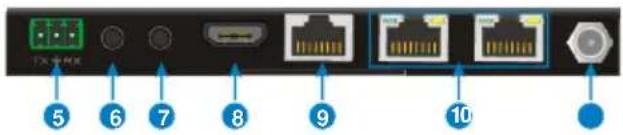
| No. | Name | Description |
| 1 | RS232 MODE switcher | CTRL: RS232 pass-through control mode;UPDATE A: Update Valens IC program, connect a PC to the RS232 port, and then double-click the update file (.bat).UPDATE B: Update compression IC program, the upgrade method is the same as the above UPDATE A. |
| 2 | Link status LED | OFF: No Link; GREEN:Link successful. |
| 3 | HDCP compliant LED | OFF: No HDMI traffic (no picture); GREEN: Traffic with HDCPBlinking: Traffic without HDCP. |
| 4 | Power LED | OFF: No power; RED: DC power present. |
| 5 | RS232 connectors | If one relates to control device (e.g. PC), and the other shou relate to the third-party that need to be controlled. |
| 6 | IR IN | Work with far-end IR OUT port, connect with IR Receiver (wit carrier) to collect IR signal to control far-end display device from local. |
| 7 | IR OUT | Work with far-end IR IN port, connect with IR Emitter to send IR signal to control input source device from remote. |
| 8 | HDMI IN (Transmitter) | Connect with HDMI source. |
| HDMI OUT (Receiver) | Connect with HDMI display. | |
| 9 | HDBT OUT (Transmitter) | Connect to the HDBT IN socket on Receiver via CAT5e/6a/7 cable. |
| HDBT IN (Receiver) | Connect to the HDBT OUT socket on Transmitter CAT5e/6a/7 cable. | |
| 10 | ETHERNET | Total 4 100M Ethernet ports, one of these ports should be used forinternet access, and the others can relate to computers. If connect successfully and work normally, the yellow LED will keep blink and the green one will keep on. |
| 11 | DC 24V power ports | Support bi-directional PoH, one of ports should relate to DC24V 1.25A power adaptor. |
Specification
| Model Spec | Transmitter | Receiver |
| Input | HDMI IN | HDBT IN |
| Output | HDBT OUT | HDMI OUT |
| Control Ports | IR IN, IR OUT, RS232 | IR IN, IR OUT, RS232 |
| Ethernet Ports | 2 RJ45 connectors | 2 RJ45 connectors |
| General | ||
| Transmission Mode & Distance | HDBaseT; 1080P ≤ 100m; 4K×2K ≤ 70m | |
| Ethernet Transmission Speed | Adaptive 10M/100M (max), full duplex or half duplex. | |
| Resolution | Up to 4K×2K@60Hz 4:4:4 | |
| Bandwidth | 18Gbps | |
| HDMI Standard | HDMI2.0 & HDCP2.2 | |
| Power Consumption | 20W (max) | |
| Temperature | -10 °C~ 50°C | |
| Humidity | 0% ~ 90% | |
| Power Supply | Input: 100VAC~240VAC, 50/60Hz; Output: 24VDC 1.25A | |
| Dimension (W*H*D) | 152mmx16.2mmx104mm | 152mmx16.2mmx104mm |
| Net Weight (g) | 240g | 240g |
System Diagram
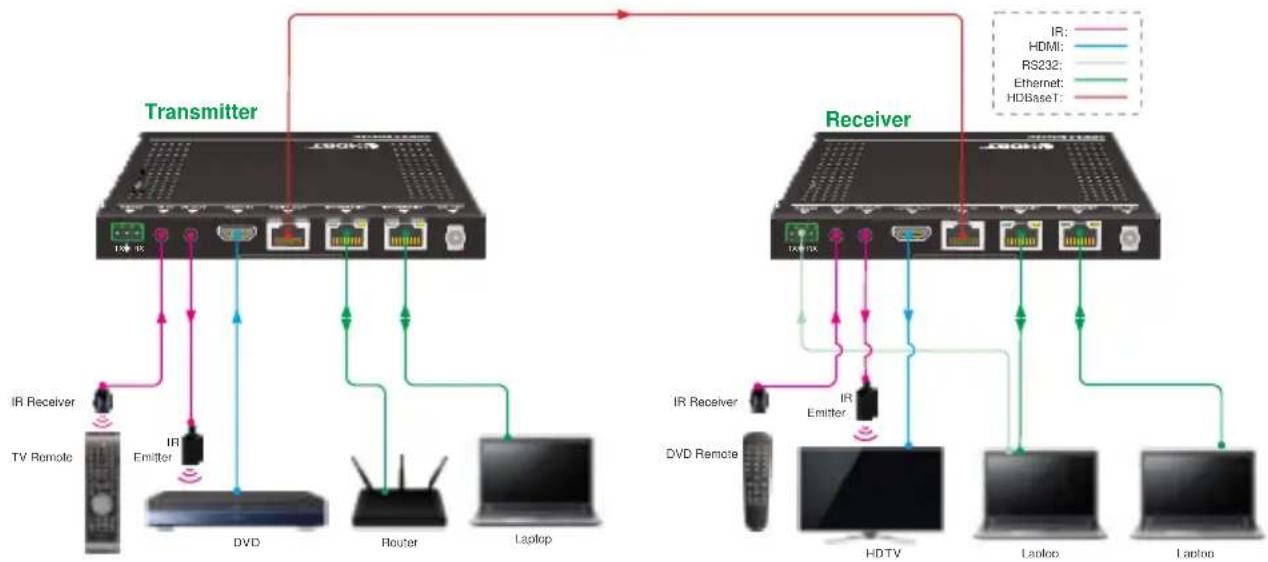
flowchart
graph TD
    subgraph Transmitter
        A["Transmitter"] -->|IR| B["IR Receiver"]
        A -->|IR| C["IR Emitter"]
        A --> D["DVD"]
        A --> E["Router"]
        A --> F["Laptop"]
    end
    subgraph Receiver
        G["Receiver"] -->|IR| H["IR Receiver"]
        G -->|IR| I["DVD Remote"]
        G --> J["HDTV"]
        G --> K["Laptop"]
        G --> L["Laptop"]
    end
    A -->|IR| M["IR Emitter"]
    A -->|IR| N["IR Emitter"]
    A -->|HDMI| O["RS232"]
    A -->|HDBaseT| P["HDBaseT"]
    style Transmitter fill:#f9f,stroke:#333
    style Receiver fill:#f9f,stroke:#333
NOTE: This picture is for reference only, the specific scheme maybe subjected to different applications.
Brand : KanexPro
Model : EXT-100SL18G
Category : AV Extender