
AV/IR Pass-Thru Balun - AV Extender MuxLab - Free user manual and instructions
Find the device manual for free AV/IR Pass-Thru Balun MuxLab in PDF.


| Product Type | AV/IR Pass-Thru Balun (Extender) |
| Brand | MuxLab |
| Models | 500048 (male RCA connectors), 500049 (female RCA connectors) |
| Application | Extends composite video, stereo audio, and IR signal over a single Cat5e/6 cable |
| Video Signal | Composite video (NTSC, PAL, SECAM) |
| Audio Signal | Line level analog stereo audio, 20 Hz – 20 kHz bandwidth |
| IR Pass-Through | Supports IR emitter via dedicated twisted pair (pins 4 & 5) |
| Maximum Distance (Video) | 2,200 ft (670 m) over Cat5e/6 UTP/STP |
| Maximum Distance (Audio) | 3,250 ft (990 m) over Cat5e/6 UTP/STP |
| Video Impedance | 75 ohms |
| Audio Impedance | 600 ohms minimum |
| Connectors (500048) | 3 RCA male (yellow video, red/white audio), 2-pole terminal block for IR, RJ45 female |
| Connectors (500049) | 3 RCA female (yellow video, red/white audio), 2-pole terminal block for IR, RJ45 female |
| Cable Requirements | Cat5e/6 UTP/STP, 24 AWG solid copper, 100 ohms at 1 MHz, max capacitance 20 pf/ft |
| Dimensions | 2.40” x 2.25” x 1.00” (6.10 x 5.72 x 2.54 cm); 500048 adds 6” cable leads |
| Weight | 3.1 oz (89 g) per balun |
| Enclosure Material | Fire retardant plastic |
| Operating Temperature | 0° to 55°C |
| Storage Temperature | -20° to 85°C |
| Humidity | Up to 95% non-condensing |
| Power | Passive, no external power required |
| Warranty | Lifetime |
| Maintenance | Keep connectors clean; no other maintenance required |
| Safety | No special precautions needed; low voltage passive device |
| Spare Parts / Repairability | Not repairable; replace unit if defective |
Frequently Asked Questions - AV/IR Pass-Thru Balun MuxLab
User questions about AV/IR Pass-Thru Balun MuxLab
0 question about this device. Answer the ones you know or ask your own.
Ask a new question about this device
Download the instructions for your AV Extender in PDF format for free! Find your manual AV/IR Pass-Thru Balun - MuxLab and take your electronic device back in hand. On this page are published all the documents necessary for the use of your device. AV/IR Pass-Thru Balun by MuxLab.
USER MANUAL AV/IR Pass-Thru Balun MuxLab
| Environment | Composite video (NTSC, PAL, SECAM). Line level analog audio. IR Remote. |
| Devices | DVD players, VCR, satellite receivers, MPEG players, laptops, notebooks, monitors, LCD projectors, CCD cameras, video switchers, sequencers, digital video servers, video multiplexers, video splitters, video converters and other composite video equipment. |
| Transmission | Transparent to the user |
| Composite Video Audio | ||
| Bandwidth | DC to 6 MHz 20 Hz to 20 KHz over the distance range | |
| Impedance | 75 ohms 600 ohms min. | |
| Max. Input | 1.1 Vp-p 1.1 Vp-p | |
| Insertion Loss | Less than 2 dB per pair over the frequency range from DC to 6 MHz | Less than 2 dB per pair over the frequency range |
| Return Loss | Better than 15 dB over the frequency range N/A | |
| Common Mode Rejection Ratio | Greater than 40 dB over the frequency range N/A | |
| Max. Distance via Cat 5E/6 UTP/STP Cable | 2,200 ft (670 m)IR: Please refer to IR vendor specifications | 3,250 ft (990 m) |
| Pin Configuration (RJ45) | Video: Pins 7(R) & 8(T)IR Pass-Thru: Pins 4(R) & 5(T)Reverse Polarity Sensitive | Audio 1: Pins 1(R) & 2(T)Audio 2: Pins 3(R) & 6(T) |
| Cable:Cat 5E/6UTP/STP | 24 AWG or lower solid copper twisted pair wireImpedance: 100 ohms at 1 MHzMaximum capacitance: 20 pf/ftAttenuation: 6.6 dB/1,000 ft at 1 MHz | |
| Connectors | 500048: Three RCA-M connectors: Video (yellow) & stereo audio (red, white)500049: Three RCA-F connectors: Video (yellow) & stereo audio (red, white)One (1) 2-pole terminal block for IR emitter pass-throughOne (1) RJ45 for Cat 5E/6 | |
| Temperature | Operating: 0° to 55°CStorage: -20° to 85°CHumidity: Up to 95% non-condensing | |
| Enclosure | Fire retardant plastic | |
| Dimensions | 500048: 2.40" x 2.25" x 1.00" (6.10 x 5.72 x 2.54 cm) plus 6" (15 cm) cable leads for video and stereo audio500049: 2.40" x 2.25" x 1.00" (6.10 x 5.72 x 2.54 cm) | |
| Weight | 3.1 oz (89 g) | |
| Warranty | Lifetime | |
| Order Information | 500048 Stereo AV/IR Pass-Thru Balun, M500049 Stereo AV/IR Pass-Thru Balun, F | |
MuxLab
8495 Dalton Road, Mount Royal, Quebec, Canada. H4T 1V5
Tel: (514) 905-0588 Fax: (514) 905-0589
Toll Free (North America): (877) 689-5228
E-mail: videoease@muxlab.com URL: www.muxlab.com

natural_image
Two Muxlab audio recording devices with connected audio/video cables and connectors (no visible text or symbols on the devices themselves)Stereo AV / IR Pass-Thru Balun
500048, 500049
Quick Installation Guide
Overview
The Stereo AV/IR Pass-Thru Balun (500048, 500049) allows one (1) composite video, one (1) stereo audio and one (1) IR emitter signal to be transmitted via a single Cat 5E/6 cable in a point-to-point connection. The Stereo AV/IR Pass-Thru Balun features full audio bandwidth response for high fidelity applications and features built-in color-coded cable leads for ease of installation. The Stereo AV/IR Pass-Thru Balun also works in conjunction with third party IR Remote Control equipment. This enables the IR Emitter to connect to the IR control module using the same Cat 5E/6 cable as video and audio, allowing for more cost-efficient cabling. Some applications include: Classroom video distribution, commercial and home audio/video systems, hospital video training, video conferencing, and video kiosks
Installation
One (1) pair of baluns is needed to complete one composite stereo audio-video connection via Cat 5E/6 twisted pair. To install the baluns, perform the following steps:
- Identify the pin configuration of the baluns. One (1) twisted pair is required for composite video and two (2) twisted pairs are required for stereo analog audio. The pin configuration follows the EIA/TIA 568A/B standard. The Stereo Hi-Fi Video Balun is reverse polarity sensitive. Please ensure that wiring is straight-through (Ring to Ring, Tip to Tip).

- Plug one (1) balun into the composite video/stereo audio output of the video source according to the color code of the RCA cable leads.
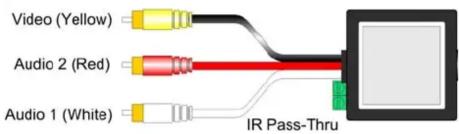
- Plug the second balun into the composite video/stereo audio input of the video screen or receiver at the remote end.
- Complete the connection between the two baluns, using standard Cat 5E/6 twisted pair cable and connecting hardware, terminated on RJ45 plugs at both ends. Ensure that there are no split pairs or taps.
- Power-on the audio-video equipment. Check the image quality and refer to the troubleshooting table below if the image quality is unsatisfactory. The following diagram shows a typical installation.

flowchart
graph LR
    A["DVD Player"] --> B["2-wire IR emitter (3rd party)"]
    B --> C["Cat5 Unshielded Twisted Pair"]
    C --> D["500048"]
    D --> E["500048"]
    E --> F["IR Control Module & PSU (3rd party)"]
    E --> G["IR Emitter Out"]
    G --> H["IR Sensor (3rd party)"]
    H --> I["Plasma"]
© MuxLab Inc.
Troubleshooting
The following tables describe some of the symptoms, probable causes and possible solutions in respect to the installation of the Stereo Hi-Fi Video Balun. If you still cannot diagnose the problem, please call MuxLab Customer Technical Support at 877-689-5228 (toll-free in North America) or (+1) 514-905-0588 (International).
| Video Symptom Probable Cause Possible Solutions | ||
| No continuity in video link | Verify cable continuity between balun pairs. | |
| Power off Check power | supplies of video equipment.No video | |
| Improper connection and/or swapped pair | Check that baluns are connected to correct video inputs and outputs. | |
| Unusual colors Reversed polarity Check wiring & ensure straight-through polarity | ||
| Background pattern EMI interference | Identify possible radiating frequency sources (i.e., wireless LANs, switching power supplies). Try to isolate them from the video connection. Use shielded twisted pair grounded at both ends. | |
| Smearing Exceeded distance | Verify cable grade. Use higher grade cable if necessary. | |
| Weak contrast | Exceeded distance | Verify cable grade. Use higher grade cable if necessary. Increase contrast on monitor. |
| Unusual link attenuation | Verify cable distance using ohmmeter or cable tester. | |
| Image not stable | Defective link or equipment | Verify video equipment interface integrity. |
| Horizontal bars moving slowly | Substantial crosstalk between multiple video sources | Consecutively turn off other video sources to determine which video source is the cause of interference. |
| Snowy picture Distance | is near limit | Verify cable grade. Use higher grade cable if necessary. Reduce color intensity at monitor. |
| Audio Symptom Probable Causes Possible Solutions | ||
| Poor audio quality | EMI interference | Check that wiring is not too close to transformers and ballasts. |
| Split pair | Ensure that the UTP pairs are not split and that each pair of wires is twisted. | |
| No audio | No power Check your audio system for power. | |
| Open circuit Check wiring to ensure continuity. | ||
| Defective balun | Change Stereo Hi-Fi/Video Baluns for another pair. | |
| Audio phase cancellation | Reversed wires Check for straight-through wiring. | |
| Audio weak | Distance specifications exceeded | Check DC loop resistance and verify if distance spec is exceeded. Reduce cable length or eliminate high-loss components. |
| IR Symptom Probable Cause Possible Solutions | ||
| No IR signal | No continuity in IR pair | Check wiring |
| IR equipment malfunction | Check IR equipment with direct connection | |


Brand : MuxLab
Model : AV/IR Pass-Thru Balun
Category : AV Extender