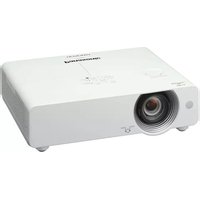
USER MANUAL PT-VW440 PANASONIC
| Main unit |
| Power supply | | 100-240 V AC, 50/60 Hz |
| Power consumption | | 365 W(0.3 W when STANDBY MODE set to ECO,*1 11.5 W when STANDBY MODE set to NETWORK.) |
| LCD panel Panel size | | 15.0 mm (0.59 inches) diagonal (16:10 aspect ratio) |
| Display method | Transparent LCD panel (×3, R/G/B) |
| Pixels | 1,024,000 (1,280 × 800) × 3, total of 3,072,000 pixels |
| Pixel configuration | Stripe |
| Lens | | Manual zoom (1.6x), manual focus,F 1.60 - 2.12, f 15.28 - 24.62 mm |
| Throw ratio | | 1.18-1.90:1 |
| Lamp | | 280 W UHM lamp |
| Screen size | | 0.76-7.62 m (30 - 300 inches) diagonally, 16:10 aspect ratio |
| Colors | | Full color (16,777,216 colors) |
| Brightness*2 | | 4,800 lumens (LAMP POWER: NORMAL) |
| Center-to-corner uniformity*2 | | 85% |
| Contrast*2 | | 3,500:1 (full on/off, LAMP POWER: NORMAL, with iris on) |
| Resolution | | 1,280 × 800 pixels (Input signals that exceed this resolution will be converted to 1,280 × 800 pixels.) |
| Scanning frequency HDMI | | fH: 25 kHz - 80 kHz, fv: 24 Hz - 85 Hz,dot clock: 162 MHz or lower |
| RGB | fH: 15 kHz - 100 kHz, fv: 50 Hz - 100 Hz, dot clock: 140 MHz or lower(Signals above 140 MHz are downsampled.) |
| YPBPR(YCBCR) | 480i (525i): fH 15.75 kHz; fv 60 Hz,576i (625i): fH 15.63 kHz; fv 50 Hz,480p (525p): fH 31.50 kHz; fv 60 Hz,576p (625p): fH 31.25 kHz; fv 50 Hz,720 (750)/60p: fH 45.00 kHz; fv 60 Hz,720 (750)/50p: fH 37.50 kHz; fv 50 Hz,1080 (1125)/60i: fH 33.75 kHz; fv 60 Hz,1080 (1125)/50i: fH 28.13 kHz; fv 50 Hz |
| Video/S-Video | fH: 15.75 kHz, fv: 60 Hz [NTSC/NTSC4.43/PAL-M/PAL60]fH: 15.63 kHz, fv: 50 Hz [PAL/PAL-N/SECAM] |
| Optical axis shift | | Vertical: +48% (manual) |
| Keystone correction range | | Vertical: ±30° (±20° with Real-Time Keystone Correction) |
| Installation | | Ceiling/desk, front/rear (menu selection) |
| Built-in speaker Size | | 4 cm (1-9/16 inches) (round) × 1 |
| Output power | 10 W (monaural) |
| Terminals HDMI IN | | HDMI 19-pin × 1, HDCP compatible480p (525p), 576p (625p), 720 (750)/60p, 720 (750)/50p,1080 (1125)/60i, 1080 (1125)/50i, 1080 (1125)/60p, 1080 (1125)/50pVGA (640 × 480) - WUXGA*3 (1,920 × 1,200),audio signal: linear PCM(sampling frequencies: 48 kHz, 44.1 kHz, 32 kHz) |
| COMPUTER (RGB) 1 INR, G, B | D-sub HD 15-pin (female) × 1G: 0.7 Vp-p (1.0 Vp-p for sync on G), 75 ohms;B, R: 0.7 Vp-p, 75 ohms;HD/VD, SYNC: high impedance, TTL (positive/negative)NOTE: SYNC/HD and VD terminals do not accept tri-level sync signals. |
| Y, PB (CB), PR (CR) | Y: 1.0 Vp-p (including sync signal);PB (CB), PR (CR): 0.7 Vp-p, 75 ohms |
| COMPUTER (RGB) 2 IN /R, G, B | 1 OUTD-sub HD 15-pin (female) × 1(input/output selectable using on-screen menu.)G: 0.7 Vp-p (1.0 Vp-p for sync on G), 75 ohms;B, R: 0.7 Vp-p, 75 ohms;HD/VD, SYNC: high impedance, TTL (positive/negative)NOTE: SYNC/HD and VD terminals do not accept tri-level sync signals. |
| VIDEO IN | Pin jack × 1, 1.0 Vp-p, 75 ohms |
| S-VIDEO IN | Mini DIN 4-pin × 1, Y: 1.0 Vp-p; C: 0.286 Vp-p, 75 ohms |
| COMPUTER AUDIO IN 1 | M3 (L, R) × 1, 0.5 Vrms |
| COMPUTER AUDIO IN 2 / MIC IN | M3 (L, R) × 1, 0.5 Vrms |
| VIDEO/S-VIDEO AUDIO IN |
| Pin jack × 2 (L/R × 1), 0.5 Vrms |
| AUDIO OUT | M3 (L, R) × 1 (monitor out: 0–2.0 Vrms, variable) |
| SERIAL IN | D-sub 9-pin (female) × 1, for external control (RS-232C compliant) |
| LAN | RJ-45 × 1, for network connection, 100Base-TX/10Base-T, compliant with PJLinkTM |
| Power cord length | | 2.0 m (6 ft 7 in) |
| Cabinet materials | | Molded plastic |
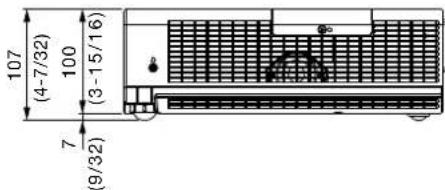
| Dimensions (W × H × D) | | 379 mm × 107 mm*4 × 305 mm*5(14-29/32 × 4-7/32*4 × 12*5 inches) |
| Weight | | Approximately 4.8 kg (10.6 lbs) |
| Operation noise | | 38 dB (LAMP POWER: NORMAL), 31 dB (LAMP POWER: ECO) |
| Operating temperature | | 0 – 40 °C (32 – 104 °F) |
| Operating humidity | | 20%– 80% (no condensation) |
| Remote control unit |
| Power supply | | 3 V DC (R03/LR03/AAA type battery × 2) |
| Operation range*8 | | Approximately 7 m (23 ft) when operated from directly in front of the signal receptor |
| Dimensions (W × H × D) | | 52 × 110 × 18 mm (2-1/16 × 4-11/32 × 23/32 inches) |
| Weight | | Approx. 67 g (2.4 oz) (including batteries) |
| Supplied accessories |
| | Power cord (× 1) (× 2 for PT-VW440EA) |
| | AC power cord holder (× 1) |
| | Wireless remote control unit (× 1) |
| | Batteries for remote control (R03/LR03/AAA type × 2) |
| | Carrying bag (× 1) |
| | Computer cable (1.8 m (5 ft 11 in), for VGA) (× 1) |
| | Software CD-ROM (Logo Transfer Software, Multi Projector Monitoring and Control Software) (× 1) |
| Optional accessories |
| Replacement lamp unit | | ET-LAV200 |
| Replacement filter unit | | ET-RFV200 |
| Ceiling mount bracket | | ET-PKV100H (for high ceilings) |
| | ET-PKV100S (for low ceilings) |
| Bracket assembly | | ET-PKV200B |
Weights and dimensions shown are approximate. Specifications subject to change without notice.
*1 When the STANDBY MODE is set to ECO, network functions such as power on over the LAN network will not operate. Also, only certain commands can be received for external control using the serial terminal.
*2 Measurement, measuring conditions, and method of notation all comply with ISO 21118 international standards.
*3 WUXGA resolution is supported only when the signals are compliant with VESA CVT-RB (Coordinated Video Timing-Reduced Blanking).
*4 With legs at shortest position.
*5 Protruding parts not included.
*6 Operation range differs depending on environments.
Dimensions

unit: mm (inch) NOTE: This illustration is not drawn to scale.

Terminals

1 Computer 1 input 2 Computer 2 input / computer 1 output 3 HDMI input 4 LAN connector 5 Serial input 6 Video input 7 Audio input for video/S-Video 8 Audio input for computer 1 9 Audio input for computer 2 / mic input 10 Audio output 11 S-Video input
Standard setting-up position
NOTE: Illustrations show the projector installed using optional ceiling mount bracket ET-PKV100H and bracket assembly ET-PKV200B. This illustration is not drawn to scale. unit: mm (inch)

Caution:
- All construction work should be done by a qualified technician.
- When mounting to the ceiling, use the special mounting bracket. To prevent the projector from swaying or dropping, attach the wire that is included with the projector between the mounting bracket and the ceiling.
Projection distance for 16:10 aspect ratio screen unit: meters (feet)
| Projection size[diagonal] | Projection distance [L] | Height from the edge of screen to center of lens [H] |
| Min [wide] Max [telephoto] |
| 0.76 m / 30" | 0.7 | (2.3) | 1.2 | (3.9) | 0.01 - 0.20 | (0.03 - 0.66) |
| 1.02 m / 40" | 1.0 | (3.3) | 1.6 | (5.2) | 0.01 - 0.27 | (0.03 - 0.89) |
| 1.27 m / 50" | 1.3 | (4.3) | 2.0 | (6.6) | 0.01 - 0.34 | (0.03 - 1.12) |
| 1.52 m / 60" | 1.5 | (4.9) | 2.5 | (8.2) | 0.02 - 0.40 | (0.07 - 1.31) |
| 1.78 m / 70" | 1.8 | (5.9) | 2.9 | (9.5) | 0.02 - 0.47 | (0.07 - 1.54) |
| 2.03 m / 80" | 2.0 | (6.6) | 3.3 | (10.8) | 0.02 - 0.54 | (0.07 - 1.77) |
| 2.29 m / 90" | 2.3 | (7.5) | 3.7 | (12.1) | 0.02 - 0.61 | (0.07 - 2.00) |
| 2.54 m / 100" | 2.5 | (8.2) | 4.1 | (13.5) | 0.03 - 0.67 | (0.10 - 2.20) |
| 3.05 m / 120" | 3.1 | (10.2) | 4.9 | (16.1) | 0.03 - 0.81 | (0.10 - 2.66) |
| 3.81 m / 150" | 3.8 | (12.5) | 6.2 | (20.3) | 0.04 - 1.01 | (0.13 - 3.31) |
| 5.08 m / 200" | 5.1 | (16.7) | 8.3 | (27.1) | 0.05 - 1.35 | (0.16 - 4.43) |
| 6.35 m / 250" | 6.4 | (21.0) | 10.3 | (33.9) | 0.07 - 1.68 | (0.23 - 5.51) |
| 7.62 m / 300" | 7.7 | (25.3) | 12.4 | (40.6) | 0.08 - 2.02 | (0.26 - 6.63) |
NOTE: - The value for L (distance to screen) varies slightly depending on the zoom lens characteristics. - At the shortest projection distance, the zoom lens characteristics may cause slight image distortion.
Projection distance for 16:9 aspect ratio screen unit: meters (feet)
| Projection size[diagonal] | Projection distance [L] | Height from the edge of screen to center of lens [H] |
| Min [wide] Max [telephoto] |
| 0.76 m / 30" | 0.8 | (2.5) | 1.2 | (3.9) | 0.01 - 0.19 | (0.03 - 0.62) |
| 1.02 m / 40" | 1.0 | (3.4) | 1.7 | (5.6) | 0.01 - 0.25 | (0.03 - 0.82) |
| 1.27 m / 50" | 1.3 | (4.2) | 2.1 | (6.9) | 0.01 - 0.31 | (0.03 - 1.02) |
| 1.52 m / 60" | 1.6 | (5.1) | 2.5 | (8.2) | 0.02 - 0.37 | (0.07 - 1.21) |
| 1.78 m / 70" | 1.8 | (6.0) | 3.0 | (9.8) | 0.02 - 0.44 | (0.07 - 1.44) |
| 2.03 m / 80" | 2.1 | (6.8) | 3.4 | (11.2) | 0.02 - 0.50 | (0.07 - 1.64) |
| 2.29 m / 90" | 2.3 | (7.7) | 3.8 | (12.5) | 0.02 - 0.56 | (0.07 - 1.84) |
| 2.54 m / 100" | 2.6 | (8.6) | 4.2 | (13.8) | 0.03 - 0.62 | (0.10 - 2.03) |
| 3.05 m / 120" | 3.1 | (10.3) | 5.1 | (16.7) | 0.03 - 0.75 | (0.10 - 2.46) |
| 3.81 m / 150" | 3.9 | (12.9) | 6.4 | (21.0) | 0.04 - 0.93 | (0.13 - 3.05) |
| 5.08 m / 200" | 5.3 | (17.2) | 8.5 | (27.8) | 0.05 - 1.25 | (0.16 - 4.10) |
| 6.35 m / 250" | 6.6 | (21.5) | 10.6 | (34.8) | 0.06 - 1.56 | (0.20 - 5.12) |
| 7.62 m / 300" | 7.9 | (25.9) | 12.7 | (41.7) | 0.08 - 1.87 | (0.26 - 6.14) |
NOTE: - The value for L (distance to screen) varies slightly depending on the zoom lens characteristics. - At the shortest projection distance, the zoom lens characteristics may cause slight image distortion.
Calculation of the projection distance
For a screen size different from the above, use the equation below to calculate the projection distance.
Aspect ratio 16:10
minimum L (m) = (diagonal screen size in inches) × 0.0257 - 0.0294
maximum L (m) = (diagonal screen size in inches) × 0.0414 - 0.0319
Aspect ratio 16:9
minimum L (m) = (diagonal screen size in inches) × 0.0264 - 0.0294
maximum L (m) = (diagonal screen size in inches) × 0.0426 - 0.0319
NOTE:
Distances calculated with the above equations will include a slight error.
Shift range
The optical axis shift function allows you to shift the position of the projected image as shown below.
- Floor mount

- Ceiling mount

Installable angle
Install the projector at an angle within the range shown below.
• Vertical direction
The projector may be installed at a vertical angle of 30°.

• Horizontal direction
The projector may be installed at a horizontal angle of 15°.

List of compatible signals
The signals that can be input to this projector are shown in the table below. Horizontal scanning frequencies of 25 kHz to 80 kHz (15 kHz to 100 kHz for RGB signals), vertical scanning frequencies of 50 Hz to 120 Hz (50 Hz to 100 Hz for RGB signals), and a dot clock of 162 MHz maximum (140 MHz maximum for RGB signals) can be input.
NOTE: The native resolution of this projector is 1,280 × 800 pixels. If the display resolution of the input signal is different from the native resolution, image compression or expansion will be used to convert the input signal to a level within the native resolution.
| Display mode Display | resolution (dots)*1 | Scanning frequency | Dot clock frequency (MHz) | Format |
| H (kHz) | V (kHz) |
| NTSC/NTSC4.43/PAL-M/PAL60 | 720 × 480i | 15.7 | 59.9 | - | VIDEO/S-VIDEO |
| PAL/PAL-N/SECAM | 720 × 576i | 15.6 | 50.0 | - | |
| 480i (525i) | 640 × 480i | 15.7 | 59.9 | 12.3 | YPBPR/RGB |
| 576i (625i) | 768 × 576i | 15.6 | 50.0 | 14.8 | |
| 480p (525p) | 640 × 480 | 31.5 | 59.9 | 25.2 | HDMI/YPBPR/RGB |
| 576p (625p) | 768 × 576 | 31.3 | 50.0 | 29.5 | |
| 720p | 1280 × 720 | 45.0 | 60.0 | 74.3 | |
| | 37.5 | 50.0 | 74.3 | |
| 1035i | 1920 × 1035i | 33.8 | 60.0 | 74.3 | |
| 1080i | 1920 × 1080i | 33.8 | 60.0 | 74.3 | |
| | 28.1 | 50.0 | 74.3 | |
| VGA | 640 × 400 | 31.5 | 70.1 | 25.2 | RGB |
| 640 × 480 | 31.5 | 59.9 | 25.2 | HDMI/RGB |
| | 37.5 | 75.0 | 31.5 | RGB |
| | 37.9 | 72.8 | 31.5 | |
| | 37.9 | 74.4 | 31.5 | |
| | 43.3 | 85.0 | 36.0 | |
| 720 × 400 | 31.5 | 70.1 | 28.3 | |
| MAC LC13 | 640 × 480 | 35.0 | 66.6 | 31.3 | |
| MAC13 | | 35.0 | 66.7 | 30.2 | |
| SVGA | 800 × 600 | 32.7 | 51.1 | 32.7 | |
| | 34.5 | 55.4 | 36.4 | |
| | 35.2 | 56.3 | 36.0 | |
| | 37.9 | 60.3 | 40.0 | |
| | 37.9 | 61.0 | 40.0 | |
| | 38.0 | 60.5 | 40.1 | |
| | 38.6 | 60.3 | 38.6 | |
| | 46.9 | 75.0 | 49.5 | |
| | 48.1 | 72.2 | 50.0 | |
| | 53.7 | 85.1 | 56.3 | |
| MAC16 | 832 × 624 | 49.7 | 74.6 | 57.3 | |
| XGA | 1024 × 768 | 44.0 | 54.6 | 59.1 | |
| | 46.9 | 58.2 | 63.0 | |
| | 47.0 | 58.3 | 61.7 | |
| | 48.4 | 60.0 | 65.0 | HDMI/RGB |
| | 48.5 | 60.0 | 65.2 | RGB |
| | 58.0 | 72.0 | 74.7 | |
| | 60.0 | 75.0 | 78.8 | HDMI/RGB |
| | 60.3 | 74.9 | 79.3 | |
| | 61.0 | 75.7 | 81.0 | RGB |
| | 62.0 | 77.1 | 84.3 | |
| | 63.5 | 79.4 | 83.4 | |
| | 56.5 | 70.1 | 75.0 | HDMI/RGB |
| | 68.7 | 85.0 | 94.5 | |
| 1024 × 768i | 36.0 | 87.2 | 47.3 | RGB |
| | 35.5 | 87.0 | 44.9 | |
| MAC19 | 1024 × 768 | 60.2 | 75.1 | 80.0 | |
*1 The "i" appearing after the resolution indicates an interlaced signal.
| Display mode Display | resolution (dots)*1 | Scanning frequency | Dot clock frequency (MHz) | Format |
| H (kHz) | V (kHz) |
| WXGA | 1280 × 768 | 47.8 | 59.9 | 79.5 | HDMI/RGB |
| 60.3 | 74.9 | 102.3 |
| 68.6 | 84.8 | 117.5 |
| 1280 × 800 | 41.2 | 50.0 | 68.6 |
| 49.6 | 60.1 | 79.4 |
| 49.7 | 59.8 | 83.5 |
| 56.0 | 70.0 | 95.0 | RGB |
| 57.6 | 72.0 | 97.8 |
| 58.2 | 70.0 | 98.9 |
| 60.0 | 72.0 | 102.8 |
| 62.8 | 74.9 | 106.5 |
| 63.9 | 60.0 | 108.0 | HDMI/RGB |
| 71.5 | 84.8 | 122.5 | RGB |
| 1360 × 768 | 47.7 | 60.0 | 86.7 |
| 56.2 | 72.0 | 86.7 |
| 1366 × 768 | 48.4 | 60.0 | 100.1 |
| 1376 × 768 | 48.4 | 60.0 | 86.7 |
| MAC21 | 1152 × 870 | 68.7 | 75.1 | 100.0 | |
| SXGA | 1152 × 900 | 61.2 | 65.2 | 92.0 | HDMI/RGB |
| 71.4 | 75.6 | 105.1 |
| 61.9 | 66.0 | 94.5 |
| 1280 × 960 | 60.0 | 60.0 | 108.0 |
| 1280 × 1024 | 62.5 | 58.6 | 108.0 |
| 63.3 | 60.0 | 107.3 |
| 63.7 | 60.0 | 109.5 |
| 63.9 | 60.0 | 108.0 |
| 71.7 | 67.2 | 117.0 |
| 81.1 | 76.1 | 135.0 |
| 64.0 | 60.2 | 108.1 |
| 80.0 | 75.0 | 135.0 |
| 63.4 | 60.0 | 111.5 |
| 77.0 | 72.0 | 130.1 |
| 63.8 | 60.2 | 109.5 |
| 91.1 | 85.0 | 157.5 |
| 1280 × 1024i | 50.0 | 86.0 | 80.0 |
| 50.0 | 94.0 | 80.0 |
| 46.4 | 86.7 | 78.4 |
| MAC | 1280 × 960 | 75.0 | 75.1 | 126.0 | RGB |
| 1280 × 1024 | 80.0 | 75.1 | 135.2 |
| SXGA+ | 1400 × 1050 | 64.0 | 60.2 | 108.0 | HDMI/RGB |
| 65.4 | 60.1 | 122.9 |
| 65.1 | 59.9 | 122.4 |
| WXGA+ | 1440 × 900 | 55.9 | 59.9 | 106.5 | |
| 74.9 | 60.0 | 161.9 | RGB |
| UXGA | 1600 × 1200 | 75.0 | 60.0 | 162.0 | |
| 81.3 | 65.0 | 175.5 |
| 87.5 | 70.0 | 189.0 |
| 93.8 | 75.0 | 202.5 |
| WSXGA+ | 1680 × 1050 | 65.3 | 60.0 | 146.3 | HDMI/RGB |
| WUXGA | 1920 × 1200 | 74.0 | 59.9 | 154.0 | |
| 74.6 | 59.9 | 193.3 | RGB |
*1 The "i" appearing after the resolution indicates an interlaced signal.
Serial connector
The serial connector complies with RS-232C. To control the projector from a personal computer, commands must be input through communication software, based on the format and satisfying the communication conditions shown below.
Pin assignments and signal names

D-sub 9-pin (female)
Serial input
| No. | Signal name | Description | No. | Signal name | Description |
| 1 | - | NC | 6 | - | NC |
| 2 | TXD | Send data | 7 | RTS | Connected internally |
| 3 | RXD | Receive data | 8 | CTS | Connected internally |
| 4 | - | NC | 9 | - | NC |
| 5 | GND | Ground | | | |
Communication conditions (factory setting)
| Signal level | RS-232C-compliant |
| Synchronization method | Start-stop synchronization |
| Baud rate | 19,200 bps |
| Parity | None |
| Character length | 8 bits |
| Stop bit | 1 bit |
| X parameter | None |
| S parameter | None |
Transmission from the computer begins with STX, then command, parameter, and ETX are sent in this order. Add parameters according to the details of control.
![graph TD A["STX"] --> B["Start (1 byte)"] B --> C["C1 C2 C3"] C --> D["Command (3 bytes)"] D --> E[":"] E --> F["Colon (1 byte)"] F --> G["P1 P2 ... Pn"] G --> H["Parameters (undefined length)"] H --> I["ETX"] I --> J["End (1 byte)"]](/content/2026/05/951457/images/a8fd5b5d0748fbce3760f6aaccd1cc9510c3440e335b9a523d371838d389c162.jpg)
NOTE: When sending commands without parameters, a colon (:) is not necessary.
![graph TD A["Same as the basic format without sub-commands"] --> B["STX"] A --> C["C1 C2 C3"] A --> D[":"] A --> E["ETX"] B --> F["S1 S2 S3 S4 S5"] C --> G["E"] D --> H["P1 P2 P3 P4 P5 P6"] E --> I["Sub-command (5 bytes)"] E --> J["Parameters (6 bytes): “+” or “-” sign (1 byte) with setting/adjusting…](/content/2026/05/951457/images/0a7dc35f374d7ea88772a82b28e4c2369947a58a1560ae144982ec96860d966a.jpg)
NOTE: When sending sub-commands that require no parameters, operation (E) and parameters are not necessary.
CAUTION
- It may not be possible to send or receive commands for about 10 to 60 seconds when the lamp is first turned on. If this occurs, wait for 60 seconds, then try sending or receiving again.
- When sending multiple commands, be sure to wait for at least 0.5 second after receiving a response from the projector before sending the next command.
- Additional time is sometimes required for response due to processing inside the projector. Set the time-out period for command response to 10 seconds or more.
Cable specifications
| 1 | NC | NC | PC (DTE)Proj |
| 2 | | | 1 |
| 3 | | | 2 |
| 4 | NC | NC | 3 |
| 5 | | | 4 |
| 6 | NC | NC | 5 |
| 7 | | | 6 |
| 8 | | | 7 |
| 9 | NC | NC | 8 |
Control commands
| Command:Function Callback:Parameter value |
| | | Min Max | |
| PON * 1 /*2 | Power on (standby mode on) | PON | - | - |
| POF *1 | Power off (standby mode off) | POF | - | - |
| AVL: | Volume control | AVL: | 0 | 63 |
| IIS: | Input signal selection | IIS: | - | - |
| OFZ: | Freeze | OFZ: | 0 | 1 |
| VPM:STD | Picture mode: Standard | VPM:STD | - | - |
| VPM:DYN | Picture mode: Dynamic | VPM:DYN | - | - |
| VPM:CIN | Picture mode: Cinema | VPM:CIN | - | - |
| VPM:REA | Picture mode: Real | VPM:REA | - | - |
| VPM:BBD | Picture mode: Blackboard | VPM:BBD | - | - |
| VPM:CBD | Picture mode: Colorboard | VPM:CBD | - | - |
| VPM:IM1 | Picture mode: Image 1 | VPM:IM1 | - | - |
| VPM:IM2 | Picture mode: Image 2 | VPM:IM2 | - | - |
| VPM:IM3 | Picture mode: Image 3 | VPM:IM3 | - | - |
| VPM:IM4 | Picture mode: Image 4 | VPM:IM4 | - | - |
| AUU | Volume up | AUU | - | - |
| AUD | Volume down | AUD | - | - |
| OSH *1 | AV mute | OSH | - | - |
| DZU | Digital zoom: Enlargement | DZU | - | - |
| DZD | Digital zoom: Reduction | DZD | - | - |
*1 Do not send PON, POF, or OSH commands continuously in a short period of time. Doing so may burst the lamp or shorten the lamp replacement cycle.
-2 These commands are effective when the STANDBY MODE is set to ECO. (Other commands are not effective.)
Status request commands
| Command Description Callback |
|
| QPW | Standby power status | | |
| QS | Lamp status | | |
| QIN | Input signal status | | |
| QAV | Volume adjustment value | | |
| QPM | Picture mode status | Standard | STD |
| Dynamic | DYN |
| Cinema | CIN |
| Real | REA |
| Blackboard | BBD |
| Colorboard | CBD |
| Image 1 | IM1 |
| Image 2 | IM2 |
| Image 3 | IM3 |
| Image 4 | IM4 |
| QFZ | Freeze status | | |
| QL | Lamp run time | | |
| QSH | AV mute function status | | |
NOTE: If a wrong command is received, the projector will send an ER401 command to the computer.
Parameter format
| Parameter format | Size (Byte) | Definition |
| 3 (1 or 2 bytes also possible when under control) | Decimal without signs: 0 to 999 (000, 001, 002...999) Decimal with signs: -99 to +99 (-99...-01, +00, +01, +02...+99) Callback from the projector is 3 Byte. |
| 1 | 0 = off, 1 = on |
| 3 | HD1 = HDMI, RG1 = computer 1, RG2 = computer 2, VID = video, SVD = S-Video |
| 3 | 000 = power off (standby mode off), 001 = power on (standby mode on) |
| 1 | 0 = standby, 1 = lamp on under control, 2 = lamp on, 3 = lamp off under control |
| 4 | Decimal without signs: 0000–9999 hours |
NOTE: If a wrong command is received, the projector will send an ER401 command to the computer.
Command example
To set the volume to +30, send the command as shown below.

NOTE: When sending commands without parameters, a colon (:) is not necessary.
Notes on projector placement and operation
The projector uses a high-wattage lamp that becomes very hot during operation. Please observe the following precautions.
- Never place objects on top of the projector while it is operating.
- Make sure there is the unobstructed space as shown below or more around the projector's exhaust openings. In addition to this space, also ensure that there is a sufficient work space for removing and installing the lamp, filter and other parts.
- Make sure that nothing blocks the projector's air intake and exhaust openings. Also, install the projector so that cool or hot air from other air conditioning equipment does not flow directly toward the projector's air intake or exhaust openings.
- Do not install the projector in an enclosed space. If it is necessary to install it in an enclosed space, add a separate ventilation system. If ventilation is insufficient, hot air will accumulate at the intake opening. This may cause the projector's protective circuit to interrupt projector operation.

Direction of air intake and exhaust
![graph TD A["Device 1"] --> B["Processing Unit"] B --> C["Device 2"] C --> D["Device 3"] D --> E["Device 4"] E --> F["Device 5"] style A fill:#f9f,stroke:#333 style B fill:#ccf,stroke:#333 style C fill:#cfc,stroke:#333 style D fill:#fcc,stroke:#333 style E fill:#cff,stroke:#333 style F fill:#ffc,stro…](/content/2026/05/951457/images/d6704b66abd0ad6efe66ec6a2d05c0adad82f819a4413298644a2ae1e36fc4d7.jpg)
Operating the projector continuously
- If the projector is to be operated continuously 12 hours or more, lamp replacement cycle duration becomes shorter.
- The lamp replacement cycle duration becomes shorter if the projector is operated repeatedly for short periods (one hour or less).
Weights and dimensions shown are approximate. Specifications and appearance are subject to change without notice. Product availability differs depending on region and country. This product may be subject to export control regulations.
HDMI, the HDMI logo and High-Definition Multimedia Interface are trademarks or registered trademarks of HDMI Licensing LLC in the United States and other countries. PJLink is a registered trademark, or a trademark application has been filed, in Japan, the United States, and other countries and regions. All other trademarks are the property of their respective trademark owners.