E225W-19203R - Screen Sceptre - Free user manual and instructions
Find the device manual for free E225W-19203R Sceptre in PDF.


| Product Type | Monitor |
| Brand | Sceptre |
| Model | E225W-19203R |
| Screen Size | 21.5 inches (diagonal) |
| Resolution | 1920 x 1080 (Full HD) |
| Panel Type | TN (Twisted Nematic) |
| Refresh Rate | 60 Hz |
| Response Time | 5 ms |
| Brightness | 250 cd/m² |
| Contrast Ratio | 1000:1 |
| Viewing Angles | 170° horizontal / 160° vertical |
| Connectivity | 1x HDMI, 1x VGA, 1x Audio Out |
| Power Input | AC 100-240V, 50/60Hz |
| Power Consumption (Typical) | 25W |
| Standby Power | <1W |
| Dimensions (with stand) | 20.2 x 15.6 x 7.1 inches |
| Dimensions (without stand) | 20.2 x 12.0 x 2.0 inches |
| Weight (with stand) | 5.5 lbs |
| VESA Mount | 100 x 100 mm |
| Built-in Speakers | No |
| Special Features | Flicker-Free, Blue Light Filter, Wall Mountable |
| Care & Cleaning | Wipe with a soft dry cloth; do not use chemical cleaners. |
| Safety Instructions | Use a grounded outlet; do not open the chassis. |
| Spare Parts & Repairability | External power adapter and cables available; limited user repairability. |
Frequently Asked Questions - E225W-19203R Sceptre
User questions about E225W-19203R Sceptre
0 question about this device. Answer the ones you know or ask your own.
Ask a new question about this device
Download the instructions for your Screen in PDF format for free! Find your manual E225W-19203R - Sceptre and take your electronic device back in hand. On this page are published all the documents necessary for the use of your device. E225W-19203R by Sceptre.
USER MANUAL E225W-19203R Sceptre
Electricity is used to perform many useful functions, but it can also cause personal injuries and property damage if improperly handled. This product has been engineered and manufactured with the highest priority on safety. However, improper use can result in electric shock and / or fire. In order to prevent potential danger, please observe the following instructions when installing, operating and cleaning the product. To ensure your safety and prolong the service life of your Liquid Crystal Display, please read the following precautions carefully before using the product.
- Read these instructions.
- Keep these instructions.
- Heed all warnings.
- Follow all instructions.
- Do not use this apparatus near water.
- Clean only with dry cloth.
- Do not block any ventilation openings. Install in accordance with the manufacturer's instructions.
- Do not install near any heat sources such as radiators, heat registers, stoves, or other apparatus (including amplifiers) that produce heat.
- Do not defeat the safety purpose of the polarized or grounding-type plug. A polarized plug has two blades with one wider than the other. A grounding type plug has two blades and a third grounding prong. The wide blade and the third prong are provided for your safety. If the provided plug does not fit into your outlet, consult an electrician for replacement of the obsolete outlet.
- Protect the power cord from being walked on or pinched particularly at the plugs, convenience receptacles, and the point where they exit from the apparatus.
- Only use attachments/accessories specified by the manufacturer.
- Use only with the cart, stand, tripod, bracket, or table specified by the manufacturer, or sold with the apparatus. When a cart is used, use caution when moving the cart/apparatus combination to avoid injury from tip-over.
- Unplug this apparatus during lightening storms or when unused for long periods of time.
- Refer all servicing to qualified service personnel. Servicing is required when the apparatus has been damaged in any way, such as power-supply cord or plug is damaged, liquid has been spilled or objects have fallen into the apparatus, the apparatus has been exposed to rain or moisture, does not operate normally, or has been dropped.
Never place a display set in an unstable location. A display set may fall, causing serious personal injury or death. Many injuries, particularly to children, can be avoided by taking simple precautions such as:
- Use only cabinets or stands recommended by the manufacturer of the display set.
- Use only furniture that can safely support the display set.
- Make sure the display set is not overhanging the edge of the supporting furniture.
- Do not place the display set on tall furniture (for example, cupboards or bookcases) without anchoring both the furniture and the display set to a suitable support.
- Do not place the display set on cloth or other materials that may be located between the display set and supporting furniture.
- Make sure to warn and educate children about the dangers of climbing on furniture to reach the display set or its controls.
- Keep a minimum distance of 5 cm around all edges of the display for sufficient ventilation.
- The ventilation should not be impeded by covering the ventilation openings with items, such as newspapers, table-cloths, curtains, etc. Install in accordance with the manufacturer's instructions.
- No naked flame sources, such as lighted candles, should be placed on the apparatus.
- Operating environment: temperature: 5°C\~35°C, Humidity: 10% to 85% non-condensing, altitude: 0\~2,000 m.
WARNING: TO REDUCE THE RISK OF FIRE OR ELECTRIC SHOCK, DO NOT EXPOSE THIS PRODUCT TO RAIN OR MOISTURE.

CAUTION
RISK OF ELECTRIC SHOCK DO NOT OPEN

CAUTION: TO REDUCE THE RISK OF ELECTRIC SHOCK, DO NOT REMOVE COVER (OR BACK). NO USER-SERVICEABLE PARTS INSIDE. REFER SERVICING TO QUALIFIED SERVICE PERSONNEL.

The lightning flash with arrow-head symbol, within an equilateral triangle, is intended to alert the user to the presence of uninsulated "dangerous voltage" within the product's enclosure that may be of sufficient magnitude to constitute a risk of electric shock to persons.

The exclamation point within a triangle is intended to alert the user to the presence of important operating and maintenance (servicing) instructions in the literature accompanying the product.
CAUTION: TO PREVENT ELECTRIC SHOCK, MATCH WIDE BLADE OF PLUG TO WIDE SLOT, FULLY INSERT.
CAUTION:
DO NOT PLACE THIS PRODUCT ON AN UNSTABLE CART, STAND, TRIPOD, BRACKET, OR TABLE. THE PRODUCT MAY FALL CAUSING SERIOUS PERSONAL INJURY AND SERIOUS DAMAGE TO THE PRODUCT. USE ONLY WITH A CART, STAND, TRIPOD, BRACKET, OR TABLE RECOMMENDED BY THE MANUFACTURER OR SOLD WITH THE PRODUCT. FOLLOW THE MANUFACTURER'S INSTRUCTIONS WHEN INSTALLING THE PRODUCT AND USE MOUNTING ACCESSORIES RECOMMENDED BY THE MANUFACTURER. A PRODUCT AND CART COMBINATION SHOULD BE MOVED WITH CARE, QUICK STOPS, EXCESSIVE FORCE, AND UNEVEN SURFACES MAY CAUSE THE PRODUCT AND CART COMBINATION TO OVERTURN.

WARNING: FCC Regulations state that any unauthorized changes or modifications to this equipment not expressly approved by the manufacturer could void the user's authority to operate this equipment.
CAUTION:
This product satisfies FCC regulations when shielded cables and connectors are used to connect the unit to other equipment. To prevent electromagnetic interference with electric appliances such as radios and televisions, use shielded cables and connectors for connections.

Dispose unwanted electronics and batteries through an approved recycler.
For display please visit the web at http://www.earth911.com/recycling-guide/how-to-recycle-large-electronics/
For Batteries please visit the web at http://www.call2recycle.org/

This equipment has been tested and found to comply with the limits for a Class B digital device, pursuant to part 15 of the FCC Rules. Please refer to the last page for further references.
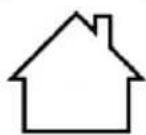
The house icon identifies that this product is for indoor use.
This product is designed and manufactured to operate within defined design limits, and misuse may result in electric shock or fire. To prevent the product from being damaged, the following rules should be observed for the installation, use and maintenance of the product. Read the following safety instructions before operating the display. Keep these instructions in a safe place for future reference.
- To avoid the risk of electric shock or component damage, switch off the power before connecting other components to the display.
- Unplug the power cord before cleaning the display. Please use the included custom bezel cleaning cloth for cleaning the bezel of the display only. Do not use a liquid or a spray cleaner for cleaning the product. Do not use abrasive cleaners.
- Always use the accessories recommended by the manufacturer to insure compatibility.
- When moving the display from an area of low temperature to an area of high temperature, condensation may form on the housing. Do not turn on the display immediately after this to avoid causing fire, electric shock or component damage.
- Do not place the display on an unstable cart, stand, or table. If the display falls, it can injure a person and cause serious damage to the appliance. Use only a cart or stand recommended by the manufacturer or sold with the display.
- Only use furniture that can safely support the display.
- Make sure the display is not overhanging the edge of the support furniture.
- Do not place the display onto tall furniture (such as cupboards or bookcases) without anchoring both the furniture and the display to a suitable support.
- Do not place the display on cloth or other materials that may be located
between the display and supporting furniture.
- Be sure to educate your children regarding the dangers of climbing on furniture to reach the display or its controls.
- Any heat source should maintain a distance of at least 5 feet away from the display, i.e. radiator, heater, oven, amplifier etc. Do not install the product too close to anything that produces smoke or moisture. Operating the product close to smoke or moisture may cause fire or electric shock.
- Slots and openings in the back and bottom of the cabinet are provided for ventilation. To ensure reliable operation of the display and to protect it from overheating, be sure these openings are not blocked or covered. Do not place the display in a bookcase or cabinet unless proper ventilation is provided.
- Never push any object into the ventilation slots of the display. Do not place any objects on the top of the Product. It could short circuit parts causing a fire or electric shock. Never spill liquids on the display.
- Do not use the display in a portrait format (by rotating 90 degrees) under high temperature environment (25°C or higher), since this would retard heat dissipation and would eventually damage the display.
- The display should be operated only from the type of power source indicated on the label. If you are not sure of the type of power supplied to
your home, consult your dealer or local power company.
- The power cable must be replaced when using different voltage from that specified in the User Manual. For more information, contact your dealer.
- The display is equipped with a two-pronged plug.
- Do not overload power strips and extension cords. Overloading can result in fire or electric shock.
- The wall socket should be installed near the equipment and should be easily accessible.
- Only the marked power source can be used for the product. Any power source other than the specified one may cause fire or electric shock.
- Do not touch the power cord during thunderstorms. To avoid electric shock, avoid handling the power cord during electrical storms.
- Unplug the unit during a lightning storm or when it will not be used for a long period of time. This will protect the display from damage due to power surges.
- Do not attempt to repair or service the product yourself. Opening or removing the back cover may expose you to high voltages, the risk of electric shock, and other hazards. If repair is required, please contact your dealer and refer all servicing to qualified service personnel.
- Keep the product away from moisture. Do not expose this appliance to rain or moisture. If water penetrates into the product, unplug the power cord and contact your dealer. Continuous use in this case may result in fire or electric shock.
- Do not use the product if any abnormality occurs. If any smoke or odor becomes apparent, unplug the power cord and contact your dealer immediately. Do not try to repair the product yourself.
- Avoid using dropped or damaged appliances. If the product is dropped and the housing is damaged, the internal components may function abnormally. Unplug the power cord immediately and contact your dealer for repair. Continued use of the product may cause fire or electric shock.
- Do not install the product in an area with heavy dust or high humidity. Operating the product in environments with heavy dust or high humidity may cause fire or electric shock.
- Hold the power connector when removing the power cable. Pulling the power cable itself may damage the wires inside the cable and cause fire or electric shocks. When the product will not be used for an extended period of time, unplug the power connector.
- To avoid risk of electric shock, do not touch the connector with wet hands.
- Insert batteries in accordance with instructions while using the remote control. Incorrect polarities may cause damage and leakage of the batteries, operator injury and contamination the remote control.
- If any of the following occurs please contact the dealer:
- The power connector fails or frays.
- Liquid sprays or any object drops into the display.
- The display is exposed to rain or other moisture.
- The display is dropped or damaged in any way.
- The performance of the display changes substantially.
- Operating environment: Temperature: 5°C \~ 35°C, Humidity: 10% to 85% non-condensing, Altitude: 0\~2,000 m.

Dear Sceptre Customer,
Congratulations on your new SCEPTRE E22 LED monitor purchase. Thank you for your support. To ensure safety and many years of trouble free operation of your LED monitor, please read the manual carefully before making any adjustments, and keep them in a safe place for future reference. We hope you enjoy your new SCEPTRE monitor.
For technical assistance, please call 1800-788-2878 and select option 3 or email our tech support group at SceptreTS@SCEPTRE.com.
For all other inquiries, please call 1800-788-2878 and select option 4 or email our customer service group at SceptreCS@SCEPTRE.com.
Live Chat also available during business hours M-F 8:30AM-5:30PM.
We recommend you register your SCEPTRE monitor by going to our website http://www.sceptre.com/registration.html.
Opening the Package
The SCEPTRE display is packaged in a carton. The size and weight of the product might be too heavy for 1 person to handle. In the event of that happening; it is recommended that the display package must be handled by a minimum of 2 or more persons. Since the glass can be easily scratched or broken, please handle the product gently. Never place the unit on a surface with the glass facing downwards unless it is on protective padding. When opening the carton, check that the product is in good condition and that all standard accessories and items are included. Save the original box and all packing materials for future shipping needs.
Package Contents
SCEPTRE Display x 1
Display Base x 1
Display Neck x 1
Screws x 2
Spacers x 4
VGA Cable x 1
HDMI to DVI cable x 1
Power Adapter x 1
User Manual x 1
Installation
Please read the user manual carefully before performing the installation. When an extension cord is required, use one with the correct power rating. The product should be installed on a flat surface to avoid tipping. Space should be maintained between the back of the product and the wall for proper ventilation. Avoid installing the product in the kitchen, bathroom or other places with high humidity dust or smoke, so as not to shorten the service life of the electronic components. Please ensure the product is installed with the screen in landscape orientation. Any 90° clockwise or counterclockwise installation may induce poor ventilation and successive component damage.
Installing the Monitor Stand Assembly
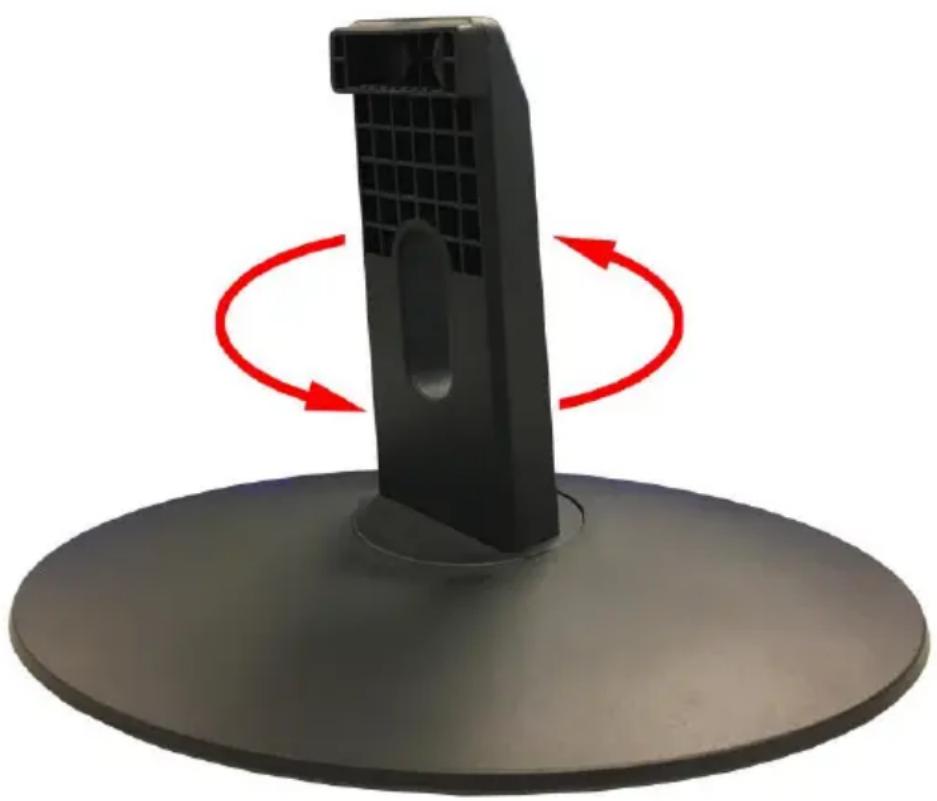
- Insert the neck into the base with the front of the neck at an angle facing the left side. Afterwards, twist the neck counter-clockwise until you hear a click sound and the neck is facing forward. Now the neck should be aligned with the base.
natural_image
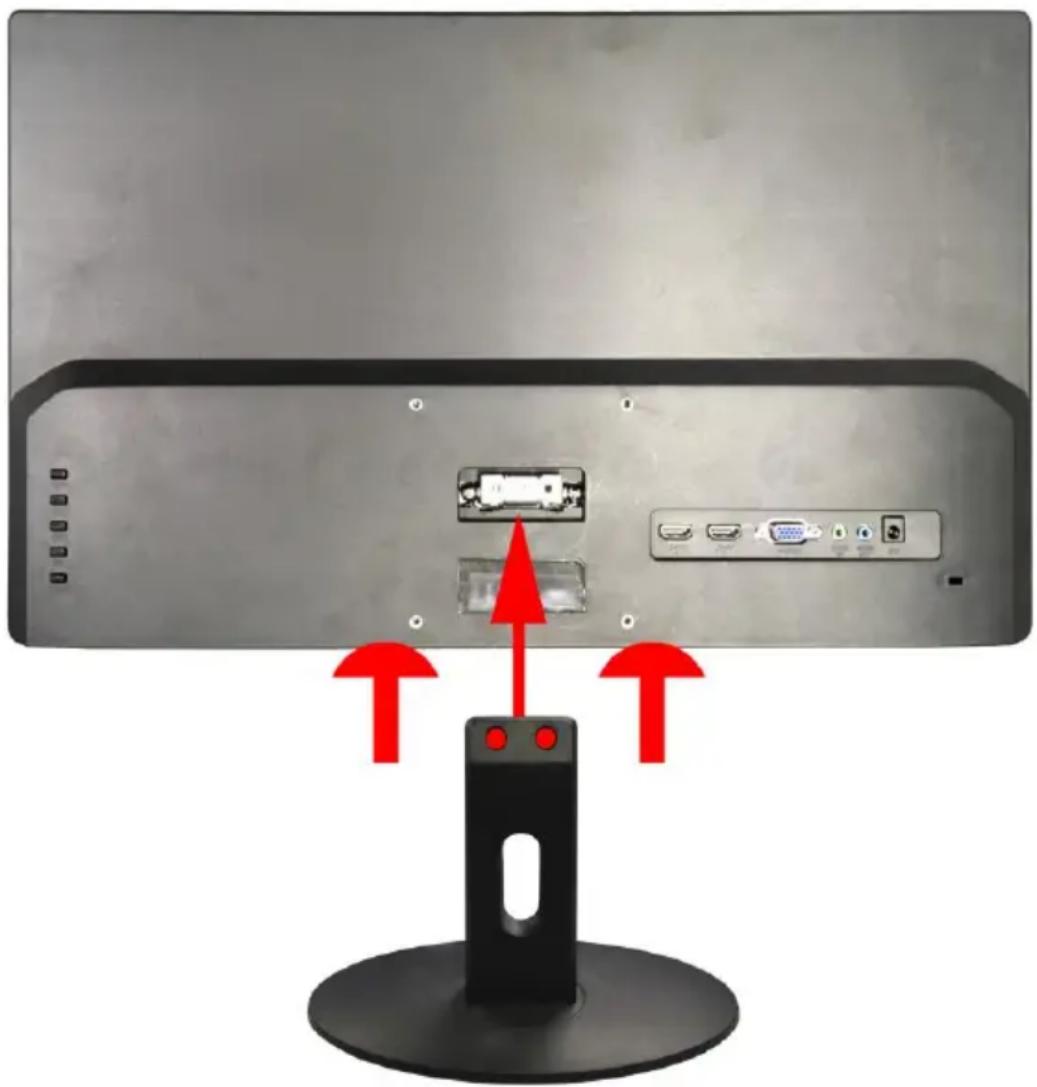
Black plastic device with a grid-patterned top and red circular arrows indicating rotational motion (no text or symbols)- Lay the monitor flat on a surface and insert the neck + base assembly to the back of the monitor. Secure the top of the neck by screwing in 2 screws.
natural_image
Back view of a computer monitor with a close-up of the front panel showing internal components and red arrows indicating loading or movement (no text or symbols present)- To finalize your installation of the display, please read the following:
a. If you are placing the display on a stand, we would recommend you to use a display safety strap (not included) in order to minimize the possibility of the display toppling over.
b. If you are mounting the display on the wall
c. Make sure the wall is structurally safe for the weight of the display
d. Make sure the wall mount kit is compatible with the display
e. Read and follow all instructions provided by the wall mounting kit.
f. Securely install all screws and connections.
Removing the Stand for Wall Mounting
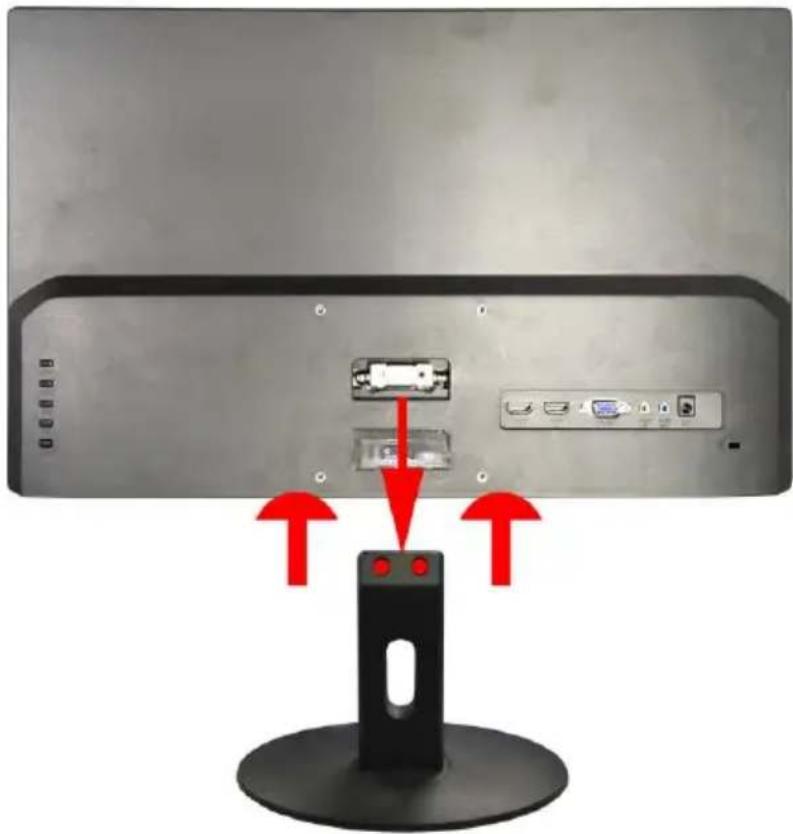
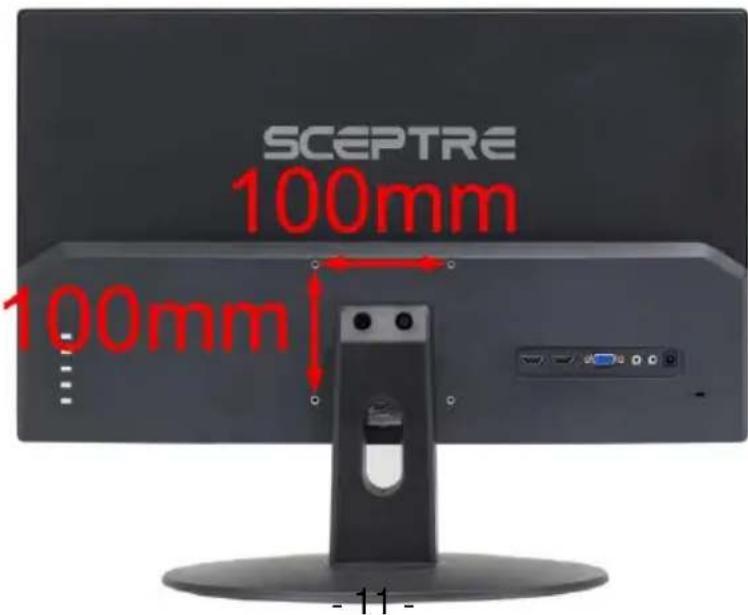
- To remove the stand, lay the monitor flat on a table. Unscrew the two screws indicated and you can pull the stand completely off. If you want to wall mount the monitor you will need to use the included spacers first on the mounting pattern before you attach your mounting plate.
natural_image
Back view of a computer monitor with a close-up of its internal components and red arrows indicating direction (no text or symbols)- The display's mountain pattern is 100mm by 100mm using M4 x 10mm size screws.
www.SCEPTRE.com
SCEPTRE E22 Display User Manual
SAFETY INSTRUCTIONS .... 1
SAFETY INSTRUCTIONS 2
IMPORTANT INFORMATION......3
IMPORTANT INFORMATION......3
SAFETY INSTRUCTIONS 5
Opening the Package....8
Package Contents 8
Installation 8
Installing the Monitor Stand Assembly 9
Removing the Stand for Wall Mounting 11
Table of Contents 12
Identifying Front and Rear Panel 13
Front View....13
Back View with Buttons 14
Back View with Connections.... 15
Connections 16
If You have HDMI Connection on Your Video Card.... 16
If You have VGA Connection on Your Video Card.... 17
On Screen Display (OSD) Menu 18
QUICK START....19
PICTURE 20
COLOR 22
SYSTEM 23
Supported VGA Resolution 24
Supported HDMI Resolution 25
Troubleshooting 26
How do I clean the LED Monitor? 29
Specification 30
LIMITED PRODUCT WARRANTY 31
Disclaimer, Trademarks, Icons & Copyright Information 33
FCC Compliance Statement 34
Identifying Front and Rear Panel
Front View
natural_image
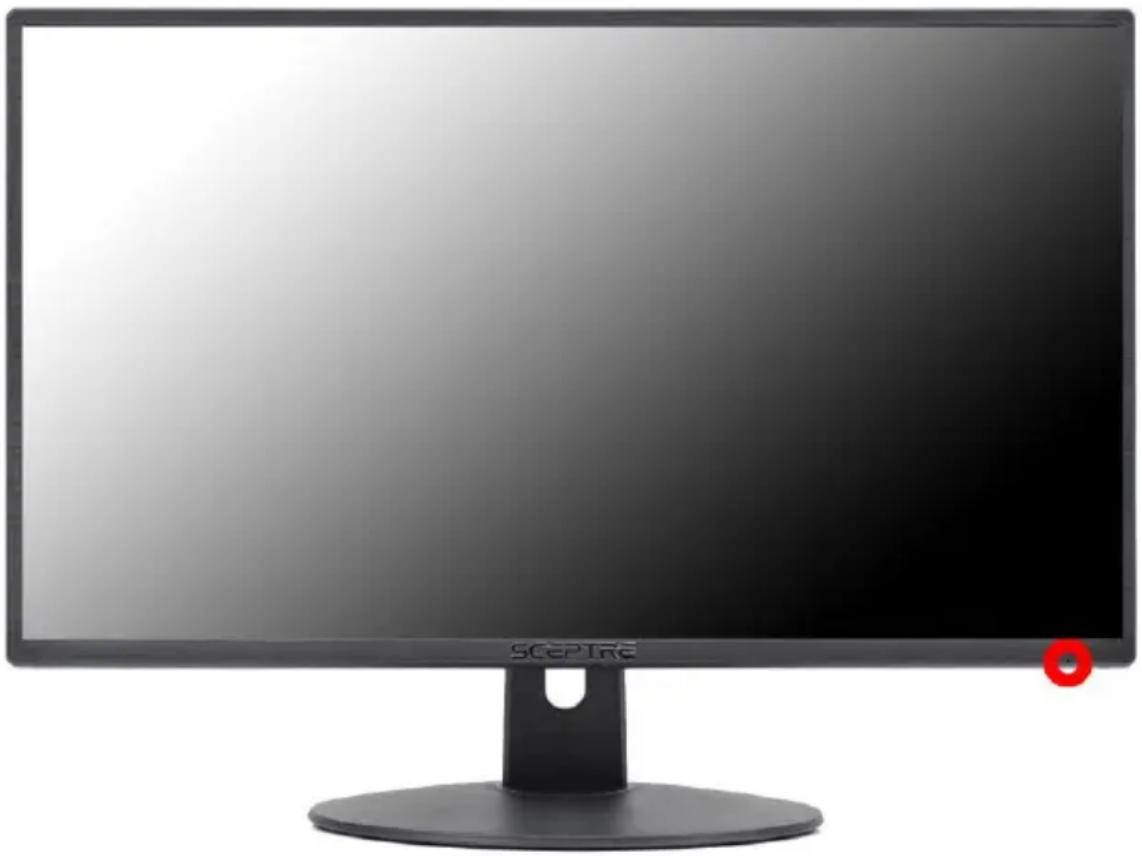
Black desktop monitor with 'SCEPTRE' branding and a red circular button on the right side (no additional text or symbols visible)Indicator Light: This light turns blue when the monitor is turned on and red when the monitor is turned off. The light will be off if the power adapter is removed from the back of the monitor.
Back View with Buttons
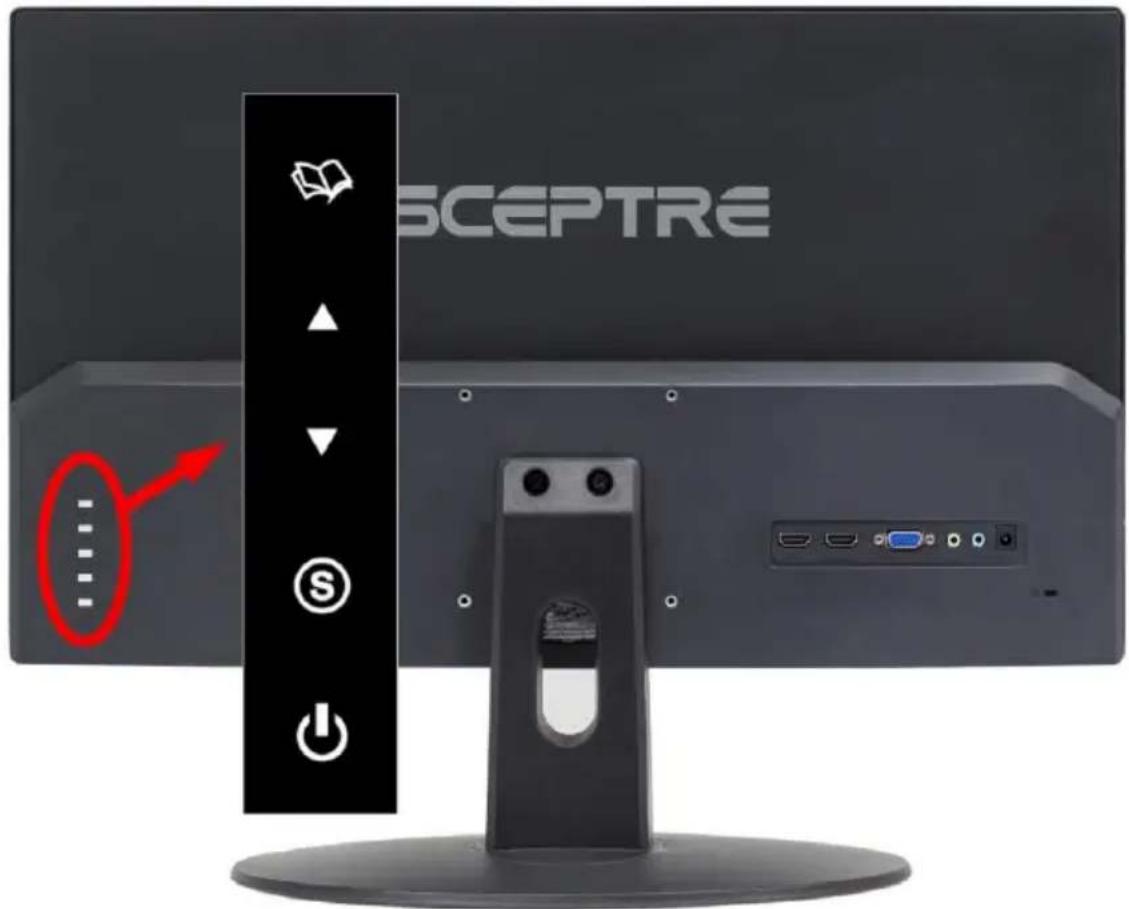
- – This button activates the On Screen Display (OSD). While the OSD is active, this button will act as the select button to open up an option for adjustment.
- ▲ – With no OSD, this button this button will also increase the volume of the internal speaker. With the OSD turned on, this button moves the selection upwards.
- ▼ – With no OSD, this button will also decrease the volume of the internal speaker. With the OSD turned on, this button moves the selection downwards.
- Ⓐ- When the OSD is active, this button acts as the EXIT button and exits out of the option or OSD. This button switches between all the different inputs of the display.
-
- This button turns the display on or off.
Back View with Connections
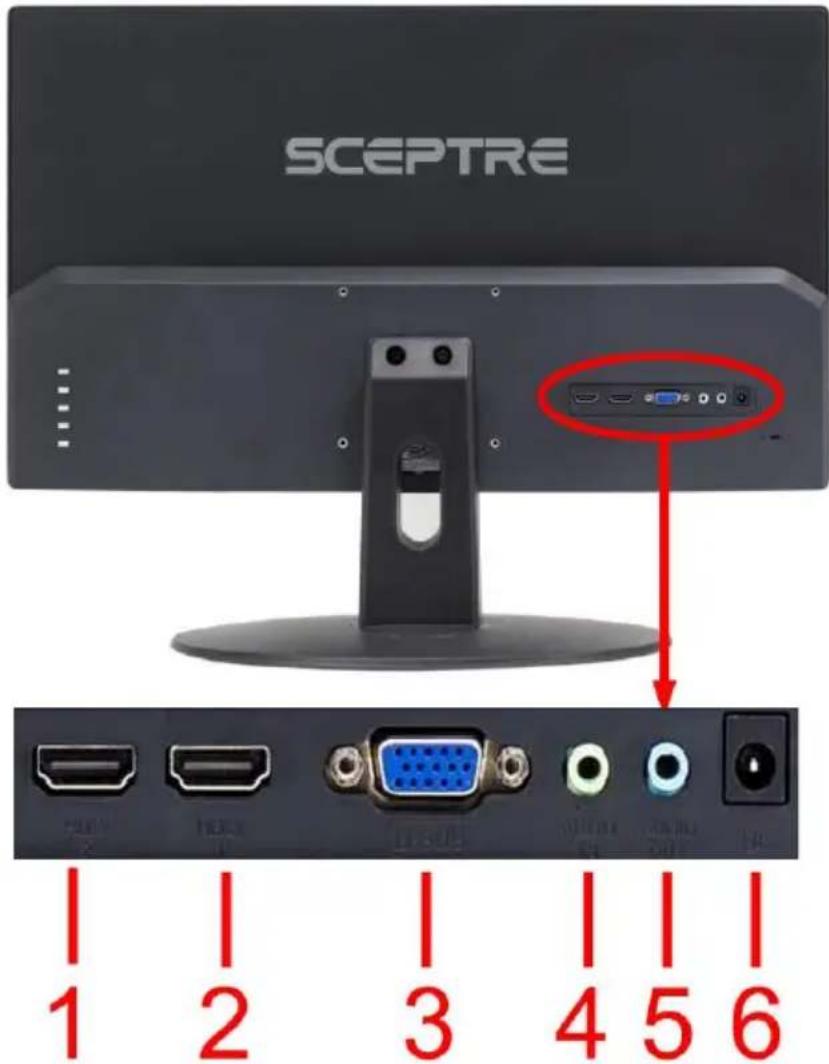
- HDMI 2 – HDMI stands for High Definition Multimedia Interface. This connection is for computers with HDMI video output.
- HDMI 1 – HDMI stands for High Definition Multimedia Interface. This connection is for computers with HDMI video output.
- VGA – VGA stands for Video Graphics Array. This connection is for computers to send video signals to the monitor by an analog signal. This method of connection is the most commonly used connection.
- AUDIO IN – This connection is for audio in from the computer going into the monitor. This connection is used with VGA.
- AUDIO IN – This connection is for audio out from the monitor going out to either a speaker or headphone.
- DC IN – This connection is for electricity supplied from the included power adapter.
Connections
If You have HDMI Connection on Your Video Card...
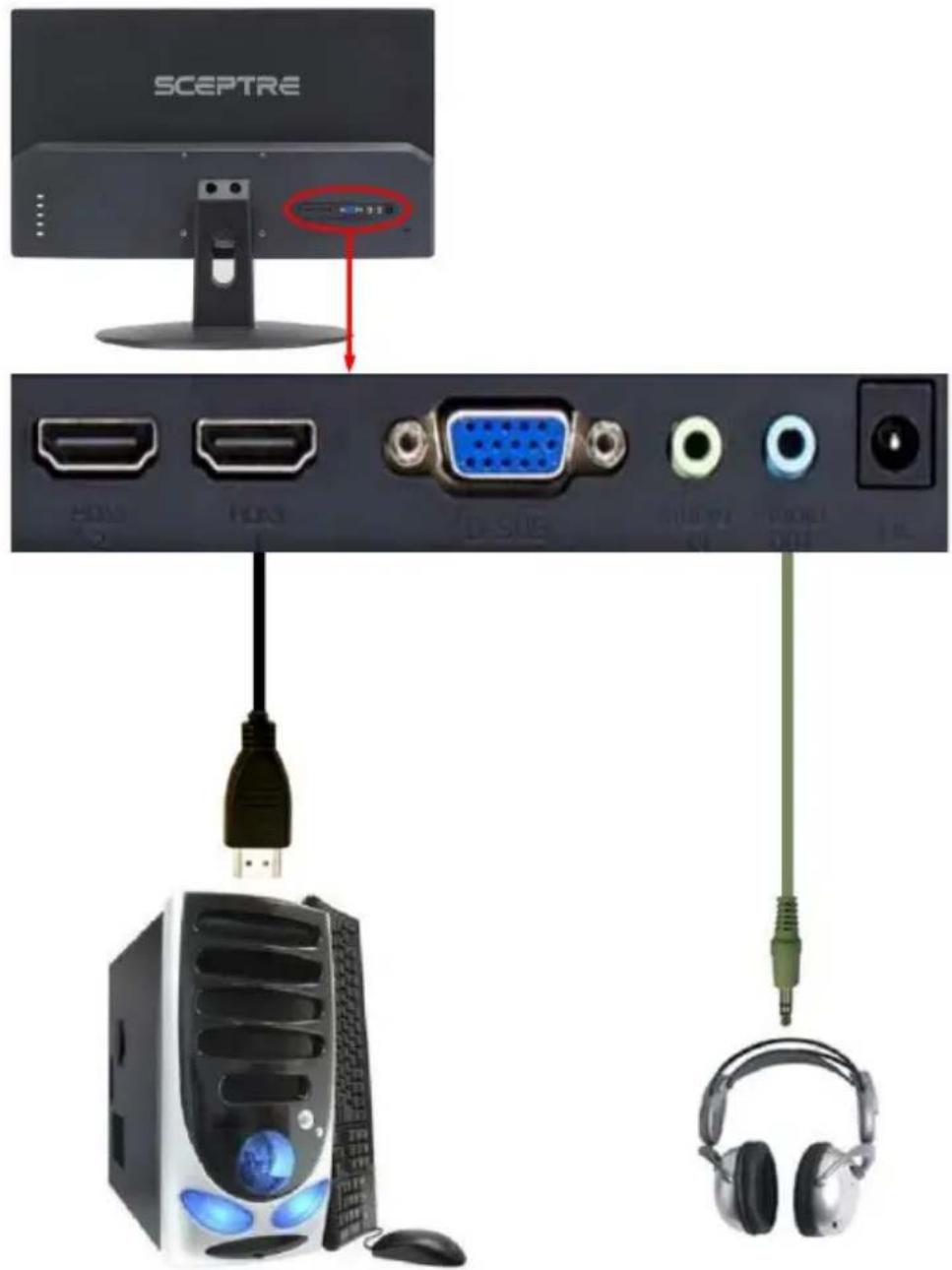
- Make sure the power of the E22 LED MONITOR is turned off.
- Obtain a HDMI cable and connect one end to the back of the monitor and the other end to the back of the computer.
- Turn on the power of both the E22 LED MONITOR and the computer.
Please Note:
- The PC's clearest picture is ran with 1920 x1080 at 60 Hz.
If You have VGA Connection on Your Video Card...
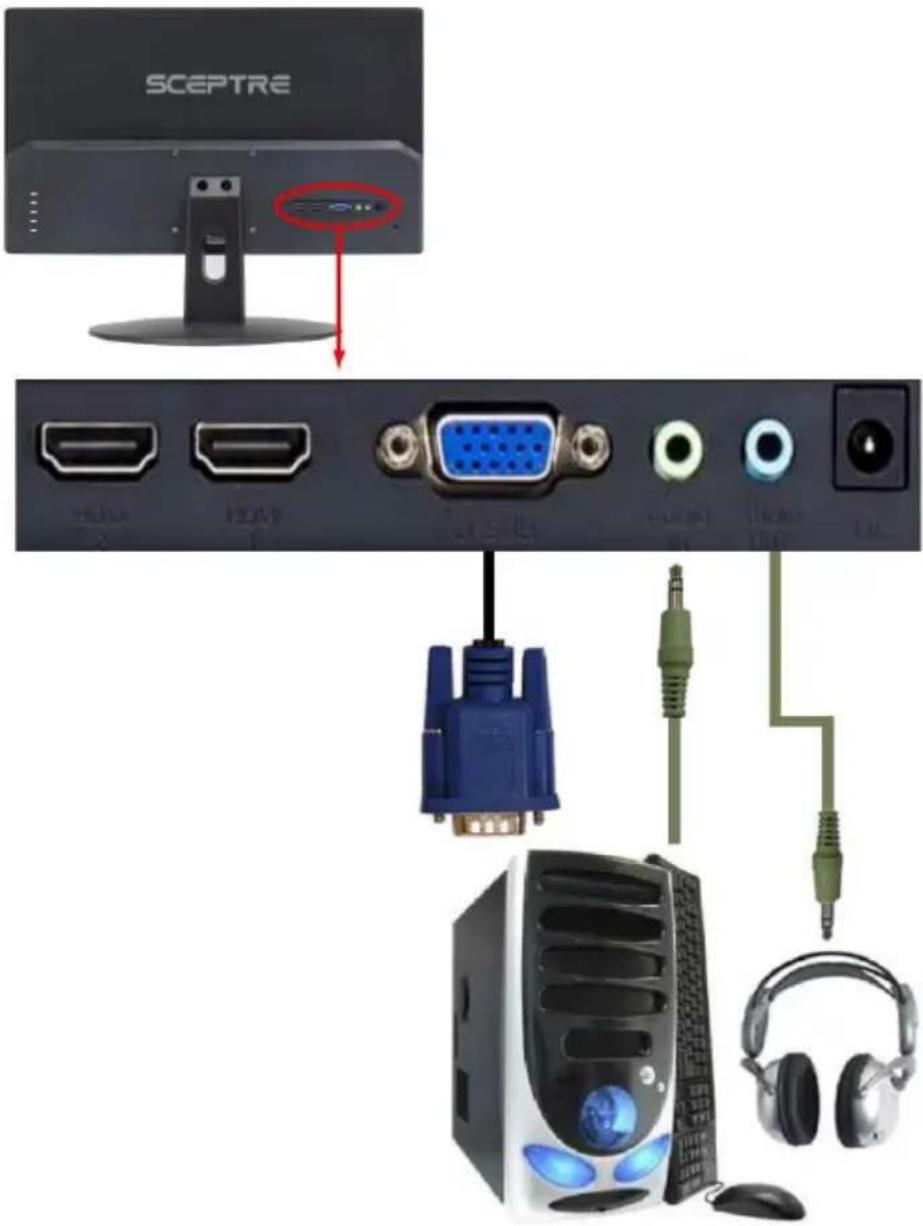
-
Make sure the power of E22 LED MONITOR is turned off.
-
If you were previously using a CRT (bulky) monitor, please hook up your old monitor first and make sure your refresh rate is set to 60 Hz frequency before using the E22 LED MONITOR. You can find the refresh rate information and change it by RIGHT CLICKING on the desktop with nothing selected. After you have right clicked, select the DISPLAY SETTINGS option. Scroll to the bottom of the page and click on the DISPLAY ADAPTER PROPERTIES. Click on the MONITOR tab. In that tab, change the refresh rate to 60 Hz and click on APPLY. After the refresh rate changed, please shut down the computer and monitor.
-
Obtain the VGA cable and connect to the VGA connection on your PC. Connect the other end of the cable to your E22 LED MONITOR.
-
Obtain a 3.5mm mini-jack cable connect it between the computer's audio out and the monitor's audio in.
-
Turn on the power of both the E22 LED MONITOR and the PC.
Please Note:
The PC's clearest picture is ran with 1920 x1080 at 60 Hz.
The OSD menu of the monitor provides various adjustments for the monitor such as color, brightness, and contrast .....etc.
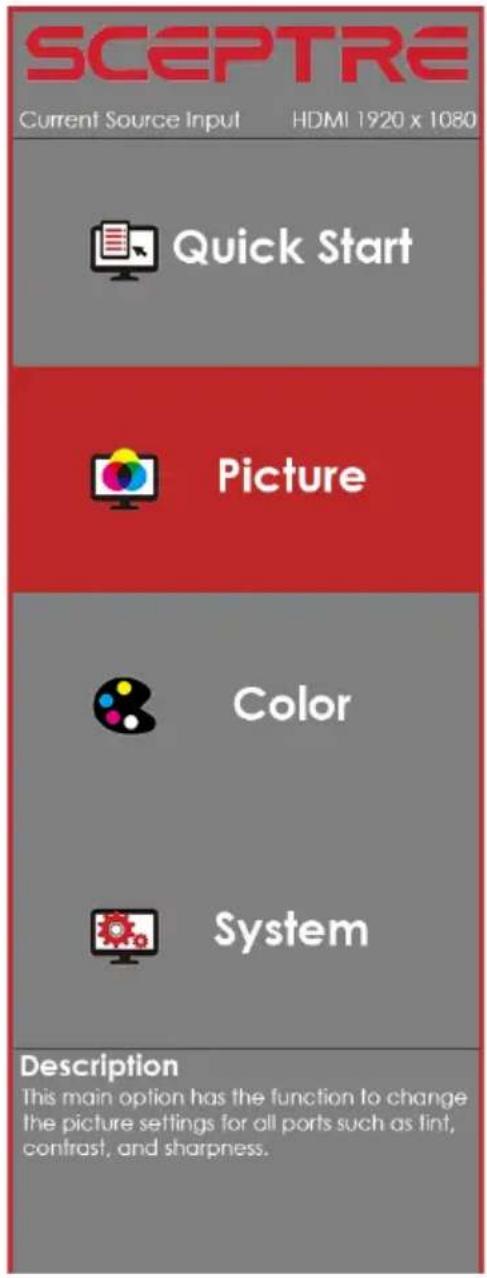
When you press the button on the monitor, the OSD screen will appear. Select each of the functions with the ▲ or ▼ buttons. Use the 📋 button again to enter each of the function or when you're in the function already, use the button to select the option you want to adjust. Use the ▲ or ▼ buttons to adjust each option's values. When you want to exit press the Ⓧ button.
QUICK START
Quick Start offers users a variety of often adjusted options for users.
| Quick Start | |
| Backlight | 80 |
| Brightness | 50 |
| Contrast | 50 |
| Preset | User |
| Aspect Ratio | Full |
| Source | HDMI |
| Blue Light Shift | Off |
- BACKLIGHT - This option adjusts the intensity of the LED diode directly.
- BRIGHTNESS – This option adjusts the brightness of the monitor.
- CONTRAST- This option adjusts the contrast of the monitor.
- PRESET – This option lets the user select different preset display modes of the monitor. Only USER mode will allow the user to adjust options freely.
a. STANDARD – This display mode is for regular users.
b. USER – This display mode allows you to adjust contrast and brightness manually.
c. MOVIE – This display mode is for playing movies.
d. ECO – This display mode is for power saving.
e. FPS – This display mode is for playing first person shooter games.
f. RTS – This display mode is for playing real time strategy games.
- ASPECT RATIO – This option lets the user adjust the aspect ratio of the monitor.
a. FULL – This option automatically stretches any picture to the full screen regardless of picture proportion.
b. 4:3 - This option forces any resolution to a 4:3 square format.
-
SOURCE – This option lets the user manually switch an input or auto where the monitor detects a signal and changes the source automatically.
-
BLUE LIGHT SHIFT – This display mode filters out blue light for users who want blue light protection.
| Picture | |
| Backlight | 80 |
| Brightness | 50 |
| Contrast | 50 |
| Preset | User |
| DCR | Off |
| Aspect Ratio | Full |
| Sharpness | 50 |
| VGA Settings | |
| Auto Adjust | |
| Auto Color | |
| H Position | 50 |
| V Position | 50 |
| Clock | 50 |
| Phase | 50 |
- BACKLIGHT - This option adjusts the intensity of the LED diode directly.
- BRIGHTNESS – This option adjusts the brightness of the monitor.
- CONTRAST- This option adjusts the contrast of the monitor.
- PRESET – This option lets the user select different preset display modes of the monitor. Only USER mode will allow the user to adjust options freely.
a. STANDARD – This display mode is for regular users.
b. USER – This display mode allows you to adjust contrast and brightness manually.
c. MOVIE – This display mode is for playing movies.
d. ECO – This display mode is for power saving.
e. FPS – This display mode is for playing first person shooter games.
f. RTS – This display mode is for playing real time strategy games.
-
DCR – This option turns on or off the dynamic contrast option of the monitor. Dynamic Contrast automatically adjusts the contrast of the monitor based off the video signal provided.
-
ASPECT RATIO – This option lets the user adjust the aspect ratio of the monitor.
a. FULL – This option automatically stretches any picture to the full screen regardless of picture proportion.
b. 4:3 - This option forces any resolution to a 4:3 square format.
-
SHARPNESS – This option adjusts the sharpness of graphics and text for this monitor.
-
VGA Settings – This setting allows users to adjust the image quality of the monitor.
a. AUTO ADJUST – This option auto adjusts the picture for optimal performance while under VGA connection.
b. AUTO COLOR – This option auto adjusts the color balance for the picture to maximize display performance while under VGA connection.
c. H. POSITION – This option adjusts the horizontal position of the image.
d. V. POISTION – This option adjusts the vertical position of the image.
e. CLOCK – This option adjusts the picture clarity by large increments.
f. PHASE – This option adjusts the picture clarity by small increments.
COLOR
| Color | |
| Temperature | User |
| Red | 50 |
| Green | 50 |
| Blue | 50 |
| Advanced Settings | |
| Red | 50 |
| Green | 50 |
| Blue | 50 |
| Cyan | 50 |
| Magenta | 50 |
| Yellow | 50 |
| Gamma | 2.0 |
| Tint | 50 |
| Saturation | 50 |
| Blue Light Shift | Off |
- TEMPERATURE – This option let users select different color temperatures of the monitor.
a. NORMAL – This color temperature is for users who prefer a neutral white balance.
b. COOL – This color temperature is for users who prefer a cool white balance.
c. USER – This color temperature is for users who would like to adjust the RGB (red, green, blue) values manually.
i. ADVANCE SETTINGS – This setting adjusts finer values besides RGB going into cyan, magenta, and yellow.
d. WARM – This color temperature is for users who prefer a warm white balance.
-
GAMMA – This option adjusts the gamma curve value of the monitor.
-
TINT – This option adjusts the tint of the entire monitor.
-
SATURATION – This option adjusts the color saturation of the entire monitor.
-
BLUE LIGHT SHIFT – This display mode filters out blue light for users who want blue light protection.

System
| Overdrive | On |
| Sleep Mode | Off |
| Language | English |
| OSD H Position | 100 |
| OSD Timer | 15 |
| OSD Transparency | 0 |
| Volume | 50 |
| Reset |
- OVERDRIVE – This option increases the pixel response time of the LCD screen.
- SLEEP MODE – With the monitor given no video signal, enabling this option will make the monitor automatically shut off after 30 minutes, 60 minutes, or 2 hours.
- LANGUAGE – This option allows users to change the menu language of the monitor.
- OSD H POSITION – This option adjusts the placement of the OSD menu horizontally.
- OSD TIMER – This option adjusts the time it takes for the OSD menu to automatically shut off.
- OSD TRANSPARENCY – This option adjusts the opacity of the OSD menu.
- VOLUME – This option allows users to change the output level of the audio out port.
- RESET – This option resets all values of the menu back to factory default.
| RESOLUTION & REFRESH RATE |
| 1920 x 1080 @ 60Hz |
| 1680 x 1050 @ 60Hz |
| 1600 x 900 @ 60Hz |
| 1440 x 900 @ 60Hz |
| 1400 x 1050 @ 60Hz |
| 1366 x 768 @ 60Hz |
| 1360 x 768 @ 60Hz |
| 1280 x 1024 @ 60Hz |
| 1280 x 960 @ 60Hz |
| 1280 x 800 @ 60Hz |
| 1280 x 768 @ 60Hz |
| 1280 x 720 @ 60Hz |
| 1280 x 600 @ 60Hz |
| 1152 x 864 @ 60Hz |
| 1024 x 768 @ 60Hz |
| 800 x 600 @ 60Hz |
| 1400 x 1050 @ 60Hz |
| 1280 x 1024 @ 60Hz |
| 1280 x 800 @ 60Hz |
| 1280 x 768 @ 60Hz |
| 1280 x 720 @ 60Hz |
| 1152 x 864 @ 60Hz |
| 1024 x 768 @ 60Hz |
| 1024 x 600 @ 60Hz |
| 800 x 600 @ 60Hz |
*Specifications are subject to change without notice.
| Problem | Possible solutions |
| DISPLAY IS UNCLEAR AND UNSTABLE | To stabilize and clarify your display, use the AUTO ADJUST function or change the resolution to the display's optimal setting 1920 x 1080 at 60Hz, then AUTO ADJUST. |
| THERE IS NO LED DISPLAY or SCREEN SAYS NO SIGNAL | Make sure you switched to the correct source. Check both sources to see video is on the other source. Check your video cable. It might be corrupt. Swap out the video cable for another one to see if the monitor will work. Check your power plug. See if it is fully plugged in on both the monitor and the wall. |
| MONITOR SAYS “SIGNAL OUT OF RANGE” | If you have a CRT monitor, please connect the CRT monitor to the computer and change the refresh rate down to 60 Hz via your video card's display settings menu. After the setting of 60 Hz has been change you can then use the LED on the computer.1. To change the setting go to display settings by right clicking on your desktop with nothing selected.Choose the PROPERTIES option.2. Click on the SETTINGS tab, verify the resolution is NOT higher than 1920 x 1080, and click on the ADVANCED button.3. Click on the MONITOR tab and change the refresh rate to 60 Hz.4. Click on OK 2-3 times to finalize your change.If you do NOT have a CRT monitor or it's already broken, please make sure both the F22 LED monitor and your computer is turned off.1. Turn on the LED monitor and the computer.2. While the computer is turned on, press the “F8” key on your keyboard continuously until a selection menu appears and select the “Safe Mode” option.3. When you've entered Safe Mode please uninstall any video card driver and monitor driver by using either the “Add / Remove Programs” icon or going into “System4. Properties” and manually removing anything under “Monitors” and “Display Adapters”. After removing all the drivers, please reboot your computer and you should be able to see windows. Please install your monitor driver first, then your video card driver.Please remember to make sure your refresh rate should be at 60Hz. |
| I CAN'T OPEN THE OSD | You need to have a valid video signal going through the monitor before you can turn on the OSD. |
| I CANNOT GET THE RESOLUTION1920 x1080 | If you are using HDMI, please try out VGA to see if you are able to achieve that resolution. If your VGA can then, your video card's HDMI cannot support widescreen resolutions.Sometimes your video card will not read the monitor correctly and will not allow you to achieve the resolution you want. Rebooting your computer will solve the situation.You can also make sure your video card's video drivers are up to date. You can find what video card you have by clicking on START then RUN. Type in "DXDIAG". When the diagnostic window pops up, click on the DISPLAY tab. The program will tell you what video chipset you have. Copy that name then search it with an online search engine like GOOGLETM. Find your video card company's web address and search for newer drivers. If updating your drivers does not work, you probably have one of the older video cards and cannot achieve a widescreen resolution. You'll need to upgrade your video card to a newer one. |
| THE VIDEO IS TOO BRIGHT NO MATTER WHAT I ADJUST | Sometimes having older video cards this type of problem might happen due to newer LEDs having to provide HD video capability and not being fully compatible with older video cards. You can try adjusting the contrast to a lower value and adjust the brightness to compensate. |
| THE WORDS AND VIDEO ARE TOO BLURRY | Are you using the monitor's native resolution? If not you'll need to switch resolution to the native 1920 x 1080 at 60 Hz to make the words clearer.If the words are still blurry, please try enabling or disabling CLEAR TYPE function from windows. |
| THE COLORS ARE NOT CORRECT | Sometimes the colors are not correct because your VGA or HDMI cable is loose or corrupt. Please try reconnecting your cable or swap out your current cable to see if the problem persists. |
| HOW DO I RESET THE MONITOR | Make sure there is a valid video signal to the monitor and press menu to open the OSD. Look for RESET under the OTHER options. |
| I CHANGED MY COLOR SETTINGS NOW I CAN'T GET THE FACTORY DEFAULT BACK. | Open the OSD, under OTHER, select RESET to reset all values back to factory default. |
| THE WORDS ARE TOO SMALL AT 1920 x1080 | At the native resolution of 1920 x1080, some people might feel that the words are too small to read. You can change the size of the words in Windows Operating System via its display properties.For Windows XPRight click on the background with nothing selected. Left click on the PROPERTIES option.Click on the SETTINGS tab.Under SETTINGS, click on the ADVANCED button.Under GENERAL tab, change the size of the words by selecting the option NORMAL SIZE and change it to LARGE SIZE.Click on OK on all windows to exit.Once you have finished rebooting, the computer is ready for use.For Windows VISTA or Windows 8 or Windows 10Right click on the Wallpaper. Left click on the PERSONALIZE option.Click on ADJUST FONT SIZE (DPI) option on the left column andClick on CONTINUE.In there you can change the size of the words by changing from the option DEFAULT SCALE to LARGE SCALE.Click on APPLY to finalize your selection.Once you have finished rebooting, the computer is ready for use. |
IMPORTANT
- The power cable has to be removed from the socket before cleaning the display.
- Do not use volatile solvent (alcohol, rosin, and toluene) to clean the display. These types of chemicals might damage the housing and the LCD glass.
Cleaning the bezel
- Use a 100% cotton cloth or micro-fiber cloth for cleaning.
- If the bezel is dirty to the point where you cannot simply dry wipe it, please lightly dampen the wiping material with clean water and wipe again. Wipe the display with a dry micro-fiber cloth or 100% cotton cloth afterwards.
Please Note:
- Make sure you wring the water out of the cloth before cleaning the bezel in order to prevent water from penetrating into the electronics.
Cleaning the Screen
- Use a 100% cotton cloth or micro-fiber cloth for cleaning.
- The LCD screen glass is extremely fragile. Do not scrape it with any material. Do not press or tap the screen to avoid cracking. When the screen is dirty to the point where you cannot simply dry wipe it, please lightly dampen the wiping material with clean water and wipe again. Wipe the display with a dry micro-fiber cloth or 100% cotton cloth afterwards.
| Display panel | |
| Active Area / Screen Size | 22" (diagonal 21.53") |
| Aspect Ratio | Widescreen 16 : 9 |
| Resolution | Native: 1920 x1080 |
| Brightness | 200 cd/m2 |
| Dynamic Contrast | 1,000,000:1 |
| Response Time | 5ms (G-to-G) |
| Refresh Rate | Up to 75 Hz |
| Viewing Angle | Typical 170/160 Degree (Horizontal/Vertical) |
| Colors | 16.7 million of colors |
| LED Backlight | 30,000 hours |
| Monitor Display | |
| Dimension | With Stand: 19.92" x 15.1" x 7.02" Without Stand: 19.92" x 11.92" x 1.46" |
| Weight | 5.81 lb (with stand), 5.15 lb (without stand) |
| Wall Mount Pattern | 100mm x 100mm Screw Size M4 x 10mm |
| Power input | Input: 100 – 240V~ 50/60Hz, 2.5A Max |
| Tilt | Backward:15° Forward: 5° |
| Features | |
| On Screen Display Control (OSD) | QuickStart, Picture, Color, System |
| OSD Language | English (Default), French, Spanish, Chinese |
| Preset Picture Mode | Standard, User, Movie, Eco |
| Preset Game Mode | RTS, FPS |
| Blue Light Shift | Available |
| I/O | VGA, HDMI (HDCP supported) |
| Compliance | FCC, cETLus, ISTA 6, HDMI, WHQL (Win 10), Energy Star |
*Specifications are subject to change without notice.
Please read this warranty card carefully, it is a "ONE-YEAR LIMITED WARRANTY" on parts and labor (90 days for commercial use) and is only valid when purchased from an Authorized Reseller, only on new and non-refurbished product, and available to customers in the Continental US, Alaska, Hawaii and Puerto Rico. See below for the SCEPTRE Extended Service warranty.
SCEPTRE's Responsibility
SCEPTRE units purchased from an authorized SCEPTRE U.S. Reseller in the United States and that are used in the fifty (50) United States or Puerto Rico and Canada are warranted to be free from manufacturing defects in materials and workmanship for a period of one (1) year from the date of their original retail purchase (or a period of ninety (90) days for commercial use). If the unit fails to conform to this warranty, we will service the units using new or refurbished parts. In the event that the part required for replacement is no longer in production and/or is obsolete, SCEPTRE will repair or replace the unit with similar or like parts of equal value. If a similar or like part is not available, a charge may be incurred to the owner, for any upgraded parts substituted.
Service Labor
During a period of one (1) year from the effective warranty date (or a period of ninety (90) days for commercial use), SCEPTRE will provide, when needed, service labor to repair a manufacturing defect at its designated Service Center. To obtain warranty service in the United States, you must first call our Customer Support at (800) 788-2878. The determination of service will be made by SCEPTRE Customer Support. PLEASE DO NOT RETURN YOUR UNIT TO SCEPTRE WITHOUT PRIOR AUTHORIZATION.
Parts
New or remanufactured parts will be used for repairs by SCEPTRE at its designated Service Center for one (1) year (or ninety (90) days for commercial use) from the effective warranty date. Such replacement parts are warranted for the remaining portion of the original warranty period.
Service
During the one (1) year (or ninety (90) days for commercial use) warranty period, SCEPTRE will, at its option and sole discretion, repair or replace defective parts, including replacement of the entire Panel. The Customer will be required to ship the unit to the Service Center indicated at the time Customer Support is contacted to make the necessary repairs, you are responsible for all transportation charges to the service facility. SCEPTRE is not responsible for the de-installation or re-installation of the unit.
Packaging and Shipping Instruction
When you send the product to an authorized SCEPTRE service facility you must use the original carton box and packing material or an equivalent as designated by SCEPTRE. If you no longer have them please contact Sceptre's Customer Support.
Not Covered
This warranty does not cover the following: cosmetic defects; damage, malfunctions, or failures resulting from shipping or transit accidents, abuse, misuse, operation contrary to furnished instructions, operation on incorrect power supplies, operation with faulty associated equipment, modification, alteration, improper servicing, tampering and or, damage from fire, water, lightning, power surges, abnormal environmental conditions, or other acts of nature; normal wear and tear (SCEPTRE reserves the right to determine “wear and tear” on any and all products); unsatisfactory visual or audio performance not caused by a manufacturing
defect; or displays on which the serial number has been removed or defaced. Image Sticking caused by operating at excessive brightness levels for extended periods or mishandling are not covered by this warranty. Installation, removal, transportation and reinstallation of a display and routine maintenance and cleaning, are not covered by this warranty. Any hardware, components, and/or software bundled with the display are not covered by this warranty. Any damages caused directly or indirectly by Buyer's or Reseller's "Value Added Feature" are not covered by this warranty or Sceptre, Inc. Any damages of any kind including, but not limited to, direct or indirect damages, lost profits, lost savings, or other special incidental, exemplary or consequential damages whether for breach of contract, tort, or otherwise, or whether arising out of the use of or inability to use the product, even if SCEPTRE, INC. or any dealer, distributor of authorized service provider/partner has been advised of the possibility of such damages, or any claim by any other warranty are not covered by this warranty or Sceptre Inc.
ANY IMPLIED WARRANTIES, INCLUDING ANY IMPLIED WARRANTY OF MERCHANTABILITY AND FITNESS FOR A PARTICULAR PURPOSE SHALL BE LIMITED IN DURATION TO THE PERIOD OF TIME SET FORTH ABOVE. OUR LIABILITY FOR ANY AND ALL LOSSES AND DAMAGES RESULTING FROM ANY CAUSE WHATSOEVER, INCLUDING OUR NEGLIGENCE, ALLEGED DAMAGE OR DEFECTIVE GOODS, WHETHER SUCH DEFECTS ARE DISCOVERABLE OR LATENT, SHALL IN NO EVENT EXCEED THE PURCHASE PRICE OF THE DISPLAY. WE SHALL NOT BE RESPONSIBLE FOR LOSS OF USE, COMMERCIAL LOSS OR OTHER INCIDENTAL OR CONSEQUENTIAL DAMAGES. SOME STATES DO NOT ALLOW LIMITATIONS ON HOW LONG AN IMPLIED WARRANTY LASTS OR THE EXCLUSION OR LIMITATION OF INCIDENTAL OR CONSEQUENTIAL DAMAGES, SO THE ABOVE LIMITATIONS OR EXCLUSIONS MAY NOT APPLY TO YOU. This warranty gives you specific legal rights, and you may also have other rights which vary from state to state. This is the only warranty applicable; no one is authorized to extend or modify it or to grant any other warranty. SCEPTRE retains the right to assess all warranty claims and to determine if damages are covered by the warranty. In case of a claim that is not covered by the warranty, you will be contacted to determine whether SCEPTRE should repair the damage for a fee or whether the product should be returned to you as received by the repair center.
Dead Pixel Policy
SCEPTRE sets limit on the LCD at 3 dead pixels in a cluster adjacent to each other, or 5 dead pixels in a combination of color and brightness. Any number of dead or bad pixels under the limit is considered to be within normal performance specification of the LCD and is not considered defective.
Owner's Responsibility
Effective Warranty Date
Warranty begins on the date of sale to the end user. To ensure warranty service, keep the dated bill or sale receipt as evidence of the purchase date. If you can no longer obtain your receipt, the warranty will revert to the unit's manufacture date according to the serial number of the unit. This limited warranty applies only to the original purchaser and is non-transferable.
Warranty Service
For warranty service information, contact SCEPTRE Technical Support at email address SceptreTS@SCEPTRE.com, via phone at (800) 788-2878, or via World Wide Web chatting service at www.Sceptre.com. SCEPTRE Technical Support is available Monday to Friday 8:30 AM to 5:30 PM Pacific Time. Parts and service labor that are SCEPTRE's responsibility (see above) will be provided without charge. Other services or services not covered by the warranty are at the owner's expense. You must provide the model, serial number and date of purchase. Before you ask for warranty service, read your User Manual. You might avoid a service call.
Warranty conditions are subject to change, for latest Warranty Terms and Conditions and additional information regarding your warranty, please see complete details online at www.SCEPTRE.com.
Disclaimer, Trademarks, Icons & Copyright Information
• HDMI® "HDMI, the HDMI logo and High-Definition
Multimedia Interface are trademarks or registered trademarks of HDMI Licensing LLC."
- Microsoft, Windows are registered trademarks of Microsoft Corporation in the United States and other countries.
This Display meets the ENERGY STAR® guidelines under the default picture settings. Changing this setting or enabling other options will increase power consumption which could possibly exceed the guidelines of ENERGY STAR®.
For more information on the ENERGY STAR program, please refer to www.energystar.gov.
- SCEPTRE is a trademark or registered trademark of Sceptre Group.
- Sceptre, Inc. shall not be liable for technical or editorial errors or omissions contained herein; nor for incidental or consequential damages resulting from furnishing this material, or the performance or use of this product.
- In the interest of continuing product improvement, Sceptre, Inc. reserves the right to change product specifications without notice. Information in this document may change without notice.
- No part of this document may be copied, reproduced, or transmitted by any means, for any purpose without prior written permission from Sceptre, Inc.
This device complies with Part 15 of the FCC Rules.
Operation is subject to the following two conditions:
(1) This device may not cause harmful interference, and (2) this device must accept any interference received, including interference that may cause undesired operation.
Please Note: This equipment has been tested and found to comply with the limits for a Class B digital device, pursuant to part 15 of the FCC Rules. These limits are designed to provide reasonable protection against harmful interference in a residential installation. This equipment generates uses and can radiate radio frequency energy and, if not installed and used in accordance with the instructions, may cause harmful interference to radio communications. However, there is no guarantee that interference will not occur in a particular installation. If this equipment does cause harmful interference to radio or television reception, which can be determined by turning the equipment off and on, the user is encouraged to try to correct the interference by one or more of the following measures:
- Reorient or relocate the receiving antenna.
- Increase the separation between the equipment and the receiver.
- Connect the equipment into an outlet on a circuit different from that to which the receiver is connected.
Caution: To comply with the limits for an FCC Class B computing device, always use the signal cord and power cord supplied with this unit.
The Federal communications Commission warns that changes or modifications to the unit not expressly approved by the party responsible for compliance could void the user's authority to operate the equipment.
European Notice
Products with the CE marking comply with both the EMC Directive (89/336/EEC), (93/68/EEC) and the Low Voltage Directive (72/23/EEC) issued by the Commission of the European Community.
- CAUTION
- CAUTION:
- Dear Sceptre Customer,
- Opening the Package
- Package Contents
- Installation
- Installing the Monitor Stand Assembly
- Removing the Stand for Wall Mounting
- Identifying Front and Rear Panel
- Front View
- Back View with Buttons
- Back View with Connections
- Connections
- If You have HDMI Connection on Your Video Card...
- If You have VGA Connection on Your Video Card...
- QUICK START
- COLOR
- System
- IMPORTANT
- Cleaning the bezel
- Cleaning the Screen
- SCEPTRE's Responsibility
- Service Labor
- Parts
- Service
- Packaging and Shipping Instruction
- Not Covered
- Dead Pixel Policy
- Owner's Responsibility
- Warranty Service
- Disclaimer, Trademarks, Icons & Copyright Information
- European Notice
Brand : Sceptre
Model : E225W-19203R
Category : Screen