
iBT73 - Loudspeaker IHOME - Free user manual and instructions
Find the device manual for free iBT73 IHOME in PDF.


| Product Type | Bluetooth Rechargeable Mini Speaker |
| Brand | iHome |
| Model | iBT73 |
| Connectivity | Bluetooth, Aux-in (3.5mm) |
| Power Source | Built-in rechargeable lithium battery |
| Charging | Micro-USB (5V), red LED while charging |
| Battery Indicator | Solid red while charging, off when fully charged |
| Bluetooth Pairing | Automatic, passcode 1234 |
| Audio Input | 3.5mm aux-in (via combination cable) |
| LED Lighting | 4 modes: Fast Color Cycle, Slow Color Cycle, One Color, Off |
| Controls | On/Off/Bluetooth switch, LED Lighting Effects button |
| Design | Collapsible, twist to lock/unlock |
| Included Accessories | Combination cable (micro-USB to USB + 3.5mm audio) |
| Maintenance | Clean with soft cloth and mild soap; avoid harsh chemicals |
| Safety | Lithium battery precautions, keep away from water and heat |
| Warranty | 1 year limited warranty |
| Customer Support | www.ihome.com, 1-800-286-2792 |
| Regulatory Compliance | FCC ID: EMOIBT73, IC: 986B-IBT73 |
Frequently Asked Questions - iBT73 IHOME
User questions about iBT73 IHOME
0 question about this device. Answer the ones you know or ask your own.
Ask a new question about this device
Download the instructions for your Loudspeaker in PDF format for free! Find your manual iBT73 - IHOME and take your electronic device back in hand. On this page are published all the documents necessary for the use of your device. iBT73 by IHOME.
USER MANUAL iBT73 IHOME
Model: IBT73 (Front)
IB (English)
Size: 324Wmm x 200Hmm
Color: Print in Black Color Date: May 14, 2014
Date: May 14, 2018

For Models That Use Lithium Batteries
- Lithium batteries can explode or cause burns if disassembled, shorted, rochargod, exposed to water, fire, or high temperatures & not handled appropriately
- Do not place loose batteries in a pocket, purse, or other container containing metal
objects, do not mix with used or other battery types, or store with hazardous or combustible materials.
• Store in cool dry ventilated areas
- Follow applicable laws and regulations for transport and disposal.
Maintenance
- Pace the unit on a level surface away from sources of direct sunlight or excessive heat.
- Protect your furniture when picking your unit on a natural wood and lacquatic finish. A cloth or other protective material should be placed between it and the furniture.
- Clean your unit with a soil clean moistened only with into soap and water. Stronger cleaning spectra such as flume or silicate refrigerant can disperse the airway of the water
Limited 1 Year Warranty Information
A Consumer Guide to Product Safety
IMPORTANT SAFETY INSTRUCTIONS
When used in the directed manner, this unit was been designed and manufactured to ensure your personal safety. However, improper use can result in potential electrical shock or the hazards. Please read all safety and operating instructions carefully before installation and use, and keep these instructions ready for future reference. Take special note of all warnings listed in these instructions and on the unit.
- Water and Moisture The unit should not be used near water. For example, near a oathtub, washow, kitchen sink, laundry tub, swimming pool or in a wet basement.
- Ventilation The unit should be split into so that it is location or position does not interfere with its proper ventilation. For example, it should not be situated on a bed, sofa, rug or similar surface that may block ventilation openings. Also, it should not be placed in a built-in installation, such as a bookcase or cloud, which may impede the flow of air through the ventilation openings.
-
Heat - The unit should be situated away from heat sources such as radiators, heat registers, stoves or other spoliances (including amplifiers) that produce heat
-
Power Sources - The unit should be connected to a power supply only of the type described in the operating instructions or as marked on the appliance.
-
Power-Cable Protection - Power supply cables should be routed so that they are not likely to be walked on or pinched by items placed upon or against them. It is always best to have a clear area from where the cable extra-15 unit to where it is placed into an AC socket.
-
Cleaning - The unit should be cleared only as recommended. See the Maintenance section of this manual for cleaning instructions.
-
Objects and Liquid Entry – Care should be taken so that objects do fall and liquids are not spilled into any openings or vents located on the
-
Attachments – Do not use attachments not recommended by the product manufacturer.
-
Lightning and Power Surge Protection - Unplug the unit from the wall socket and disconnect the antennas or cobe system during a lighting storm or when it is left unstended and unused for long periods or time. This will prevent damage to the request due to lightning and power line surges.
-
Overloading: Do no overhad wall sockets, extension cards, or integral convenience receptacles as this can result in a risk of free or electric shock.
-
Damage Requiring Service - The unit should be serviced by qualified service personnel vision:
A. the power supply cable or plug has been damaged. B. objects have taken into or liquid has been soiled into the enclosure.
Q. the unit has been exposed to rain.
D: the unit has been dropped or the enclosure damaged. For the unit exhibit a modified stone in performance of
E. The unit exists a marked charge in performance or does not operate normally.
-
Periods of Nonuse - The unit is to be all unused for an extended period of time, such as a month or longer; the power cable should be unplugged from the unit to prevent damage or corrosion.
-
Servicing - The user should not attempt to service the unit beyond those methods described in the user's operating instructions. Service methods are covered in the operating instructions should be referred to qualified service personnel.
I name Products, a division of SCI Technologies Inc. hereafter referred to as SCI, warrants the product to be seen from defects in workmanship and materials, under normal use and condition, for a period of one (1) year from the date of original purchase.
Should this product fall to function in a satisfactory manner, it is best to first return if the store where it was originally purchased. Should this fall to resolve the dealer and service still be secured by reason of any defect or malfunction during the warranty period, SBI will repair or all its discretion, replace this product without charge. The decision is subject to verification of the defect or malfunction upon delivery of this product to the SBI Customer Service. The product must include your proof of purchase, including date of purchase. An out-of-warranty fee for services will be changed for unless that are received without proof of purchase.
Before returning the product for service, please first replace the batteries (i) applicable with fresh issue, as exhausted or defective batteries are the most common causes of problems encountered.
1.2023年1月1日
-
Call-EDI Customer Service at 1-800-265-2702 for Return Authorization and for the address of the Energy Service Center
-
Remove the networks if applicable and lock the unit in a wall paddle, heavy corrugated new ECI is not responsible for damage that occurs during shipping to the Factory Service Center.
S. Enclose a photocopy of your sake reader, credit and statement, or other proof of the
date, 25 October, 1894. The company is said, also includes your name and information, a brief updated on for who the unit is also returned, and the return
authorization number. No unit can be processed without a return authorization number.
- Write the return authorization number on the size of the shipping package and send the E.P. revenue and tax rate in the Lachina Services Card for address at this act as 1931.
In property and taxes to the factory service for additional drivers but by 2017 Customer Service.
Declaration of Warranty
HOLI: The warranty is valid only if the product is used for the purpose for which it was designed. It does not cover it products which have been damaged by negligence or in factors, misuse or accident, or which it has been modified or repaired by unsatisf and persons; it cracked or broken bearing, or unless damaged by excessive heat; it damage or capital measures present. C/D's or tape cassette. It applies; it's the cost of shipping this product to the Factory Service Center and its return to the owner.
This warranty is valid only in the United States of America and does not extend to owners of the product other than to the original purchaser in no event will SUI or any of its affiliates, contractors, retailers, their officers, directors.
shareholders, members or agents be liable to you or any third party for any consequential or incidental damages, any lost profits, actual, exemplary or punitive damages. Some states do not allow limitations on implied warranty or exclusion of consequential damages, so these restrictions may not apply to you. This warranty gives you specific legal rights, and you may also have other rights which vary from state to state.
Your acknowledgment and agreement to fully and commercially abide by the above mentioned disclaimer or warranty is contractually binding to you upon your transfer of currency (money order, cashier's check, or credit card for purchase of your SF product.
02.2014 ED Technologies, Inc. All rights reserved
Questions? Visit www.ihome.com or call 1-800-286-2792 Toll Free
七/210614. http://www.hua

Model:BT73
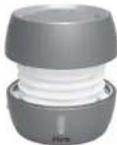
GlowTunes Bluetooth
Rechargeable
Mini Speaker
CHARGE
BEFORE
USE
Questions? Visit www.ihome.com

FCC ID: EMOIBT73
IC: 986B-IBT73
FCC Information
FCC Radiation Exposure Statement
This paper is provided with a red-aided deposit, which is \$10.75 for all other conditions. This paper must be co-located or open to a combination with any other
in terms of interest. At This device comes with industry Canada license, except 358 standard%. Canadian law app
to the following best conditions:
[1] this device may not cause interference, and
- This device must accept any interference, including interference that may cause unassured operation of the device.
The device meets the exemption from the routine evaluation limits in section 2.5 of HSG 102 and compliance with HSG 102 R exposure, users can obtain Canadian Information on R exposure and compliance.

- Warning: Changes a modifications to this unit not expressly approved by the party
reserve the for compliance standard with the best and only to complete the equipment. NOTE: This equipment has been issued and found to comply with the limits for a Class B
These limits are designed to provide reasonable protection against harmful interference in a novel local institution. The equipment generates dose and can validate no frequency energy, and not installed based on accordance with the instructions may cause harmful interference to radio communications. However, there is no guarantee of interference will not occur in particular isolation. In the equipped dose cause harmful interference to radio or television exception, we can use the necessary for turning the equipment at all, but the service is organized by law enforcement by the rules of the following measures:
- Connect the equipment into an outlet or a circuit different from that to which the receiver is connected.
• Consult the dealer or an experienced rock/ V technician or help.
CAN ICES-3 (B)NMB-3(B)
QDID: B020770
IMPORTANT
Read before processing
If you have any question regarding the operation or use of this product, please visit www.ihome.com to view questions to focus by other questions.
To learn more about this work at the Home products, please visit up online at www.ihome.com
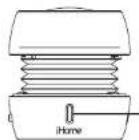
Charging Pairing LED
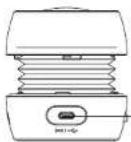
Audio/ Charging Jack
Speaker back view
Speaker front view
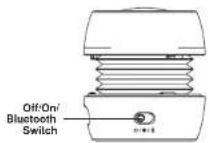
Speaker left view
When speaker is ON (●), press the LED Lighting Effects Button ① to cycle through 4 lighting effects modes: Fast Color Cycle, Slow Color Cycle, One Color, and lighting effect Off
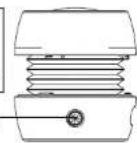
Speaker right view
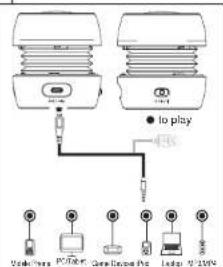
Aux-In Mode
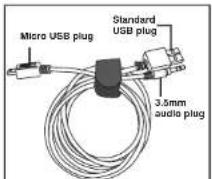
Combination cable
USB AC adapter connected to working outlet
Locking and Unlocking the IBT73
To compress and lock speaker, gently press speaker down from the top and twist clockwise to lock in place.
To unlock and expand the speaker, grip the top and bottom and give a small twist counter-clockwise. DO NOT pull hard once open, as the built in spring will automatically extend the speaker to its proper position.
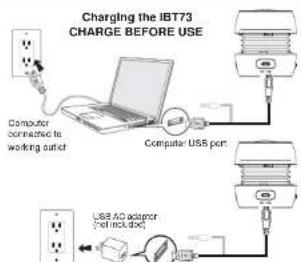
Charging the iBT73
The IBT73 is powered by a rechargeable battery in the speaker. Make sure to charge speaker before use.
- Connect the micro-USB plug to the (0) / Audio/Charging jack on the speaker.
- Connect the larger USB plug to a powered USB port, such as that on a computer. Your computer should be connected to a wall outlet when speaker is charging. The light on the speaker will turn to solid red while charging and turn off when fully charged.
- If the blue LED dims, or you notice sound distortion at higher volumes, or there is no sound at all it's time to recharge the batteries. Note: the LED Lighting Effects may still work even in low battery conditions.
Using Bluetooth with the iBT73
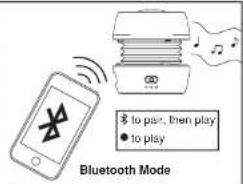
- Slide the of Off/On/Bluetooth Switch on the speaker to the Bluetooth position ( * ). The light will flash blue and red and a tone will sound as the speaker attempts to pair with a Bluetooth device.
- Place your audio device in Bluetooth mode (often found in the device's Settings or Tools menu) and make it "discoverable". iHome iBT72" should appear on your device. If "Not Connected" or similar message appears, select it to connect. If your device asks for a passcode, enter 1234'.
- Once paired, the light will glow solid blue. You can then stream audio to the speaker. If pairing is not successful, turn the power OFF (o) on the speaker and repeat pairing procedure.
- To listen to Bluetooth audio, make sure the Off/On/Bluetooth Switch on the speaker is in Bluetooth (✗) or ON (●) position.
• Control Bluetooth audio from your device
Remember to turn off the speaker and your device after listening. NOTE: When unit is charging, the blue light will appear solid red.
Using the IBT73 with Aux Devices
- Connect the micro-USB plug to the (**) / -Audio/Charging jack on the speaker.
- Connect the stereo 3.5mm audio plug to the headphone jack or line-out of any audio device.
- Slide the Off/On/Bluetooth Switch on the speaker to the ON (●) position. The blue power light will flash, indicating auto-link mode. - Press play on your audio device and adjust its volume to listen to audio.


- For Models That Use Lithium Batteries
- Maintenance
- Limited 1 Year Warranty Information
- A Consumer Guide to Product Safety
- IMPORTANT SAFETY INSTRUCTIONS
- Questions? Visit www.ihome.com or call 1-800-286-2792 Toll Free
- FCC Information
- IMPORTANT
- Locking and Unlocking the IBT73
- Charging the iBT73
- Using Bluetooth with the iBT73
- Using the IBT73 with Aux Devices
Brand : IHOME
Model : iBT73
Category : Loudspeaker