
Lux Power iCVBTW11 - Loudspeaker IHOME - Free user manual and instructions
Find the device manual for free Lux Power iCVBTW11 IHOME in PDF.


| Product Type | Portable Bluetooth Speaker |
| Model | Lux Power iCVBTW11 |
| Brand | iHome |
| Dimensions (H x W x D) | 3.2 x 5.5 x 2.8 inches |
| Weight | 0.5 kg (1.1 lbs) |
| Power Source | Rechargeable lithium-ion battery (2000 mAh) |
| Charging Interface | USB-C (5V/1A) |
| Playback Time | Up to 10 hours (at 50% volume) |
| Bluetooth Version | 5.0 |
| Bluetooth Range | Up to 33 feet (10 meters) |
| Speaker Driver | 40mm full-range driver |
| Output Power | 5W RMS |
| Frequency Response | 100 Hz - 20 kHz |
| Water Resistance | IPX5 (splash-proof) |
| Controls | Power, Volume +/-, Play/Pause, Bluetooth pairing button |
| Microphone | Built-in for hands-free calls |
| Audio Inputs | Bluetooth, AUX 3.5mm |
| Care & Cleaning | Wipe with a soft, dry cloth. Do not use liquids or aerosols. |
| Safety Warnings | Do not expose to extreme temperatures or moisture. Use only provided charger. |
| Spare Parts & Repairability | Contact iHome support for replacement parts. Not user-serviceable. |
Frequently Asked Questions - Lux Power iCVBTW11 IHOME
User questions about Lux Power iCVBTW11 IHOME
0 question about this device. Answer the ones you know or ask your own.
Ask a new question about this device
Download the instructions for your Loudspeaker in PDF format for free! Find your manual Lux Power iCVBTW11 - IHOME and take your electronic device back in hand. On this page are published all the documents necessary for the use of your device. Lux Power iCVBTW11 by IHOME.
USER MANUAL Lux Power iCVBTW11 IHOME
Instruction manual - US English
size: 408mm(W) x 150mm(H)
Folded Size: 102 x 150 mm
157g Art paper / 1C + 1C / Straight corners Dec 13, 2019

iHome Beauty
LUX POWER
Model: ICVBTW11
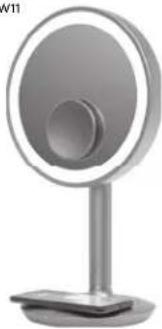
natural_image
Modern digital display stand with circular and rectangular design (no visible text or symbols)Vanity Speaker + Wireless Charging
Quick Start Guide
QUESTIONS? visit www.ihome.com
WHAT'S INCLUDED:
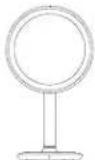
LUX POWER
Vanity Speaker

Removable Detail Mirror
The back of the "Or magnifying dental mirror" has SimpleStuck™ mon suction material for easily attaching and detaching almost anywhere. It necessary clear SimpleStuck material with office face
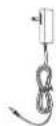
AC Adapter

Cleaning Cloth
Use the included clearing cloth to keep the large surface and detail mirror serrage-free.
GETTING STARTED
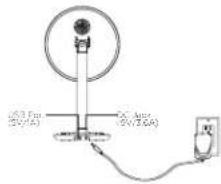
Connecting the Unit
Connect the included AC adapter to the DC pack located on the side of the unit and connect the other end to a working well outlet.
Connecting to Bluetooth
- Press the Power Button to turn the vanity speaker ON.
• Turn on your Bluetooth device and make it 'discoverable' by
- Fresh one held the Bluetooth Pairing Button on the vanity speaker for 2 seconds to enter a new mode.
- Select LLX POWER on your device's Bluetooth menu to connect
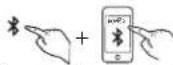
Note: If no audio is paying for 15 minutes, the unit will automatically power off.
2
FEATURES & FUNCTIONS

Power Button
Press to turn very wide speaker ON or OFF

Light Button
- Pass to turn reverse light ON or OT
• Passes repeatedly to equal light curves

Bluetooth Pairing Button
• Press and hold to enter pair no media
• F=1.1× POWER on your device to correct

Play/Pause/Speakerphone Button
• Press to play/pause Bluetooth studio
• Pass to answer/end Bluetooth calls
- Puts are held to sell an operating cell
• Uress and held to activate Sri/Goole

Bluetooth Pairing LED
• Flashes white to inclare when and is a pairing mode
• 5 mos and while to indicate 5 outdoors is corrected

Wireless Charging LED
White LED releases wireless charging status (pre page 1)

USB Charging Part (1A)
Connect a standard USB cable (10L, includes)
to charge devices

DC Jack
Centrus induced AC adapter (to power source
5
ADJUSTING LIGHT MODES
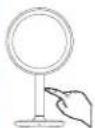
Using the Stem
• As the stem to turn the light ON or OFF
• As the stem repeatedly to cycle
Through bright trees levels
- 每日,14:30-15:30

Using the Light Button
• Press the Light Button to Turn the Mirror
light ON or OFF
- Press the Light Button repeatedly to
cycle through brightness levels: High,
Red Lock and OFF
Note: Power and Light features operate separately;
- Free The Power Button to create audio signals, including Rosed
- Less the light button to success light before and after light has been
CHARGING VIA USB PORT
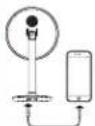
- Connect a standard USE cable (not
included by the USB Charging Port
1.2013年1月1日
• Connect the other and to your peers to
bao zhangha
4
WIRELESS CHARGING
Supports:
- Q compatible phones (also won with plastic cases up to 3mm thick) - Apple AirPark
Price Of comparison device 'ear up on the charging rest' located on the base of the mirror as shown twice. Make sure the carrier of the device aligned over the center of the charging rest.


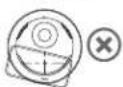
Charging will begin upon contact. The Wireless Charging LED located on the front of the mirror will indicate charging status:

—Wireless Charging LED
Rapid blinking LED: Device is not charging (reposition device)
Slow dialicking LED. Device is charging
(1) 2017, the company's share capital increased by \$5.3 billion
CAUTION Remove phone's motor protective case before charging. Do not place magnetic or metal objects on charger during charging. Of compatible process with metallic bending brushes will charge normally
Note: The wireless charging process generates best that may cause phones and charges to be warm to the lock. This is natural for wireless charging devices.
5
IMPORTANT SAFETY INSTRUCTIONS
When a result in the estimated warning of the will that the target is great and manufacture, to solve your personal safety. However, I improve use can result in potential electrical process of the risks. Please read and follow all details and sections of structures clearly relevant to information and work and practice requirements that are from non-essential basis, and use of warnings easily to ensure their use.
- Water and Hydro, no - the, and should not be used now water. For example, near a bellbush, hydrocarbon, kitchen, or away, in certain direction of sound treatment.
- We think: The oil should be studied so that its location or position does not like fire with to cope ventilation. For example, it is able not be situated on a bed rate, so we can be without any clock work at open space. And it should not be pleased to do or solve, such as a cloud or cloud, which may impose the flow of air through the river on our road.
- Fuel - The unit is what other solution always can be used in the first section, but regarding above or other appliances (including a pencil) that prevent them. - Power Services - The unit should be connected to a power supply city of the two deceers and in the operating instructions or as amended on the appliance. Only use the 4% act at that point with a ground
-
Power Supply Protection - Power supply tasks should be rounded so that they are not likely to be worked or be directed by items placed upon or against them. It is always tied to have a clear area from or set the cable wire that is not when it is managed role as well.
-
Clearing The unit should be cleaned only as recommended. See the maintenance section for cleaning structures.
-
Attachments Do not use attachments to recommend by the product manufacturer
B. Lighting and Power Surge Protection. Unrupt one unit from the wall socket and disconnect the antenna or cable system during a light-to-storm or when it is left uncorrected and turned for long periods of time. The wall prevent damage to the
- Damage Requiring Services: The unit should be serviced by our Pte service person who
A. The following table provides the original text: "The name of the company is 100% (see Section 4.2.1).
C. the unit has been exposed to re-n
- The in the last order of the stock is demanded
II. Perce of Newze - If the unit is to be left used for an extended period of time such as a bell or longer, remove but not take storage
In the setting, the main should be at time in service and to understand new instruction described in the user manual. Service methods not covered in the operating instructions should be referred to qualified service personnel.
-
Cavity of the climate is associated with the climate. The climate is so table for use in tree can be more effective. In a second Nature scene, such as climate condition can be presented at the appearance, 15. WASHINGTON. To construct the kind of tree in nature, it does not occur in a process, in
-
The main plan of power adaptor is used as the disconnect device. It shall remain recently operated.
- Clean-up will carry duty.
(二) 本次股东大会的召集和召开程序
c
FCC INFORMATION
TCC. Radium Copper, m. Dapertett
This can be called to the TCC indicator product (including for an uncontrolled environment).
This is very important to make and we used with a minimum distance of 20 cm diameter. The radius of
The data is complexed with Part II of the 100% axis, spanning the indirect to vertical axis conditions (by the curve may be necessary for the body, and by the derivative of the connecting line and the right side of the body) and any connection between the body and the right side of the body.
- 3016 (main of the main class) has a class A, which is the main class.
Thaalindi an angara to provide the support of a great deal against the interest in a small market. This
the system is also in the environment.
CANICES-3 (D) / HND-3(D), CAN RSG216 / CNR-210
(2) 10.31/09/01
This device can be used to create a new product (e.g. organic food products, processed foods, etc.)
[1] 2016.04.19
[1] Concentrated and per-protein-rich layer
- In agreement with the 100% of the value of the difference between the 25% and 100% of the value of the difference between the 100% and 25% of the value of the difference between the 100% and 25% of the value of the difference between the 100% and 25% of the value of the difference between the 100% and 25% of the value of the difference between the 100% and 25% of the value of the difference between the 100% and 25% of the value of the difference between the
www.csc10.com.cn
WARRANTY
For product support information and warranty please visit
www.home.com/support
t
-
-
-
-
-
-
-
-
-
-
-
-
-
-
-
-
-
-
-
-
-
-
-
-
-
-
-
-
-
-
-
-
-
-
-
-
-
-
-
-
-
-
-
-
-
-
-
-
-
-
-
-
-
-
-
-
-
-
-
-
-
-
-
-
-
-
-
-
-
-
-
-
-
-
-
-
-
-
-
-
-
-
-
-
-
-
-
-
-
- 99.
-
-
-
-
-
-
-
-
-
-
-
-
-
-
-
-
-
-
-
-
-
-
-
-
-
-
-
-
-
-
-
-
-
-
-
-
-
-
-
-
-
-
-
-
-
-
-
-
-
-
-
-
-
-
-
-
-
-
-
-
-
-
-
-
-
-
-
-
-
-
-
-
-
-
-
-
-
-
-
-
-
-
-
-
-
-
-
-
(1) 本说明仅供参考。
CARTS 121215 ACHI
"blood


Brand : IHOME
Model : Lux Power iCVBTW11
Category : Loudspeaker