
RP7702S - Radio RCA - Free user manual and instructions
Find the device manual for free RP7702S RCA in PDF.


| Brand | RCA |
| Model | RP7702S |
| Product Type | AM/FM Clock Radio |
| Dimensions | Approx. 6 x 3 x 5 inches (15 x 8 x 13 cm) |
| Weight | Approx. 1 lb (0.45 kg) |
| Power Supply | AC 120V 60Hz; backup: 2 x AA batteries (not included) |
| Tuning Range | AM 520-1710 kHz; FM 87.5-108 MHz |
| Alarm | Dual alarm with buzzer or radio |
| Sleep Timer | Up to 90 minutes |
| Display | LED clock display with adjustable brightness |
| Controls | Rotary knobs for volume and tuning; buttons for alarm, sleep, snooze |
| Speaker | Single 3-inch dynamic speaker |
| Headphone Jack | 3.5mm output |
| Antenna | Built-in FM wire antenna; built-in AM ferrite bar antenna |
| Battery Backup | Preserves clock and alarm settings during power outage |
| Cleaning | Wipe with dry, soft cloth; do not use liquids or solvents |
| Safety | Do not expose to water, heat, or moisture; unplug during storms; do not open case |
| Reparability | No user-serviceable parts; contact RCA support for service |
| Included Accessories | Radio, user manual |
Frequently Asked Questions - RP7702S RCA
User questions about RP7702S RCA
0 question about this device. Answer the ones you know or ask your own.
Ask a new question about this device
Download the instructions for your Radio in PDF format for free! Find your manual RP7702S - RCA and take your electronic device back in hand. On this page are published all the documents necessary for the use of your device. RP7702S by RCA.
USER MANUAL RP7702S RCA
Portable radio & cassette player
FCC INFORMATION
This device consists of a Part 15 of the FCO failure. Operation is subject to the following two conditions: (1) the demand required to maintain its maintenance and (2) the demand should only require maintenance, including the demand that may cause maintenance or accident.
In accordance with RIO requirements, changes or modifications not equitably supersede by Theorem Consumer Electron should yield the user's authority to acquire this product.
This device generates and uses radio frequency (RF) energy, and it is installed and used properly. This instrument has used information by the and its own resources.
In this question, we can therefore use a range of time to account whether you can be written by turning the computer all and out, by being what the time is up or more. In the following cases: - Repeated the moving remote that is the same to the time is when it is moving too.
• Hors, to unit rear from the equipment, the receiving interest.
- Hug the arm, into a different wall coat of all, and in work and the operation, moving in knowledge and or different search results
If these measures do not stimulate its tolerance, please consult your doctor or an emergency nurse to receive referrals for all other agencies.
Headset Safety
- Do not play your headset at a high volume. Scoring open, other open and closed together with play.
- If you sometimes, singing in your ears, would be voluted to divide me too. - You should use extreme colour, so everything is almost nice in potential for how your thoughts. - Pour it your instrument in my inner-or-lower design good to let you hear an inside universe, don't have it a very nice as high that you can't hear what's around you

Mood 27-7700 20234210 (Jan. 6) 58-59 Furide a Hong Kong
THOMSON CONSUMER ELECTRONICS © 1928 Thomson Consumer Discretionary Inc. Industrials & Biological Marcelia Research
Before you begin
Powering Up
The unit operates on battery or AC power.
Battery Power
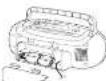
Inert 4 Second kitchen hatched (not supplies) and you can take your store out about anywhere. Open the battery compartment cover on the back of the unit, by pressing down on the two labs and pulling out the cover. Inert batteries as shown in the battery
compartment. Note that the AC line card must be unplugged from the AC power car of to prepare an baller in. You can wind the air cars and install into the hard-in case colour.
IMPORTANT: Be sure to remove batteries when starting the cut for more than 30 days. Leaky batteries can badly damage the so co. Always turn tape operation buttons to their off-pattern before during. This will release pressure on certain ports in the tape between the might delarm after long periods at time. It appears to leaky, dead or weak bar were properly
AC Power
Plug the power supply cord into an AC power outlet that aspects the polarized plug-lone blade wider than the other.
Antennas
The AM asteria is built in, so adjusting the position of the unit may help AM resection. The FM whip concerns on the back of the unit can be extended and pointed for better FM reception.
Headphones
To listen to your stereo with headphones that installed, use the NE inch PHONE jack on the top of the unit.
Have a Blast—Just Not on Your Eardrums Make sure that you turn down the stores before you out on the headquarters, then increase the volume to the desired level after they are in close.
general controls
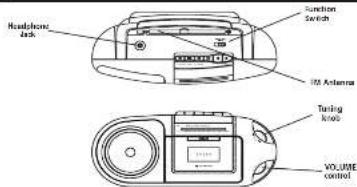
Headphone jack - play a set of headphones (rat is used) into the jack for next listening. Function Switch - More the function switch to select which part of the portable slot or you want to use: TAPE, FM or AM.
VOLUME - Adjust the volume control knob to increase or decrease volume to the desired level. FOR Antenna - When I'm going in F5 and a brochure, so and the instrument for cover orception. Turning knob - Adjust the knob for tuning to the desired radio station.
Using the Radio
Tuning in Radio Stations
Move the FUNCTION switch to AM or FM for turning ON the radio. - Turn to the desired station by adjusting the turning knob - In turn all the radio, move the funding switch to TAPE
Using the Tape Player
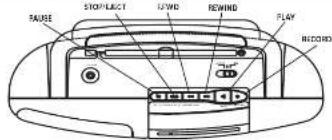
If you know what each button does, it's easy to figure out how to operate the face deck. RECORD — How to record from the radio.
PEN = 100% PAP / 100% PAP
REMIND - From step made, press to 'swing the tape' board the beginning.
STOP/LECT — Press to stop current tape activity or to open the cassette compartment door when no calls are active
PAUSE Presale interrupt tape play or record mode. Presale second time to record tape play or tape record mode.
Playing a Cassette Tape
-
Maw the fun is switch to TAPL
-
Press STOP/ELECT to open the muscle compartment door.
-
Insert cassette tape into the compartment with the oes edge facing us and the full reel or the right.
-
Close the don't secure y
-
Free REWIND or F. FWD to move away in the desired dating point
-
Prop PLAY a begin playing the base. The case is type plays until a needed, the one of the side, then unit automatically steps.
Erase Protection
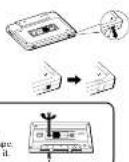
When you wound red material, the canicle deck descends over whatever it on a tape. To protect a tape from students ensure, break all one or both plastic she once for each tape and on the top of the canal in tape. If you disagree later in record on the tape, we the tape with a piece of cashstone tape.
Dull Stacking A 11. It is all dark in your tape, can continue scales on the tape, or were yet, the tape oud break. If you notice some slack in the tape, are a pencil to tighten it up before you insect it.
Recording from the Radio
-
Insert a cassette tape into the tape deck and close door.
-
Move the Function switch to the desired band: AM or PM
-
Time to the desired radio station by adjusting the timing knob
-
The RECORD to begin recording with the ECD 1 and IAY batteries are now depressed.
-
In a new update, one STOPJECT
-
To turn off radio, slide Function Switch to TAPE.
Pause for a N oment Use PAUSE on the cassette disk, instead of STOP to momentarily interrupt rounding gives a much different sounding rounding!
CARE AND MAINTENANCE
Tape Care
- Don't expose hedges to sunlight or there in hot places. High temperatures may wrap the shell or damage the tape itself.
- Keep cigarettes in their boxes when not in use.
- Conductive lamps can be used by magnetic fields produced by magnets, electric motors, electrical transformers, and other devices. Korea lamps away from magnets are magnetic fields.
care and maintenance (CONTINUED)
Cleaning the Tape Heads
Iron oxide part cie from the magnetic tape can build
up to the pediatr come in contact with the tape. These docetile can cause incomplete damage, culled
portharcsound, and mgtal pravuli siazeni i da
To clean a cassette tape dock, open the compartment
doo, cross PLAY and gently clean the next and push wheels with a liquid head cleaner.
Always inclug the power cord before cleaning, and allow 35 minutes drying time when using a liquid shower.
Dear he/she is every 25 hours of use.
• Demagnosed the head occasionally with a head depicting an acute Available from
many and equipment stores
- Never use any metal objects or near the tape tape. Can not allow any staining material in fall into the tape soonics.
Troubleshooting Tips
| Problem | Solution |
| Unit prompt form an | Make sure power card is accurately plugged into the AC power card for the ball and are held. |
| Inject the unit for a moment, and then plug it back in. | |
| Check the outlet by plugging, is another device. | |
| In sound | Adjust volume card |
| Make sure you see the current function, TAPE or AMT/AMT | |
| Pool radio reception | Adjust the 54 chip antenna for better RF reception. |
| Make the unit to subsume better RF reception. | |
| Try using of a pair and optimized one, but not with a bit down a vacuum cleaner, or fluorescent light. | |
| Disturbed or relay recordings | Improve the seconding mode and down it in recovery. |
| Disaccurate to recording noise (as explained in the CARE AND MAINTENANCE set end) |
Canadian Warranty
Thompson Consumer Electronics Canada, Inc. warrants to the purchaser or gift recipient that if any remuneration did not become apparent in this product within
1 year, from the original date of purchase, it will be replaced free of charge, including return transportation.
This warranty does not include damage to the product recruiting from accident, m case or leaking batteries.
Should your product not perform properly during the warranty period, either
-
Return to the trading dealer with proof of purchase (or replacement).
-
Remove the batteries [where applicable], and pack product complete with accessories in the original outlet in electrical
MAI prepaid with principal purchase and inspired to
Thomson Consumer Electronics Canada, Inc.
Distribution Centre
Mississima, Ontario L
The provisions of this written warranty are in addition to and not a modification of or subsection from the statutory amendments and other rights and remedies contained in any applicable legislation, and to the extent that any such provisions purport to disclaim, exclude or limit any such statutory warranties and other rights and remedies, such provisions shall be deemed to be amended in the extent necessary to comply therewith.
If you are articles to line a quartile and service for out of warranty services, you may scale to
Thomson Consumer Electronics Canada, Inc.
P.O. Box 1041
Indianapolis, Tel: 0.225, 40206-0811
Attach your sales receipt to this booklet for future reference. This information is required by service is needed during the warranty period.
PURCHASE DATE
NAME OF STORE
- Portable radio & cassette player
- FCC INFORMATION
- Headset Safety
- Before you begin
- Powering Up
- Battery Power
- AC Power
- Antennas
- Headphones
- Using the Radio
- Tuning in Radio Stations
- Using the Tape Player
- Playing a Cassette Tape
- Erase Protection
- Recording from the Radio
- CARE AND MAINTENANCE
- Tape Care
- care and maintenance (CONTINUED)
- Cleaning the Tape Heads
- Troubleshooting Tips
- Canadian Warranty
Brand : RCA
Model : RP7702S
Category : Radio