
iBT155 - Loudspeaker IHOME - Free user manual and instructions
Find the device manual for free iBT155 IHOME in PDF.


| Product Type | Portable Bluetooth Speaker |
| Brand | iHome |
| Model | iBT155 |
| Dimensions (W x H x D) | 6.5 x 2.5 x 1.8 in (16.5 x 6.4 x 4.6 cm) |
| Weight | 11.5 oz (326 g) |
| Power Source | Built-in rechargeable lithium-ion battery (3.7V 1500mAh) |
| Bluetooth Version | Bluetooth 5.0 |
| Wireless Range | Up to 33 ft (10 m) |
| Audio Output | 3W mono speaker (1 x 3W) |
| Frequency Response | 100 Hz - 20 kHz |
| Playback Time | Up to 8 hours (at 50% volume) |
| Charging Time | Approximately 2-3 hours via micro USB |
| Inputs | Micro USB charging port, 3.5mm AUX input |
| Controls | Power, Volume +/-, Play/Pause, Track Skip, Bluetooth pairing |
| Additional Features | Built-in microphone for hands-free calling, LED indicator |
| Care and Cleaning | Wipe with a soft, dry cloth. Do not use liquids or abrasive cleaners. |
| Safety | Do not expose to extreme temperatures or moisture. Use only provided charger. |
| Spare Parts / Repairability | Battery not user-replaceable. Contact iHome support for service. |
| General Information | Ideal for portable music streaming and hands-free calls. |
Frequently Asked Questions - iBT155 IHOME
User questions about iBT155 IHOME
0 question about this device. Answer the ones you know or ask your own.
Ask a new question about this device
Download the instructions for your Loudspeaker in PDF format for free! Find your manual iBT155 - IHOME and take your electronic device back in hand. On this page are published all the documents necessary for the use of your device. iBT155 by IHOME.
USER MANUAL iBT155 IHOME
Bluetooth Rechargeable
Waterproof Speaker
Model: IBT155
QUICK START GUIDE
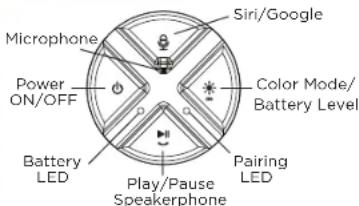
CHARGE UNIT BEFORE USE ABOUT 6 HOURS

Questions?
www.ihome.com 1·800·288·2792
QUICK SET-UP
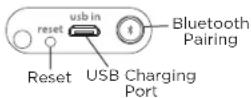
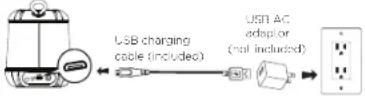
1 CHARGING THE IBT155
2 BLUETOOTH PAIRING
Pairing The First Time
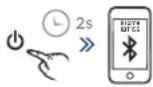
Manual Pairing
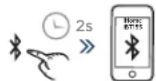
3 PLAYING BLUETOOTH AUDIO
Run Your Favorite Music Apps
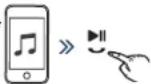
Press to Play/Pause Audio
USING SPEAKERPHONE
Answer Call
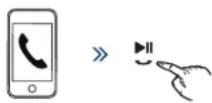
End Call

» The speaker must be on and connected with a paired Bluetooth device to receive calls.
» Press the Speakerphone Button to answer incoming call. Press and hold to reject or end a call.
COLOR CHANGING MODE
LED STATUS INDICATOR (TOP OF UNIT)
While Charging:

= battery level < 95%

= battery level > 95%
No Charger Connected:

= battery level < 15%

= battery level 15-100%
Bluetooth Pairing:

= pairing

= connected to Bluetooth
BATTERY LEVEL REVIEW
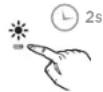
» Press and hold the Color Mode Button to enter Battery Review Mode. A voice prompt will confirm battery level status.
» Connected iOS devices will also display the battery life of the iBT155 via an icon on your iPhone or iPad screen.
USING VOICE COMMANDS


» When connected to a Bluetooth device, press to access Siri or Google Assistant using voice commands.
WATERPROOF COVER
ready
for
water

not
ready for water

» Make sure the waterproof cover on the back of the unit is completely flush with the unit by pressing along the entire edge of the cover until it is completely and securely in place.
Contact Us: 1·800·288·2792
For warranty and full instructions
visit: www.fome.com/support
FCC Information
FCC ID: EMOIBT155
IC: 986B-IBT155
FCC Radiation Exposure Statement This equipment complies with FCC RF radiation exposure limits set forth for an uncontrolled environment.
This device complies with Part 15 of the FCC Rules, operation is subject to the following two conditions: (1) This device may not cause harmful interference, and (2) this device must accept any interference received, including interference that may cause undesired operation.
- Warning: Changes or modifications to this unit not expressly approved by the party responsible for compliance could void the user's authority to operate the equipment.
- NOTE: This equipment has been tested and found to comply with the limits for a Class B digital device, pursuant to Part 15 of the FCC Rules.
These limits are designed to provide reasonable protection against harmful interference in a residential installation. This equipment generates, uses and can radiate radio frequency energy and, if not installed and used in accordance with the instructions, may cause harmful interference to radio communications.
However, there is no guarantees that interference will not occur in a particular installation. If this equipment does cause harmful interference to radio or television reception, which can be determined by turning the equipment off and on, the user is encouraged to try to correct the interference by one or more of the following measures:
- Reorient or relocate the receiving antenna.
- Increase the separation between the equipment and receiver.
- Connect the equipment into an outlet on a circuit different from that to which the receiver is connected.
- Consult the dealer or an experienced radio/TV technician for help.
CAN ICES-3 (B)/NMB-3(B)
IBT155-181114-A Printed in China
Canada Statement
This device complies with Industry Canada's licence-exempt RSSs. Operation is subject to the following two conditions:
(I) This device may not cause interference; and
(2) This device must accept any interference, including interference that may cause undesired operation of the device.
The device meets the exemption from the routine evaluation limits in section 2.5 of RSS-102 and compliance with RSS-102 RF exposure, users can obtain
Canadian information on R- exposure and compliance.
Internal Rechargeable Lithium-ion Battery
This device uses an internal non-replaceable rechargeable lithium-ion battery that should last the lifetime of the device. If you suspect your battery may be dead, try charging it for an extended period of time and try resetting the unit. If this fails, contact Customer Service at 1-800-288-2792.
WARNING/DISPOSAL OF UNIT
Do NOT attempt to change the battery. Doing so will void the warranty and could cause injury and damage to your device. To dispose of the unit, follow the instructions below:
- Never dispose of used batteries/electronics with ordinary
- Solid wastes, since they may contain toxic substances. • Always dispose of used batteries/electronics in accordance with the prevailing community regulations.
- Many electronics retailers now recycle batteries and other electronic components at no charge.
GENERAL BATTERY PRECAUTIONS
- Never use or charge a battery if it appears to be leaking,
- Never disassemble the unit or attempt to remove battery as that could cause leakage of alkaline solution or other electrolytic substances.
- Avoid charging a rechargeable battery when the temperature is not within 5°C - 35°C (41" - 95" Fahrenheit). - Never expose a battery to any liquid
- Never expose a battery to excessive heat such as direct sunlight or fire. Never use a battery pack in an unventilated vehicle
- Always keep batteries out of the reach of infants and small children.
IMPORTANT SAFETY INSTRUCTIONS
Please heed all warnings, read and follow all instructions and keep these instructions handy for future reference.
Heat - The unit should be situated away from heat sources such as radiators, heat registers, stoves or other appliances (including amplifiers) that produce heat.
Only use attachments/accessories specified by the manufacturer. This product is suitable for use in tropical and/or moderate climates.
The unit should be serviced by qualified service personnel when the enclosure damaged or does not operate normally. No naked flame sources, such as lighted candles, should be placed on the apparatus.


- QUICK START GUIDE
- QUICK SET-UP
- CHARGING THE IBT155
- BLUETOOTH PAIRING
- PLAYING BLUETOOTH AUDIO
- USING SPEAKERPHONE
- COLOR CHANGING MODE
- LED STATUS INDICATOR (TOP OF UNIT)
- While Charging:
- No Charger Connected:
- Bluetooth Pairing:
- BATTERY LEVEL REVIEW
- USING VOICE COMMANDS
- WATERPROOF COVER
- FCC Information
- CAN ICES-3 (B)/NMB-3(B)
- Canada Statement
- Internal Rechargeable Lithium-ion Battery
Brand : IHOME
Model : iBT155
Category : Loudspeaker