
SS-4 - Hi-Fi System Niles - Free user manual and instructions
Find the device manual for free SS-4 Niles in PDF.


| Product Type | Speaker Selector / Impedance Matching Volume Control |
| Brand | Niles Audio |
| Model | SS-4 |
| Number of Zones | 4 |
| Speaker Outputs | 4 pairs (up to 8 speakers) |
| Power Handling | 100 watts per channel (RMS) |
| Minimum Impedance | 4 ohms per zone |
| Frequency Response | 20 Hz - 20 kHz (±1 dB) |
| Total Harmonic Distortion | <0.05% @ 1 kHz, rated power |
| Signal-to-Noise Ratio | >90 dB |
| Input Type | Single stereo line-level input (RCA) |
| Speaker Wire Gauge | 14-18 AWG |
| Impedance Protection | Automatic impedance matching circuitry |
| Mounting Type | Rack-mountable (1U) or free-standing |
| Dimensions (W x H x D) | 19.0 x 1.75 x 6.5 inches (rack ears included) |
| Weight | 5.5 lbs (2.5 kg) |
| Power Supply | External 12V DC adapter |
| Power Consumption | 15 watts (max) |
| Controls | Individual volume controls for each zone, master on/off |
| Indicators | Power LED, protection LED per zone |
| Protection Features | Overload, short-circuit, thermal protection |
| Compliance | UL, CE, RoHS |
Frequently Asked Questions - SS-4 Niles
User questions about SS-4 Niles
0 question about this device. Answer the ones you know or ask your own.
Ask a new question about this device
Download the instructions for your Hi-Fi System in PDF format for free! Find your manual SS-4 - Niles and take your electronic device back in hand. On this page are published all the documents necessary for the use of your device. SS-4 by Niles.
USER MANUAL SS-4 Niles
Miami, Florida 33186
Tel: (305) 238-4373
Fax: (305) 238-0185
62004 Niles Audio Corporation. All rights reserved. Niles, the Niles logo and Blending High Fidelity and Architecture are registered trademarks of Niles Audio Corporation. Because we strive to improve our products, Niles reserves the right to change product specifications without notice. The technical and other information contained herein is not intended to set forth all technical and other specifications of Niles products. Additional information can be obtained on-line at www.nilesaudio.com or by calling Niles at 1-800-293-4434. Printed in China 1/04 D500356ACN
natural_image
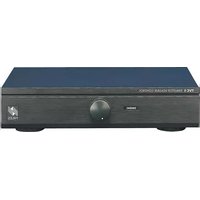
Front view of a black electronic device with multiple ports and indicator lights (no visible text or labels)SS-4/SS-6
Speaker Selection System
TABLE OF CONTENTS
Introduction 1
Features and
Benefits 2
Installation
Considerations 3
Installation 6
Operation 9
Specifications 14

NILES.
The SS-4/SS-6 allows you to connect multiple pairs of speakers to your stereo receiver or amplifier and play any pair, any combination of pairs, or all pairs simultaneously. You don't have to worry about overloading your amplifier. The SS-4/SS-6 has a protection circuit that keeps your amplifier running safely, even if you have all pairs of speakers playing at the same time.
Balancing Speaker Volume
The volume control on your receiver or amplifier serves as the "master" volume for all speaker pairs connected.
The volume level of the speakers may vary from room to room. This is caused by several factors. Two lesser factors are the size of the speaker and its efficiency. The largest factor is the physical size of the room.
The best way to balance speaker volume is to equip each of the speaker pairs in your system with a Niles volume control. The controls allow you to adjust the volume of each speaker pair individually. If all the speaker pairs in your system are equipped with Niles volume controls, you can leave the amplifier or receiver volume set at one position and use the Niles controls exclusively.
SPECIFICATIONS
Audio Power Handling
100 Watts/channel
continuous music power
Frequency Response
+0 dB, -0 dB (flat) from
20 Hz to 20 kHz
Mounting
Table-top component
Wiring Requirements
Individual runs of
2-conductor speaker
wire. Removable con-
nectors accommodate
wire sizes 14-22 gauge
(16 gauge
recommended)
Overall Dimensions
8-1/2" wide x 2" high
x 6-3/4" deep (55-4); or
11-1/2" wide x 2" high x
6-3/4" deep (SS-6)
Weight
1-3/4 lbs (SS-4);
2-1/4 lbs (SS-6)

Installation Considerations
SS-4/SS-6 Power Handling
The SS-4/SS-6 is designed for use with a receiver or amplifier having a maximum power output of 100 watts per channel at 8 ohms. Damage caused by the use of a higher-power receiver or amplifier will void the warranty. Niles speaker selectors with higher power handling capabilities are available. Consult your Niles dealer, or receiver/amplifier manufacturer, if you are uncertain about the power rating of your receiver or amplifier.
Amplifier Impedance Load
As more pairs of speakers are parallel connected to a receiver or amplifier, the overall system impedance becomes lower. For example, if two pairs of 8-ohm speakers are connected in parallel, the impedance will be 4 ohms; two pairs of 4-ohm speakers in parallel become 2 ohms, and so on.
Most receivers or amplifiers are not rated for use below a 4 ohm load. Most manufacturers do not recommend connecting more than two pairs of speakers without using some form of impedance correction.
The SS-4/SS-6 includes impedance correction circuitry which protects your receiver or amplifier from low impedance loads. The circuitry assures that your receiver or amplifier will see a safe operating load, even when all speaker pairs are playing at the same time.
Playing Two or More Speaker Pairs Simultaneously
-
Make sure the amplifier or receiver power is OFF and set the volume to minimum.
-
On the right side of the SS-4/SS-6's front panel is a button labeled PROTECTION. This button activates the SS-4/SS-6's impedance correction circuitry. The circuitry assures that your receiver or amplifier will see a safe operating load when playing multiple speaker pairs simultaneously. Since most receivers and amplifiers are not rated for use below a 4 ohm load, you will need to activate the Protection button whenever the overall system impedance might fall below 4 ohms. Use the following chart as a guide for setting the Protection button.
"TECH TIP"
You will need to activate the SS-4/SS-6's PROTECTION button whenever the overall system impedance might fall below 4 ohms.
| When playing the following speakers: | The Protection button should be: |
| 1 or 2 pair of 8-ohm speakers | OFF |
| 3 or more pairs of 8-ohm speakers | ON |
| 1 pair of 4-ohm speakers | OFF |
| 2 or more pairs of 4-ohm speakers | ON |
| Any combination of 4 and 8 ohm speakers | ON |
Set the Protection button to the correct position using the chart shown above.
Avoiding Interference
Speaker wires can act as an "antenna" for electrical noise. Locating speaker wires too close to a light dimmer or switch may cause a "buzzing" or "popping" sound to be heard through the speakers. If you must locate the SS-4/SS-6 wiring near electrical devices, route the speaker wires several feet away from the electrical wiring.
Using the SS-4 with Tube-Type Amplifiers
Virtually all tube amplifiers must have a load connected at all times. If the amplifier to be connected to the SS-4/SS-6 is a tube amplifier, be sure to always have at least one pair of speakers switched on at all times. An alternative is to permanently connect a 150 ohm, 5 watt resistor across the tube amplifier's output in parallel with the SS-4/SS-6. See (Figure 1) on next page for hookup diagram.
Playing One Pair of Speakers At a Time
- Make sure the amplifier or receiver power is OFF and set the volume to minimum.
- Locate the on/off button on the unit's front panel which corresponds to the speaker pair you wish to play. Set it to the ON position by engaging the button.
- Turn on the amplifier or receiver and select a source, such as the tuner or CD player.
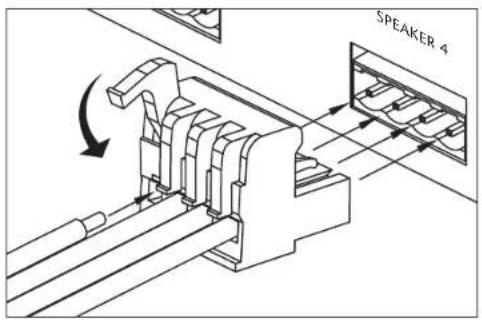
Figure 3
Connecting the
Wires

Operation
There are two ways to use the SS-4/SS-6. You may play one pair of speakers at a time, or play multiple pairs simultaneously. If you intend to play more than one pair of speakers at the same time, you will need to become familiar with the operation of the SS-4/SS-6's Protection button.

flowchart
graph TD
    A["Receiver"] --> B["TUNER 94.9"]
    B --> C["Niles SS-4"]
    C --> D1["Speaker Pair 4"]
    C --> D2["Speaker Pair 3"]
    C --> D3["Speaker Pair 2"]
    C --> D4["Speaker Pair 1"]
    B --> E["Line 1"]
    B --> F["Line 2"]
    B --> G["Line 3"]
    B --> H["Line 4"]
    style A fill:#f9f,stroke:#333
    style B fill:#ccf,stroke:#333
    style C fill:#cfc,stroke:#333
    style D1 fill:#ffc,stroke:#333
    style D2 fill:#ffc,stroke:#333
    style D3 fill:#ffc,stroke:#333
    style D4 fill:#ffc,stroke:#333
    style E fill:#fcc,stroke:#333
    style F fill:#fcc,stroke:#333
    style G fill:#fcc,stroke:#333
Installation
- Select a convenient mounting location for the SS-4/SS-6.
- Run all the necessary wiring to the SS-4/SS-6. Label the wires for future reference. See (Figure 2).
- Locate the connector plugs (and remove them if they are plugged in). See (Figure 2).
- Strip 1/4" of insulation from the end of each wire. Tightly twist the end of each wire until no frayed ends remain.
- Use a small flathead screwdriver or your thumbnail to raise the locking tabs, exposing the holes on the removable connector plug.
- Insert each wire into the appropriate hole on the removable connector plug, and snap the locking tab down.
NOTE: To help you avoid Improper Installation, the connector plug is keyed.
- Insert the smooth side of the connector plug into the smooth side of the socket. Don't force the scalloped side of the connector plug into the smooth side of the socket. See (Figure 3).
The inputs of the SS-4/SS-6 are the connector terminals labeled "AMPLIFIER". The outputs are the connector terminals labeled "SPEAKERS". Be sure not to reverse these connections or the SS-4/SS-6 will not function properly.
- Locate the pre-printed Room Labels. Affix the appropriate label to the recessed area over each on/off selector button.
"TECH TIP"
If your amplifier or receiver has "A" and "B" speaker-pair outputs, connect the SS-4/SS-6 to the "A" outputs. Do not connect anything to "B". This will prevent the amplifier or receiver from driving an unusually low impedance load.
- Slowly turn up the amplifier or receiver volume and set it to a comfortable (not maximum) listening level. Be careful not to overdrive or "clip" your amplifier. If the sound becomes muddy or distorted, you have reached the limit of your amplifier's volume capability and should quickly reduce the volume to avoid damaging your speakers.
- To turn off the speaker pair, simply press the corresponding on/off button on the SS-4/SS-6.
The actual impedance load the SS-4/SS-6 presents to your receiver or amplifier will vary, depending on how many speaker pairs are playing and the impedance rating of each speaker. If you have four pairs of 8-ohm speakers playing, the SS-4/SS-6 will present a 4.5 ohm impedance load to your receiver/amplifier. With four pairs of 4-ohm speakers playing, the load drops to slightly under 4 ohms.
If you intend to use the SS-4/SS-6 with more than 2 pairs of 4-ohm speakers, it is recommended that you verify that the receiver or amplifier is capable of driving a 4-ohm load. Consult your Niles dealer, or receiver/amplifier manufacturer, if you are uncertain about the capabilities of the receiver/amplifier.
Type of Speaker Wire
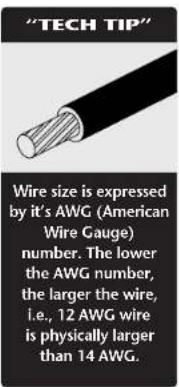
For most applications, we recommend you use 16 or 18 gauge, stranded copper speaker wire for the SS-4/SS-6 connections. For wiring runs longer than 80 feet, 14 gauge wire is recommended. Using speaker wire larger than 14 gauge for the SS-4/SS-6 connections is not recommended—the wire may not fit into the connectors. Never use solid-core, aluminum, or "Romex" type wire with the SS-4/SS-6. When running speaker wires inside walls, most states and municipalities in the U.S. specify that you must use a special type of speaker wire. Usually, the requirement is that the wire has a specific "CL" fire rating, such as "CL-2" or "CL-3". Consult your Niles dealer, building contractor, or local building and inspection department if unsure about which type of wire is best for your application.
TOOLS REQUIRED
- Wire Stripper
- Locate the on/off buttons on the SS-4/SS-6 which correspond to the speaker pairs you wish to play. Set them to the ON position.
- Turn on the amplifier or receiver and select a source, such as the tuner or CD player.
- Slowly turn up the amplifier or receiver volume and set it to a comfortable (not maximum) listening level. Be careful not to overdrive or "clip" your amplifier. If the sound becomes muddy or distorted, you have reached the limit of your amplifier's volume capability and should quickly reduce the volume to avoid damaging your speakers.
- To turn off one or more speaker pairs, simply press the corresponding on/off button(s) on the SS-4/SS-6. Refer to the Protection chart for the correct setting of the Protection button.
Features and Benefits
The SS-4/SS-6 offers a number of improvements over other speaker selectors:
• Power handling: 100 watts per channel RMS
• Protection circuit safeguards receiver/amplifier
- Separate left and right ground paths for compatibility with all amplifiers, including bridged designs
- Removable screwless connectors accommodate up to 14 gauge wire
• Rugged all metal chassis construction
- Non-skid feet won't scratch furniture and ensure unit stability during operation
• 72 adhesive-backed room identification labels
- Requires an amplifier that is compatible with a 4 ohm load
• Warranty: Ten-year limited
- Dimensions: 8-1/2" wide x 2" high x 6-3/4" deep (SS-4); 11-1/2" wide x 2" high x 6-3/4" deep (SS-6)
• Shipping weight: approximately 4 lbs (SS-4); 5 lbs (SS-6)
TECH
SUPPORT
HOTLINE
If you have questions
regarding the
operation of the
Niles SS-4/SS-6,
contact your local
Niles dealer or Niles
Customer Service at
1-800-289-4434.


- Balancing Speaker Volume
- SPECIFICATIONS
- Installation Considerations
- SS-4/SS-6 Power Handling
- Amplifier Impedance Load
- Playing Two or More Speaker Pairs Simultaneously
- "TECH TIP"
- Avoiding Interference
- Using the SS-4 with Tube-Type Amplifiers
- Playing One Pair of Speakers At a Time
- Operation
- Installation
- NOTE: To help you avoid Improper Installation, the connector plug is keyed.
- Type of Speaker Wire
- TOOLS REQUIRED
- Features and Benefits
- TECH
- SUPPORT
- HOTLINE
Brand : Niles
Model : SS-4
Category : Hi-Fi System