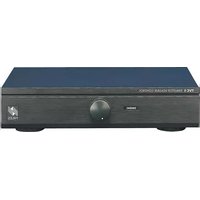
TVC-1 - Hi-Fi System Niles - Free user manual and instructions
Find the device manual for free TVC-1 Niles in PDF.


| Brand | Niles |
| Model | TVC-1 |
| Product Type | Hi-Fi System |
| Power Output | 100W per channel (RMS) |
| Frequency Response | 20 Hz - 20 kHz |
| Impedance | 8 ohms |
| Dimensions (W x H x D) | 430 mm x 140 mm x 360 mm |
| Weight | 5.0 kg |
| Power Supply | AC 120V / 60 Hz |
| Power Consumption | 250W (max) |
| Audio Inputs | CD, AUX, Tape, Phono |
| Audio Outputs | Speaker outputs, Headphone jack |
| Remote Control | Included |
| Speaker Compatibility | 4-16 ohms |
| Signal-to-Noise Ratio | 88 dB |
| Total Harmonic Distortion | <0.05% |
| Color | Black |
| Cooling | Ventilated design, keep space around unit |
| Cleaning Instructions | Wipe with soft dry cloth; avoid solvents |
| Safety Certifications | UL, CE |
Frequently Asked Questions - TVC-1 Niles
User questions about TVC-1 Niles
0 question about this device. Answer the ones you know or ask your own.
Ask a new question about this device
Download the instructions for your Hi-Fi System in PDF format for free! Find your manual TVC-1 - Niles and take your electronic device back in hand. On this page are published all the documents necessary for the use of your device. TVC-1 by Niles.
USER MANUAL TVC-1 Niles
natural_image
Exterior view of a black electronic device with a knob and control knob (no visible text or symbols)TVC-1
TABLETOP STEREO VOLUME CONTROL

NILES®
BLENDING HIGH FIDELITY AND ARCHITECTURE®
TABLETOP STEREO VOLUME CONTROL
TVC-1
Tabletop Stereo
Volume Control
TABLE OF CONTENTS
Introduction 1
Features and 2 Benefits
Installation 5 Considerations
Installation 7
Operation 9
Specifications 10

NILES®
Introduction
The TVC-1 is a tabletop volume control for speakers. It connects between the speaker-level output of an amplifier, speaker selector, etc. and a pair of speakers.
A perfect application for the TVC-1 is adjusting the volume of remotely located speakers. The TVC-1 adjusts the volume of speakers connected to it by attenuating the amplifier signal. Niles volume controls use autoformers instead of L-pads for the volume controlling element. This assures minimal internal power dissipation with virtually no power wasted as heat.
Features and Benefits
The TVC-1 offers a number of improvements over other tabletop volume controls:
- Power handling: 100 watts per channel RMS; 200 watts peak
- Selectable impedance magnification for 1, 2, 3/4, 5/6 pairs of speakers
- Individual room on/off selector switches
• 12-step controls; 54dB maximum attenuation - Separate left and right ground paths for compatibility with all amplifiers
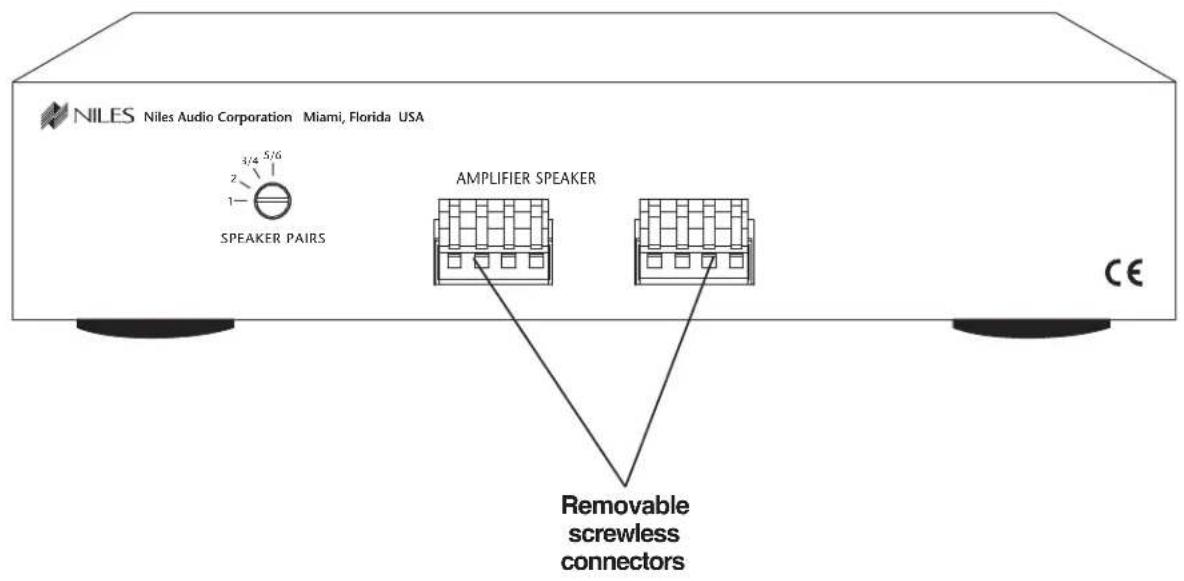
- Removable screwless connectors accommodate up to 14 gauge wire
- Rugged all metal chassis construction
- Nonskid feet won't scratch furniture and ensure unit stability during operation
- 72 adhesive-backed room identification labels
- Warranty: Ten-year limited
- Dimensions: 8 1/2" wide x 2" high x 7 1/4" deep
• Shipping weight: 2 1/4 lbs
TECH SUPPORT HOTLINE
If you have questions regarding the operation of the Niles TVC-1, contact your local Niles dealer or Niles Customer Service at 1-800-289-4434.
Installation Considerations
Calculating the Impedance Magnification Setting
Use the following instructions to select the correct switch setting for the number and type of speakers in your system.
CAUTION! EVERY SPEAKER PAIR IN THE SYSTEM MUST BE CONNECTED TO AN IMPEDANCE-MAGNIFYING VOLUME CONTROL AND SET TO THE SAME MAGNIFICATION.
- Count the number of pairs of speakers you are connecting to the system.
- Set the Speaker Pairs switch on the rear panel of the TVC-1 to match the number of pairs of speakers (1, 2, 3/4, 5/6).
TVC-1 Power Handling
The TVC-1 is designed for use with a receiver or amplifier having a maximum power output of 100 watts per channel at 8 ohms. Damage caused by the use of a higher-power receiver or amplifier will void the warranty. Consult your Niles dealer, or receiver/amplifier manufacturer, if you are uncertain about the power rating of your receiver or amplifier.
TABLETOP STEREO VOLUME CONTROL
Type of Speaker Wire
For most applications, we recommend you use 16 or 18 gauge, stranded copper speaker wire for the TVC-1 connections. For wiring runs longer than 80 feet, 14 gauge wire is recommended. Using speaker wire larger than 14 gauge for the TVC-1 connections is not recommended—the wire may not fit into the connectors. Never use solid-core, aluminum, or “Romex” type wire with the TVC-1. When running speaker wires inside walls, most states and municipalities in the U.S. specify that you must use a special type of speaker wire. Usually, the requirement is that the wire has a specific “CL” fire rating, such as “CL-2” or “CL-3”. Consult your Niles dealer, building contractor, or local building and inspection department if unsure about which type of wire is best for your application.
Avoiding Interference
Speaker wires can act as an "antenna" for electrical noise. Locating speaker wires too close to a light dimmer or switch may cause a "buzzing" or "popping" sound to be heard through the speakers. If you must locate the TVC-1 wiring near electrical devices, route the speaker wires several feet away from the electrical wiring.
TOOLS REQUIRED
- Wire Stripper
IMPORTANT
DO NOT use the TVC-1 with amps or receivers rated at more than 100 watts per channel RMS at 8 ohms.
TABLETOP STEREO VOLUME CONTROL
"TECH TIP"

natural_image
Cross-sectional illustration of a black cable with internal insulation (no text or symbols)Wire size is expressed by it's AWG (American Wire Gauge) number. The lower the AWG number, the larger the wire, i.e., 12 AWG wire is physically larger than 14 AWG.
Mounting Location
Convenient mounting locations for the TVC-1 are:
- With other stereo components
- Near a desk
- At your bedside
- Close to a telephone
Installation
- Select a convenient location for the TVC-1.
- Run all the necessary wiring to the TVC-1. Label the wires for future reference. See (Figure 1).
- Locate the connector plugs (and remove them if they are plugged in). See Figure 6.
- Strip 1/4" of insulation from the end of each wire. Tightly twist the end of each wire until no frayed ends remain.
- Use a small flathead screwdriver or your thumbnail to raise the locking tabs, exposing the holes on the removable connector plug.
TABLETOP STEREO VOLUME CONTROL

TABLETOP STEREO VOLUME CONTROL
- Insert each wire into the appropriate hole on the removable connector plug, and snap the locking tab down.
NOTE: To help you avoid improper installation, the connector plug is keyed.

TABLETOP STEREO VOLUME CONTROL
- Insert the smooth side of the connector plug into the smooth side of the socket. Don't force the scalloped side of the connector plug into the smooth side of the socket. See Figure 2.
The inputs of the TVC-1 are the connector terminals labeled "AMPLIFIER". The outputs are the connector terminals labeled "SPEAKERS". Be sure not to reverse these connections or the TVC-1 will not function properly.
- Locate the pre-printed Room Labels. Affix the appropriate label to the recessed area next to the knob on the TVC-1.

Figure2 Connecting the Wires
Operation
- Make sure the amplifier or receiver power is OFF and set the volume to minimum.
- Set the TVC-1 volume to maximum (fully clockwise).
- If you are using a Niles speaker selection system, locate the on/off button which corresponds to the speaker pair you wish to play. Set it to the ON position.
- Turn on the amplifier or receiver and select a source, such as the tuner or CD player.
- Slowly turn up the amplifier or receiver volume and set it to a comfortable (not maximum) listening level. Be careful not to overdrive or "clip" your amplifier. If the sound becomes muddy or distorted, you have reached the limit of your amplifier's volume capability and should quickly reduce the volume to avoid damaging your speakers.
- Using the knob on the front of the TVC-1, adjust the volume of the speakers to the desired listening level.
- You can turn off the speakers by turning the knob on the TVC-1 fully counter-clockwise, or by pressing the on/off button on your speaker selector.
Balancing Speaker Volume
The volume control on your receiver or amplifier serves as the "master" volume for all speaker pairs connected.
The volume level of the speakers may vary from room to room. This is caused by several factors. Two lesser factors are the size of the speaker and its efficiency. The largest factor is the physical size of the room.
The best way to balance speaker volume is to equip each of the speaker pairs in your system with a Niles volume control. The controls allow you to adjust the volume of each speaker pair individually. If all the speaker pairs in your system are equipped with Niles volume controls, you can leave the amplifier or receiver volume set at one position and use the Niles controls exclusively.
SPECIFICATIONS
Audio Power Handling 100 Watts/channel continuous music power
Mounting Table-top component
Wiring Requirements Individual runs of 2-conductor speaker wire. Connectors accommodate wire sizes 14-22 gauge (16 gauge recommended)
Overall Dimensions 8-1/2" wide x 2" high x 7-1/4" deep
Weight 2-1/4 lbs.

NILES®
Niles Audio
Corporation
www.nilesaudio.com
12331 S.W. 130 Street
Miami, Florida 33186
Tel: (305) 238-4373
Fax: (305) 238-0185
© 2004 Niles Audio Corporation. All rights reserved. Because Niles constantly strives to improve the quality of its products, Niles reserves the right to change product specifications without notice. Niles and the Niles logo are registered trademarks of Niles Audio Corporation. Printed in China 1/04 DS00356ACN
| ATRIUM | BEDRM 2 | DINING | GAZEBO | MAID RM | SAUNA |
| ATTIC | BEDRM 3 | DOCK | GREAT RM | M. BATH | SHOWER |
| BALCONY | BEDRM 4 | DRESS RM | GUEST RM | M. BEDRM | SITTING |
| BALLROOM | BEDROOM | DUNGEON | GYM | MEDIA RM | STATE RM |
| BAR | BOARD RM | ENTRY | HALLWAY | NURSERY | STAIRS |
| BASEMENT | BONUS RM | FAMILY | JACUZZI | OFFICE | STUDIO |
| BATH RM | BREAKFAST | FOYER | KIDS ROOM | OUTSIDE | STUDY |
| BATH RM 1 | CELLAR | GALLERY | KITCHEN | PATIO | SUN ROOM |
| BATH RM 2 | CLOSET | GALLEY | LAUNDRY | POOL | TENNIS |
| BATH RM 3 | DANCE | GAME RM | LIBRARY | PORCH | TERRACE |
| BBQ | DECK | GARAGE | LIVING RM | RECROOM | THEATER |
| BEDRM 1 | DEN | GARDEN | LOFT | SALON | WORK SHOP |

Use a marker on blanks to create personalized labels.
Room/Zone Labels

NILES®
©2001 Niles Audio Corporation. All rights reserved. LA01021ACN
LIMITED WARRANTY
Niles Audio Corporation ("NILES") warrants its passive products (those not requiring AC or battery power) to the original purchaser to be free of manufacturing defects in material and workmanship for a period of ten years from date of purchase.
Niles Audio Corporation ("NILES") warrants its passive loudspeaker products (those not requiring AC or battery power) to the original purchaser to be free of manufacturing defects in material and workmanship for a period of five years from date of purchase.
Niles Audio Corporation ("NILES") warrants its outdoor loudspeaker products to the original purchaser to be free of manufacturing defects in material and workmanship for a period of two years from date of purchase.
Niles Audio Corporation ("NILES") warrants its active products (those requiring AC or battery power) to the original purchaser to be free of manufacturing defects in material and workmanship for a period of two years from date of purchase.
This Warranty is subject to the following additional conditions and limitations. The Warranty is void and inapplicable if NILES deems that the product has been used or handled other than in accordance with the instructions provided by the manufacturer, including but not limit-
ed to damage caused by accident, mis- handling, improper installation, abuse, negligence, or normal wear and tear, or any defect caused by repair to the pro- duct by anyone other than NILES or an authorized NILES dealer.
To obtain warranty service, take the unit to the nearest authorized NILES dealer, who will test the product and if necessary, forward it to NILES for service. If there are no authorized NILES dealers in your area, you must write to NILES and include your name, model and serial number of your unit, along with a brief description of the problem. A factory Return Authorization Number will be sent to you. DO NOT RETURN ANY UNIT WITHOUT FIRST RECEIVING WRITTEN AUTHORIZATION AND SHIPPING INSTRUCTIONS FROM NILES.
If the above conditions are met, the purchaser's sole remedy shall be to return the product to NILES, in which case NILES will repair or replace, at its sole option, the defective product without charge for parts or labor. NILES will return a unit repaired or replaced under warranty by shipping same by its usual shipping method from the factory (only) at its expense within the United States of America. THERE ARE NO OTHER WARRANTIES, INCLUDING WITHOUT LIMITATION, EITHER EXPRESS OR IMPLIED WARRANTIES OF MERCHANTABILITY OR FITNESS FOR
A PARTICULAR PURPOSE, WITH RESPECT TO THE PRODUCT.
REPAIR OR REPLACEMENT AS PROVIDED UNDER THIS WARRANTY IS THE EXCLUSIVE REMEDY OF THE CONSUMER/PURCHASER. NILES SHALL NOT BE RESPONSIBLE FOR ANY INCIDENTAL OR CONSEQUENTIAL DAMAGES EXCEPT TO THE EXTENT PROVIDED (OR PROHIBITED) BY APPLICABLE LAW.
Some states do not allow the exclusion or limitation of incidental or consequential damages, so the above limitation may not apply to you. This warranty gives you specific legal rights, and you may also have other rights which vary from state to state.
For the name of your nearest authorized NILES dealer, contact:
NILES AUDIO CORPORATION PO. BOX 160818, Miami, Florida 33116.
| Model |
| Serial No. |
| Purchase Date |

NILES.
Detach this portion and keep for your records.
PLEASE REGISTER YOUR NEW NILES PRODUCT
(Please Print Clearly)
Model Purchased
Serial No. (If applicable)
Date Purchased (month/day/year) ____ / ____ /
Dealer Name and Location
DR. MISS MR. MRS. MS.
Name
Address
City ____ State ____ Zip ____
Daytime phone ____ Evening phone
Email address
Please take a moment to fill out our warranty registration card. The information helps us get to know you better and develop the products you want.
Age:
Under 25
□25-34
□ 35-44
45-54
55 & over
Income:
□ Under \$24,999
□ \25,000-\34,999
□ \35,000-\44,999
□ \45,000-\59,999
□ \60,000-\74,999
□ \75,000-\99,999
Over \$99,999
Occupation:
Arts/Entertainment
Business Owner
Engineer
□ Finance/Account.
General Office
Management
Professional
Sales/Marketing
□ Student
Tradesperson
What magazines do you read?
| 1. | |
| 2. | |
| 3. |
Musical tastes:
(Please check all that apply)
Alternative
Classical
□ Country
□ Jazz
□ New Age
□ Popular
□R&B
Rock
□ Other
How did you hear about Niles?
Architect/Developer
□ Custom Installer
Direct Mail
Friend/Family
In-Store Display
□ Interior Designer
□ Magazine Ad
Mail-Order Catalog
□ Newspaper Ad
□ Product Brochure
Product Review
□ Retail Salesperson
Who will install the product?
□ Custom A/V Installer
Electrician
□ Friend
□ Myself
Which factor(s) influenced the purchase of your Niles product?
(Please check all that apply)
Ease of Use
□ Made in the USA
Price/Value
□ Product Features
Quality/Durability
□ Reputation
Style/Appearance
□ Warranty
Do you...?
☐ Own a House. If yes, how many square feet?
□ Own a Town House/
Condominium/Co-op
□ Rent an Apartment
□ Rent a House
Are you interested in
receiving literature on
other Niles products?
□ Yes □ No
What products/capabilities would you like to see developed in the future?
Niles Audio Corporation
Customer Service Department
P.O. Box 160818
Miami, Florida 33116-0818
WARRANTY AND REGISTRATION CARD
CONGRATULATIONS
ON YOUR PURCHASE
OF A NILES PRODUCT.
PROPERLY INSTALLED
AND OPERATED, YOUR
NEW NILES PRODUCT
WILL GIVE YOU YEARS OF
TROUBLE-FREE USE.

NILES®
www.nilesaudio.com
© 2004 Niles Audio Corporation. Printed in China. WR00001CCN
Please tape bottom and mail

PLEASE RECYCLE


- TVC-1
- TABLETOP STEREO VOLUME CONTROL
- TABLE OF CONTENTS
- Introduction
- Features and Benefits
- TECH SUPPORT HOTLINE
- Installation Considerations
- Calculating the Impedance Magnification Setting
- CAUTION! EVERY SPEAKER PAIR IN THE SYSTEM MUST BE CONNECTED TO AN IMPEDANCE-MAGNIFYING VOLUME CONTROL AND SET TO THE SAME MAGNIFICATION.
- TVC-1 Power Handling
- Type of Speaker Wire
- Avoiding Interference
- TOOLS REQUIRED
- IMPORTANT
- "TECH TIP"
- Mounting Location
- Installation
- Operation
- Balancing Speaker Volume
- SPECIFICATIONS
- Room/Zone Labels
- LIMITED WARRANTY
- PLEASE REGISTER YOUR NEW NILES PRODUCT
- Age:
- Income:
- Occupation:
- What magazines do you read?
- Musical tastes:
- How did you hear about Niles?
- Who will install the product?
- Which factor(s) influenced the purchase of your Niles product?
- Do you...?
- Are you interested in
- Niles Audio Corporation
Brand : Niles
Model : TVC-1
Category : Hi-Fi System