
MC24-ES - Microphone Senal - Free user manual and instructions
Find the device manual for free MC24-ES Senal in PDF.


| Product Type | Professional Condenser Shotgun Microphone |
| Polar Pattern | Hypercardioid |
| Frequency Response | 40 Hz - 20 kHz |
| Sensitivity (48V Phantom) | -35 dB ±3 dB (1 dB = 1 V/Pa at 1 kHz) |
| Output Impedance (48V Phantom) | 500 Ω ±20% (at 1 kHz) |
| Maximum Input SPL (48V Phantom) | 130 dB (THD ≤1% at 1 kHz) |
| Signal-to-Noise Ratio | 74 dB (1 kHz at 1 Pa) |
| Power Requirements | 48 V phantom power |
| High-Pass Filter | Selectable, 180 Hz |
| Output Connector | XLR male (3-pin) |
| Weight | 3.6 oz (103 g) |
| Length | 7.1 in (18 cm) |
| Diameter | 0.8 in (2.1 cm) |
| Included Accessories | Foam windscreen, mic clip, carry pouch, 1/4">5/8 bushing |
| Warranty | 2-year limited warranty |
| Cleaning | Soft, dry cloth only |
| Operating Temperature | Do not exceed 110°F (43°C); avoid high humidity |
Frequently Asked Questions - MC24-ES Senal
User questions about MC24-ES Senal
0 question about this device. Answer the ones you know or ask your own.
Ask a new question about this device
Download the instructions for your Microphone in PDF format for free! Find your manual MC24-ES - Senal and take your electronic device back in hand. On this page are published all the documents necessary for the use of your device. MC24-ES by Senal.
USER MANUAL MC24-ES Senal
natural_image
Close-up of a black cylindrical electronic device with a coiled, grid-like pattern and ventilation slots (no visible text or symbols)MC24-ES (Short)

natural_image
Close-up of a black cylindrical mechanical component with threaded end and flange (no visible text or symbols)MC24-EL (Long)

MC24-€S/€L
PROFESSIONAL CONDENSER SHOTGUN MICROPHONE
USER'S GUIDE
Table of Contents:
Introduction 2-3
Precautions ......3
Overview 4
Powering the
Microphone 5
Installing the Battery
(MC24-EL only) 6
Mounting the
Microphone 7
The High-Pass Filter ..... 7
Troubleshooting 8-9
Specifications .....10-11
Warranty 12
Thank you for choosing Senal.
The Senal MC24-EL and MC24-ES are shotgun microphones that deliver broadcast-quality sound in the studio or on location. They are thoughtfully designed and engineered for demanding video productions, ENG, and broadcast applications.
These professional microphones feature a high-grade condenser transducer that captures detailed and accurate sound. The hypercardioid polar pattern, combined with the line-plus-gradient acoustic principle, allow for a narrow, focused pick-up pattern while maximizing the rejection of sound coming from the sides and rear. These design elements make the MC24-EL and MC24-ES highly directional and ideal for recording speech or dialog. The broad frequency response with full lows, clear and precise mids, and crisp highs, delivers superb sound reproduction. For locations with excessive low-frequency noise, the selectable high-pass filter at 180 Hz minimizes unwanted noise and rumble.
Both microphones run on 48 V phantom power available from most professional video cameras, mixing boards, or recording devices. The MC24-EL has the additional feature of running on battery power with a single AA battery. Both are suitable for mounting on boom poles, mic stands, or cameras. The
MC24-EL captures sound at a slightly longer distance, while MC24-ES's compact size ensures that it will not extend into the picture frame.
Both microphones are covered with a matte-black rubberized coating that greatly reduces handling noise and ensures trouble-free recordings when the microphone is in motion. The matte finish also rejects unwanted light reflections. Gold-plated XLR connectors deliver flawless signal transfer.
A foam windshield is included to minimize wind noise and to protect the microphone from dust and debris, and a mic clip is included for boom pole or mic stand mounting.
Whether in the studio or in the field, the MC24-EL and MC24-ES microphones will deliver pro-quality, defined, and rich sound for any ENG, outdoor, or broadcast production.
Precautions ⚠️
- Please read and follow these instructions and keep this manual in a safe place.
- Keep this product away from water and flammable gases or liquids.
- Do not attempt to disassemble or repair this product yourself.
- Handle this product with care.
- Clean this product with only a soft, dry cloth.
■ Make sure that this product is intact and that there are no missing parts.
- Remove the battery from the battery compartment when the microphone is not in use.
- All images are for illustrative purposes only.
- Do not leave this microphone in the open sun, or where temperatures exceed 110^ F ( 43^ C) for extended periods. Extremely high humidity should also be avoided.


Powering the Microphone
The MC24-EL and MC24-ES require power to operate. Both microphones can operate with 48 V phantom power supplied by most professional video cameras, mixing consoles, or recording devices.
To power the MC24-EL or MC24-ES, connect an XLR cable to the microphone and activate phantom power on your source.

natural_image
Technical line drawing of a mechanical component with threaded end and tapered shaft (no text or symbols)Installing the Battery (MC24-EL only)
The MC24-EL can also run on a single AA battery. To install the battery, follow these steps:
- Unscrew the base of the microphone and slide it down to expose the battery compartment.
Note: The battery compartment cover does not come off. Do not try to force it off of the microphone.
- Insert the bottom of the battery into the battery compartment according to the orientation on the diagram.
- Press the top of the battery down into place in the compartment.

natural_image
Diagram of a mechanical component with internal structure and directional arrows (no text or symbols)- Slide the battery cover over the battery compartment and screw it in until tight.
Note: The microphone draws power from the battery when it is installed. To prolong battery life, remove the battery when the microphone is not in use.
Mounting the Microphone
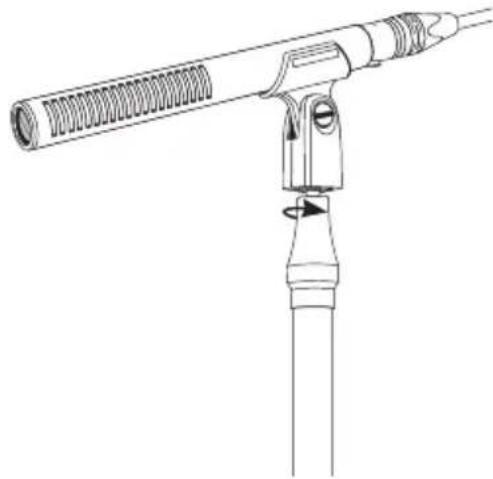
A mic clip is included for mounting your microphone on a mic stand or boom pole with a 3/8" or 5/8" stud.
An adapter bushing comes installed in the mic stand. For mounting on a 5/8" stud, remove the bushing from the mounting socket of the mic clip with a screwdriver or a coin.
Make sure to mount the microphone so that the mic clip is not blocking the side ports of the microphone. Blocking the side ports can affect the microphone's performance and polar pattern and make it more susceptible to picking up off-axis sound.
The High-Pass Filter
Engage the high-pass filter in settings where there is audible low-end noise such as air blowers, fans, or other ambient noise. With this setting, frequencies below 180 Hz are attenuated.
To select the high-pass filter, move the switch to the ( ) icon with a small screwdriver or the tip of a pen.
natural_image
Line drawing of a mechanical device with a coiled spring and lever (no text or symbols)
Troubleshooting
| Problem Solution | |
| No sound is being recorded. | Make sure your mixer or amplifier is turned on.Make sure phantom power is engaged.(EL only) If using battery power, make sure a fresh battery is installed.Your preamp gain may be turned all the way down. Gradually turn it up until a satisfactory input level is reached.Make sure the microphone is properly connected, and that connections are secure.Check your cable to make sure it's reliable. Try replacing it with another cable. |
| The sound is distorted. | Move the microphone away from the sound source.The preamp gain may be too high. Gradually turn it down until a satisfactory input level is reached. |
| Too much low-frequency noise or rumble is being recorded. | Activate the high-pass filter.Turn off air conditioners, fans, heaters, or other devices that might be interfering with your recording.Fit an Auray windscreen (available separately) over the microphone to minimize noise from wind. |
Specifications
| MC24-EL MC24-ES | ||
| Transducer | Condenser Condenser | |
| Polar Pattern | Hypercardioid Hypercardioid | |
| Frequency Response | 40 Hz to 20 kHz 40 Hz to 20 kHz | |
| Sensitivity | 48 V: -32 dB ±2 dB(1 dB=1 V/Pa at 1 kHz)1.5 V: -36 dB ±2 dB(1 dB=1 V/Pa at 1 kHz) | 48 V: -35 dB ±3 dB(1 dB=1 V/Pa at 1 kHz) |
| Output Impedance | 48 V: 500 Ω ±20% (at 1 kHz)1.5 V: 600 Ω ±20% (at 1 kHz) | 48 V: 500 Ω ±20% (at 1 kHz) |
| Max. Input SPL | 48 V: 130 dB (THD ≤1% at 1 kHz)1.5 V: 115 dB (THD ≤1% at 1 kHz) | 48 V: 130 dB (T.H.D. ≤1% at 1 kHz) |
| Signal-to-Noise Ratio | 74 dB (1 kHz at 1 Pa) 74 dB (1 kHz at 1 Pa) | |
| Power Requirements | 48 V phantom power/1.5 V AA battery | 48 V phantom power |
| High-Pass Filter | 180 Hz 180 Hz | |
| Output Connector | XLR Male XLR Male | |
| Weight | 5.2 oz. (148 g) 3.6 oz. (103 g) | |
| Length | 11.2" (28.5 cm) 7.1" (18 cm) | |
| Diameter | 0.8" (2.1 cm) | 0.8" (2.1 cm) |
Frequency Response Graph

Polar Pattern

radar
| Angle (°) | Value | | --------- | ----- | | 0 | 1 | | 30 | 2 | | 60 | 1 | | 90 | 2 | | 120 | 1 | | 150 | 2 | | 180 | 1 | | 210 | 2 | | 240 | 1 | | 270 | 2 | | 300 | 1 | | 330 | 2 |Two-Year Limited Warranty
This Senal product is warranted to the original purchaser to be free from defects in materials and workmanship under normal consumer use for a period of two (2) years from the original purchase date or thirty (30) days after replacement, whichever occurs later. The warranty provider's responsibility with respect to this limited warranty shall be limited solely to repair or replacement, at the provider's discretion, of any product that fails during normal use of this product in its intended manner and in its intended environment. Inoperability of the product or part(s) shall be determined by the warranty provider. If the product has been discontinued, the warranty provider reserves the right to replace it with a model of equivalent quality and function.
This warranty does not cover damage or defect caused by misuse, neglect, accident, alteration, abuse, improper installation or maintenance. EXCEPT AS PROVIDED HEREIN, THE WARRANTY PROVIDER MAKES NEITHER ANY EXPRESS WARRANTIES NOR ANY IMPLIED WARRANTIES, INCLUDING BUT NOT LIMITED TO ANY IMPLIED WARRANTY OF MERCHANTABILITY OR FITNESS FOR A PARTICULAR PURPOSE. This warranty provides you with specific legal rights, and you may also have additional rights that vary from state to state.
To obtain warranty coverage, contact the Senal Customer Service Department to obtain a return merchandise authorization (“RMA”) number, and return the defective product to Senal along with the RMA number and proof of purchase. Shipment of the defective product is at the purchaser’s own risk and expense.
For more information or to arrange service, visit www.senalsound.com or call Customer Service at 212-594-2353.
Product warranty provided by the Gradus Group.
www.gradusgroup.com
Senal is a registered trademark of the Gradus Group. © 2016 Gradus Group LLC. All Rights Reserved.

SENAL ^TM
A Gradus Group Brand
Brand : Senal
Model : MC24-ES
Category : Microphone