LC2I - Audio/video converter AudioControl - Free user manual and instructions
Find the device manual for free LC2I AudioControl in PDF.


| Brand | AudioControl |
| Model | LC2I |
| Product Type | Line Output Converter (Audio/Video Converter) |
| Dimensions (W x H x D) | 3.5 x 1.25 x 2.75 inches (approx.) |
| Weight | 0.4 lbs (approx.) |
| Power Supply | 12V DC (car battery) |
| Input Channels | 2-channel (stereo) high-level speaker input |
| Output Channels | 2-channel RCA low-level output |
| Input Voltage Range | Up to 40V RMS |
| Output Voltage | Up to 9V RMS |
| Frequency Response | 20 Hz – 20 kHz (±0.5 dB) |
| Signal-to-Noise Ratio | >110 dB (typical) |
| Total Harmonic Distortion | <0.01% |
| Main Functions | Converts high-level speaker signals to low-level RCA outputs; features AccuBASS® for bass restoration |
| Installation | Hardwired; requires power, ground, and remote turn-on connection |
| Maintenance | Keep dry and clean; no user-serviceable parts |
| Safety | Use with proper fuse; avoid short circuits; disconnect battery during installation |
| Spare Parts | Contact AudioControl or authorized dealer for replacement harnesses or units |
| Repairability | Not user-serviceable; contact manufacturer for service |
| General Information | Designed for aftermarket car audio integration with factory head units |
Frequently Asked Questions - LC2I AudioControl
User questions about LC2I AudioControl
0 question about this device. Answer the ones you know or ask your own.
Ask a new question about this device
Download the instructions for your Audio/video converter in PDF format for free! Find your manual LC2I - AudioControl and take your electronic device back in hand. On this page are published all the documents necessary for the use of your device. LC2I by AudioControl.
USER MANUAL LC2I AudioControl
"Maximum Processing with Minimal Effort"
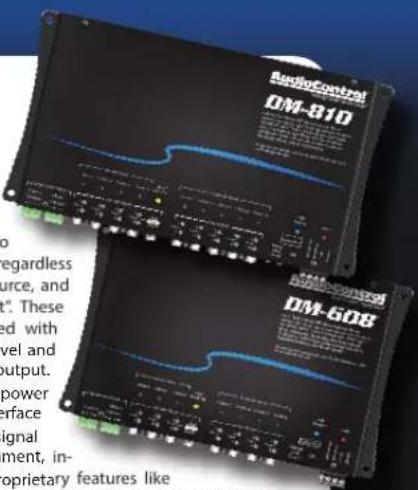
AudioControl's new Matrix DSP processors
When you require total control and optimization to achieve great sound quality, AudioControl Digital Signal Processors are the solution. The powerful DM-810™ and DM-608™ DSP processors allow users to truly optimize the performance of their audio system, regardless of whether they are using a factory or aftermarket source, and to truly achieve our goal "Making Good Sound Great". These highly versatile Digital Signal processors are equipped with key features, such as active speaker-level inputs, line-level and digital audio inputs, providing up to 10 channels of output. AudioControl's "smart user" interface contains the power of AudioControl processing through a flexible PC interface packed full of features and simply laid out. Includes signal summing, 30 bands of equalization, signal time-alignment, in-
put delay and phase correction, plus AudioControl proprietary features like AccuBASS ^® , GTO ^™ Signal Sense, and MILC ^™ as well as integrated input and output RTA's.
LC2i ^TM
TWO CHANNEL LINE OUTPUT CONVERTER WITH ACCUBASS®
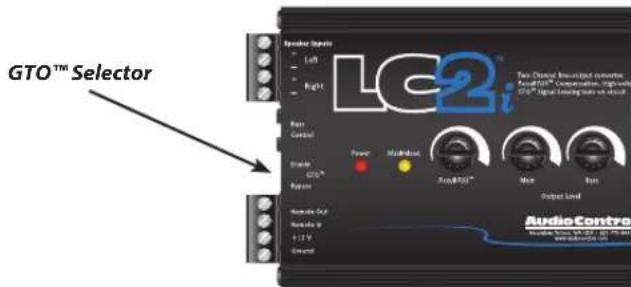
GTO™ Great Turn On: No need to look for a trigger wire. However you still need power and ground.
Connect the speaker level inputs and as soon as you turn on the factory audio system the LC2i will power up as well. After the LC2i turns on, it provides a 12 volt trigger output to turn on your amplifier. A Jumper which you can reach from the end panel allows you to set this feature on/off for specialized installations. The factory default setting for the GTO ^™ circuit is always ON.
Setting the AccuBASS® Bass Compensation:
Factory speaker systems have trouble reproducing loud clean bass. Some companies systems limit the bass at higher volumes so as not to damage speakers. The AccuBASS® circuit puts that bass back.
Here's how you set it up. After the LC2i /Amps/ and speakers are installed and ready go:
-
Turn the system on and play some music with a good bass track.
-
Turn the volume up while listening for the bass.
AudioControl®
Making Good Sound Great™
- If you hear a spot where the bass just drops right out...stop. Leave the volume there and go to your LC2i.
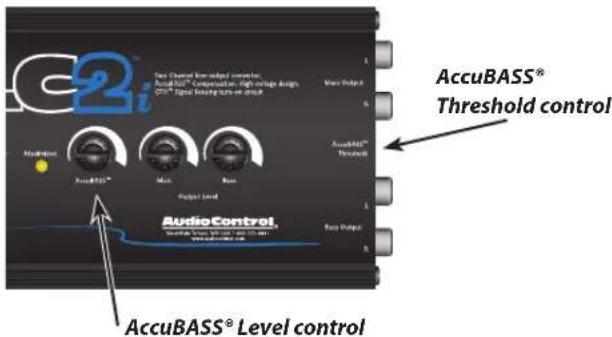
- Set the AccuBASS® Level control on the top of LC2i to the center detent.
- Now, use a small screwdriver to turn the Threshold control clockwise slowly until you hear the bass pop back in.
- Re-adjust the AccuBASS® Level control on the top of the unit to get the proper amount of bass compensation, and you're ready for some ground pounding bass. OK, what if your bass doesn't roll off, but you still want more?
No problem! Turn the AccuBASS® Level control fully down, rotate the threshold control fully clockwise to lock in the bass equalization. Now you can turn up the AccuBASS® Level control for the amount of bass you want.
Level Matching:
For a video on Level Matching go to: https://youtu.be/fmR2VrXHfbg or scan the code at the left.

Specifications:
Maximum speaker level input . .400 watts per channel @4 Ohms Maximum Preamp output ..... 9.5Vrms/13V peak Optional Dash Level Control Remote .....+0dB / -19dB Frequency response.....33 Hz - 100 kHz; ±1dB Total harmonic distortion ..... 0.01% Signal to Noise ratio.....>110dB Input Impedance.....20K ohms Output Impedance.....150 ohms Power draw.....150 mA Recommended fuse rating.....1 Amp Size (Chassis).....3.25" x 1.5" x 5.4" (6.5" L including mounting) Weight .....1 pound
Conditional Warranty
People are scared of warranties. Lots of fine print, lots of noncooperation, months of waiting around. Well, don't be scared of this warranty. It's designed to make you rave about us to your friends. It's a warranty that looks out for you and helps you resist the temptation to have your friend "who's good with electronics" try to repair your AudioControl LC2i. So go ahead and read this warranty, then enjoy your new component for a few days before sending in the warranty card and comments.
"Conditional" doesn't mean anything ominous. The Federal Trade Commission tells all manufacturers to use the term to indicate that certain conditions have to be met before they'll honor the warranty. If you honor these conditions, we will warrant all materials and workmanship on your LC2i for five years from the date you bought it, if installed by an authorized AudioControl dealer, and will fix or replace it, at our option, during that time.
Here are the conditions that make this warranty conditional:
- We need to know that you bought your product from an authorized AudioControl dealer. So go to www.audiocontrol.com or audiocontrolregistration.com right away, and register your LC2i.
-
You must keep your sales receipt for proof of purchase, showing when and from whom the unit was bought. We're not the only ones who require this, so it's a good habit to get into with any major purchase.
-
Your LC2i must have originally been purchased from an authorized AudioControl dealer. You do not have to be the original owner, but you do need a copy of the original sales slip.
- You cannot let anybody who isn't (A) the AudioControl factory; (B) somebody authorized in writing by AudioControl to service your LC2i
If anyone other than (A) or (B) messes with your LC2i, that voids your warranty.
- The warranty is also void if the serial number is altered or removed, or if the LC2i has been used improperly. Now these sound like big loopholes, but here is all we mean by it.
Unwarranted abuse is (A) physical damage (don't use the LC2i for a jack stand); (B) improper connections (120 volts into the power jack can fry the poor thing); (C) sadistic things. This is the best mobile product we know how to build, but if you mount it to the front bumper of your car, something will go wrong.
- If an authorized United States AudioControl dealer installs your LC2i, the warranty is five years, otherwise the warranty is one year.
Assuming you conform to 1 through 6, and it really isn't all that hard to do, we get the option of fixing your old unit or replacing it with a new one.
Validate your warranty: Visit audiocontrolregistration.com to register your LC2i.
Legalese Section
This is the only warranty given by AudioControl. This warranty gives you specific legal rights, which vary from state to state.
Promises of how well your LC2i will work are not implied by this warranty. Other than what we've covered in this warranty, we have no obligation, express or implied. Also, we will not be obligated for direct or indirect consequential damage to your system caused by hooking up the AudioControl LC2i.
Failure to send in a properly completed warranty card, negates any service claims.
AudioControl®
Making Good Sound Great™
Active, High Voltage, High Impedance, Line Converter for Audiophile Sound from Factory Head Units
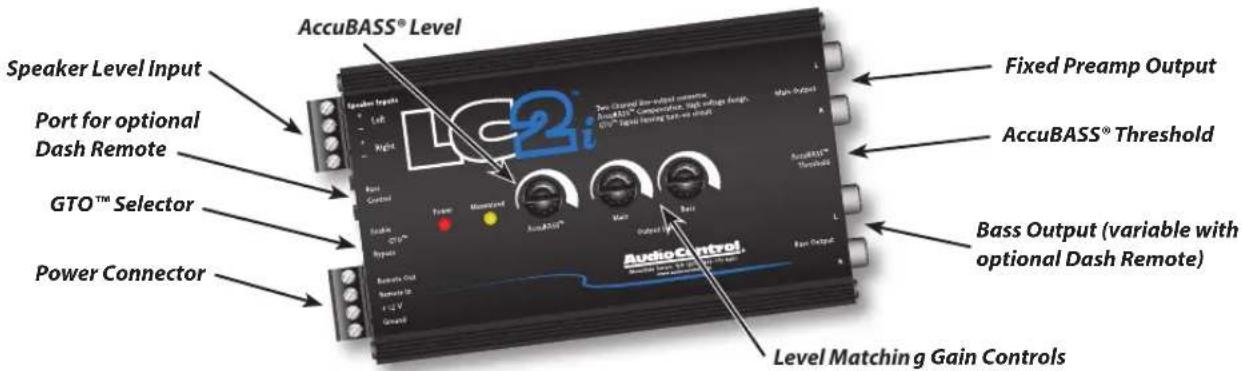
Speaker Level Input accepts up to 400 watts RMS • AccuBASS® Bass Compensation • Selectable GTO™ turn-on • 9.5 Volt Pre-out • 12 Volt Trigger Out • Dual Amplifier Outputs • Level Matching Controls • Optional Dash Remote Level Control • Designed and Manufactured in the Pacific Northwest
AccuBASS® Bass Compensation
Most factory speaker systems are not capable of loud, clean bass reproduction. This is why many car manufacturers restrict bass frequencies at higher volumes. AudioControl's AccuBASS® Bass Compensation circuit corrects this with a set it and forget it remix circuit.
Basic Bass Add-on System

flowchart
graph LR
    A["Radio"] --> B["Speaker Level"]
    B --> C["LG2"]
    C --> D["Pre-out"]
    D --> E["SUB AMP"]
    E --> F["Output"]

Multi-Amp Add-on System
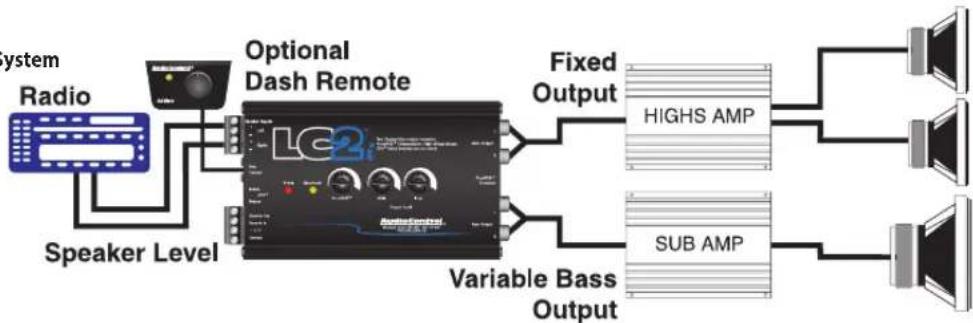
flowchart
graph LR
    A["Radio System"] --> B["Speaker Level"]
    B --> C["Optional Dash Remote"]
    C --> D["Fixed Output"]
    C --> E["Variable Bass Output"]
    D --> F["HIGHS AMP"]
    E --> G["SUB AMP"]
    F --> H["Output"]
    G --> I["Output"]
AudioControl®
Making Good Sound Great™
22410 70th Ave West | Mountlake Terrace, WA 98043 USA
Phone 425-775-8461 | Fax 425-778-3166
www.audiocontrol.com
©2016 AudioControl. All rights reserved.
P/N 9120310 Rev A
Brand : AudioControl
Model : LC2I
Category : Audio/video converter