
Flood/Freeze Sensor - Monitor RING - Free user manual and instructions
Find the device manual for free Flood/Freeze Sensor RING in PDF.


| Product Type | Flood/Freeze Sensor |
| Brand | Ring |
| Category | Monitor |
| Dimensions (Approx.) | 2.5 x 2.5 x 1.5 inches (6.35 x 6.35 x 3.81 cm) |
| Weight (Approx.) | 3.5 oz (100 g) |
| Power Source | 1 x CR123A battery (3V) |
| Battery Life (Estimated) | Up to 1 year under normal use |
| Main Functions | Flood detection via bottom sensors; freeze detection via internal temperature sensor (alerts at ~40°F / 4.4°C) |
| Wireless Protocol | Z-Wave |
| Compatibility | Requires Ring Alarm Base Station (Z-Wave) |
| Setup | Via Ring app (iOS/Android); QR code or PIN pairing |
| LED Indicators | Blue blink (water/freeze alert), red blink (tamper), slow/fast blink (pairing), solid blue 3s (successful pair) |
| Tamper Protection | Tamper switch triggers red LED blink if sensor is opened |
| Operating Temperature | Indoor use; 32°F to 120°F (0°C to 49°C) |
| Battery Replacement | CR123A; replacement automatically reconnects to Base Station |
| Factory Reset | Hold Setup button 10 seconds; LED stops blinking |
| Range (Approx.) | Up to 250 ft (76 m) in open air to Base Station |
| Warranty | See ring.com/warranty |
| Certifications | FCC Part 15, Industry Canada ICES-003, RoHS |
| Environmental Protection | IP rating not specified; keep dry indoors |
Frequently Asked Questions - Flood/Freeze Sensor RING
User questions about Flood/Freeze Sensor RING
0 question about this device. Answer the ones you know or ask your own.
Ask a new question about this device
Download the instructions for your Monitor in PDF format for free! Find your manual Flood/Freeze Sensor - RING and take your electronic device back in hand. On this page are published all the documents necessary for the use of your device. Flood/Freeze Sensor by RING.
USER MANUAL Flood/Freeze Sensor RING
natural_image
White remote control device with a circular logo on top (no text or symbols visible)Prevent water and ice damage at home.
Ring Flood/Freeze Sensor is a smart sensor for your Ring Alarm system. Place it anywhere you want to monitor for flooding or freezing conditions.
On the bottom of the Sensor, you'll see flood sensors that can tell when water is present. Inside, a temperature sensor keeps watch for dangerously low temperatures (around 40 °F or 4.4 °C).
When either of these conditions occur, the Ring app notifies you so you can take care of the issue.
Contents
- Diagram
- In-app Setup
- Physical Installation
- Additional Information
1.
Say hello to your Ring Flood/Freeze Sensor.
Diagram


2.
Set up your Ring Flood/ Freeze Sensor in the Ring app.
Begin the setup process near your Ring Alarm Base Station.
In the Ring app, tap Set Up a Device.
Choose Security Devices, then Sensors, then Ring Flood/Freeze Sensor, then tap Add Device.
To complete the setup process, follow the in-app instructions.

When prompted, scan the QR
Code or enter the PIN.
This begins the pairing process. The QR Code and PIN are on the back of your sensor and in the product packaging.

Can't scan the QR code?
No problem! In the app, on the scanning screen, tap Not working? Enter number instead.
Then, enter the 5-digit PIN code you'll see below the QR code. Next, you'll put your Sensor in manual pairing mode.
To do this, open the Sensor, then remove and reinstall the battery. Finally, press the Setup Button to begin pairing.

When prompted, open the lid and pull out the clear tab.
Twist the lid to the left to unlock, then lift it to remove. Next, pull out the clear battery tab. This turns on the Sensor.
Your Base Station finds it automatically.

natural_image
Line drawing of two hands holding a small electronic device with internal components (no text or symbols)Watch your Sensor connect.
As your Sensor pairs to your Base Station, its LED ring blinks slowly, then quickly.
Once the Sensor is paired, the LED glows blue for three seconds.

If the Sensor does not pair successfully, the LED ring glows red. To try the pairing process again, remove and reinstall the battery inside the Sensor.
Battery

natural_image
Close-up of a white circular device with internal components including a green circuit board and metallic components (no visible text or symbols)3.
Place your Ring Flood/Freeze Sensor.
Test your Flood/Freeze Sensor.
Now that your Sensor is set up, bring it to the area you want to monitor. To ensure it remains connected to your Alarm Base Station in its new location, test the Sensor.
To do this, push the Setup button inside the Sensor. If the LED blinks blue, the Sensor is connected and ready to place.
If it blinks red, try the test again. You may find that repositioning the Sensor (even just a few inches) can improve reception.

If the Sensor cannot connect, try installing a Ring Range Extender between your Sensor and Base Station.
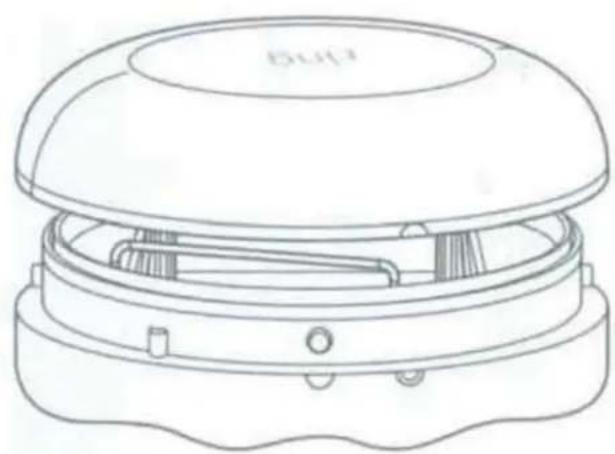
Close the lid.
Place the lid back on the Sensor, taking care to line up the semi-circle on the rim of the lid with the "open" semi-circle on the base. Twist the lid clockwise to lock it in.
natural_image
Line drawing of a microwave oven with lid and base (no text or symbols)
natural_image
Simple line drawing of a device with a circular arrow indicating rotation (no text or symbols)
natural_image
Line drawing of a small electronic device with a dome-shaped top and two circular ports (no text or symbols)Place the Sensor on the ground.
Choose a spot next to a possible source of flooding, such as your water heater, sink, or refrigerator. Take care to place the Sensor in a location where it won't be kicked or moved unintentionally.

If the surface you're placing on is not flat, try to place your Sensor at the lowest point.

natural_image
Line drawing of a simple square basin with four legs and a side sink, no text or symbols present4.
Additional information.
How to remove this Sensor from your system:
Open the side menu in the Ring app and tap Devices, then Base Station. Next, select your Sensor, then tap the gear-shaped icon, and tap Remove Device.
When prompted, open the sensor and remove and reinstall the battery to complete the removal.
Having trouble with your Sensor?
If your Flood/Freeze Sensor stops working or can't connect (even with a good battery), try a factory reset.
To do this, press and hold the Setup button for 10 seconds. When the LED ring stops blinking, the Sensor has reset.

This process disconnects the Sensor from Ring Alarm. To begin using the Sensor again, repeat the setup process in the Ring app.
How to replace the battery:
Twist the lid on the Sensor counterclockwise and lift to remove. Replace the battery with a fresh CR123A cell.
The Sensor then reconnects to your Ring Base Station automatically.
LED status patterns:
Water or low temperature detected

Blue Blink (1x)
Sensor tampered

Red Blinks (3x)
For info on other LED patterns, visit ring.com/help.
ring
1523 26th St. Santa Monica, CA 90404
This device complies with Part 15 of the FCC Rules. Operation is subject to the following two conditions: (1) This device may not cause harmful interference, and (2) this device must accept any interference received, including interference that may cause undesired operation.
This device complies with Industry Canada's licence-exempt RSSs. Operation is subject to the following two conditions: (1) This device may not cause interference; and (2) This device must accept any interference, including interference that may cause undesired operation of the device.
CAN ICES-3 (B)/NMB-3(B) - This Class B digital apparatus complies with Canadian ICES-003.
The FCC ID of the device in this package can be found on the back or bottom of the device.
CAUTION
Danger of explosion if battery is incorrectly replaced. Replace only with the same of equivalent type recommended by the manufacturer. Dispose of the used batteries according to the manufacturer's instructions.
WARNING: Changes or modifications to this unit not expressly approved by the party responsible for compliance could void the user's authority to operate the equipment.
NOTE: This equipment has been tested and found to comply with the limits for a Class B digital device, pursuant to Part 15 of the FCC Rules. These limits are designed to provide reasonable protection against harmful interference in a residential installation. This equipment generates, uses, and can radiate radio frequency energy and, if not installed and used in accordance with the instructions, may cause harmful interference to radio communications.
However, there is no guarantee that interference will not occur in a particular installation. If this equipment does cause harmful interference to radio or television reception, which can be determined by turning the equipment off and on, the user is encouraged to try to correct the interference by one or more of the following measures:
• Reorient or relocate the receiving antenna.
- Increase the separation between the equipment and receiver.
- Connect the equipment into an outlet on a circuit different from that to which the receiver is connected.
- Consult the dealer or an experienced radio/TV technician for help.
Protect the device from direct sunlight. Install the device at dry locations, and protect it against rain and humidity. The device may not get in contact to salt water or other conductive liquids. The device must be charged only within a building in a dry state.
This device may not be disassembled and used for any other purpose. This unit, and all the components are configured for the sole purpose of providing a security system. They are not approved for individual cellular use, battery use or other mishandling.
2012/19/EU (WEEE directive):
Products marked with this symbol should not be mixed with general household waste. For proper recycling, return this product to your local supplier upon the purchase of equivalent new equipment, or dispose of it at designated collection points.

natural_image
Simple line drawing of a trash bin with crossed lines indicating no waste or restriction (no text or symbols)A mobile app must be used to set up the device.
This device is not an Access point or Hotspot and should not be used as one.
To review your warranty coverage, please visit www.ring.com/warranty.
Patents: www.ring.com/patents
Version 1.2
Ring Flood/Freeze Sensor Z-Wave Device Specific Key (DSK)


Brand : RING
Model : Flood/Freeze Sensor
Category : Monitor