
Smoke/CO Listener - Monitor RING - Free user manual and instructions
Find the device manual for free Smoke/CO Listener RING in PDF.


| Product Type | Smoke and Carbon Monoxide Alarm Listener |
| Brand | Ring |
| Model | Smoke/CO Listener |
| Dimensions | Approximately 5.1 x 5.1 x 2.5 cm (2 x 2 x 1 in) |
| Weight | Approximately 50 g (1.8 oz) |
| Power Source | 2 x AA batteries (not included) |
| Battery Life | Up to 1 year under normal conditions |
| Connectivity | Wi-Fi 802.11 b/g/n (2.4 GHz only) |
| Compatibility | Works with most standard smoke and CO alarms; requires Ring Alarm system or Ring app |
| Primary Function | Listens for existing smoke or CO alarm sounds and sends push notifications via the Ring app |
| Additional Features | Integrates with Ring Alarm, can trigger smart lights, supports Alexa voice control |
| Installation | Mount near existing alarm via adhesive strip or screws (included), no wiring required |
| Operating Temperature | 0°C to 40°C (32°F to 104°F) |
| Maintenance | Test monthly, clean with dry cloth; replace batteries annually or when low-battery alert appears |
| Safety Certifications | UL listed, complies with FCC and industry standards |
| Spare Parts & Repairability | Not user-serviceable; contact Ring support for replacement or warranty service |
| Warranty | Limited 1-year warranty |
Frequently Asked Questions - Smoke/CO Listener RING
User questions about Smoke/CO Listener RING
0 question about this device. Answer the ones you know or ask your own.
Ask a new question about this device
Download the instructions for your Monitor in PDF format for free! Find your manual Smoke/CO Listener - RING and take your electronic device back in hand. On this page are published all the documents necessary for the use of your device. Smoke/CO Listener by RING.
USER MANUAL Smoke/CO Listener RING
ring
Smoke/CO Listener For Ring Alarm

Smoke and CO notifications for Ring Alarm.
Ring Smoke/CO Listener is a smart sound sensor for Ring Alarm. It does not sense smoke or CO directly. Instead, it adds smart features to your UL listed smoke, CO, or smoke & CO alarm.
When your smoke or CO alarm begins to sound, the Listener activates and Ring Alarm notifies you of the issue. If your system is professionally monitored, our monitoring center is also notified.
Is your smoke or CO alarm ready? Your new Listener depends on the proper functioning of your smoke or CO alarm. Smoke and CO alarms have finite lifespans and some require regular battery changes. Be sure to follow the manufacturer's maintenance guidelines.
Contents
-
Diagram
-
In-app Setup
-
Physical Installation
-
Additional Information
1
Say hello to your Ring Smoke/CO Listener.
Diagram

2.
Set up your Ring Smoke/ CO Listener in the Ring app.
Begin the setup process near your Ring Alarm Base Station.
To add devices to your Ring Alarm, it must be disarmed. If your Ring Alarm is armed, please disarm it now.
In the Ring app, tap Set Up a Device and find Ring Smoke & CO Listener in the Security Devices menu.
To complete the setup process, follow the in-app instructions.
When prompted, scan the QR Code or enter the PIN.
This begins the pairing process. The QR Code and PIN are on the back of your Listener and in the product packaging.

When prompted, pull out the clear tab.
This turns the Listener on. Your Alarm Base Station then finds it automatically. As the Listener pairs to your Alarm Base
Station, its LED ring blinks slowly, then quickly. Once it pairs, the LED glows blue for three seconds.
If the Listener does not pair successfully, the LED ring glows red. To try the pairing process again, remove and reinstall the battery inside the listener.


Install your Listener first. Then, test it. During the setup process, the Ring app will prompt you to test your new Smoke/CO Listener. This test depends on the Listener being installed next to your smoke or CO alarm, so it can reliably hear its alarm signals. So, be sure to install your Listener before you proceed with the testing step.
Line up the mounting bracket. Find a place for the bracket within six inches (15.25 cm) of your smoke or CO alarm. You can use the ruler below to make sure. Position the mounting bracket so that the arrow marked Smoke/CO Alarm This Side points directly at your smoke or CO alarm.
Secure the mounting bracket and mount the Listener. Once you've decided on a location, secure the bracket to your ceiling or wall with the included screws.
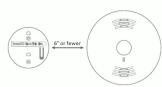
When mounting on drywall, pre-drill the holes and insert the included anchors. During the setup process, the Ring app prompts you to press the "Test" button on your smoke or CO alarm. Mount the Listener on its bracket before testing your alarm.


Test your Listener.
Now, it's time to head back to the Ring app and go through the testing process. When prompted, press the test button on your smoke or CO alarm, if you're got
The Ring app will tell you when your Listener has detected the smoke or CO signal from your alarm. If your alarm is a smoke/CO combo, both smoke and CO signals should be detected.
If your Listener is unable to detect the signal, your Ring Alarm cannot monitor your smoke or CO alarm. This may mean your alarm is too old and must be replaced.
4
Additional information.
Theorem 1.2. (Theorem of [10, Theorem 1.1]) Let be a finite field and let (x) be the set of all elements of such that
Theorem 1.2. (Theorem of [10, Theorem 1.1]) Let be a finite field and let (x) be the set of all elements of such that

How to replace the battery:
Twist the lid on your Listener counterclockwise and lift to remove. Replace the battery with a fresh CR123A cell. The Listener then reconnects to your Alarm Base Station automatically.
Place the lid back on the Listener, taking care to line up the semi-circle on the rim of the lid with the "open" semi-circle on the base. Twist the lid clockwise to lock


How to remove Ring Smoke/CO Listener from your system:
Listener from your system.
Open the side menu in the Ring app and tap Devices, then Base Station. Next,
select your Listener and tap the gear-shoading. The two Remove Devices
shaped icon. Then tap Remove Device.
When prompted, open the Listener and remove and reinstall the battery to
and remove and remoal the battery to complete the removal.
Having trouble with your Listener?
Having trouble with your listener, if useful internet stop working now will not
If your listener stops working or will not connect (even with a good battery), try a
factory reset.
To do this, press and hold the Setup button for 10 seconds. When the LED ring
button for 16 seconds. When the LED ring stops blinking, your Listener has reset.
This process disconnects the Listener from Ring Alarm. To begin using the Listener again, repeat the setup process in the Ring app.
LED status patterns:
Smoke or CO
alert sound detected
Sensors
Sensor tampered
For info on other LED pc
visit ring.com/help.
Do not print this day
Do not paint this de
Painting your Listener can functioning correctly.
functioning correctly.
Painting smoke of CO a degrade their performa.
and is strongly discoura
[Non-Text]
© 2019Ring LLC or its affiliates. Ring, always/home, and all related logos are trademarks
Laesi upratislerei-CH/SC1118

Brand : RING
Model : Smoke/CO Listener
Category : Monitor