IVADH30PW - Dehumidifier Ivation - Free user manual and instructions
Find the device manual for free IVADH30PW Ivation in PDF.


| Product Type | Dehumidifier |
| Brand | Ivation |
| Model | IVADH30PW |
| Dimensions | 13.39" x 9.92" x 21.3" |
| Weight | 30 lbs |
| Power Supply | 115V~60Hz |
| Current Consumption | 3.0 A |
| Moisture Removal | 30 Pints per day (at 80°F/60% RH) |
| Refrigerant | R-410A |
| Operating Temperature Range | 41°F to 89.6°F (5°C to 32°C) |
| Control Panel | Power On/Off, Fan Speed (High/Low), Timer, Humidity Set (30%-90% RH), Temperature Display (°C/°F), Defrost Indicator, Reservoir Full Indicator |
| Fan Speeds | High and Low |
| Continuous Drainage | Yes, using included drain hose |
| Water Reservoir Capacity | Standard bucket (automatic shut-off when full) |
| Auto Defrost | Yes, activates at low temperatures |
| Air Filter | Washable, clean every 2 weeks |
| Energy Star Rated | Yes |
| Safety Features | Overheat protection, auto shut-off when bucket full, child safety considerations |
| Warranty | Limited 1-year warranty |
| Mobility | Roll casters and handle |
| Intended Use | Household use only |
Frequently Asked Questions - IVADH30PW Ivation
User questions about IVADH30PW Ivation
0 question about this device. Answer the ones you know or ask your own.
Ask a new question about this device
Download the instructions for your Dehumidifier in PDF format for free! Find your manual IVADH30PW - Ivation and take your electronic device back in hand. On this page are published all the documents necessary for the use of your device. IVADH30PW by Ivation.
USER MANUAL IVADH30PW Ivation
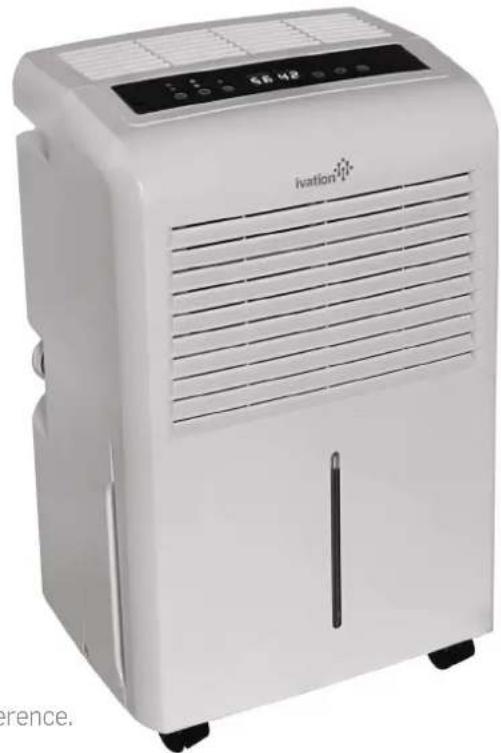
Thank you for purchasing the Ivation 30 Pint Dehumidifier. This User Guide is intended to provide you with guidelines to ensure that operation of this product is safe and does not pose risk to the user. Any use that does not conform to the guidelines described in this User Guide may void the limited warranty.
Please read all directions before using the product and retain this guide for reference. This product is intended for household use only.
This product is covered by a limited one-year warranty. Coverage is subject to limits and exclusions. See warranty for details. This dehumidifier is Energy Star rated for quality assurance (www.energystar.gov).
natural_image
White IVation air purifier with ventilation slots and control panel (no visible text or symbols on device body)European Disposal Instructions
When using this product in European countries, follow the instructions below:
DISPOSAL: Do not dispose this product as unsorted municipal waste. Collection of such waste separately for special treatment is necessary. Disposal of this appliance in domestic household waste is prohibited. For proper disposal, there are several possibilities:
A) Each municipality has established collection systems, where electronic waste can be disposed of free of charge to the user.
B) When buying a new product, the retailer will take back the old product free of charge.
C) The manufacturer will take back the old appliance for disposal free of charge to the user.
D) As old products contain valuable resources, they can be sold to scrap metal dealers.
Unauthorized disposal of waste in forests and other natural land endangers public health when hazardous substances leak into the ground water and infiltrate the food chain.
CAUTION!
- This appliance should not be operated by children or by persons with reduced physical, sensory or mental capabilities or lack of experience and knowledge. Children should not play with this appliance. Cleaning and maintenance should not be performed by children without supervision.
- If the supply cord is damaged, it must be replaced by the manufacturer, its service agent or similarly qualified persons in order to avoid a hazard.
- This appliance must be installed in accordance with wiring regulations.
• Operation should take place at least three feet (one meter) from combustible materials. - Contact an authorized service technician for repair or maintenance of this unit.
Safety Precautions
To prevent injury to the user or others as well as property damage, the following instructions must be followed. Incorrect operation due to ignoring of instructions may cause harm or damage.
WARNING
Do not exceed the power rating of the outlet or connection device.
This may cause electric shock or fire due to excess heat generation.
Do not modify power cord length or share the outlet with other appliances
This may cause electric shock or fire due to heat generation.
Disconnect the power if strange sounds, smell, or smoke comes from it.
This may cause fire and electric shock.
Do not use the machine near flammable gas or combustibles, such as gasoline, benzene, thinner, etc.
This may cause an explosion or fire.
Do not operate or stop the unit by switching on or off the power.
This may cause electric shock or fire due to heat generation.
Do not insert or pull out plug with wet hands.
This may cause electric shock.
Never try to take apart or repair the unit by yourself.
This may cause failure of machine or electric shock.
Do not drink or use the water drained from the unit.
This contains contaminants and could make you sick.
Do not damage or use an unspecified power cord.
This may cause electric shock or fire.
Do not place the unit near a heat source.
Plastic parts may melt and cause a fire.
Before cleaning, turn off the power and unplug the unit.
This may cause electrical shock or injury.
Do not remove water bucket during operation.
This may cause electric shock.
CAUTION
Do not cover the intake or exhaust openings with cloths or towels.
A lack of airflow can lead to overheating or fire.
Never insert fingers or other foreign objects into grills or openings. Take special care to warn children of these dangers.
It may cause electric shock or failure of appliance.
Always insert the filters securely. Clean filter once every two weeks.
Operation without filters may cause failure of appliance.
Care should be taken when using the unit in a room with the following persons:
Infants, children, elderly people, and people not sensitive to humidity.
Do not place heavy objects on the power cord and take care so that the cord is not compressed.
This presents a danger of fire or electric shock.
If water enters the unit, turn the unit off and disconnect the power. Contact a qualified service technician.
This may cause failure of appliance or accident.
Do not use in areas where chemicals are handled.
This will cause the unit to deteriorate due to chemicals and solvents dissolved in the air.
Do not climb up on or sit on the unit.
You may be injured if you fall or if the unit falls over.
Do not place flower vases or other water containers on top of the unit.
Water may spill inside the unit, causing insulation failure and electrical shock or fire.
Electrical Information
• See the information on the rear panel of the unit for electrical and other technical data specific to this unit.
- Be sure the unit is properly grounded. To minimize shock and fire hazards, proper grounding is necessary.
- The power cord is equipped with a three-prong grounding plug for protection against shock hazards.
- Your unit must be used in a properly grounded wall outlet. If the wall outlet you intend to use is not adequately grounded or protected by a time delay fuse or circuit breaker, have a qualified electrician install the proper outlet.
- Ensure the outlet is accessible after unit installation.
- Do not use extension cords or an adapter plug with this unit. However, if it is necessary to use an extension cord, use an approved dehumidifier extension cord only (available at most local hardware stores).
• To avoid the possibility of personal injury, always disconnect the power supply to the unit, before installing and/or servicing.
Understanding the Control Panel
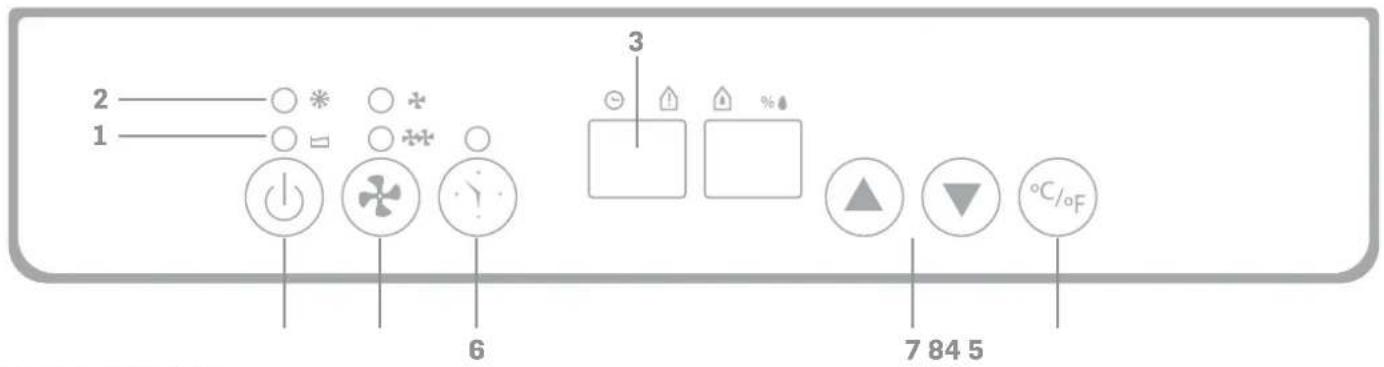
The control panel may differ slightly from the illustration below.
Lights and Displays
1 Reservoir Full Light
Indicates when water reservoir is full
2 Defrost Light
Indicates Defrost Mode activation when temperature is low.
3 Current Temp/Timer Display
Displays current temperature when unit is in operation. When "Timer" button is pressed to set operation time, this display shows set time for ten (10) seconds before returning to current temperature display.
7 Set Humidity/Current Humidity Display
Displays current humidity when unit is in operation. To select preferred humidity, press ▲ or ▼. Selections will display here in increments of 5% with each press. Adjustable range is between 30% and 90% RH (relative humidity). Once humidity is set, display will return to current humidity after ten (10) seconds.
Control Buttons
4 Power ON/OFF Button
Turns the unit ON or OFF manually.
5 Fan Speed Button
Choose HIGH ( ✦) or LOW ( ✦) fan speed (speed indicator lights above button)
6 Timer Button
Press to initiate the Auto start and Auto stop feature.
8 °C/°F Button
Press to switch between Celsius and Fahrenheit.
Components
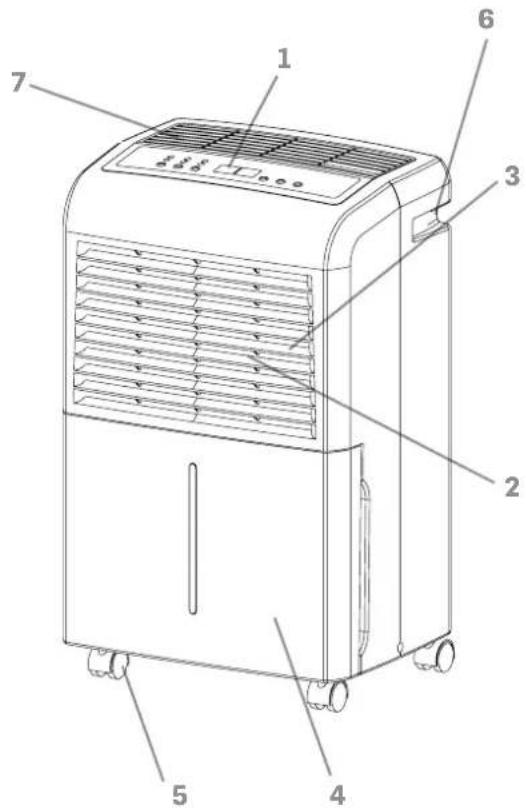
- Control Panel
- Moist Air Intake
- Air Filter
- Drain Reservoir
- Roll Casters
- Handle
- Dehumidified Dry Air Vent
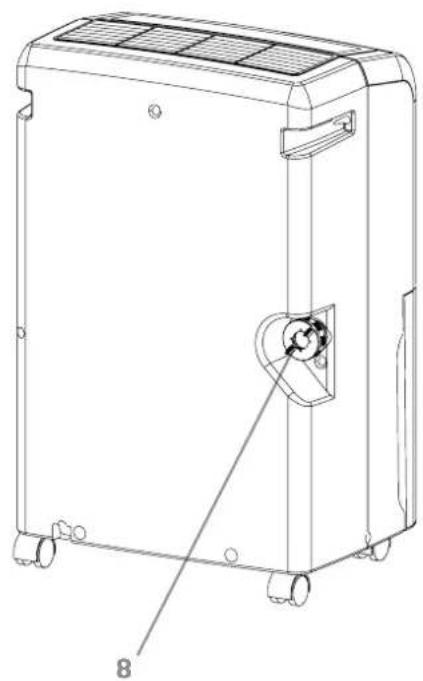
- Continuous Drainage Outlet
natural_image
Technical line drawing of a portable air purifier unit with labeled component '8' (no text or symbols beyond label)Operational Instructions
General Operation
- Place the unit in the upright position ensuring that it is on a flat, stable, heat-resistant surface.
Note: To avoid a hazardous condition, do NOT place within 39 inches (100 mm) of anything that is flammable or heat-sensitive. -
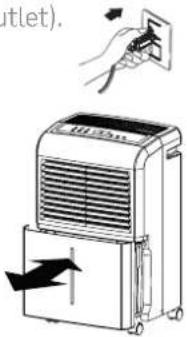
Plug unit into wall socket (check the rating label to ensure that it matches the voltage of your electrical outlet).
-
Ensure that the Water Reservoir is properly attached and placed.
Note: If the Reservoir Full light illuminates on first use, slide water reservoir out and make sure that "Float" lever moves freely. Return reservoir to proper position.
When Reservoir Full Light is ON
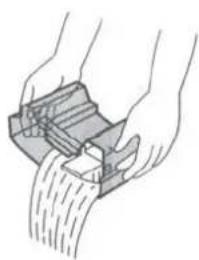
When the reservoir is full, the unit will stop and the "Reservoir Full" light will illuminate. Carefully remove the reservoir from the unit by sliding it out from the front of the unit, and discard water. Once the reservoir is empty, return it to position. The unit will return to normal operation.
Note: Use both hands when emptying the reservoir to avoid spillage.
natural_image
Illustration of hands using a mechanical device to lift or lift material (no text or symbols visible)Defrost Mode
When the unit operates at low temperatures (less than 56.6^ F/ 12^ C, a layer of frost may develop on the evaporator surface, which reduces the dehumidifier's efficiency. In these cases, the unit goes into periodic Defrost Mode. Time to defrost may vary. Note: This unit can operate in temperatures as low as 41^ F/ 5^ C. If the unit freezes, turn OFF and restart. If the room temperature remains below 41^ F/ 5^ C, switch the unit OFF.
Continuous Drainage Function
Continuous Drainage Function
If the unit is operating in a location with good drainage, follow the steps below to use the Continuous Drainage Function:
-
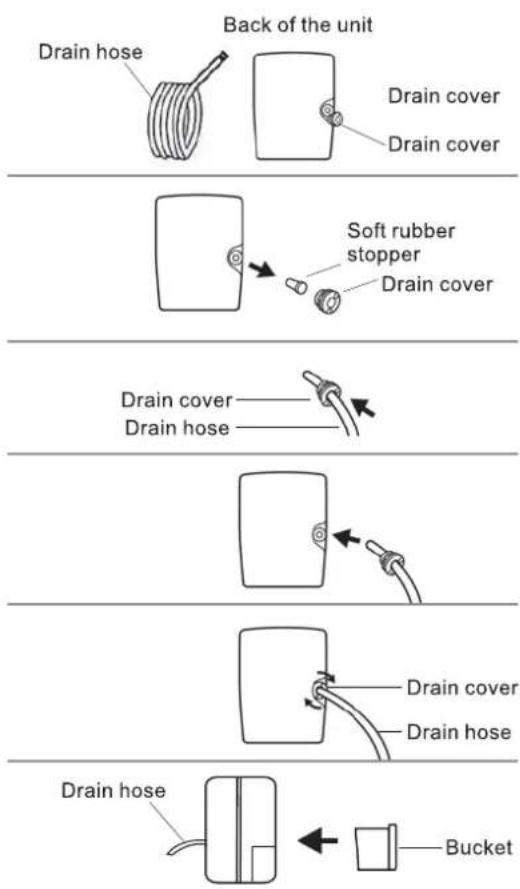
To avoid periodic emptying of the water reservoir, use the Continuous Drainage Function by attaching the drain hose (included) to the continuous drainage outlet at the back of the unit.
-
Unscrew and remove drain cover.
-
Remove soft rubber stopper (place in water reservoir for storage).
-
Insert the drain hose through the hole in the drain cover.
-
Connect drain hose to continuous drainage outlet.
-
Tighten drain cover by turning clockwise.
-
Return water reservoir to original position.
Maintenance Guide
Make sure the unit in unplugged from wall unit before cleaning.
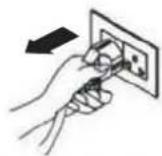
Cleaning the exterior
-
Wipe with clean soft cloth.
-
If unit is especially dirty, use mild detergent with a moist cloth.
-
Do NOT clean with hose or immerse in water as this may short circuit the unit causing it to malfunction.
Cleaning the air filter
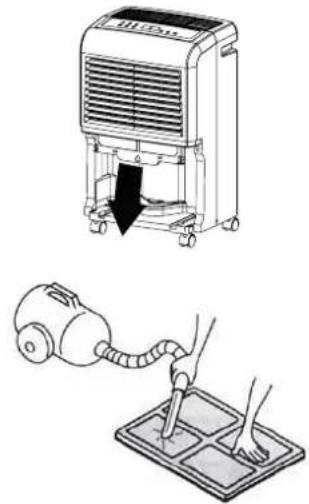
The air filter is designed to filter dust and other materials from the air. When the air filter is clogged, the unit will use more electricity to operate. For optimal efficiency, clean the air filter once every two (2) weeks.
- Pull air filter out gently.
natural_image
Illustration of a vacuum cleaner and a hand-painted cleaning machine (no text or symbols)-
Clean with a vacuum cleaner or wash with clean water and dry with a soft cloth.
-
Carefully re-install air filter to the unit
Troubleshooting Guide
Unit does not start
• Make sure the dehumidifier's plug is secured entirely into the outlet.
- Check your home fuse/circuit breaker box.
- Dehumidifier has reached its preset level or bucket is full.
• Water bucket is not in the proper position.
Dehumidifier does not dry the air as it should
- Allow enough time to remove the moisture.
• Make sure there are no curtains, blinds or furniture blocking the front or back of the dehumidifier.
• The humidity control may not be set low enough.
- Check that all doors, windows and other openings are securely closed.
• Room temperature is too low, below 41^ F ( 5^ C).
- There is a kerosene heater or something giving off water vapor in the room.
The unit makes a loud noise when operating
• The air filter is clogged.
• The unit is tilted instead of upright as it should be.
• The floor surface is not level.
Frost appears on the Coils
• This is normal. The dehumidifier has Auto defrost feature.
Water on floor
- Hose to connector or hose connection may be loose.
- Intend to use the bucket to collect water, but the rear drain plug is removed.
ES, AS, P2 and EC appear in the display
• These are error codes and protection code. See the CONTROL BUTTONS ON THE DEHUMIDIFIER section.
Specifications
Power: 115V\~60Hz
Moisture Removal: 30 Pint (80°F/60%RH)
Refrigerant: R-410A
Current Consumption: 3.A
Dimensions: 13.39" x 9.92" x 21.3"
Weight: 30 lbs.
Operating Temperature: 41°F – 89.6°F
This product is covered by a limited one-year warranty. Coverage is subject to limits and exclusions. See warranty for details.
Customer Service:
info@myivation.com
866-849-3049
Distributed by
C&A Marketing, Inc.
114 Tived Lane East
Edison, NJ 08837 USA
C&A Marketing UK LTD
167 Hermitage Road
Crusader Industrial Estate
London N4 1LZ
United Kingdom
info@myivation.com
Made in China
Ivation is a trademark of
C&A IP Holdings, LLC
©2016 All rights reserved
- European Disposal Instructions
- CAUTION!
- Safety Precautions
- WARNING
- CAUTION
- Electrical Information
- Understanding the Control Panel
- Lights and Displays
- Control Buttons
- Components
- Operational Instructions
- General Operation
- When Reservoir Full Light is ON
- Defrost Mode
- Continuous Drainage Function
- Maintenance Guide
- Cleaning the exterior
- Cleaning the air filter
- Troubleshooting Guide
- Unit does not start
- Dehumidifier does not dry the air as it should
- The unit makes a loud noise when operating
- Frost appears on the Coils
- Water on floor
- ES, AS, P2 and EC appear in the display
- Specifications
- Customer Service:
Brand : Ivation
Model : IVADH30PW
Category : Dehumidifier