IVADM35 - Dehumidifier Ivation - Free user manual and instructions
Find the device manual for free IVADM35 Ivation in PDF.


| Product Type | Peltier Dehumidifier (No Compressor) |
| Brand | Ivation |
| Model | IVADM35 |
| Technology | Thermo-electric Peltier Module |
| Dimensions (W x H x D) | 245 mm x 360 mm x 185 mm |
| Water Tank Capacity | 2 Liters |
| Dehumidification Capacity | Up to 600 ml per day (at 30°C, 80% RH) |
| Power Consumption | 72 Watts |
| Power Supply | 12V DC, 6A AC/DC Switching Mode Adapter |
| Fan Type | 90mm x 90mm High Speed DC Brushless Motor |
| Operating Temperature | Above 15°C |
| Operating Humidity | Above 40% RH |
| Safety Features | Auto Shut-off When Tank Full; Yellow LED Indicator |
| Drying Function | Warm Air Outlet for Drying |
| Water Level Detection | Automatic Float Switch |
| Air Inlet/Outlet | Front Inlet Grill; Side Dry Air Outlet |
| Additional Features | Rubber Feet; Lift-slot for Carrying; Removable Water Tank |
| Cleaning Instructions | Soft Cloth for Surface; Brush for Grills; Unplug Before Cleaning |
| Included Accessories | AC/DC Switching Mode Power Supply |
| Warranty | Not Specified; Contact Distributor |
Frequently Asked Questions - IVADM35 Ivation
User questions about IVADM35 Ivation
0 question about this device. Answer the ones you know or ask your own.
Ask a new question about this device
Download the instructions for your Dehumidifier in PDF format for free! Find your manual IVADM35 - Ivation and take your electronic device back in hand. On this page are published all the documents necessary for the use of your device. IVADM35 by Ivation.
USER MANUAL IVADM35 Ivation
natural_image
White portable air purifier with ventilation slots and a black base (no visible text or symbols)Compact & Elegant
NAMES AND FUNCTION OF PARTS
natural_image
Close-up of a hand pressing down on a white appliance with a knob (no visible text or symbols)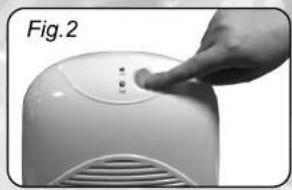
natural_image
Close-up of a hand pressing a button on a white appliance (no text or symbols visible)IV. REMOVABLE WATER TANK
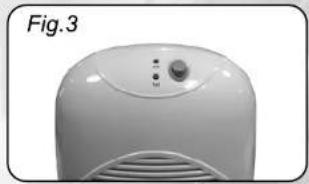
When the water tank is full, with approximately 1.5 litre of water collected, the unit will be switched off automatically and the "Yellow" LED(3) will be on.[as Fig.3]
natural_image
White portable air conditioner unit with control panel and ventilation grille (no visible text or symbols)To remove the water tank, first switch off the MID Size Dehumidifier, press "On/Off" button to the "Off" position. Then, remove the water tank from the unit and pour the water out to the toilet or bathroom. Put the water tank back into the unit. To continue dehumidifying, press the "On/Off" button to "On" position again.
V. CLEANING
Before cleaning the unit, turn off the MID Size Dehumidifier and unplug the AC plug from the main socket first. Use a piece of soft cloth to clean the surface of the product or use a brush to wipe the dust off the grills of the air inlet(4) and air octlet(6).
natural_image
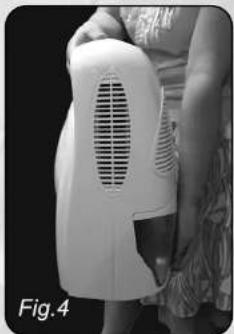
Person holding a white portable air conditioner unit, labeled Fig. 4 (no visible text or symbols on device)I. FEATURES
The MID Size Dehumidifier uses Peltier technology (no compressor) which makes it light and quiet. It is perfect for small rooms. Poor ventilation causes musty odour and fungus in wardrobes, larder, etc. The MID Size Dehumidifier eliminates this problem by keeping them free of unwanted moisture.
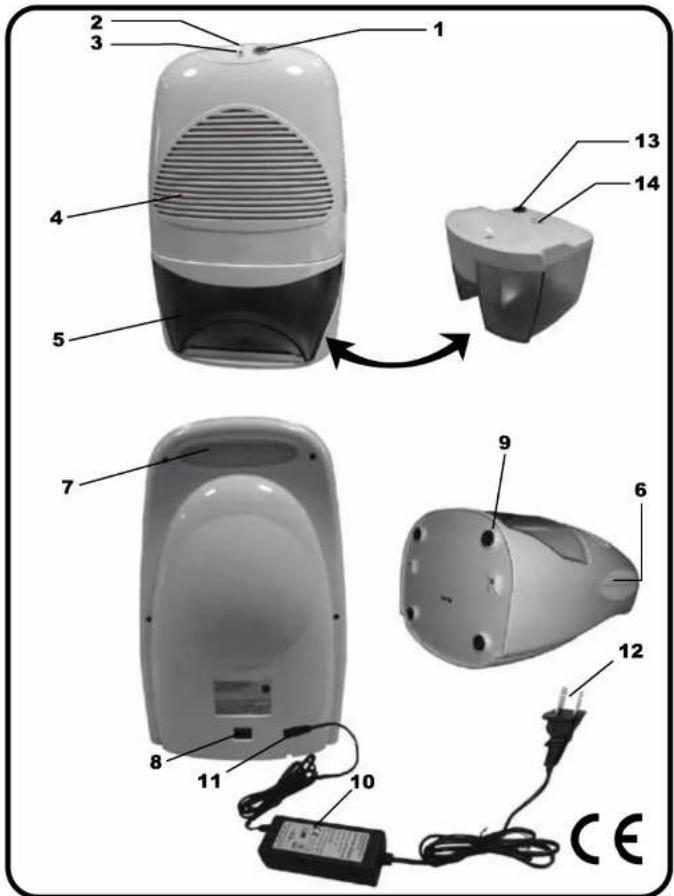
(1) On/Off button
(2) 'On' Green LED
(3) 'Full' Yellow LED
(4) Air inlet
(5) Removable water tank
(6) Dry air outlet
(7) Lift-slot
(8) DC power socket
(9) Rubber feet
(10) AC/DC switching mode power supply
(11) DC power jack
(12) AC plug with power cord (Plug type is subject to market)
(13) Water displacement hole
(14) Float switch
- To avoid electric shock. Do not open. There are no user-serviceable parts inside.
- Any repair work must be done by qualified technician appointed by our distributors.
- Specifications are subject to change for improvement without prior notice.
II. SPECIFICATIONS
Capacity : Approximately 600ml per day at 30°C, 80%RH
Cooling element : Thermo-electric Peltier module
Fan : 90mm x 90mm high speed long life DC brushless motor with turbo blades
Power adaptor : 12V DC 6Amp
Power consumption : 72 W
Water tank capacity : 2Litre
Water Level Detector : Automatic switch off with "Yellow" LED Indicator when water tank is full
Drying feature : Warm air outlet on top for drying purposes
Product dimension : 245mm (W) x 360mm(H) x 185mm(D)
Working environment : Over 15°C, over 40% RH
III. CONNECTION
- After removing the packaging materials, there should be 2 items:
a. MID Size Dehumidifier
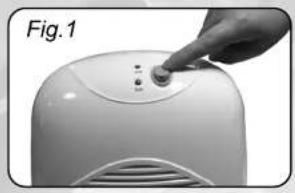
b. AC/DC switching mode power supply - Plug the DC power jack (11) of the switching mode power supply to the DC Power socket(8), then connect the AC plug(12) of the switching mode power supply to the appropriate main socket. Press the "On/Off" button (1) to "On" position, The MID Size Dehumidifier will begin to operate. The green LED will be turned on. Listen and feel for the air blowing from dry air outlet. [as Fig.1]
TO switch off the unit, press "On/Off" button (1) to Off" position, the MID Size Dehumidifier will be turned off [as Fig 2]
VI. CAUTIONS
- After having finished using the MID Size Dehumidifier, the user should switch the unit off by pressing the "On/Off" button to "Off" position.
- Avoid using the AC/DC switching mode power supply in wet or damp place. Position it in areas where the air ventilation is good.
- Keep the front inlet grill and the side outlet free from air blocking materials such as clothing, plastic bag or paper.
- If the unit has been properly connected and no power is flowing, have the AC/DC switching mode power supply checked by a qualified electrician.
- Always keep the unit at an up-right position to avoid water leakage.
- The thumb should be placed at the top centre of the unit while lifting by the lift-slot(7), to avoid tilting. At the same time, the other hand should be holding the base to secure the unit.[as Fig.4]
TROUBLE SHOOTING
| PROBLEM | CAUSE | SOLUTION |
| Dehumidifier does not operate | No Power to appliance | 1. Connect plug to power socket. |
| 2. Check fuse and wires in the plug. | ||
| 3. Check the lead is inserted fully Into the back of the machine | ||
| Switch not turned on | Switch on (both on the machine and on the wall socket) | |
| Tank is not properly inserted to press the internal switches on | Pull tank out and manually test internal switches to see if unit powers up. Carefully push tank back in | |
| Water tank is full | Pour the water out | |
| Dehumidifier collects little water | Air inlet vent is blocked | Remove obstacles |
| Doors and windows are open | Seal room from external areas | |
| Extreme hot or cold freezing Weather such as during brief Sudden cold snaps or heatwaves | Peltier type dehumidifiers work best within a specific temperature range. Unusually extreme weather will Affect the level of performance. | |
| Water leaks down the front of the machine | The machine is on an uneven Surface, leaning forward so Water drips out of the front Instead of into the tank | Tilt the machine back to level by raising the two front feet onto a piece of card or a 1p piece |
Distributed by
C&A Marketing, Inc.
2 Bergen Turnpike
Ridgvefield Park, NJ 07660
info@myivation.com
MADE IN CHINA
IVATION is a trademark of C&A IP Holdings, LLC
©2013 All Rights Reserved
Brand : Ivation
Model : IVADM35
Category : Dehumidifier