IVADDH06 - Humidifier Ivation - Free user manual and instructions
Find the device manual for free IVADDH06 Ivation in PDF.


| Product Type | Desiccant Dehumidifier |
| Model | IVADDH06 |
| Brand | Ivation |
| Dehumidification Capacity | 13 pints/day (at 68°F, 60% RH) |
| Water Tank Capacity | 0.5 gal (1.8 L) |
| Power Consumption (High/Low) | 470W / 280W |
| Voltage | 120V ~ 60Hz |
| Operating Temperature Range | 33°F – 104°F |
| Dimensions (W x D x H) | 10.6" x 6.85" x 17.35" |
| Modes | Low fan + heat, High fan + heat, Low fan + heat + dimmed display |
| Humidity Control | Adjustable 35-85% in 5% increments, Continuous mode |
| Timer | 1 – 12 hours (or no timer) |
| Air Vent Swing | Up (70°), Front (50°), Wide (120°), Hold |
| Display Dimming | Adjustable brightness, dim mode shows gear icon |
| Temperature Unit | Switchable °C / °F (press TIMER + SWING simultaneously) |
| Continuous Drainage | Yes, via 7/16" ID hose (knockout removal required) |
| Filter Cleaning | Every 2 weeks; vacuum or rinse with water and air dry |
| Safety Features | Auto shut-off when water tank full; blockage detection indicator |
| Warranty | 1 year limited |
| Customer Service | 866-849-3049 or info@myivation.com |
Frequently Asked Questions - IVADDH06 Ivation
User questions about IVADDH06 Ivation
0 question about this device. Answer the ones you know or ask your own.
Ask a new question about this device
Download the instructions for your Humidifier in PDF format for free! Find your manual IVADDH06 - Ivation and take your electronic device back in hand. On this page are published all the documents necessary for the use of your device. IVADDH06 by Ivation.
USER MANUAL IVADDH06 Ivation
natural_image
White rectangular electronic device with a curved top and side panel, no visible text or symbols.Thank you for purchasing the Ivation® 13-Pint Desiccant Dehumidifier. This User Guide is intended to provide you with guidelines to ensure that operation of this product is safe and does not pose risk to the user. Any use that does not conform to the guidelines described in this User Guide may void the limited warranty.
Please read all directions before using the product and retain this guide for reference. This product is intended for household use only.
This product is covered by a limited one-year warranty. Coverage is subject to limits and exclusions. See warranty for details.
Box Contents
13-pint dehumidifier
User guide
Safety Precautions
- Do not operate the unit with a damaged cord or plug after it malfunctions or has been dropped or damaged in any way. Return to an authorized service facility for examination and repair.
• This unit should always be kept in an upright position on a flat surface to avoid any damage. - Check the household voltage to ensure it matches the unit's rated specification before operating.
• Operate this unit in an ambient temperature between 33°F and 104°F. - Ensure that the air inlets and outlets are not blocked or covered.
• Do not place the unit too close to curtains or other objects. - When using the dehumidifier to dry cloths, please keep the clothing at a safe distance from the unit to prevent exposure to water.
• Never place anything on top of the unit or cover it with anything while in use.
• This product is intended for domestic and light office use only and not for commercial, industrial or outdoor use.
• To protect against electrical shocks, do not immerse unit, plug or cord in water or spray with liquids.
• Never unplug the power cord while the unit is turned on.
• To disconnect from the power supply, grip the plug and pull from the power socket. Never pull by the cord.
• Always empty the water tank before storing the unit. - Close supervision is necessary when any appliance is used by or near children and pets.
- Do not run power cord under carpeting or cover with rugs or runners. Position the cord away from areas where it may be tripped over.
• Never operate or store the unit in direct sunlight.
• To repair the unit, take it to a qualified service engineer. - Where possible, avoid the use of an extension cable as they may overheat or create an enhanced risk of fire. Only use an extension cord after ensuring that it is in perfect condition.
• Do not use the unit without the air filter.
Parts
- Control panel
- Air intake vent
- Air outlet vent
- Air filter
- Water reservoir
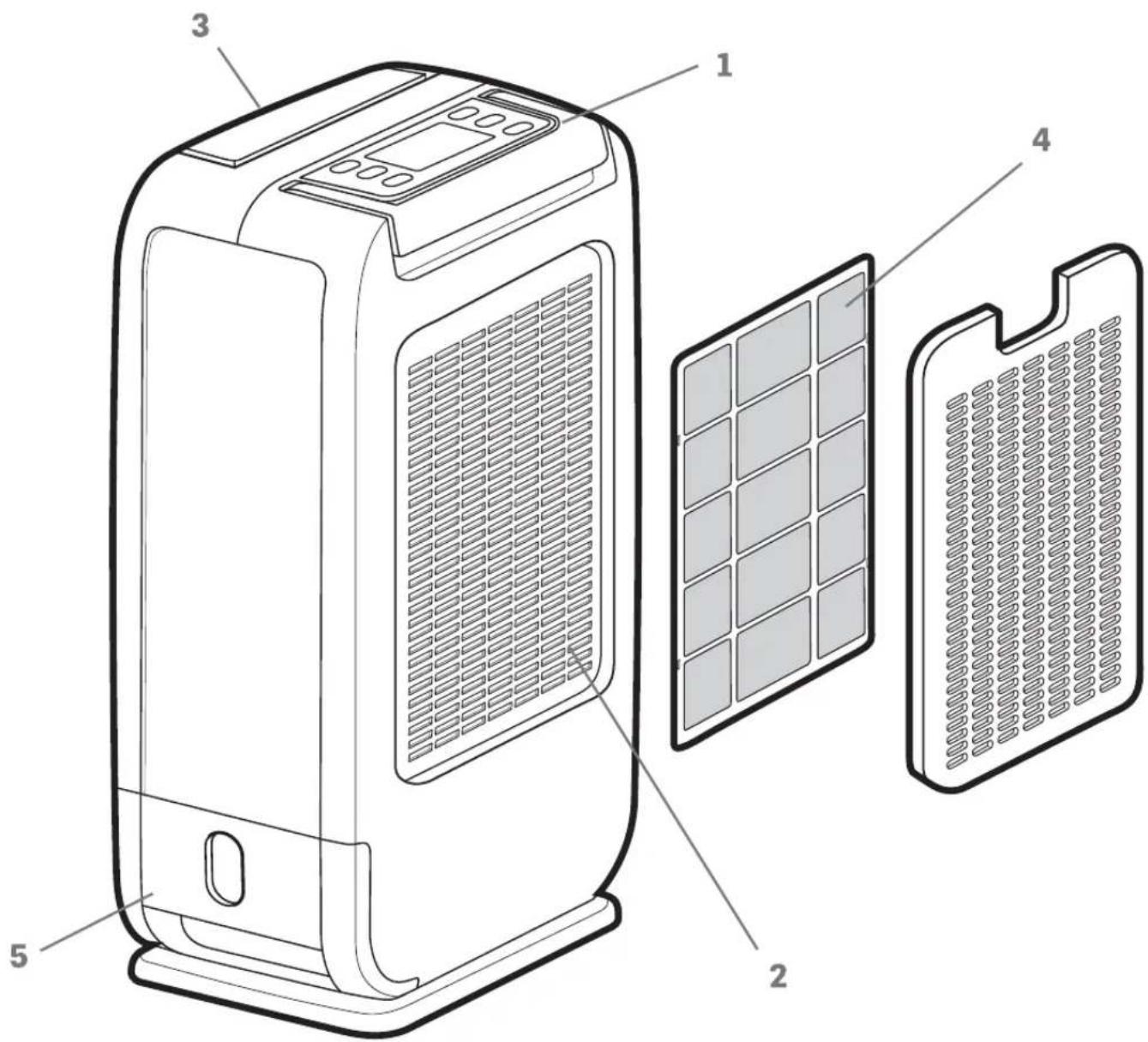
Setting up the Dehumidifier
- Place the unit in an upright position on a flat, stable surface.
- Please ensure that the unit is placed a safe distance away from walls or furniture using the guide below.
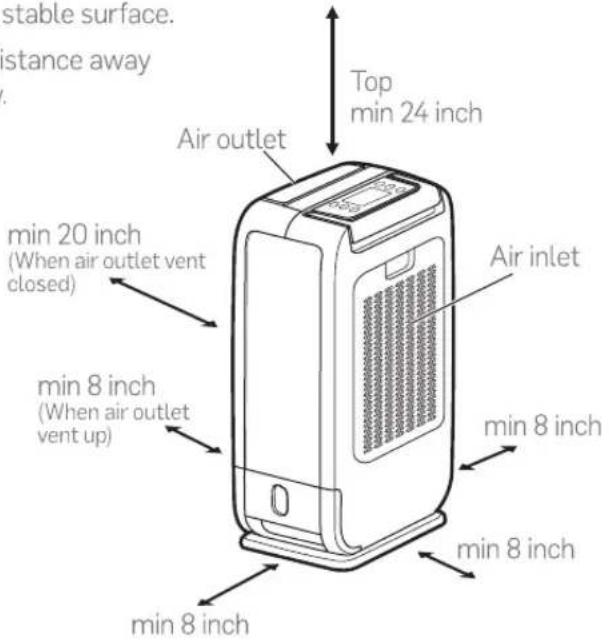
Panel Features
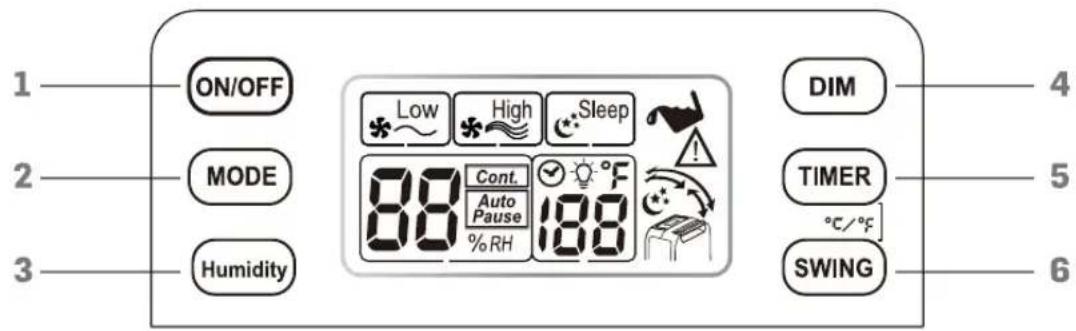
- ON/OFF button: press this button to turn the unit on or off.
- MODE button: switches between the following modes
a) Low fan speed and heat
b) High fan speed and heat
c) Low fan speed and heat, plus dimmed LCD display
- HUMIDITY button: adjusts the level of desired humidity (adjustable between 35–85% in increments of 5%, or select "continuous" to keep it running with no optimal humidity set)
a) Click once to activate adjustment, then click repeatedly until you land on your desired humidity level.
b) When the unit reaches your desired humidity, it will shut off automatically but the fan will run periodically to maintain circulation (the LCD display will blink "AUTO PAUSE" during this time).
c) Whenever the humidity climbs to 5% beyond your set humidity level, the unit will reactivate until you are back down to your chosen humidity level.
d) Even when the humidity is within 5% of your chosen level, the fan will run every half-hour for 5 minutes in order to maintain air circulation and allow for more precise humidity detection.
- DIM button: adjusts the brightness of the backlit LCD screen (click once to activate adjustment, then click repeatedly until you land on your desired brightness level). The ⚙ icon will display when dimmed.
- TIMER button: Adjusts the amount of time that you'd like the dehumidifier to operate before automatically shutting itself off. Click once to activate adjustment, then click repeatedly until you land on your desired length of time for your unit to run (anywhere from 1 to 12 hours, or “—” for “no time specified”).
- SWING button: adjusts the movement of the air vent

Up - moves in a 70° range

Front - moves in a 50° range

Wide - moves in a 120° range

Hold - stops moving
- SWITCHING BETWEEN °C and °F: Press the TIMER button and the SWING button at the same time to switch between °C and °F temperature units.
Removing Collected Water
Collected water can be removed in the following ways:
- When the water reservoir is full, remove and empty it before placing it back in the unit.
- Continuous draining: water can be automatically emptied into a floor drain by attaching the unit to a water hose.
a. Use a screwdriver to remove the circular knockout below the air intake vent (as shown).
b. Securely attach a hose with a 7/16" inner diameter (not included).
c. Position the hose so that it leads downward to a drain or appropriate outlet for water disposal.
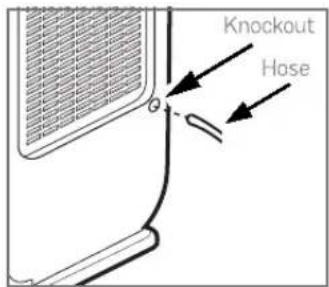
Note: please level the unit correctly, or water may still overflow into the tank, even while the hose is connected.
Cleaning the Air Filter
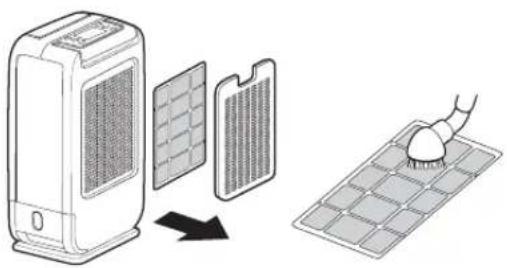
- Clean your air filter every two weeks in order to prolong the life of your dehumidifier.
• Turn off the unit and remove the back panel. - Remove the filter.
- Clean the filter with a vacuum cleaner or running water (if the latter, let it air dry afterwards).
• Put the filter back in position.
Cleaning the Unit
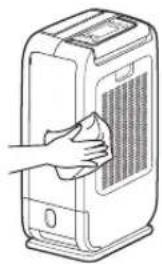
- Turn off the unit. When the fan has completely stopped, unplug it from the power outlet.
• Clean the surface with a soft damp cloth.
• Dry thoroughly with a towel.
Care Before Storing
• Turn off the power on the unit and disconnect it from the outlet.
• Clean and dry the bucket.
• Leave the unit to drain for approximately 1 day.
• Clean the filter and the unit.
• Cover the unit to protect it from dust and store upright in a cool place.
• Do not expose to direct sunlight.
natural_image
Line drawing of a hand cleaning a portable air conditioner unit (no text or symbols)Troubleshooting
| Issue | Possible Solution |
| The fan is still running about 2 minutes after the unit is turned off | This is a normal function of the unit and not a cause for concern |
| The unit works within 33-104°, but stops working when the temperature in the area is above or below this range (instead displaying "HI" or "LO" | This is normal, as the unit is designed to only work within this temperature range. |
| The unit is emitting an unusual odor | This is a normal and harmless byproduct of the Zeolite desiccant material. The smell occurs because the Zeolite absorbs odors from cigarettes, cosmetics, hair sprays, building materials and new furniture, and when heated. discharges this odor into the room. |
| The "⚠️" symbol is blinking to signify a blockage in the air inlet or outlet | The filter is dirty or clogged. Please clean or replace. |
WARNING: If any of these issues persist, contact your retailer or a qualified service professional. DO NOT try to repair this unit yourself, as doing so could lead to risk of electric shock and the voiding of your warranty.
Specifications
• Operating temperature range: 33^ F – 104^ F
• Dehumidification: 13 pints/day (68°F/60%RH)
• Water tank capacity: 0.5 gal (1.8L)
• Power consumption (H/L): 470W/280W
• Voltage: 120V\~60Hz
• Product size: 10.6" x 6.85" x 17.35"
Customer Service:
info@myivation.com
866-849-3049
Distributed by
C&A Marketing, Inc.
114 Tived Lane East
Edison, NJ 08837 USA
Europe: C&A Europe
167 Hermitage Road
Crusader Industrial Estate
London N4 1L2
United Kingdom
info@myivaton.com
Made in China
Ivation and the Ivation logo are registered
trademarks of C&A Holdings, LLC in the U.S.
©2017 All rights reserved
Brand : Ivation
Model : IVADDH06
Category : Humidifier