IVALDH30PW - Humidifier Ivation - Free user manual and instructions
Find the device manual for free IVALDH30PW Ivation in PDF.


| Product Type | Humidifier |
| Brand | Ivation |
| Model | IVALDH30PW |
| Color | White |
| Dimensions (L x W x H) | 10.5 x 6.3 x 8.7 inches |
| Weight | 2.5 lbs |
| Power Supply | AC 120V, 60Hz |
| Water Tank Capacity | 1.5 liters |
| Coverage Area | Up to 500 sq ft |
| Runtime | Up to 12 hours on low setting |
| Mist Output | Adjustable, up to 250 ml/h |
| Technology | Ultrasonic cool mist |
| Auto Shut-off | Yes, when water tank is empty |
| Noise Level | < 30 dB (quiet operation) |
| Humidistat | Built-in, maintains desired humidity level |
| Filter Type | Filterless (demineralization cartridge optional) |
| Essential Oil Tray | Yes, built-in aroma diffuser |
| Night Light | Soft LED night light with auto-off |
| Cleaning | Weekly cleaning with vinegar or descaling solution |
| Safety Features | Auto shut-off, overheat protection |
| Warranty | 1 year limited |
| Manufacturer | Ivation |
| Country of Origin | China |
Frequently Asked Questions - IVALDH30PW Ivation
User questions about IVALDH30PW Ivation
0 question about this device. Answer the ones you know or ask your own.
Ask a new question about this device
Download the instructions for your Humidifier in PDF format for free! Find your manual IVALDH30PW - Ivation and take your electronic device back in hand. On this page are published all the documents necessary for the use of your device. IVALDH30PW by Ivation.
USER MANUAL IVALDH30PW Ivation
Thank you for purchasing the Ivation® 30-Pint Energy Star Dehumidifier. This User Guide is intended to provide you with guidelines to ensure that operation of this product is safe and does not pose risk to the user. Any use that does not conform to the guidelines described in this User Guide may void the limited warranty.
Please read all directions before using the product and retain this guide for reference. This product is intended for household use only.
This product is covered by a limited one-year warranty. Coverage is subject to limits and exclusions. See warranty for details.
Box contents
30-pint dehumidifier User guide
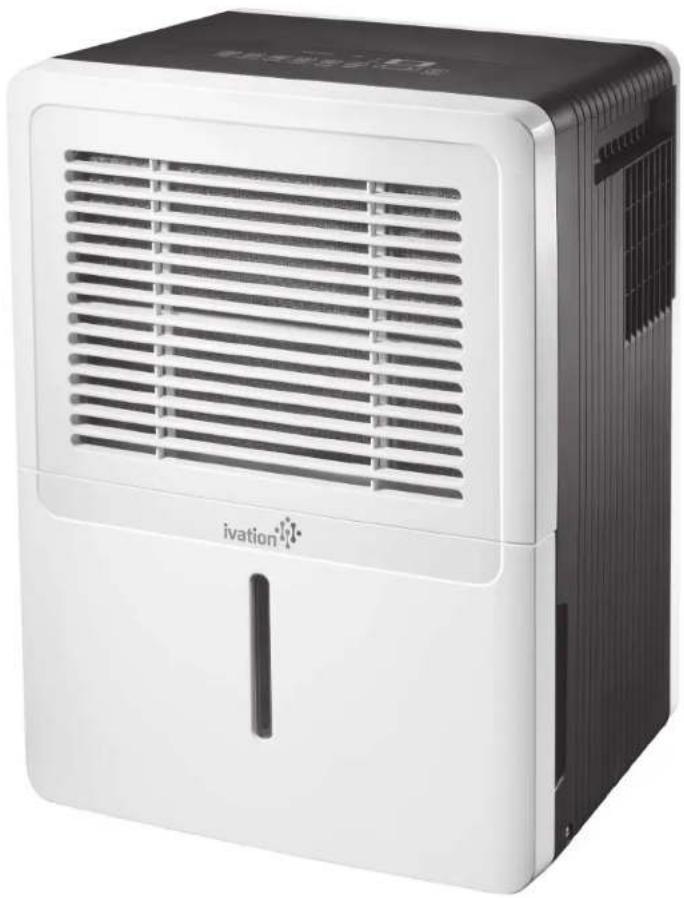
natural_image
White and black portable electronic device with ventilation grille and 'ivation' logo (no visible text beyond branding)Parts
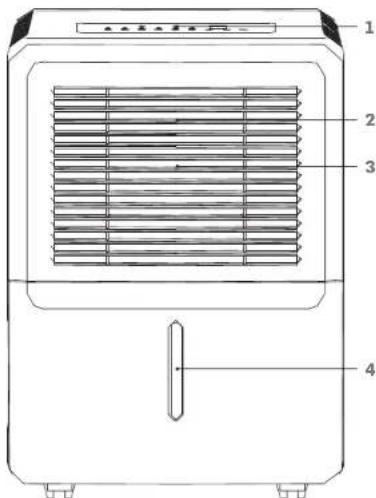
- Control panel
- Air intake vent
- Air filter
- Water reservoir
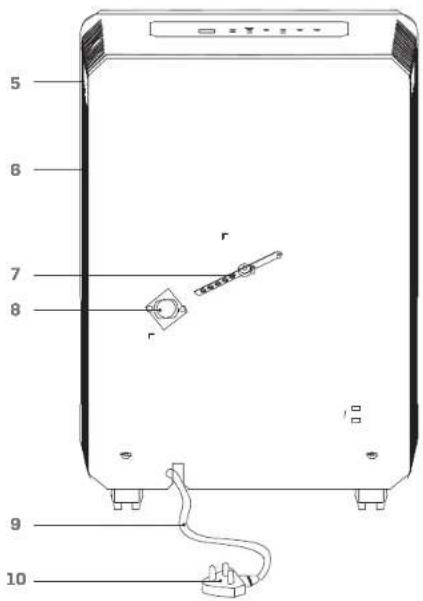
- Handle
- Air outlet vent
- Power cord band
- Drain hose outlet
- Power cord
- Power plug
Control panel
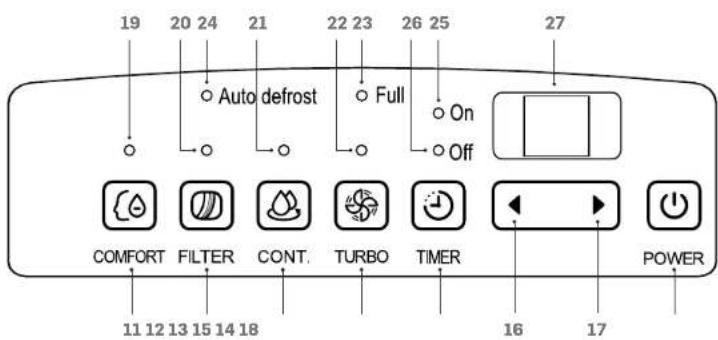
- Comfort mode button
- Filter light reset button
- Continuous (CONT.) mode button
- Timer button
- Fan (TURBO) button
- Decrease button
- Increase button
- Power button
-
Comfort mode light
-
Clean filter light
- Continuous mode light
- Turbo speed fan light
- Reservoir full light
- Auto defrost light
- On light
- Off light
- Digital display
Safety precautions
- Do not exceed the unit's rated power.
- Do not pause the unit by turning off the power.
- Do not use a damaged or unspecified power cord.
- Do not modify the cord length or share the outlet with other appliances.
- Do not handle the plug with wet hands.
- Do not install the unit in a place where it may be exposed to combustible gas.
- Do not place the unit near a heat source.
- Disconnect the power if unusual sounds, smells, or smoke, comes from the unit.
- Never attempt to take apart or repair the unit.
- Before cleaning the unit, always turn off the power and unplug.
- Do not drink or use the water drained from the unit.
- Do not remove the water reservoir during operation.
- Do not place the unit in a place where it may become wet or damp.
• Always place the unit on a level, stable section of the floor.
- Do not cover the intake or exhaust vents with cloths or towels.
- Keep out of reach of children or pets.
- Do not use in areas where chemicals are handled.
- Never insert fingers or other foreign objects into the vents or openings.
- Do not place heavy objects on the power cord.
- Do not climb on or sit on the unit.
• Always insert the filters securely. Clean the filter once every two weeks.
- If water enters the unit, turn it off and disconnect the power. Contact a qualified service technician.
Operation
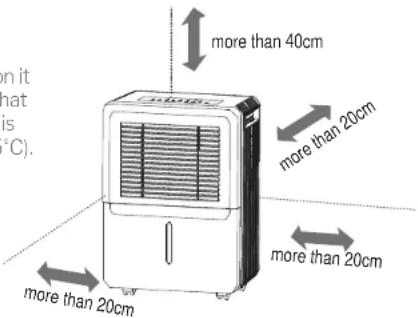
Before turning the unit on, position it as seen in the diagram. Be sure that you place the unit in a room that is between 41°F (5°C) and 95°F (35°C).
Automatic features
AUTO SHUT OFF: The unit will automatically shut off when either the reservoir is full or the set humidity is reached. Wait 3 minutes before resuming operation.
AUTO DEFROST: When frost builds up on the evaporator coils, the compressor will cycle off and the fan will continue to run until the unit has defrosted.
AUTO RESTART: If the power is cut unexpectedly, the unit will restart with the previous settings when power resumes.
Manual features
COMFORT MODE: This mode will set the unit to automatically control humidity between 45%-55% based on the temperature of the room. Note that the humidity cannot be manually set while in this mode.
FILTER: When it is time to clean the filter, the clean filter light will turn on. To reset the light after cleaning the filter, press the filter light reset button.
CONTINUOUS MODE: To set the dehumidifier to run constantly without a timer, press the continuous mode button. The continuous mode light will turn on.
HUMIDITY CONTROL: Relative humidity can be adjusted in 5% increments. For dryer air, press the minus button. For damper air, press the plus button. Note that relative humidity can be set within a range of 35% to 85%.
TIMER: The timer can be set to indicate either when the dehumidifier will start or when it will stop. To set a time, press the timer button until the desired timer light turns on. Use the increase and decrease buttons to adjust the time in .5 hour increments up to 10 hours.
FAN: Press the fan button to switch between high and low fan speed. Note that the higher fan speed will remove more moisture.
Removing collected water
Collected water can be removed in the following ways:
- When the water reservoir is full, remove and empty it.
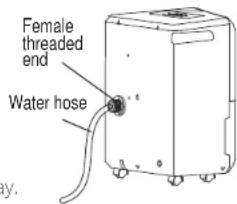
- Continuous draining: water can be automatically emptied into a floor drain by attaching the unit to a water hose with a female threaded end (not included).
a. Remove the plastic cover from the drain outlet of the unit and set aside.
b. Remove the water reservoir and insert the hose through the drain outlet of the unit, pressing it securely into the connector on the front of the unit.
c. Tighten the adapter and the unit with two screws (not included).
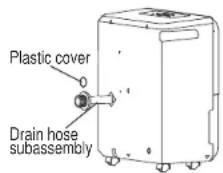
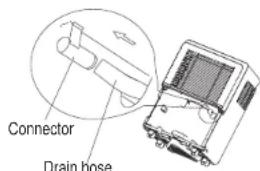
d. Install the female threaded end of the water hose into the adapter, then lead the water hose to the floor drain or a suitable drainage facility.
Error codes
The following codes may appear on the LED display.
AS: humidity sensor error
ES: temperature sensor error
P2: the reservoir is full or not positioned correctly
If there is an error, follow the steps below:
- Turn off the unit
- Check for any obstructions
- Restart the unit. If the malfunction is still present, turn off the unit and unplug the power cord.
- If the error persists, contact the manufacturer, its service agents or a similar qualified person for service.
Care and maintenance
• Always turn the dehumidifier off and unplug before cleaning.
• The water reservoir should be washed with fresh water every few weeks.
• The air filter should be washed with clean water at least every 30 days.
- When storing the unit:
• After turning off the unit, wait one day before emptying the reservoir
- Clean the main unit, reservoir, and air filter
- Wrap the cord and bundle it with a band
• Cover the unit with a plastic bag
- Store the unit upright in a dry, well-ventilated place
Specifications
Rated power: 115V
Rated frequency: 60Hz
Rated current: 2.9 amps
Refrigerant: R410A/5.29oz./0.15kg
Moisture removal: 30 pints/day
EEV: 2.0L/kW.H
Design pressure:
High: 540PSIG/3.7MPa
Low: 300PSIG/2.1MPa
Water reservoir capacity: 8gal. (3L)
Troubleshooting
| Problem | Solution/Explanation |
| Unit does not start | Check that the unit is plugged in. |
| Check the house's fuse/circuit breaker box. | |
| The unit has reached its preset level or the reservoir is full. | |
| Reservoir is not in the correct position. | |
| The unit does not dry the air as it should | Allow the unit more time to remove the moisture. |
| Make sure that nothing is blocking the front or back of the unit. | |
| Select a lower humidity setting. | |
| Check that all doors, windows, and other openings are securely closed. | |
| The room temperature is too low (below 41°F; 5°C). | |
| There is another appliance producing water vapor in the room. | |
| The unit is making loud noises | The air filter is clogged. |
| The unit is tilted instead of upright. | |
| The floor surface is not level. | |
| Frost appears on the coils | This is normal. The unit has an auto defrost feature. |
| Water is spilling on the floor | The hose connection may be loose. |
| The back drain plug is removed. |
Customer service:
info@myivation.com
866-849-3049
Distributed by
CSA Marketing, Inc. 114 Thred Loss Host
114 Tived Lane East Ediscn. NJ 00837 USA
Europe: C&A Europe
167 Hermilzqe Road
Industrial Estate London N4 117
United Kingdom
info@myivaten.com
Made in China
Ivation and the Ivation logo are registered
trademarks of CSA Holdings, LLC in the U.S.
©2017 All rights reserved
Brand : Ivation
Model : IVALDH30PW
Category : Humidifier