
KMC5 - Radio KICKER - Free user manual and instructions
Find the device manual for free KMC5 KICKER in PDF.


| Product Type | Marine Multi-Media Receiver |
| Brand | KICKER |
| Model | KMC5 |
| Power Output (2Ω stereo, <10% THD+N) | 40W x 6 |
| Power Output (4Ω stereo, <10% THD+N) | 25W x 6 |
| Frequency Response | 20 Hz – 20 kHz |
| Signal-to-Noise Ratio | 100 dB |
| Pre-Amp Outputs | Front, Rear, Sub, Zone2 |
| Input Sensitivity | 500 mV – 1.5 V (adjustable) |
| USB Playback | MP3, WMA, FLAC, WAV |
| USB Charging | DC 5V, 1A |
| USB File System | FAT32 |
| Bluetooth | Yes (pairing mode, device list) |
| SiriusXM Ready | Yes (requires SiriusXM Connect Tuner) |
| NMEA 2000 Load Equivalency Number (LEN) | LEN 1 (50 mA) |
| IP Rating | IP66 |
| Outer Trim Dimensions | 3.5 x 5.5 in (8.89 x 13.97 cm) |
| Protrusion from Mounting Surface | 1-5/16 in (3.33 cm) |
| Total Mounting Depth | 5 in (12.7 cm) |
| Mounting Hole Diameter | 3 in (7.62 cm) |
| Fuse | 20A ATC |
| Warranty | 2 years (from original purchase with receipt) |
Frequently Asked Questions - KMC5 KICKER
User questions about KMC5 KICKER
0 question about this device. Answer the ones you know or ask your own.
Ask a new question about this device
Download the instructions for your Radio in PDF format for free! Find your manual KMC5 - KICKER and take your electronic device back in hand. On this page are published all the documents necessary for the use of your device. KMC5 by KICKER.
USER MANUAL KMC5 KICKER
Owner's Manual | English
KMC5 Multi-Media-Receiver
KMC5 Multi-Media Receiver
FCC Statement
This equipment has been tested and found to comply with the limits for a Class B digital device, pursuant to part 15 of the FCC Rules. These limits are designed to provide reasonable protection against harmful interference in a residential installation. This equipment generates, uses, and can radiate radio frequency energy and, if not installed and used in accordance with the instructions, may cause harmful interference to radio communications. However, there is no guarantee that interference will not occur in a particular installation. If this equipment does cause harmful interference to radio or television reception, which can be determined by turning the equipment off and on, the user is encouraged to try to correct the interference by one or more of the following measures:
—Reorient or relocate the receiving antenna.
—Increase the separation between the equipment and receiver.
—Connect the equipment into an outlet on a circuit different from that to which the receiver is connected.
—Consult the dealer or an experienced radio/TV technician for help.
FCC Statement
This device complies with FCC radiation exposure limits set forth for an uncontrolled environment.
This device complies with Part 15 of the FCC Rules. Operation is subject to the following two conditions: (1) this device may not cause harmful interference, and (2) this device must accept any interference received, including interference that may cause undesired operation.
The Load Equivalency Number (LEN) indicates the amount of current a device draws from the NMEA 2000 network. Each device should have an LEN specified on the product or in the product documentation.
KMC5 NMEA 2000 Load Equivalency Number (LEN): 1 (50mA)
Caution! Any changes or modifications not expressly approved by the party responsible for compliance could void the user's authority to operate the equipment.
IC Notice - CAN ICES-3 (S) - This device complies with Industry Canada's licence-exempt RSSs. Operation is subject to the following two conditions
(1) This device may no cause interference; and (2) This device must accept any interference, including interference that may cause undesired operation of the device.
The device meets the exemption from the routine evaluation limits in section 2.5 of RSS 102 and compliance with RSS 102 RF exposure, users can obtain Canadian information on RF exposure and compliance.
mounting hole cutout template:
3 inches, 76.2 mm
mounting hole cutout template:
3 inches, 76.2 mm
Power Output @ 14.4V, 2Ω stereo, <10% THD+N 40W x 6
Power Output @ 14.4V, 4Ω stereo, <10% THD+N 25W x 6
Frequency Response [Hz] 20 - 20k
Signal-to-Noise Ratio [dB] 100
Pre-Amp Outputs Front, Rear, Sub, Zone2
Input Sensitivity Adjustable 500mV-1.5V
USB Playback MP3/WMA/FLAC/WAV
USB Charging DC 5V, 1A
USB Compatible File System FAT32
IP Rating IP66
Line-Out Level [M] 4
Outer Trim Dimensions[in, cm] 3.5 x 5.5, 8.89 x 13.97
Protrusion From Mounting Surface [in, cm] 1-5/16, 3.33
Total Mounting Depth [in, cm] 5, 12.7
Mounting Hole Diameter [in, cm] 3, 7.62
Authorized KICKER Dealer: ____
Purchase Date: ____
Serial Number: ____
Be careful not to drill into wiring or vehicle mechanisms. You are solely responsible for securely mounting the KMC5 Media Center. See page 2-3 for mounting hole cutout template.
Before installation, you may wish to plan your placement of the USB and Auxiliary inputs, and the optional KRC12 and KRC15 remotes (sold separately), for both convenience and looks!
With a KICKER KXM amplifier, a pair of KICKER KM speakers, and a few KICKER cables, you're looking at a full system upgrade that will dominate! KICKER amplifiers and accessories make upgrading a snap. Ask your dealer about KICKER amplifiers and speaker upgrades to complete your system!
All specifications and performance figures are subject to change. Please visit www.kicker.com for the most current information.
WARNING: KICKER products are capable of producing sound levels that can permanently damage your hearing! Turning up a system to a level that has audible distortion is more damaging to your ears than listening to an undistorted system at the same volume level. The threshold of pain is always an indicator that the sound level is too loud and may permanently damage your hearing. Please use common sense when controlling volume.
OVERVIEW
If the battery voltage is low (<+10.5V), an on-screen warning will appear. Recharge battery and avoid becoming stuck or marooned.
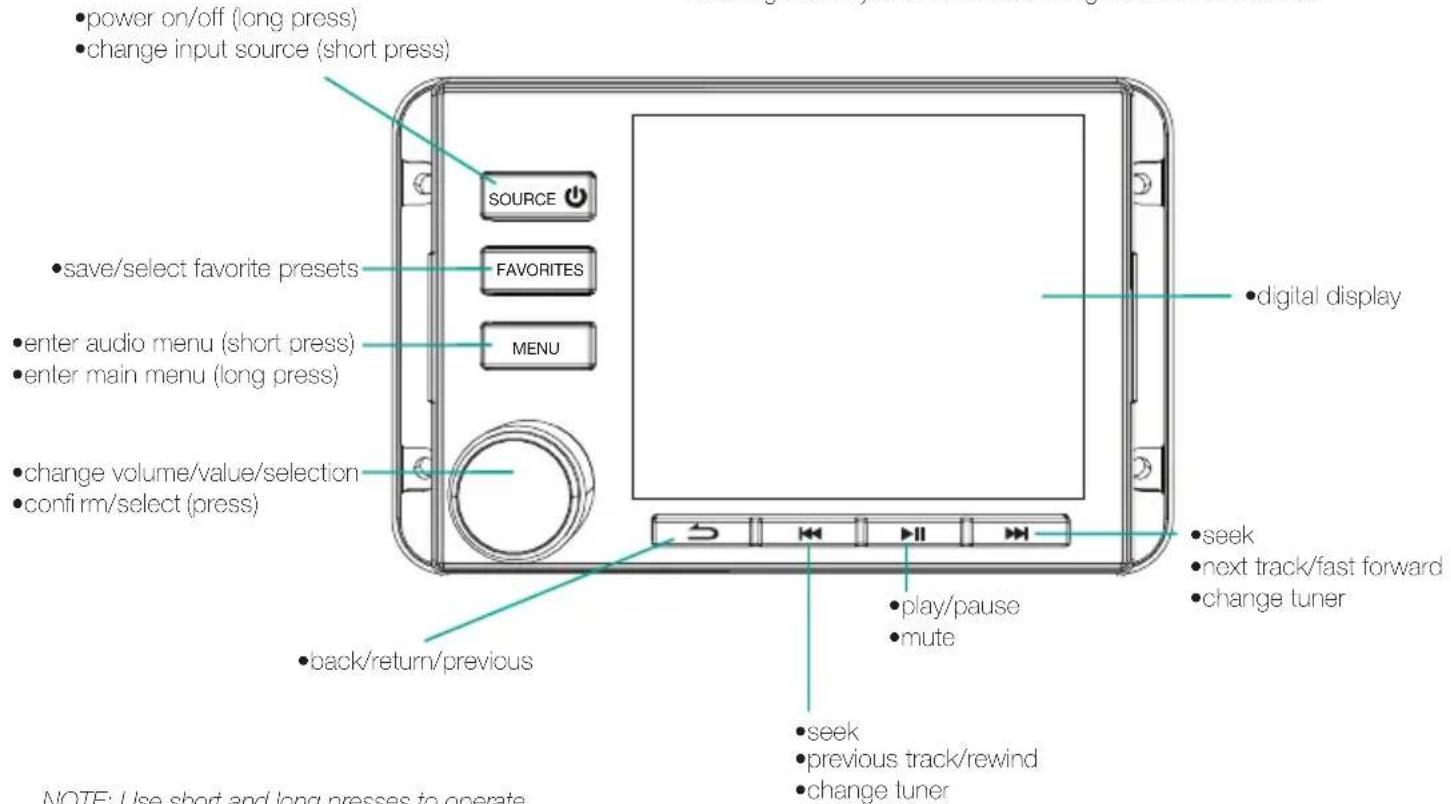
NOTE: Use short and long presses to operate.
Some input sources do not support all functions.
INSTALLATION
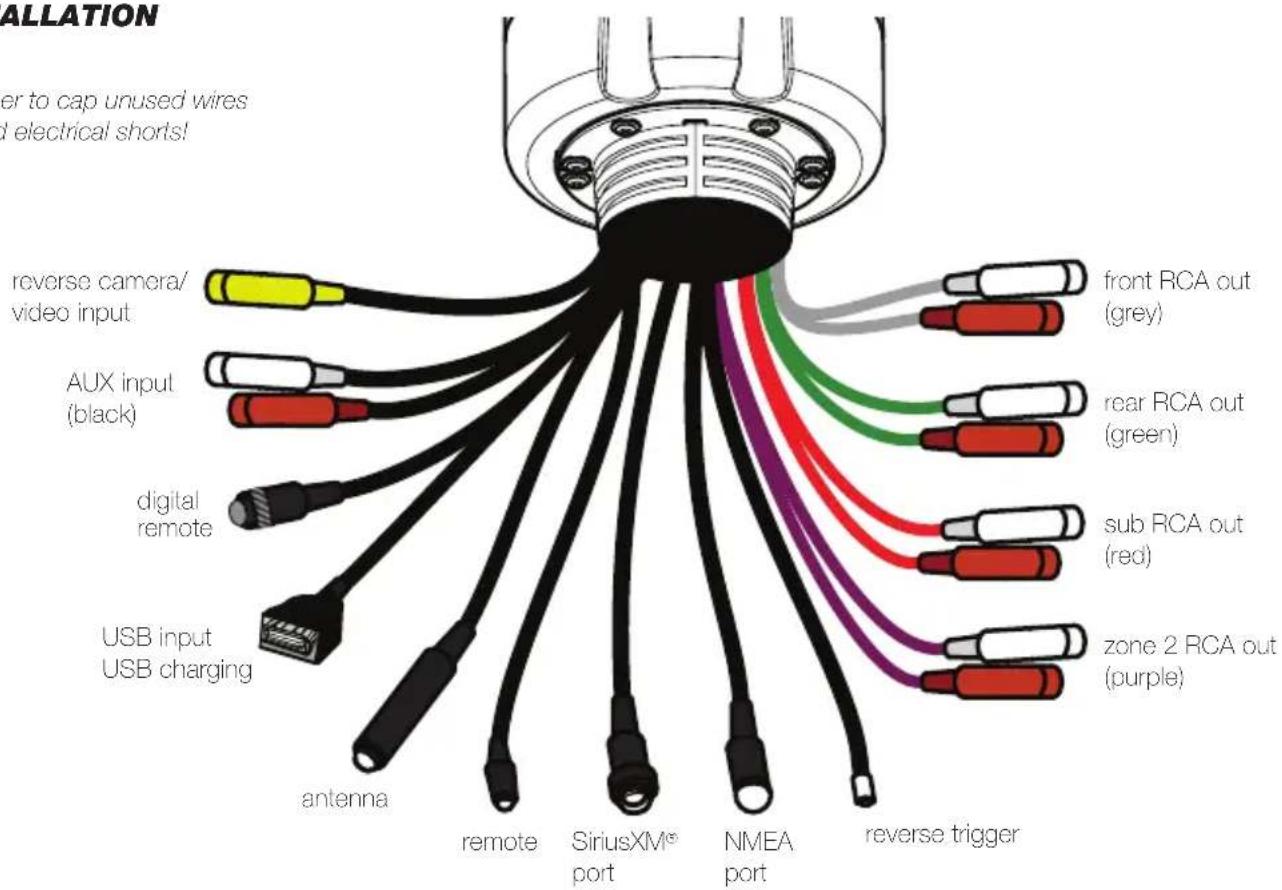
Remember to cap unused wires and avoid electrical shorts!
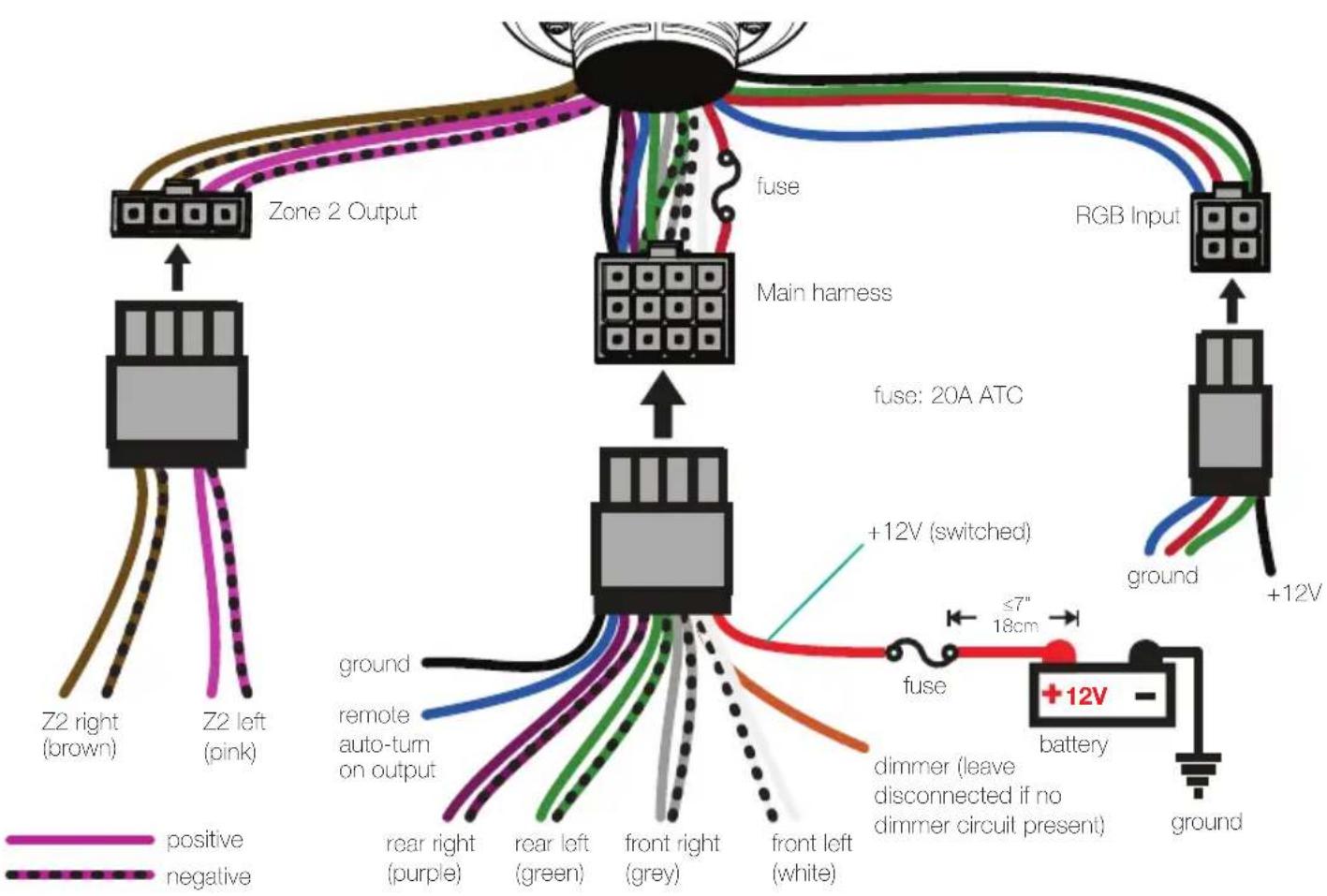
flowchart
graph TD
    A["Zone 2 Output"] --> B["Main harness"]
    B --> C["RGB Input"]
    C --> D["+12V battery"]
    D --> E["ground"]
    D --> F["+12V"]
    G["Z2 right (brown)"] --> A
    H["Z2 left (pink)"] --> A
    I["Rear right (purple)"] --> A
    J["Rear left (green)"] --> A
    K["Rear left (grey)"] --> A
    L["front right (grey)"] --> A
    M["front left (white)"] --> A
    N["fuse: 20A ATC"] --> B
    O["+12V (switched)"] --> P["fuse"]
    Q["dimmer (leave disconnected if no dimmer circuit present)"] --> R["ground"]
    S["≤7" 18cm"] --> T["fuse"]
    U["positive"] --> V["ground"]
    V --> W["+12V battery"]
    X["negative"] --> Y["ground"]
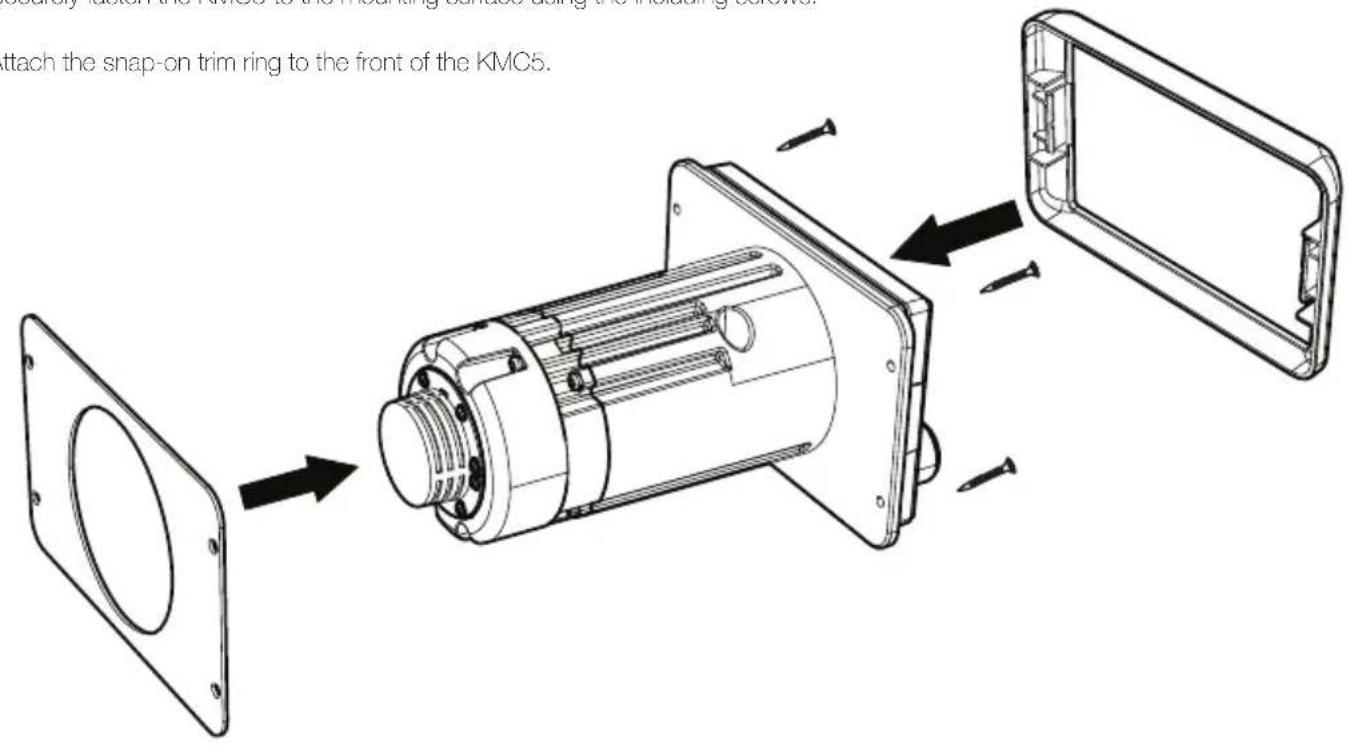
- Remove adhesive from rear gasket and apply to the back of the KMC5.
- Securely fasten the KMC5 to the mounting surface using the including screws.
- Attach the snap-on trim ring to the front of the KMC5.
OPERATION
Playback
Use the SOURCE button to enter the source menu. Use the knob to choose the input source for the KMC5: Bluetooth, USB, AUX, AM, FM, WX, and SiriusXM.
The KMC5 will automatically enter Bluetooth pairing mode when there is no Bluetooth connection, with the display message "In Pairing Mode". To enter pairing mode manually, choose Bluetooth input and then push the MENU button. This will enter the Bluetooth Menu. Select ENTER PAIRING MODE to begin pairing. When you begin scanning for devices on your audio device, the KMC5 will identify as "Media Center". Bluetooth Menu options include:
Select Device - view all paired devices and select one Disconnect Current Device - disconnects current device and for playback connects to the next device on the list
Delete Device - delete paired device from list Delete All Devices - deletes all stored Bluetooth devices and enters pairing
When a radio tuner input is selected, press the seek buttons to search for radio stations with adequate signal strength. To tune stations manually, press and hold the seek buttons for 2 seconds, then press them once to change frequencies. Use the MENU button while in WX band to turn Auto-Alerts ON/OFF for Weatherband alert messages. This will interrupt playback for emergency alerts and messages.
Set favorite presets for your favorite AM, FM, XM, and WX stations by selecting the station, pressing the FAVORITES button, selecting the favorite number (1–16) you wish to set, and pressing and holding the VOLUME KNOB for 2 seconds.
The USB input source is only available when there is a USB device connected. The KMC5 will automatically switch to USB input when a USB device is connected and detected. KICKER recommends SANDISK drives for the best performance. Drives must be formatted in FAT32 file system. USB hubs are not compatible. High-bit rate files (320kbps) may experience errors. In testing, the KMC5 has been shown to work with some HDD's and other file systems, however, this is not supported by KICKER! USB Menu options include:
Browse - Brows all files and folders using the knob to scroll and select tracks.
Repeat - turn Repeat ON/OFF for the current playlist or all tracks
Shuffle - turn Shuffle ON/OFF for the current playlist or all tracks DME - digital music enhancer will enhance the sound quality of compressed audio files.
The camera and video input may be used to connect an external camera or video source to the KMC5. The reverse trigger wire (+12v) will automatically activate the camera when the vehicle is placed in reverse. To manually activate/deactivate the video input, press and hold the FAVORITES button.
Device Settings
Press the MENU button to enter the audio settings for a selected input source. Hold the MENU button for 2 seconds to enter the device settings menu. The available device settings are: Loud, Area, Beep, Zone2, Z2VOL, HPF, and Dimmer. Use the VOLUME KNOB to change the available values for each setting.
Loudness - select On or Off for a low frequency boost Tuner - select USA or Europe
BEEP - select whether the KMC5 responds with beeps Zone 2 - toggles Zone 2 volume control on/off
Zone 2 Control - Allows you to select which connection is controlled by the Zone 2 volume:
Internal Power: Zone 2 channels are controlled by Zone 2 volume. Zone 2 RCA is controlled by Zone 1 volume. Preamp: Zone 2 RCA is controlled by the Zone 2 volume. Zone 2 internal channels are controlled by Zone 1 volume. Both: Zone 2 channels and Zone 2 RCA are controlled by Zone 2 volume.
Z2VOL - change behavior of Zone 2 volume control:
Relative: Zone 2 volume is locked to main volume. Absolute: Zone 2 volume is adjusted independently of main volume
Naming - Change the Zone 2 name: Zone 2, Tower, Transom, Cockpit, Interior
HPF - hi-pass crossover: OFF, 50Hz, 80Hz, 120Hz Dimmer - adjusts screen and button brightness: 0–12
Day/Night - change color scheme from Day Mode to Low Battery Alert - turn the Low Battery Alert ON/OFF. When set to Night Mode, KMC5 will switch automatically when lights ON, the KMC5 will activate a visual and audio alert when the voltage are turned on (orange illumination wire must be connected). drops below +10.5V, indicating the battery needs to be charged.
Audio Settings
Hold the MENU button for 2 seconds from a source screen to enter the audio settings menu. Press the MENU button to enter the audio settings. The available audio settings are: Bass, Treble, Balance, Fader, and EQ. Use the VOLUME KNOB to change the available values for each setting.
Sub - adjust the subwoofer level from 0-+12 Bass - adjust the bass level from -6-+6
Mid - adjust the mid level from -6-+6 Treble - adjust the treble level from -6-+6
Balance - adjust the balance from Left 6 to Right 6 Fader - adjust the fader from Front 6 to Rear 6
EQ - select between EQ presets:OFF, ROCK, POP, JAZZ and CUSTOM
When Custom EQ is selected, press the MENU button to enter custom frequency adjustments for 50Hz, 125Hz, 250Hz, 500Hz, 1kHz, 3kHz, and 8kHz. To manually adjust Bass, Mid, and Treble, EQ must be set to OFF.
SiriusXM
After installing your SiriusXM Connect Tuner and antenna, power on the KMC5 and select SiriusXM as the input source. Channel 1, the SiriusXM preview channel, should be audible. If it is not, please refer back to the installation instructions for your SiriusXM Connect Tuner. If the preview channel is working, tune to Channel 0 to find the Radio ID of your tuner, or locate the Radio ID on the bottom of the SiriusXM Connect Tuner.
In the USA, you can activate online or by calling SiriusXM Listener care:
Visit www.siriusxm.com/activatenow Call SiriusXM Listener Care at 1-866-635-2349
For Canadian Subscriptions, please contact:
Visit www.siriusxm.ca/activatexm Call XM customer Care at 1-877-438-9677
When the KMC5 detects that the SiriusXM Connect Tuner has received activation, it will display "Subscription Updated". The activation process can take up to an hour to complete. The KMC5 must be powered on and receiving the SiriusXM signal to receive the activation message.
Press the MENU button while in SiriusXM input mode to enter the SiriusXM menu.
Channel Browse - browse SiriusXM channels Category Browse - browse SiriusXM categories for relevant channels
Direct Tuning - manually enter SiriusXM channel Parental Controls - remove access to some channels
Information - displays SiriusXM Radio ID Reset - reset the KMC5's SiriusXM settings to factory defaults.
When choosing to enable Parental Controls for the first time, you will be prompted to enter a 4-digit passcode. (default is 0000)
Manage Password - change/reset current passcode Disable Parental Controls - remove all channel restrictions
TROUBLESHOOTING
SiriusXM
Check Antenna: The radio has detected a fault with the SiriusXM antenna. The antenna cable may be either disconnected or damaged.- Verify that the antenna cable is connected to the SiriusXM Connect Tuner.- Inspect the antenna cable for damage and kinks. Replace the antenna if the cable is damaged. SiriusXM products are available at your local retailer or online at www.shop.siriusxm.com
Check Tuner: The radio is having difficulty communicating with the SiriusXM Connect Tuner.- The tuner may be disconnected or damaged.- Verify that the SiriusXM Connect Tuner cable is securely connected to the radio.
Subscription Updated: The radio has detected a change in your SiriusXM subscription status. Press the knob (8) to clear the message. Visit www.siriusxm.com or call 866-635-2349 if you have questions about your subscription.
No Signal: The SiriusXM Connect Tuner is having difficulty receiving the SiriusXM satellite signal.- Verify that your vehicle is outdoors with a clear view of the sky.- Verify that the SiriusXM antenna is mounted on the outside of the vehicle.- Move the SiriusXM antenna away from any obstructions.- Inspect the antenna cable for damage and kinks.- Consult the SiriusXM Connect Tuner installation manual for more information on antenna installation. Replace the antenna if the cable is damaged. SiriusXM products are available at your local retailer or online at www.shop.siriusxm.com
Channel Not Available: The channel you have requested is not a valid SiriusXM channel or the channel that you were listening to is no longer available. You may also see this message briefly when first connecting a new SiriusXM Connect Tuner.- Visit www.siriusxm.com for more information about the SiriusXM channel lineup.
Channel Not Subscribed: The channel that you have requested is not included in your SiriusXM subscription package or the channel that you were listening to is no longer included in your SiriusXM subscription package.- Visit www.siriusxm.com or call 866-635-2349 if you have questions about your subscription package or would like to subscribe to this channel.
Channel Locked: The channel that you have requested is Locked by the radio Parental Control feature. See page 10 for more information on the Parental Control feature and how to access locked channels. Default Passcode is 0000.
If your KMC5 does not appear to be working, check the obvious things first such as blown fuses, poor or incorrect wiring connections etc. If you're using an amplifier, check for incorrect setting of crossover switches and gain controls etc.
No Power? ① Press the SOURCE/POWER button and make sure the KMC5 is turned on. ② Check the +12V power wire, ground wire, and fuse(s) for power and proper connection.
No or low output? ① Check the balance/fader controls on the KMC5. ② Check the speaker output connections. ③ Power cycle the KMC5. ④ Check the volume of the audio source.
Reduced volume? Reverse a speaker connection from positive to negative on the stereo channel(s); if the volume improves, the speaker was out of phase.
Buttons/Device Unresponsive? Perform Factory reset.
Factory reset: Reset the KMC5 to factory default settings by pressing and holding the PLAY/PAUSE button for ten seconds.
Radio stations not being received? Check the antenna for proper connection and ensure the Tuner setting in the menu is set to the correct region.
If you have more questions about the installation or operation of your new KICKER product, see the Authorized KICKER Dealer where you made your purchase. Please E-mail support@kicker.com or call Technical Services (405) 624-8583 for unanswered or specific questions.
ELECTRONICS LIMITED WARRANTY
When purchased from an Authorized KICKER Dealer, KICKER warrants this product to be free from defects in material and workmanship under normal use for a period of TWO (2) YEARS from date of original purchase with receipt. If this product is identified as "Refurbished" or "B Goods", the warranty is limited to a period of THREE (3) MONTH IS from the date of original purchase. In all cases you must have the original receipt. Should service be necessary under this warranty for any reason due to manufacturing defect or malfunction during the warranty period, KICKER will repair or replace (at its discretion) the defective merchandise with equivalent merchandise. Warranty replacements may have cosmetic scratches and blemishes. Discontinued products may be replaced with more current equivalent products. This warranty is valid only for the original purchaser and is not extended to owners of the product subsequent to the original purchaser. Any applicable implied warranties are limited in duration to a period of the express warranty as provided herein beginning with the date of the original purchase at retail, and no warranties, whether express or implied, shall apply to this product thereafter. Some states do not allow limitations on implied warranties; therefore, these exclusions may not apply to you. This warranty gives you specific legal rights; however you may have other rights that vary from state to state.
WHAT TO DO IF YOU NEED WARRANTY OR SERVICE:
Defective merchandise should be returned to your local Authorized Stillwater Designs (KICKER) Dealer for warranty service. Assistance in locating an Authorized Dealer can be found at www.kicker.com or by contacting Stillwater Designs directly. You can confirm that a dealer is authorized by asking to see a current authorized dealer window decal.
If it becomes necessary for you to return defective merchandise directly to Stillwater Designs (KICKER), call the KICKER Customer Service Department at (405) 624-8510 for a Return Merchandise Authorization (RMA) number. Package only the defective items in a package that will prevent shipping damage, and return to:
Stillwater Designs, 3100 North Husband St, Stillwater, OK 74075
The RMA number must be clearly marked on the outside of the package. Please return only defective components. The return of functioning items increases your return freight charges. Non-defective items will be returned freight collect to you. For example, if a subwoofer is defective, only return the defective subwoofer, not the entire enclosure. Include a copy of the original receipt with the purchase date clearly visible, and a "proof-of-purchase" statement listing the Customer's name, Dealer's name and invoice number, and product purchased. Warranty expiration on items without proof-of-purchase will be determined from the type of sale and manufacturing date code. Freight must be prepaid; items sent freight-collect, or COD, will be refused.
WHAT IS NOT COVERED?
This warranty is valid only if the product is used for the purpose for which it was designed. It does not cover:
Damage due to improper installation Freight Damage Subsequent damage to other components
Speakers damaged due to amplifier clipping or distortion
Any cost or expense related to the removal or reinstallation of product
Products returned without a Return Merchandise Authorization (RMA) number
Items previously repaired or modified by any unauthorized repair facility
Damage caused by exposure to moisture, excessive heat, chemical cleaners, and/or UV radiation
Damage through negligence, misuse, accident or abuse. Repeated returns for the same damage may be considered abuse
Return shipping on non-defective items
Products with tampered or missing barcode labels
Products purchased from an UNAUTHORIZED dealer
Service performed by anyone other than KICKER Products with tampered or missing serial numbers The cost of shipping product to KICKER
stillwaterdesigns
HOW LONG WILL IT TAKE?
KICKER strives to maintain a goal of one week turnaround for all electronics (amplifiers, crossovers, equalizers, etc.) returns. Delays may be incurred if lack of replacement inventory or parts is encountered. Failure to follow these steps may void your warranty. Any questions can be directed to the KICKER Customer Service Department at (405) 624-8510. Contact your International KICKER dealer or distributor concerning specific procedures for your country's warranty policies.
P.O. Box 459 • Stillwater, Oklahoma 74076 • USA • (105) 624-8510
20191111-C-KMC5
INTERNATIONAL WARRANTY
Contact your International Kicker dealer or distributor concerning specific procedures for your country's warranty policies.
Our goods come with guarantees that cannot be excluded under the Australian Consumer Law. You are entitled to a replacement or refund for a major failure and for compensation for any other reasonably foreseeable loss or damage. You are also entitled to have the goods repaired or replaced if the goods fail to be of acceptable quality and the failure does not amount to a major failure.
©2020 Stillwater Designs
KICKER® KMC5 MEDIA CENTER USER INFORMATION | INFORMACION DEL USUARIO INFORMATIONS DE L'UTILISATEUR | NUTZERINFORMATION
KKICKER
Thank you and congratulations on your purchase of the KICKER KMC5 Media Center! The KMC-Series are an absolute must-have for any music enthusiast or audiophile who loves the open water. With features like SiriusXM, Zone 2 control, native support for the most popular audio formats, reverse camera, remote control support, and a nearly infinite number of ways to upgrade and enhance your audio system, you'll wonder how you ever got by with stock marine audio in the first place! Complete your system with KICKER Marine amplifiers, subwoofers, speakers, and towers for an unrivaled marine audio experience.
Sincerely Steve Irby President/CEO
WARNING: KICKER products are capable of producing sound levels that can permanently damage your hearing! Turning up a system to a level that has audible distortion is more damaging to your ears than listening to an undistorted system at the same volume level. The threshold of pain is always an indicator that the sound level is too loud and may permanently damage your hearing. Please use common sense when controlling volume.
IMPORTANT: KICKER recommends a professional installation performed by licensed providers. You are solely responsible for safely mounting and wiring your products.
When purchased from an Authorized KICKER Dealer, KICKER warrants this product to be free from defects in material and workmanship under normal use for a period of TWO (2) YEARS from date of original purchase with receipt. If this product is identified as "Refurbished" or "B Goods", the warranty is limited to a period of THREE (3) MONTHS from the date of original purchase. In all cases you must have the original receipt. Should service be necessary under this warranty for any reason due to manufacturing defect or malfunction during the warranty period, KICKER will repair or replace (at its discretion) the defective merchandise with equivalent merchandise. Warranty replacements may have cosmetic scratches and blemishes. Discontinued products may be replaced with more current equivalent products. This warranty is valid only for the original purchaser and is not extended to owners of the product subsequent to the original purchaser. Any applicable implied warranties are limited in duration to a period of the express warranty as provided herein beginning with the date of the original purchase at retail, and no warranties, whether express or implied, shall apply to this product thereafter. Some states do not allow limitations on implied warranties; therefore, these exclusions may not apply to you. This warranty gives you specific legal rights; however you may have other rights that vary from state to state.
WHAT TO DO IF YOU NEED WARRANTY OR SERVICE: Defective merchandise should be returned to your local Authorized Stillwater Designs (KICKER) Dealer for warranty service. Assistance in locating an Authorized Dealer can be found at www.kicker.com or by contacting Stillwater Designs directly. You can confirm that a dealer is authorized by asking to see a current authorized dealer window decal. If it becomes necessary for you to return defective merchandise directly to Stillwater Designs (KICKER), call the KICKER Customer Service Department at (405) 624-8510 for a Return Merchandise Authorization (RMA) number. Package only the defective items in a package that will prevent shipping damage, and return to: Stillwater Designs, 3100 North Husband St., Stillwater, OK 74075
The RMA number must be clearly marked on the outside of the package. Please return only defective components. The return of functioning items increases your return freight charges. Non-defective items will be returned freightcollect to you. For example, if a subwoofer is defective, only return the defective subwoofer, not the entire enclosure. Include a copy of the original receipt with the purchase date clearly visible, and a "proof-of-purchase" statement listing the Customer's name, Dealer's name and invoice number, and product purchased. Warranty expiration on items without proof-of-purchase will be determined from the type of sale and manufacturing date code. Freight must be prepaid; items sent freight-collect, or COD, will be refused.
WHAT IS NOT COVERED? This warranty is valid only if the product is used for the purpose for which it was designed. It does not cover: Damage due to improper installation, Freight Damage. Subsequent damage to other components, Speakers damaged due to amplifier clipping or distortion, Return shipping on non-defective items, Service performed by anyone other than KICKER. Any cost or expense related to the removal or reinstallation of product, Products with tampered or missing barcode labels, Products with tampered or missing serial numbers, Products returned without a Return Merchandise Authorization (RMA) number. Products purchased from an UNAUTHORIZED dealer, The cost of shipping product to KICKER, Items previously repaired or modified by any unauthorized repair facility, Damage caused by exposure to moisture, excessive heat, chemical cleaners, and/or UV radiation, Damage through negligence, misuse, accident or abuse. Repeated returns for the same damage may be considered abuse
HOW LONG WILL IT TAKE? KICKER strives to maintain a goal of one week turnaround for all electronics (amplifiers, crossovers, equalizers, etc.) returns. Delays may be incurred if lack of replacement inventory or parts is encountered. Failure to follow these steps may void your warranty. Any questions can be directed to the KICKER Customer Service Department at (405) 624-8510. Contact your International KICKER dealer or distributor concerning specific procedures for your country's warranty policies.
INTERNATIONAL WARRANTY
Contact your International Kicker dealer or distributor concerning specific procedures for your country's warranty policies.
Our goods come with guarantees that cannot be excluded under the Australian Consumer Law. You are entitled to a replacement or refund for a major failure and for compensation for any other reasonably foreseeable loss or damage. You are also entitled to have the goods repaired or replaced if the goods fail to be of acceptable quality and the failure does not amount to a major failure.
GARANTÍA INTERNACIONAL
Versión Español
If you have a problem,
STOP
Please do not return product to the store.
KICKER Tech Support can assist you.
Call us at 800-256-KICK (5425), or contact us at support@kicker.com with any questions or problems.
Thank you for your KICKER purchase!
U.S. Customers Only
- FCC Statement
- OVERVIEW
- INSTALLATION
- OPERATION
- Playback
- Device Settings
- Audio Settings
- SiriusXM
- TROUBLESHOOTING
- ELECTRONICS LIMITED WARRANTY
- WHAT TO DO IF YOU NEED WARRANTY OR SERVICE:
- Stillwater Designs, 3100 North Husband St, Stillwater, OK 74075
- WHAT IS NOT COVERED?
- HOW LONG WILL IT TAKE?
- INTERNATIONAL WARRANTY
- KICKER® KMC5 MEDIA CENTER USER INFORMATION | INFORMACION DEL USUARIO INFORMATIONS DE L'UTILISATEUR | NUTZERINFORMATION
- KKICKER
- GARANTÍA INTERNACIONAL
- Versión Español
- STOP
- KICKER Tech Support can assist you.
Brand : KICKER
Model : KMC5
Category : Radio