
Griddler Elite GR-300WS - Grill CUISINART - Free user manual and instructions
Find the device manual for free Griddler Elite GR-300WS CUISINART in PDF.


| Brand | Cuisinart |
| Model | Griddler Elite GR-300WS |
| Product Type | Electric Griddle, Grill, and Panini Press |
| Housing Material | Brushed stainless steel |
| Plate Material | Non-stick coated aluminum |
| Number of Plates | 2 (upper and lower) |
| Reversible Plates | Yes (grill on one side, griddle on the other) |
| Cooking Positions | Storage, Preheat, Open, Closed (contact grill/panini), Flat (full grill/griddle), Top Melt |
| Functions | Grill, Griddle, Panini Press, Searing, Top Melt, Full Grill, Full Griddle, Half & Half |
| Temperature Control | Adjustable dials for upper and lower plates, independent |
| Sear Function | Dedicated sear buttons with 2-minute countdown timer |
| Timer | Digital countdown timer with up/down arrow controls |
| Display | LCD screen with backlight |
| Auto Shut-Off | After 2 hours of inactivity; Sleep mode after 10 minutes |
| Safety Features | Plate detection safety interlock, auto shut-off |
| Drip Tray | Removable, dishwasher safe |
| Cleaning | Plates, drip tray, and cleaning tool are dishwasher safe; exterior wipe clean |
| Included Accessories | 2 reversible plates, drip tray, cleaning tool |
| Voltage | 120V ~ 60Hz |
Frequently Asked Questions - Griddler Elite GR-300WS CUISINART
User questions about Griddler Elite GR-300WS CUISINART
0 question about this device. Answer the ones you know or ask your own.
Ask a new question about this device
Download the instructions for your Grill in PDF format for free! Find your manual Griddler Elite GR-300WS - CUISINART and take your electronic device back in hand. On this page are published all the documents necessary for the use of your device. Griddler Elite GR-300WS by CUISINART.
USER MANUAL Griddler Elite GR-300WS CUISINART
TROUBLESHOOTING CHART
| Power | Why won't my unit turn on? | Check to make sure your unit is plugged into a functional outlet. |
| Contact Customer Service at 1-800-726-0190. | ||
| Why is my unit turning itself off? | If the PLATE SELECT dial is not turned to ON within 10 minutes of the unit being plugged in, the Griddler® Elite will enter SLEEP mode. All lights will turn off. Turn the PLATE SELECT dial to ON to “wake up” the unit and operate the unit as normal. | |
| It is possible the unit overheated. Wait for the unit to cool down and try again. If it does not turn back on, contact Customer Service at 1-800-726-0190. | ||
| If already cooking and you want to change the temperature of the current plate selection, you do not need to hit START/STOP button again. Doing so will turn the unit off. Simply change the temperature dial for the current plate selection and the unit will adjust automatically. | ||
| If your Griddler® Elite is not turned off or if you do not change any settings, it will shut off automatically after 2 hours. This is a safety feature. | ||
| Why won't the plates get hot? | Confirm you have inserted the plates correctly into the connection blocks. If the plates are not fitted correctly and securely, they will not heat up. This is a safety feature. | |
| Programming | Can I change my temperature or plate selection when the unit is already cooking? | Yes. To change temperature of your current plate selection, simply turn the plate's temperature dial and the unit will adjust automatically. To change your plate selection, simply turn the PLATE SELECT dial and set your new temperature. |
| Can I sear when I'm already cooking? | Yes. Simply press the SEAR button(s) and the plates will preheat to sear temperature. We recommend you take the food off during preheating to SEAR. Once the SEAR cycle is complete, the unit will revert back to previously selected temperatures. | |
| Can I adjust my SEAR cycle time? | You can only sear for 2 minutes max. However if you would like to sear for less than 2 minutes, simply press the down arrow button. |
IMPORTANT!
Do not throw away. Keep for future reference.
This Quick Start Guide is intended to supplement the Instruction Booklet.
In order to ensure safe operation and optimum performance,
please read the entire Instruction Booklet.
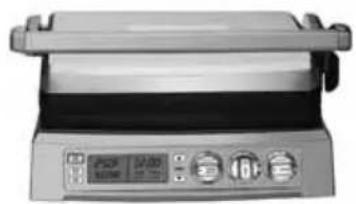
natural_image
Front view of a stainless steel grating with control buttons and display screen (no visible text or symbols)QUICK REFERENCE GUIDE
Cuisinart®
Griddler® Elite
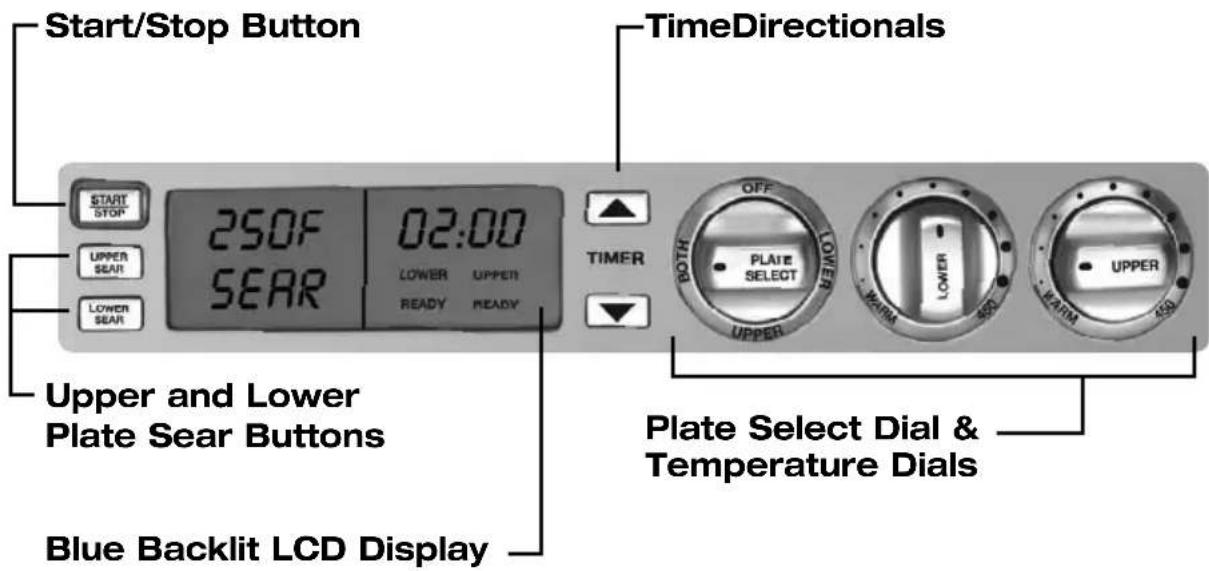
GETTING TO KNOW YOUR CONTROL PANEL
ASSEMBLY INSTRUCTIONS
Place base on a clean, flat surface where you intend to cook, with the controls directly in front of you.
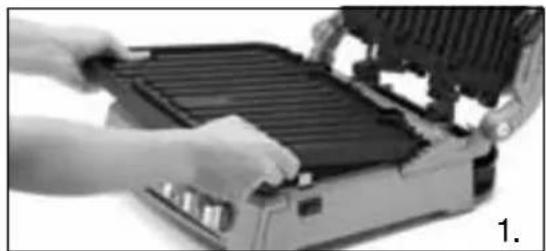
- Locate the connector prongs on the plate(s) and line up with the appropriate connection blocks. Slide the connector prongs into the blocks and push down the front end of the plate(s). They will snap into place.
NOTE: If the plate(s) are not inserted properly and completely into the connection blocks, the plate(s) will not heat up.
- Slide the drip tray into the base at the rear of the unit from the right side.
- Plug the cord into a standard electrical outlet. The blue backlight on the LCD screen will illuminate, indicating the unit is energized. The LCD will display the current settings.
natural_image
Close-up of hands operating a portable electronic device with heat exchanger (no visible text or symbols)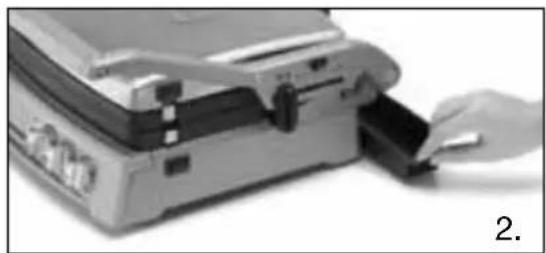
natural_image
Close-up of a hand inserting a card into a briefcase (no visible text or symbols)GRIDDLER® ELITE POSITIONS
STORAGE Position – Upper plate/cover rests flat on the lower plate/base and cover height adjuster is in Lock position.
PREHEAT Position – Upper plate cover rests flat on the lower plate/base and cover height adjuster is in Unlock position.
OPEN COOKING Position – To Cook on Lower Plate Only: Lift the handle so upper plate/cover is vertical. Plate does not "float" in this position.
CLOSED COOKING Position – To Contact Grill or Panini Press: Start with unit in Open Cooking position. Lower top carefully until plate contacts food. Hinge will automatically release the plate, allowing it to “float” and rest evenly on food.
To Top Melt: Start with unit in Open Cooking position. Wearing an oven mitt, press down slightly on front of upper plate/cover to release hinge, allowing plate to "float." Lower it to close to the desired height, then slide the cover height adjuster into a notch to set the position.
FLAT COOKING Position – To Cook on Full Grill, Full Griddle or Half Grill/Half Griddle: Upper plate/cover opens to lie flat, level with the lower plate/base.
To adjust to this position from the Preheat position, open unit and slide the hinge release lever up while pushing the handle back. The upper plate/cover will sit flat, resting on the handle.
Cooking with Upper or Lower Plate Only:
- Turn the Plate Select dial to UPPER or LOWER. On the LCD, "UPPER" or "LOWER" and the temperature position will display, indicating it is ready for selection.
- Turn the Upper or Lower temperature dial to desired temperature. Press START/STOP button.
- "PREHEAT" will display. The Upper or Lower plate temperature will flash during preheating.
- When the plate has reached temperature, the unit will beep three times and "READY" will display.
Cooking with Both Upper and Lower Plates:
- Turn the Plate Select dial to BOTH. On the LCD, "UPPER" and "LOWER" and the temperature positions will display, indicating they are ready for selection.
- Turn the Upper and Lower temperature dials to desired temperature. Press START/STOP button.
- "PREHEAT" will display. The Upper and Lower plate temperatures will flash during preheating.
- When the first plate reaches temperature it will show "READY" and the unit will beep one time. When the second plate reaches temperature it will show "READY" and the unit will beep three times.
Sear with Upper or Lower Plate Only:
- Turn the Plate Select dial to UPPER or LOWER. On the LCD, "UPPER" or "LOWER" and the temperature position will display, indicating it is ready for selection.
- Press UPPER SEAR or LOWER SEAR button. Press START/STOP button.
- "PREHEAT" will display. SEAR will flash during preheating.
- When the plate has reached sear temperature, the unit will beep three times and "READY" will display. The 02:00 minute countdown display will flash ten times to allow enough time to put the food on the plate.
- After the ten flashes, the 2-minute countdown timer will begin. Press down arrow button to sear for less than 2 minutes.
• After SEAR cycle, the unit will beep 3 times and adjust to the temperature on the dial.
Sear with Both Upper and Lower Plates:
- Turn the Plate Select dial to BOTH. On the LCD, “UPPER” and “LOWER” and the temperature positions will display, indicating they are ready for selection.
- Press UPPER SEAR and LOWER SEAR buttons. Press START/STOP button.
- "PREHEAT" will display. SEAR will flash during preheating.
- When the first plate reaches sear temperature it will show “READY” and the unit will beep one time. When the second plate reaches sear temperature it will show “READY” and the unit will beep three times. The 02:00 minute countdown display will flash ten times to allow enough time to put the food on the plates.
- After the ten flashes, the 2-minute countdown timer will begin. Press down arrow button to sear for less than 2 minutes.
- After sear cycle, the unit will beep 3 times and adjust to the temperatures on the dials.
Using the Countdown Timer:
- Press ▲ or ▼ arrows. Holding buttons down scrolls quickly; pressing and releasing advances more slowly. Time will appear in LCD display. Once you have selected your time, release the buttons. After 3 seconds of no button being pressed, the timer will automatically begin to count down.
- Once time reaches "00:00", the unit will beep 3 times. The unit will continue to operate until it is turned off.
- To stop and reset the timer at any time, hold both ▲ and ▼ at the same time for 2 seconds
NOTE: The timer does not stop cooking or turn off the unit. And the timer is inactive during a SEAR cycle.
Turning the Unit off:
When finished cooking, turn Plate Select to OFF. Unplug the unit and allow to cool completely for at least 30 minutes.
Cleaning and Care:
Make sure the plates have cooled completely for at least 30 minutes. Use the cleaning tool to remove any leftover food from the plates. Dispose of any grease from the drip tray once cooled. Press the plate release buttons on the right side of the unit to remove the plates from the housing. The plates, drip tray, and cleaning tool can be cleaned by hand or on the top shelf of the dishwasher. The housing base and control panel can be wiped clean with a soft, dry cloth.
- IMPORTANT!
- QUICK REFERENCE GUIDE
- Cuisinart®
- ASSEMBLY INSTRUCTIONS
- GRIDDLER® ELITE POSITIONS
- Cooking with Upper or Lower Plate Only:
- Cooking with Both Upper and Lower Plates:
- Sear with Upper or Lower Plate Only:
- Sear with Both Upper and Lower Plates:
- Using the Countdown Timer:
- Turning the Unit off:
- Cleaning and Care:
Brand : CUISINART
Model : Griddler Elite GR-300WS
Category : Grill