Tank Mega - Mobile Phone BLU - Free user manual and instructions
Find the device manual for free Tank Mega BLU in PDF.


| Product type | Mobile phone (feature phone) |
| Model | Tank Mega |
| Brand | BLU |
| SIM card support | Dual SIM (standard SIM) |
| Display | 2.4-inch TFT (typical for rugged phones) |
| Battery capacity | 1800 mAh (typical) |
| Charging time | First charge: 24 hours recommended |
| FM radio | Yes, with built-in antenna |
| Audio player | Yes, supports MP3 via microSD card |
| Expandable storage | microSD card slot |
| SOS button | Yes, for emergency contacts |
| GPRS settings | Menu > Settings > Connect > Network |
| Bluetooth | Yes (common in BLU phones) |
| Torch | Likely built-in (common in rugged phones) |
| Dimensions | Approximately 150 x 70 x 15 mm (typical rugged) |
| Weight | Approximately 200 g (typical) |
| Network support | 2G (GSM) only (likely) |
| Warranty | 1 year |
| Maintenance | Wipe with dry cloth; avoid water exposure |
Frequently Asked Questions - Tank Mega BLU
User questions about Tank Mega BLU
0 question about this device. Answer the ones you know or ask your own.
Ask a new question about this device
Download the instructions for your Mobile Phone in PDF format for free! Find your manual Tank Mega - BLU and take your electronic device back in hand. On this page are published all the documents necessary for the use of your device. Tank Mega by BLU.
USER MANUAL Tank Mega BLU
| BLUBOLD LIKE UST570 | 1.BEFORE POWERING ON.CHARGE FOR 24 HOURS/ANTES DE ENCENDER,CARGUE POR 24 HORAS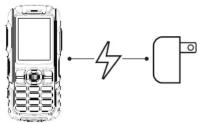 2.INSERT SIM CARD/INSERTE LA TARJETA SIM[IMAGE]P.1 2.INSERT SIM CARD/INSERTE LA TARJETA SIM[IMAGE]P.1 | 3.GPRS SETTING/CONFIGURACIÓN GPRSGPRSMENU>SETTINGS>NETWORK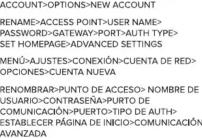 4.FM RADIO/RADIO FM[IMAGE]P.2 4.FM RADIO/RADIO FM[IMAGE]P.2 | 5.AUDIO PLAYER/REPRODUCTOR DE AUDIO1.INSERT THE MICRO SD CARD/INSERTE LATARJETA DE MEMORIA [IMAGE]P.3 [IMAGE]P.3 | CONTINUE/CONTINUAR3.COPY AND TRANSFER MUSIC FILES/COPLAR Y TRANSFERIR ARCHIVOS DE MÚSICA 4.ENJOY THE AUDIO PLAYER/DISFRUTE DEL REPRODUCTOR DE AUDIOP.4 4.ENJOY THE AUDIO PLAYER/DISFRUTE DEL REPRODUCTOR DE AUDIOP.4 | 6.SOS / EMERGENCY NUMBERS NÚMEROS DE EMERGENCIAUSE THE SOS BUTTON TO QUICKLY CALL YOUR EMERGENCY CONTACTS / USE EL BOTÓN DE SOS PARA LLAMAR RÁPIDAMENTE SUS CONTACTOS DE EMERGENCIA PRESS AND HOLD THE SOS BUTTON TO CALL AND END EMERGENCY PHONE CALLS / MANTENGA PULSADO EL BOTÓN DE SOS PARA LLAMAR Y FINALIZAR LLAMADAS DE EMERGENCIAP.5 PRESS AND HOLD THE SOS BUTTON TO CALL AND END EMERGENCY PHONE CALLS / MANTENGA PULSADO EL BOTÓN DE SOS PARA LLAMAR Y FINALIZAR LLAMADAS DE EMERGENCIAP.5 |
- SOS / EMERGENCY NUMBERS NÚMEROS DE EMERGENCIA USE THE SOS BUTTON TO QUICKLY CALL YOUR EMERGENCY CONTACTS / USE EL BOTÓN DE SOS PARA LLAMAR RÁPIDAMENTE SUS CONTACTOS DE EMERGENCIA


1.ANTES DE LIGAR, CARREGUE POR 24 HORAS/AVANT LA MISE SOUS TENSION, CHARGE PENDANT 24 HEURES

3. CONFIGURAÇÃO GPRS/CONFIGURATION GPRS
GPRS
MENU>CONFIGURAÇÕES>CONEXÃO>CONTA DA REDE>OPCÕES>CONTA NOVA
RENOMEAR>PONTO DE ACESSO>NOME DO USUÁRIO>SENHA>PORTA DE COMUNICAÇÃO>PORTA>TIPO DE AUTH> ESTABELECER PÁGINA INICIAL>CONFIGURACOÊS AVANÇADAS
MENU>PARAMÈTRES>CONNEXION>COMPTE
RÉSEAU>OPTIONS NOUVEAU COMPTE
RENOMMER>POINT D'ACCÈS>NOM
D'UTILISATEUR>MOT DE PASSE>PORT DE
COMMUNICATION>PORT>TYPE
D'AUTHENTIFICATION>ÉTABLIR PAGE
D'ACCUEIL>COMMUNICATION AVANCÉE

5. REPRODUTOR DE ÁUDIO/LECTEUR DE AUDIO
1.INSIRA O CARTÃO MICRO SIM/INSÉRER LA CARTE MICRO SIM

2.CONECTE O TELEFONE COM O COMPUTADOR VIA O CABO USB/CONNECTER LE TÉLÉPHONE À L'ORDINATEUR VIA UN CÂBLE USB

CONTINUAR/CONTINUER
3.COPIAR E TRANSFERIR ARQUIVOS DE MÚSICA/COPIER ET TRANSFÉRER DES FICHIERS MUSICAUX

4.APROVEITE O REPRODUTOR DE ÁUDID/ PROFITER DU LECTEUR DE AUDIO
6. NÚMEROS DE EMERGÊNCIA
NUMÉROS D'URGENCE / SOS
USE O BOTÃO SOS PARA CHAMAR RAPIDA-
MENTE OS SEUS CONTATOS DE EMERGÊNCIA /
UTILISER LE BOUTON SOS POUR APPELER VITE
VOS CONTACTS D'URGENCE

PRESSIONE E SEGURE O BOTÃO SOS PARA CHAMAR E ENCERRAR LIGAÇÕES DE EMERGÊNCIA /
PRESSE ET MAINTENIR LE BOUTON SOS POUR APPELER ET FIN D'URGENCE D'APPELS
Brand : BLU
Model : Tank Mega
Category : Mobile Phone