
MCSCD6W5 - Dishwasher Magic Chef - Free user manual and instructions
Find the device manual for free MCSCD6W5 Magic Chef in PDF.


| Brand | Magic Chef |
| Model | MCSCD6W5 |
| Product Type | Built-in Dishwasher |
| Place Settings | 6 |
| Dimensions (H x W x D) | 33.5 x 23.5 x 24 inches |
| Weight | 60 lbs |
| Power Supply | 120 V, 60 Hz, 10 A |
| Water Consumption | 3.1 gallons per cycle |
| Energy Star Certified | Yes |
| Number of Cycles | 6 |
| Noise Level | 52 dBA |
| Control Type | Electronic push button |
| Interior Material | Stainless steel |
| Delay Start | Up to 24 hours |
| Rinse Aid Dispenser | Yes, adjustable |
| Installation Type | Under counter |
| Ventilation System | Heated dry with fan |
| Safety Features | Child lock, flood protection |
| Maintenance | Clean filter monthly, run cleaner cycle |
| Repair and Parts | Authorized service centers, online parts |
| Warranty | 1 year limited |
Frequently Asked Questions - MCSCD6W5 Magic Chef
User questions about MCSCD6W5 Magic Chef
0 question about this device. Answer the ones you know or ask your own.
Ask a new question about this device
Download the instructions for your Dishwasher in PDF format for free! Find your manual MCSCD6W5 - Magic Chef and take your electronic device back in hand. On this page are published all the documents necessary for the use of your device. MCSCD6W5 by Magic Chef.
USER MANUAL MCSCD6W5 Magic Chef
Countertop Dishwasher
User's Manual
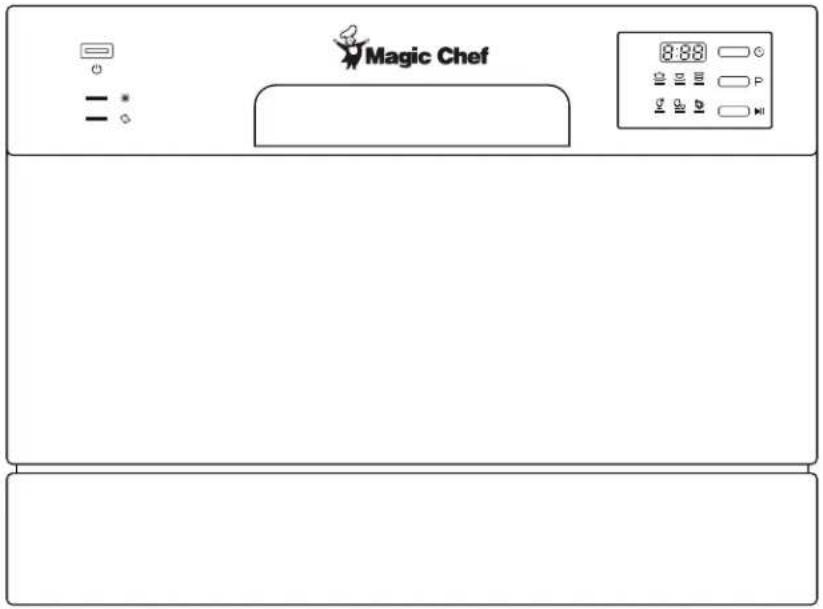
Model MCSCD6W5
PLEASE READ THIS MANUAL CAREFULLY BEFORE USING YOUR DISHWASHER AND KEEP IT FOR FUTURE REFERENCE.

PRODUCT REGISTRATION
Thank you for purchasing a Magic Chef® product. The first step to protect your new product is to complete the product registration on our website: www.mcappliance.com/register. The benefits of registering your product include the following:
- Registering your product will allow us to contact you regarding a safety notification or product update.
- Registering your product will allow for more efficient warranty service processing when warranty service is required.
- Registering your product could act as your proof of purchase in the event of insurance loss.
Once again, thank you for purchasing a Magic Chef product.
CONTENTS
PRODUCT REGISTRATION 2
IMPORTANT SAFETY INSTRUCTIONS 4
SPECIFICATIONS....6
PARTS AND FEATURES 7
INSTALLATION INSTRUCTIONS 9
BEFORE USE 11
OPERATING INSTRUCTIONS.... 15
CARE AND MAINTENANCE 18
TROUBLESHOOTING.... 21
LIMITED WARRANTY 23
IMPORTANT SAFETY INSTRUCTIONS
This manual contains Safety Instructions, Installation and Operating Instructions, and Troubleshooting Tips.
Please carefully read this manual before using your countertop dishwasher for instructions on how to use and maintain the product properly. Be sure to follow the safety instructions to avoid injury or damage to the product.
Keep this manual. When passing on/selling the device to a third party, the manual must be handed over along with the device.
Before calling for service, please make sure unit is installed and being used correctly, and read the troubleshooting section.
⚠ WARNING: When using your dishwasher, follow the precautions listed below:
▲ NOTE: Specifications may change at any time without notice.
GROUNDING INSTRUCTIONS
This appliance must be grounded. In the event of a malfunction or breakdown, grounding will reduce the risk of electric shock by providing a path of least resistance of electric current. This appliance is equipped with a grounded cord and must be plugged into an appropriate outlet that is installed and grounded in accordance with all local codes and ordinances.
⚠ WARNING: Using with an improperly grounded outlet can result in a risk of electric shock. Check with a qualified electrician or service representative if you are not sure whether the outlet is properly grounded. DO NOT modify the plug in any way. If it does not fit the outlet, have a proper outlet installed by a qualified electrician.
⚠ WARNING: DO NOT use an extension cord or an adaptor plug with this appliance.
- DO NOT use this appliance for other than its intended use.
- DO NOT unplug your appliance by pulling on the power cord. ALWAYS grasp the plug firmly and pull it straight out from the outlet.
- If the power cord gets damaged, it must be replaced by a qualified service person.
- All packing materials should be kept away from children and disposed of properly.
- DO NOT put anything flammable or explosive in the dishwasher.
- DO NOT operate if any parts are broken or missing.
- DO NOT use for commercial dishwashing purposes.
- DO NOT sit on, stand on, or misuse the door or dish rack of the dishwasher.
- DO NOT touch the heating element during or immediately after use.
- When using your dishwasher, you should prevent plastic items from coming into contact with heating element.
- DO NOT operate your dishwasher unless all enclosure panels are properly in place. Open the door very carefully if the dishwasher is operating; there is a risk of water squirting out.
- DO NOT use outdoors.
- DO NOT place heavy objects or push down on the door while it is open, as it could tip the dishwasher.
- This appliance should not be operated by anyone that is not able to follow proper safety procedures or does not have experience with this type of equipment, unless under supervision.
- Children should ALWAYS be supervised around the dishwasher.
-
DO NOT tamper with or modify the controls.
-
When disposing of or removing from service, be sure to remove the door from the front of the unit.
- When loading items to be washed, place sharp items so that they are not likely to damage the door seal
⚠ WARNING: Knives and other utensils with sharp points must be loaded in the basket with their points down or placed in a horizontal position.
- DO NOT wash plastic items unless they are marked dishwasher safe.
- Only use detergent and rinse additives designed for an automatic dishwasher. DO NOT use soap, laundry detergent, or hand washing detergent in your dishwasher. Keep these products out of the reach of children.
- Dishwasher detergents are strongly alkaline; they can be extremely dangerous if swallowed. Avoid contact with skin and eyes and ALWAYS keep children away from the dishwasher when the door is open, as there could still be some residue left inside.
- ALWAYS check that the detergent receptacle is empty at the end of the wash cycle.
- The dishwasher should be connected to the water supply using new hoses. DO NOT reuse old or damaged hoses.
- The water pressure supplied to the dishwasher should have a maximum water pressure of 145 psi (1Mpa) and a minimum of 5.8 psi (0.04Mpa).
- Disconnect electrical power and water intake hose before cleaning and/or servicing.
- DO NOT attempt to repair or replace any part of the appliance service unless specifically recommended in this user manual.
READ AND FOLLOW THIS SAFETY INFORMATION CAREFULLY SAVE THESE INSTRUCTIONS
SPECIFICATIONS
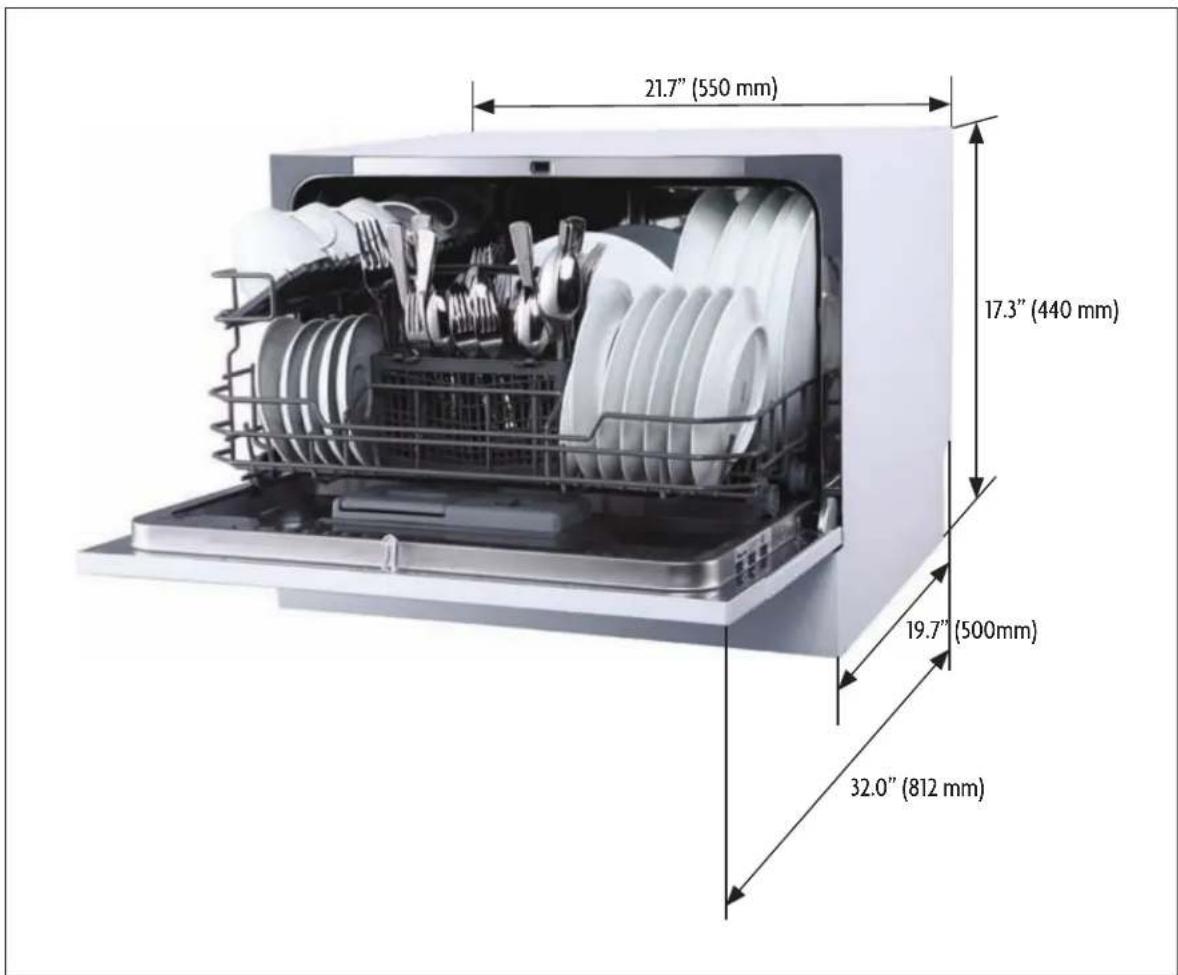
| Height 17.3” (440mm) | |
| Width 21.7” (550 mm) | |
| Depth 19.7” (500 mm) | |
| Voltage 120V AC | |
| Water Pressure 5.80-145.04psi (0.04-1.0Mpa) | |
| Hot Water Temperature 120 °F (49 °C) | |
| Power Supply 5.72A Total (Heater – 5A, Motor - .72A) | |
| Capacity 6 Place Settings |
PARTS AND FEATURES
CONTROL PANEL
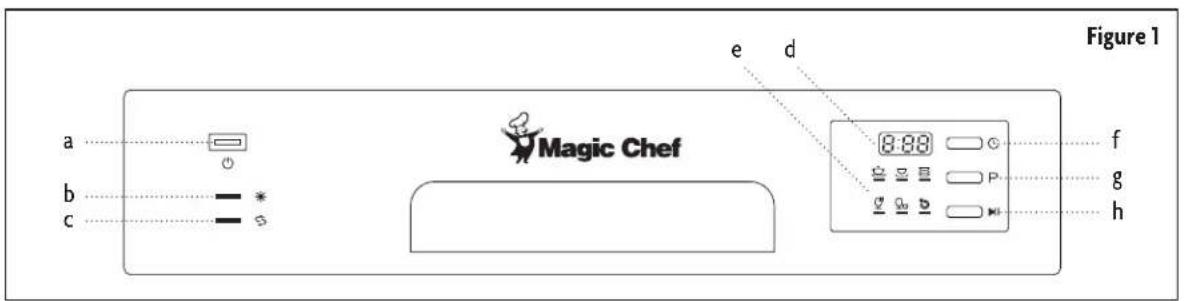
a. Power Button
b. Rinse Aid Warning Light
c. Program End Indicator
d. Display
e. Program Indicator
f. Delay Button
g. Program Select Button
h. Start/Pause Button
INSIDE AND REAR OF DISHWASHER
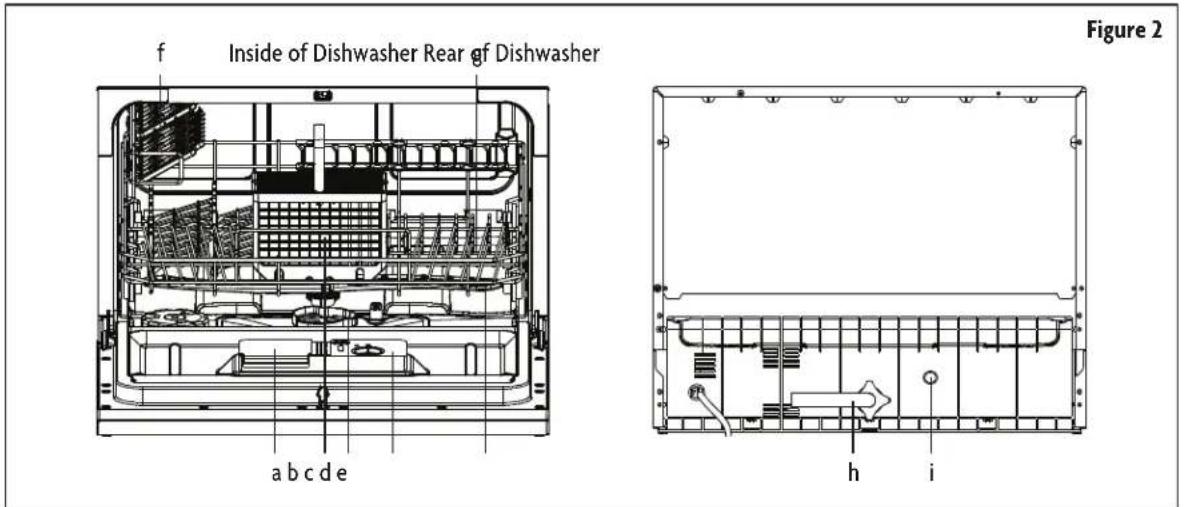
a. Detergent Dispenser
b. Cutlery Basket
c. Filter Assembly
d. Rinse Aid Dispenser
e. Spray Arms
f. Cup Shelf
g. Basket
h. Inlet Pipe Connector
i. Drain Pipe Connector
QUICK CONNECT ASSEMBLY
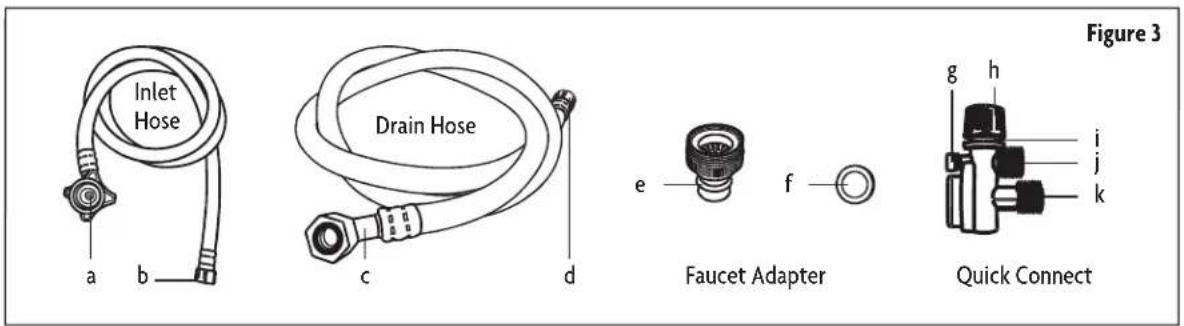
a. Inlet Port Connection
b. Quick Connect Connection
c. Drain Port Connection
d. Quick Connect Connection
e. Faucet Adapter
f. Faucet Washer
g. Pressure Relief Valve
h. Faucet Adapter Connection
i. Locking Collar
j. Inlet Hose Connection
k. Drain Hose Connection
INSTALLATION INSTRUCTIONS
⚠ WARNING: Electrical Shock Hazard - Disconnect electrical power before installing dishwasher. Failure to do so can result in electrical shock or death.
Installation of water supply pipes or electrical outlets should be performed by qualified professionals.
Set up the dishwasher on a countertop with a minimum clearance of 17.75" to the cabinet above and so the appliance is not overhanging the edge of the countertop. Make sure that the unit is close enough to electrical and water supply for the hoses and cord to reach, and that the surface is capable of supporting the weight of the dishwasher fully loaded. Have 2 people move into position to prevent injury.
ELECTRICAL REQUIREMENTS
The electrical supply should be a properly installed and grounded 3-prong outlet that meets all local codes and standards on a 10A circuit. It is recommended to use a dedicated circuit with a time delay fuse or circuit breaker.
⚠ WARNING: Using with an improperly grounded outlet can result in a risk of electric shock. Check with a qualified electrician or service representative if you are not sure whether the appliance is properly grounded. DO NOT modify the plug in any way. If it does not fit the outlet, have a proper outlet installed by a qualified electrician.
⚠ WARNING: DO NOT use an extension cord or an adaptor plug with this appliance.
The dishwasher should be placed near the water supply (faucet) and a sink for draining, as well as a properly installed and grounded electrical outlet. Position the appliance in the desired location. It can be up against a wall in the back or on the sides if needed. The water inlet and drain can be set to face to the right or left as needed.
WATER CONNECTION
Your dishwasher includes a 'Quick Connect' assembly that includes an inlet and a drain hose. The faucet adapter must first be installed on the faucet before you can connect the dishwasher. This adapter is included inside your dishwasher and is compatible with faucets using either male (outside) or female (inside) threads on the aerator.
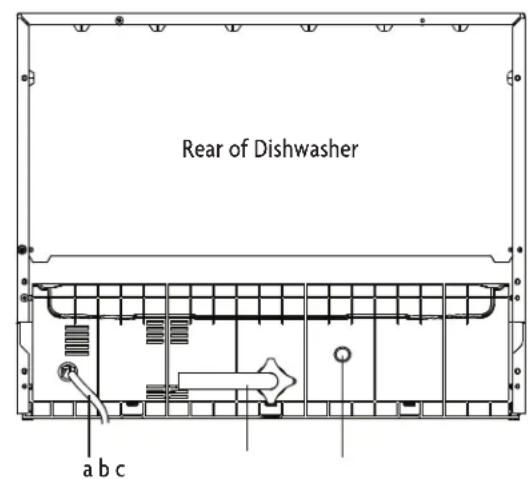
Please check and make sure you have all parts and locate the water inlet and drain ports on the back of the washer.
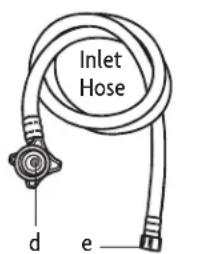
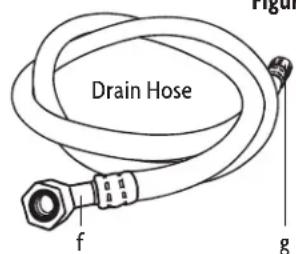
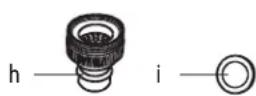
Faucet Adapter
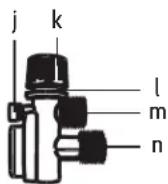
Quick Connect
Figure 4
| a. | Power Cord | f. | Drain Port Connection | k. | Faucet Adapter Connection |
| b. | Inlet Port | g. | Quick Connect Connection | l. | Locking Collar |
| c. | Drain Port | h. | Faucet Adapter | m. | Inlet Hose Connection |
| d. | Inlet Port Connection | i. | Faucet Washer | n. | Drain Hose Connection |
| e. | Quick Connect Connection | j. | Pressure Relief Valve |
- Screw the faucet adapter (Figure 4, h) onto or into the faucet tap, depending on the style of the faucet. Check for leaks (use Teflon tape to eliminate if necessary).
- Connect the drain port connection side of the drain hose (Figure 4, f) to the drain port on the back of the dishwasher (Figure 4, c). Be careful not to over-tighten (to avoid damaging the threads).
- Connect the inlet port connection side of the water inlet hose (Figure 4, d) to the inlet port on the back of the dishwasher (Figure 4, b). Be careful not to over-tighten (to avoid damaging the threads).
- Connect the quick connect side of the drain hose (Figure 4, g) onto the longer (bottom) male connection on the quick connect (Figure 4, n).
- Connect the quick connect side of the inlet hose (Figure 4, e) onto the shorter (top) male connection on the quick connect (Figure 4, m).
- Attach the quick connect onto the faucet adapter by pulling the outer locking collar on the quick connect (Figure 4, k) down while pushing the quick connect upward onto the faucet adapter.
- When the quick connect snaps onto the faucet adapter, release the locking collar. Verify the connection is secure.
- Slowly open the hot water line and check all connections for any sign of water leakage. If leaks are located, immediately close the water supply and repair the hose connections.
▲ NOTE: Once you open the water supply line, (even if it is closed immediately thereafter), the inlet hose will be pressurized. To relieve water pressure from inside the inlet hose, first make sure the water line is closed, and then press and hold the red pressure relief button on the quick connect (Figure 4, j) until the flow of water stops.
⚠ WARNING: Failure to relieve water pressure before disconnecting the quick-connect from the faucet will result in back-pressure causing the water to spray. The temperature of incoming water can be very hot and could cause severe burns and/or scalding.
⚠ WARNING: DO NOT let children disconnect the dishwasher. Close supervision of children is ALWAYS important around the appliance.
DISCONNECTING THE WATER
- Shut off the water supply at the faucet.
- Relieve water pressure from the hose using the red relief release button.
- Unplug the dishwasher by firmly grasping the plug and pulling straight out from the outlet.
- Let water drain from water inlet hose.
BEFORE USE
FILLING THE RINSE AID DISPENSER
The rinse aid is released during the final rinse to prevent water droplets that can leave spots and streaks from forming on your dishes. It also improves drying by allowing water to sheet off the dishes. Your dishwasher is designed to use liquid rinse aids. The rinse aid dispenser is located inside the door next to the detergent dispenser. To fill, open the cap and pour the rinse aid into the dispenser until the level indicator turns completely black. The rinse aid container holds about 3.7oz (110ml).
▲ NOTE: Only use branded rinse aid for dishwasher. Never fill the rinse aid dispenser with any other substances (Dishwasher cleaning agent, liquid detergent), as it may damage the appliance.
You can determine the amount of rinse-aid using the optical level indicator (see below). There is a Rinse-Aid Warning light on the control panel that will indicate when it needs to be filled. You should not let it get below 1/4 full.
As the rinse aid is used up the size of the black dot on the rinse aid level indicator changes, as illustrated below.
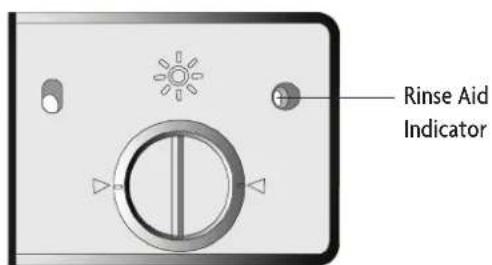
Figure 5
Full
3/4 full
1/2 full
○ Empty
1/4 full - Should refill to eliminate spotting
To open the Rinse-Aid dispenser, turn the cap counter-clockwise about 1/4 turn and lift out. Pour the rinse aid into the dispenser carefully, to avoid overfilling. Replace the cap and turn clockwise to lock. Be sure to wipe up any spilled rinse aid.
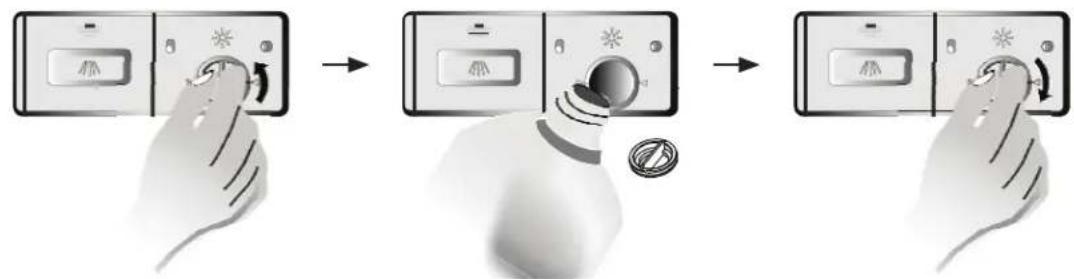
flowchart
graph TD
    A["Control Panel"] --> B["Arrow to Screen"]
    B --> C["Arrow to Display Panel"]
    C --> D["Arrow to Control Panel"]
Figure 6
ADJUSTING RINSE AID DISPENSER
The rinse aid dispenser has four settings. The recommended setting is "3". If the dishes still are not drying properly or are spotted, adjust the dial to "4".
Increase the setting if there are drops of water or lime spots on the dishes after washing. Reduce it if there are sticky whitish stains on your dishes or a bluish film on glassware or knife blades.
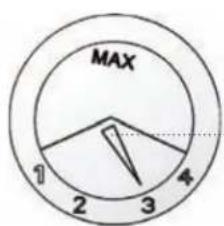
Figure 7
Adjust Lever (Rinse)
DETERGENT DISPENSER
Dishwasher detergent is necessary to remove food from dishes and help move it out of the dishwasher. Only use detergents that are specifically made for dishwashers. Fill the detergent dispenser before the start of each wash per the instructions provided in the Wash Cycle Table. Your dishwasher uses less detergent and rinse aid then conventional dishwashers. Generally, only one tablespoon of detergent is needed for a normal wash load, though more heavily soiled items may need more detergent. ALWAYS add the detergent just before starting the dishwasher to avoid it getting wet as that may prevent it from dissolving properly.
DETERGENTS
If powdered detergents that do not contain phosphate are used with hard water, white spots may appear on dishes. If this occurs, add more detergent to dishwasher for better results. Detergents that do not have chlorine may not completely remove food and spots from dishes. If this occurs, choose a wash program with a higher temperature.
Based on their chemical composition, dishwasher detergents can be split in two basic types:
Using concentrated detergents reduces pollution, is easier on your dishes, and the normal wash programs are designed to maximize the dirt-dissolving properties of the enzymes, allowing a normal wash program with concentrated detergent to give the same results normally achieved using a heavy wash program.
DETERGENT TABLETS
Different brands of detergent tablets dissolve at different rates. For this reason, some tablets may not fully dissolve and therefore may not fully clean the dishes. When using tablets, be sure to use a longer wash program to ensure that the tablet dissolves and that all residual detergents are rinsed out of the dishwasher.
▲ NOTE: Detergent tablets should only be used in models with 3-in-1 function.
FILLING DETERGENT DISPENSER
If the door to the dispenser is closed, push the release latch and it will spring open. Fill the dispenser to required level based on washing cycle.
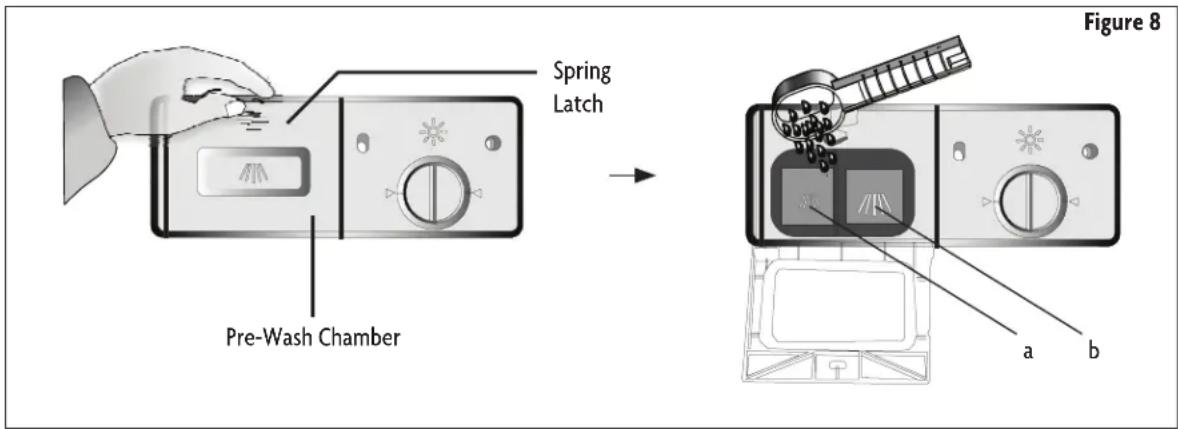
Fill the detergent dispenser with detergent. The smaller compartment on the left side(Figure 8, a) is for 0.50oz (15g) of detergent, and the larger compartment on the right side(Figure 8, b) holds 0.88oz (25g). Be sure to observe the manufacturers use and storage recommendations as stated on the detergent packaging. Close the lid and press until it locks in place. If the dishes are heavily soiled, put additional detergent in the pre-wash detergent chamber.
NOTE: See Wash Cycle Table for more information on amount of detergent to use.
NOTE: Water hardness and how soiled dishes are can vary the amount of detergent needed.
LOADING THE DISHWASHER
▲ NOTE: DO NOT wash items that are not listed as dishwasher safe.
▲ NOTE: Some types of glasses may become dull after a large number of washes.
▲ NOTE: Silver and aluminum may tarnish or discolor during washing.
For best performance, follow these guidelines when loading:
- Scrape off any large amounts of leftover food. Soak burnt food in pans to loosen. It is not necessary to rinse the dishes under running water.
- Place items such as cups, glasses, pots/pans etc. face down so that water will not collect in them.
- Curved items, or those with recesses, should be loaded at a slant so that water can run off.
- All utensils should be placed in a manner so that they cannot tip over.
- All utensils should be placed in the way that prevents them from interfering with the spray arm during washing.
- Items should not be inside one another, or covering other items.
- DO NOT let large glasses touch each other. Doing so may damage them.
- Most silverware should be placed in cutlery basket handles down.
- Small knives and sharp objects should be placed handle up to prevent injury.
- Large sharp objects such as long bladed knives can present a hazard, and should be placed horizontally in the rack.
- DO NOT put small items that can fall out of the basket in the dishwasher.
- DO NOT overload your dishwasher.
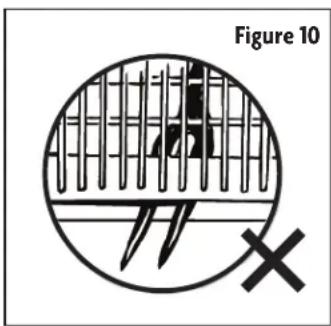
⚠ WARNING: DO NOT allow any item to stick out below the dish rack as that may interfere with the spray arm and damage the dishwasher.
⚠ WARNING: DO NOT load any sharp objects point up. Place them point down or lay them horizontally in the rack. ALWAYS position the dishes and cookware in a manner that will prevent them from being moved by spraying water.
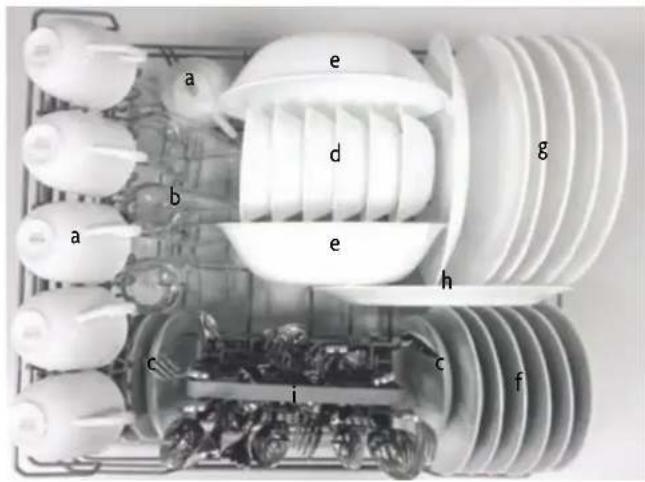
Figure 9
a. Cups
b. Glasses
c. Saucers
d. Fruit Bowls
e. Serving Bowls
f. Bread and Butter Plates
g. Dinner Plates
h. Oval Platters
i. Cutlery Basket
Cutlery should be placed handles down in the cutlery basket, unless it is a sharp object such as a knife. Sharp objects that fit in the cutlery basket should be placed handle up. Avoid having spoons and forks nest together. If an item is too large for the basket, or has a tip or point that would stick out of the bottom of the basket, place it horizontally in the dish rack.
OPERATING INSTRUCTIONS
The following things should be checked before starting the dishwasher.
- The dishwasher is level.
- The water supply is open.
- There are no leaks at the connections.
- The plug is connected securely to a properly grounded outlet.
- The power is switched on.
- The inlet and drain hoses are properly connected.
- All packing and printed materials are removed from the dishwasher.
• To operate the dishwasher, load the basket as described above, pour in the detergent and rinse aid based on the wash cycle being chosen, close the door and press the On/Off button.
- Press the Program Select button to cycle through wash cycles and choose the one you want: HEAVY » NORMAL » LIGHT » GLASS » SPEED » RINSE
• Press the Start/Pause button, and the dishwasher will start.
▲ NOTE: When you press the Start/Pause button to pause the wash cycle, the display time will stop blinking and the program will pause until you restart it.
▲ NOTE: If you open the door while the dishwasher is running, the unit will pause the wash cycle. When you close the door, you will need to push Start/Pause to continue.
ADDING DISHES AFTER STARTING THE DISHWASHER
Items can be added to the dishwasher any time before the detergent bin opens. If you need to add something:
- Press the Start/Pause button.
- Open the door slightly to stop the wash cycle.
- When the spray arm stops working, you can open the door completely.
- Add items to the rack.
- Close the door.
- Press the Start/Pause button. The dishwasher will start running again after 10 seconds.
CHANGING THE WASH PROGRAM
It is possible to change the wash program if needed. If the dishwasher has just been started and only run for a short time, you can change the cycle if needed by pressing "Start/Pause", then press the "Program Select Button" for about 3 seconds, which will put the dishwasher in Stand By. You can then follow the instructions for Operating the Dishwasher to select a new program and start the unit again.
▲ NOTE: If the unit has already released the detergent you would need to reload the detergent bin.
⚠ WARNING: It is dangerous to open the door while the dishwasher is running, due to the risk of being scalded by hot water. If you must open the door, make sure the cycle is paused and the spray arm has stopped.
The display lights indicate the status of the Wash Cycle.
▲ NOTE: If the dishwasher is standing by without any operation, it will turn off automatically after 30 minutes.
WASH CYCLE TABLE
▲ NOTE: ★ indicates Rinse Aid Dispenser should be filled.
| Program Used For | Description of Cycle | Detergent Pre/Main (g) | Running Time (min) | Energy (Kwh) | Water (l) | Rinse Aid | |
 Heavy Heavy | For the heaviest loads, pots, pans, plates that have food dried on. | Pre-WashPre-Wash (122°F/50°C)Wash (131°F/55°C)Wash (122°F/50°C)RinseRinse (154°F/68°C)Drying | 18 100 0.49 | 12.5 | ★ | ||
 Normal Normal | For normally soiled loads, such as pots, plates, glasses, and lightly soiled pans. | Pre-WashPre-WashWash (125°F/52°C)RinseRinse (149°F/65°C)Drying | 18 110 0.36 | 10.8 | ★ | ||
 Light Light | For lightly soiled loads, such as glasses and crystal. | Pre-WashPre-Wash (122°F/50°C)Wash (122°F/50°C)RinseRinse (140°F/60°C)Drying | 18 75 0.27 | 10 | ★ | ||
 Glass Glass | For lightly soiled crockery and glass | Pre-WashWash (122°F/50°C)RinseRinse (140°F/60°C)Drying | 15 70 0.28 | 8.5 | ★ | ||
 Speed Speed | Shorter wash for lightly soiled loads that do not need drying | Pre-WashPre-Wash (122°F/50°C)Wash (122°F/50°C)RinseRinse (131°F/55°C) | 15 45 0.31 | 10.5 | ★ | ||
 Rinse Rinse | For rinsing dishes, glasses, and silverware that will not be washed right away | Pre-WashWash | / | 24 | 0.03 | 4.3 | |
END OF THE WASH CYCLE
When the wash cycle is finished, a buzzer will sound for 8 seconds. Turn the dishwasher off using the ON/OFF button, shut off the water supply, and carefully open the door. Leave the door open for about 15 minutes before handling the dishes, as they are more susceptible to breakage when hot, and to allow them to dry completely. It is normal for the inside of the dishwasher to be wet when it is done running.
USING THE DELAY FEATURE
The start of the dishwasher can be delayed between 1 and 24 hours, using one hour increments.
To utilize this feature:
1) Press "ON/OFF" button to "ON" position
2) Press "PROGRAM" button
3) Press "DELAY" button once for each hour of delay. Press again after 24 hours to reset.
(e.g. press button 3 times to delay start by 3 hours)
To cancel the delay feature:
4) Press "ON/OFF" button to "OFF" position.
CARE AND MAINTENANCE
FILTER SYSTEM
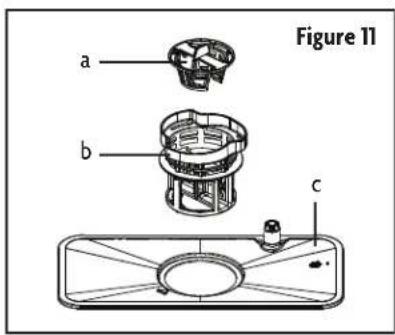
The filters prevent food remnants and other objects from getting inside the pump. The filter system consists of three parts (Refer to Figure 11): a Coarse filter (a), a Fine filter (b), and a Main filter (c).
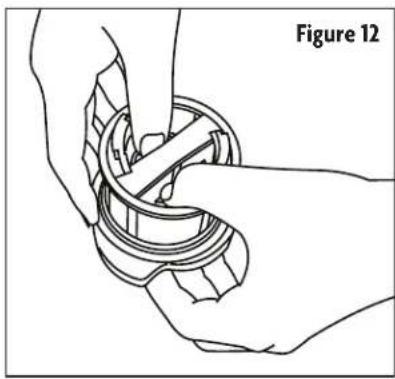
a. Coarse Filter: Larger items that could block the drain are trapped in the coarse filter. To remove items caught by the coarse filter, first remove the Fine Filter (b), then turn it upside down and gently push on the bottom of the Coarse Filter (a) until it is released. (Refer to Figure 12.) Carefully empty filter and replace into position once clean.
▲ NOTE: The Coarse Filter (a) should ONLY be removed if large, potentially hazardous items are trapped. If food particles or residue are trapped, please refer to Fine Filter (b) below.
b. Fine Filter: This filter holds soil and food residue in the sump area and prevents it from being deposited onto dishes during the wash cycle. To remove items caught by this filter, please see section entitled "Filter Assembly System" below.
c. Main Filter: Food and soil particles trapped by this filter are pulverized by a special jet on the spray arm and washed down to drain.
natural_image
Technical line drawing of a mechanical assembly with hands and gears (no text or symbols)CLEANING THE FILTER SYSTEM ASSEMBLY
For best performance and results, the filter must be cleaned regularly. For this reason, it is a good idea to remove the larger food particles trapped in the filters after each wash cycle by rinsing the filters under running water.
▲ NOTE: The entire filter assembly should be cleaned once a week
⚠ WARNING: Never run the dishwasher without the filters in place.
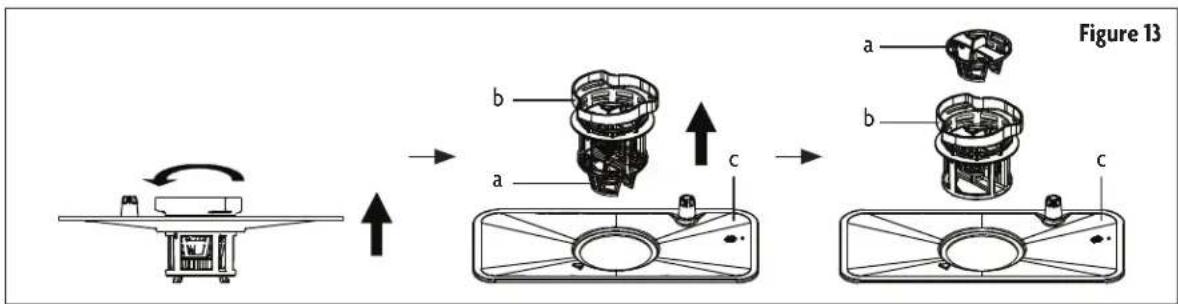
- Rotate the filter assembly (Figure 13, a, b and c) counterclockwise, then lift upward.
- Remove the fine filter (Figure 13, b) and coarse filter (Figure 13, a) by carefully pushing up on the fine filter from the bottom of the main filter (Figure 13, c).
▲ NOTE: When separating the filters, only push on the hard plastic on the bottom of the assembly. DO NOT apply pressure to the screen.
-
Remove coarse filter (Figure 13, a) from fine filter (Figure 13, b) by pushing up from the bottom on the tabs holding it to the fine filter.
-
To re-assemble and replace the filter assembly, follow above directions in reverse order.
⚠️ CAUTION: Inspect the filters every time the dishwasher has been used.
⚠ WARNING: Improper replacement of the filter may reduce the performance level of the appliance and damage dishes and utensils.
CLEANING THE FILTER
To clean the coarse filter and the fine filter, use a soft cleaning brush. Remove any food remnants and clean the filters under running water.
▲ NOTE: When cleaning the filters, DO NOT knock them against hard surfaces as that could damage them, affecting the performance of the dishwasher.
NOTE: Hard water can adversely affect the performance of your dishwasher. Hard water conditions will also contribute to 'lime' (white filmy substance) deposits and/or 'scaling' on the surface of the dishwasher tub and heater element, located in the sump underneath the removable filter screen. It is recommended to run the washer empty and rinse the inside using 1 cup of white vinegar at least once a week.
DISHWASHER CARE
The control panel can be cleaned by using a lightly dampened cloth. Dry thoroughly. Dishwasher exterior can be cleaned with a regular, non-abrasive multipurpose cleaner or polish wax. Never use sharp objects, scouring pads or harsh cleaners on any part of the dishwasher.
CLEANING THE DOOR
To clean the edge around the door, you should use only a warm, damp cloth. To avoid water contact between the door lock and electrical components, DO NOT use a spray cleaner of any kind.
WARNING:
damage the door lock and electrical components.
finish, and should not be used.
natural_image
Technical line drawing of a rectangular electronic device with internal components and mounting bracket (no text or symbols)PROTECT AGAINST FREEZING
If the dishwasher will be exposed to cold temperatures, it is necessary to take the following steps to prevent damage from freezing.
After each wash cycle:
- Turn off and unplug the dishwasher.
- Turn off the water supply and disconnect the water inlet pipe from the water valve.
-
Drain water from the inlet pipe and water valve, using a pan to catch the water.
-
Reconnect the water inlet pipe to the water valve.
-
Remove the filter at the bottom of the tub and use a sponge to absorb water in sump.
NOTE: Contact a qualified service technician if frost or ice buildup prevents the dishwasher from working.
CLEANING THE SPRAY ARMS
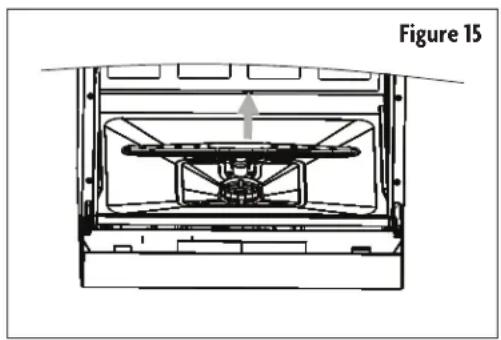
The spray arms can be easily removed for periodic cleaning of the nozzles, to prevent possible clogging. Wash them under running water and carefully replace them, checking that their rotary movement is in no way impeded. Grasp the middle of the spray arm and pull upwards to remove it. Wash the arms under running water and return them carefully to their place. After reassembly, check that the spray arms turn freely. If they do not, check that they have been installed correctly.
natural_image
Technical line drawing of a mechanical assembly with no visible text or symbolsKEEPING YOUR DISHWASHER IN GOOD CONDITION
moisture and odors are not trapped inside.
parts of the dishwasher. Only use a cloth with warm, soapy water. To remove spots or stains from the surfaces of the interior, use a cloth dampened with water and a little vinegar.
then unplug, turn off the water supply and leave the door of the appliance slightly open. This will help the door seals to last longer and prevent odors from forming within the appliance.
necessary, it can be positioned on its back.
sponge will prevent this from occurring.
TROUBLESHOOTING
| Problem Possible Causes What to Do | |||
| Technical Problems | Dishwasher does not start | Fuse blown or circuit breaker tripped. | Replace fuse or reset circuit breaker. Remove any other appliances sharing the same circuit with the dishwasher. |
| Power supply not turned on. | Make sure the dishwasher is turned on and the door is closed securely. Make sure the power cord is properly plugged into the wall socket. | ||
| Door of dishwasher not properly closed. | Close door completely and make sure it is latched. | ||
| Water not pumped from dishwasher | Kink in drain hose. Check drain hose. | ||
| Filter is clogged. Check filter system. | |||
| Kitchen sink clogged. | Check sink to make sure it is draining well. If sink is clogged, you may need a plumber. | ||
| General Problems | Suds in the tub | Improper detergent. | Use only dishwasher detergent to avoid suds. If this occurs, open the dishwasher and let suds evaporate. Add 1 gallon of cold water to the tub. Close and latch the door then Start the “Rinse” wash cycle to drain out the water. Repeat if necessary. |
| Spilled Rinse Aid. ALWAYS wipe up rinse-aid spills immediately. | |||
| Stained tub interior | Detergent with color-ant was used. | DO NOT use detergents with colorants or dyes. | |
| White film on inside surface | Hard water minerals. | To clean the interior, use a damp sponge with dishwasher detergent and wear rubber gloves. Never use any other cleaner than dishwasher detergent for the risk of foaming or suds. | |
| Rust stains on cutlery | Cutlery is not corrosion resistant. | Only put corrosion resistant items in the dishwasher. | |
| A program was not run after dishwasher detergent was added. Traces of detergent have gotten into the wash cycle. | Run the Quick Wash program without any dishes or utensils in the dishwasher after adding dishwasher detergent. | ||
| Noise | Knocking noise inside the wash cabinet | The spray arm is hitting an item in the basket. | If you are able to, interrupt the program and rearrange the items which are obstructing the spray arm. If you are unable to interrupt the program, fix the spray arm position after cycle is complete. |
| Rattling noise in the wash cabinet | Item inside is loose. | If you are able to, interrupt the program and rearrange items in the dishwasher. | |
| Knocking noise in the water pipes | This may be caused by on-site installation or the cross-section of the piping. | This has no influence on dishwasher function. If in doubt, contact a suitably plumber. | |
| Unsatisfactory Washing | The dishes are not clean | Dishes not loaded correctly. | Make sure dishes are loaded correctly per the “Loading the Dishwasher” section. |
| Unsatisfactory Washing | The dishes are not clean | Improper wash program selected. | Select a more intensive program. Refer to “Wash Cycle Table”. |
| Not enough detergent was dispensed. | Use more detergent, or change your detergent. | ||
| Items are blocking the path of spray arms. | Rearrange the items so that the spray arms can rotate freely. | ||
| The filter system in the base of wash cabinet is not clean or is not correctly fitted. This may cause the spray arm jets to get blocked. | Clean and/or fit the filter correctly. Clean the spray arm jets. Refer to “Dishwasher Care” section. | ||
| Glassware is cloudy | Combination of soft water and too much detergent. | Use less detergent if you have soft water and select a short cycle to wash the glassware and to get it clean. See “Wash Cycle Table” | |
| Black or gray marks on dishes | Aluminum utensils have rubbed against dishes. | Use a mild abrasive cleaner to eliminate the marks. | |
| Detergent left in dispenser cups | Dishes blocking deter- gent cups. | Re-load the dishes properly. See the “Loading the Dish- washer” section. | |
| Unsatisfactory Drying | The dishes are not drying | Dishes not loaded correctly. | Load the dishwasher as suggested in the directions. |
| Too little rinse aid. | Increase the amount of rinse aid or refill the rinse aid dispenser. | ||
| Dishes removed too soon. | DO NOT empty your dishwasher immediately after washing. Open the door slightly so that the steam can escape. Begin unloading the dishwasher only once the dishes are cool enough to touch. Empty the low basket first. This prevents water from dripping off dishes in the upper basket. | ||
| Wrong program Selection. | Short wash cycles use lower temperatures which lessen performance. Choose a longer wash program. | ||
| Using cutlery with a low-quality coating. | Water drainage is more difficult with these items. Cutlery or dishes of this type are not suitable for washing in the dishwasher. | ||
ERROR CODES
| Codes Meanings Possible Causes | ||
| E1 Longer water inlet time | Faucet not fully open.Water intake restricted.Low water pressure. | |
| E4 Overflow Dishwasher is leaking. | ||
⚠ WARNING: If overflow error occurs, turn off the main water supply before calling for service. If there is water in the base from an overflow or leak, the water should be removed before restarting the dishwasher.

LIMITED WARRANTY
MC Appliance Corporation warrants each new Countertop Dishwasher to be free from defects in material and workmanship, and agrees to remedy any such defect or to furnish a new part(s), at the company's option, for any part(s) of the unit that has failed during the warranty period. Parts and labor expenses are covered on this unit for a period of one year from the date of purchase. A copy of the dated sales receipt/invoice is required to receive warranty service, replacement or refund.
This warranty covers appliances in use within the contiguous United States, Alaska, Hawaii and Puerto Rico. This warranty does not cover the following:
product or improper installation.
service by an authorized service technician is not available.
accordance with published installation instructions.
subsequent owner(s).
Limitations of Remedies and Exclusions:
Product repair in accordance with the terms herein, is your sole and exclusive remedy under this limited warranty. Any and all implied warranties including merchantability and fitness for a particular purpose are hereby limited to one year or the shortest period allowed by law. MC Appliance Corporation is not liable for incidental or consequential damages and no representative or person is authorized to assume for us any other liability in connection with the sale of this product. Under no circumstances is the consumer permitted to return this unit to the factory without the prior written consent of MC Appliance Corporation.
Some states prohibit the exclusion or limitation of incidental or consequential damages, or limitations on implied warranties. This warranty gives you specific legal rights, and you may also have other rights which vary from state to state.
Model
Parts
Labor
Type of Service
MCSCD6W5
One Year
One Year
Carry In
For Service or Assistance please call 888-775-0202 or visit us on the web at www.mcappliance.com to request warranty service or order parts.

CNA International, Inc. d/b/a MC Appliance Corporation. All rights reserved. Magic Chef® logo is a registered trademark of CNA International, Inc.
www.mcappliance.com Printed in China

Modelo MCSCD6W5
POR FAVOR LEA CUIDADOSAMENTE ESTE MANUAL ANTES DE USAR SU LAVAPLATOS Y CONSÉRVELO PARA FUTURAS REFERENCIAS.

flowchart
graph TD
    A["Control Panel with Button"] --> B["Arrow to Control Panel"]
    B --> C["Arrow to Control Panel with Roll"]
    C --> D["Arrow to Control Panel with Arrow"]
Figura 6
natural_image
Line drawing of hands assembling a mechanical component (no text or symbols)LIMPIEZA DE LOS MONTAJE DEL SISTEMA DE FILTRADO
natural_image
Technical line drawing of a mechanical component with no visible text or symbolsADVERTENCIA:
natural_image
Technical line drawing of a mechanical assembly with no visible text or symbols- Countertop Dishwasher
- PRODUCT REGISTRATION
- CONTENTS
- IMPORTANT SAFETY INSTRUCTIONS
- GROUNDING INSTRUCTIONS
- READ AND FOLLOW THIS SAFETY INFORMATION CAREFULLY SAVE THESE INSTRUCTIONS
- SPECIFICATIONS
- PARTS AND FEATURES
- INSTALLATION INSTRUCTIONS
- ELECTRICAL REQUIREMENTS
- WATER CONNECTION
- DISCONNECTING THE WATER
- BEFORE USE
- FILLING THE RINSE AID DISPENSER
- ADJUSTING RINSE AID DISPENSER
- DETERGENT DISPENSER
- DETERGENTS
- DETERGENT TABLETS
- FILLING DETERGENT DISPENSER
- LOADING THE DISHWASHER
- OPERATING INSTRUCTIONS
- ADDING DISHES AFTER STARTING THE DISHWASHER
- CHANGING THE WASH PROGRAM
- WASH CYCLE TABLE
- END OF THE WASH CYCLE
- USING THE DELAY FEATURE
- CARE AND MAINTENANCE
- FILTER SYSTEM
- CLEANING THE FILTER SYSTEM ASSEMBLY
- CLEANING THE FILTER
- DISHWASHER CARE
- CLEANING THE DOOR
- WARNING:
- PROTECT AGAINST FREEZING
- CLEANING THE SPRAY ARMS
- KEEPING YOUR DISHWASHER IN GOOD CONDITION
- LIMITED WARRANTY
- Limitations of Remedies and Exclusions:
- LIMPIEZA DE LOS MONTAJE DEL SISTEMA DE FILTRADO
- ADVERTENCIA:
Brand : Magic Chef
Model : MCSCD6W5
Category : Dishwasher